
Creatify Team
SHARE


IN THIS ARTICLE
Upload a photo. Get a talking, moving, lip-synced video of that person in seconds.
That sentence would have sounded like science fiction five years ago. In 2026, it's a Tuesday afternoon for anyone with a Creatify account. The technology to animate a face from a single still image is no longer the exclusive domain of film studios or government research labs. It's a browser tab.
That's remarkable. It's also where things get genuinely interesting, because "can I create an avatar from a photo" and "should I create an avatar from a photo" are two different questions. This guide covers both — the technical how-to, the creative possibilities, and the part most tutorials skip entirely: what this technology means when it's in everyone's hands.
What is an avatar image, exactly?
An avatar image is a digital representation of a person — static or animated — used in place of a real-person video or photo. In the context of AI video creation, an avatar isn't just a profile picture. It's a fully animated digital character that can speak, emote, move its head, hold products, and deliver a scripted message in any of dozens of languages.
The difference between a traditional avatar (a cartoon icon) and an AI avatar (a photorealistic animated human) is the difference between a sketch and a deepfake — and that gap closed faster than most people noticed.
How to create an avatar from a photo in Creatify
Here's the step-by-step process for creating a custom avatar from a photo using Creatify's BYOA (Bring Your Own Avatar) feature.
Step 1: Go to Avatar Video
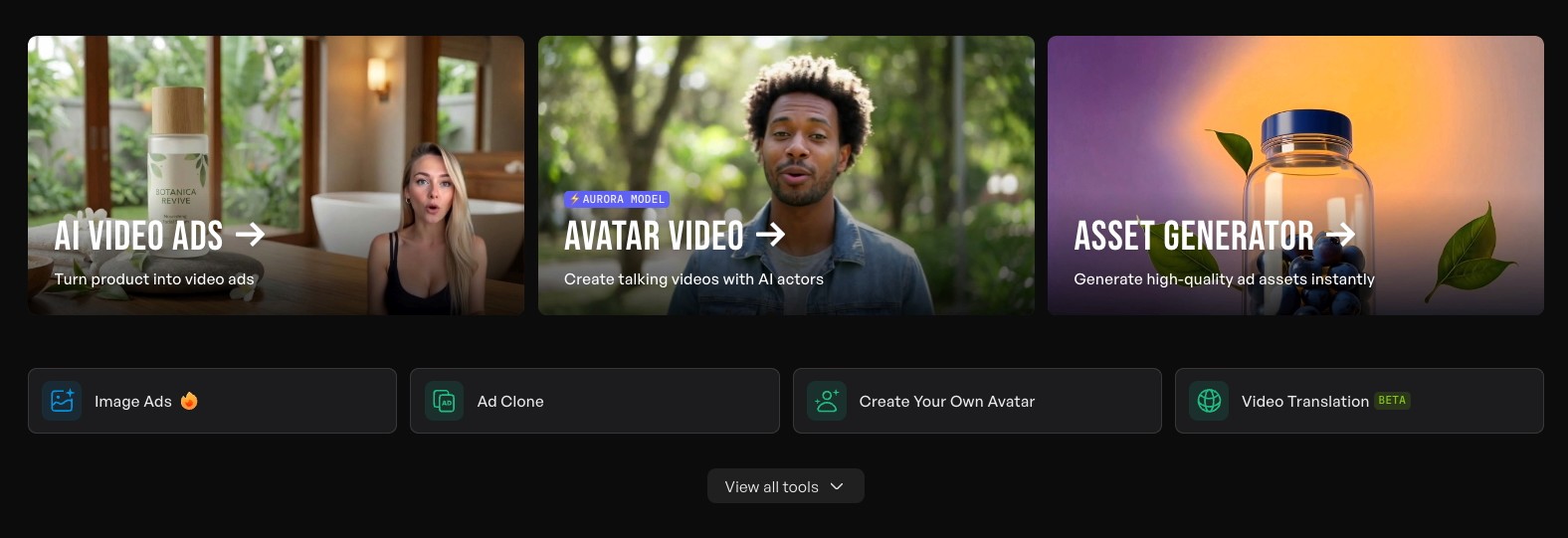
From Creatify's dashboard, click Avatar Video in the navigation. You'll see two options at the top: use the existing avatar library, or upload an image to create a custom avatar.
For a photo-based avatar, select the custom upload path.
Step 2: Upload your photo
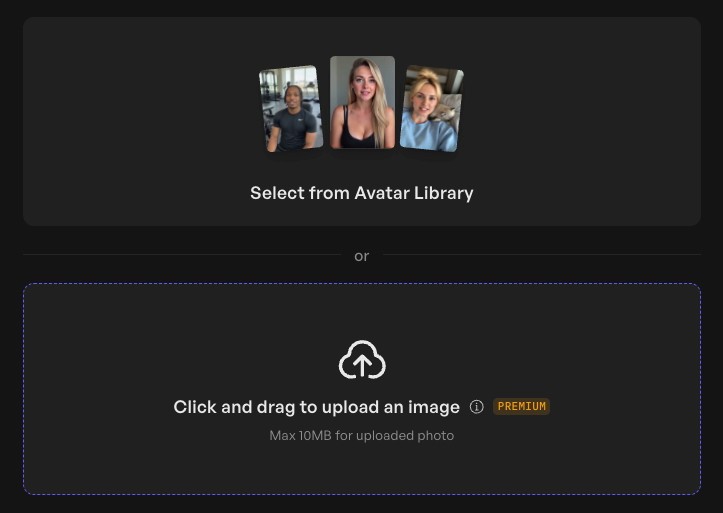
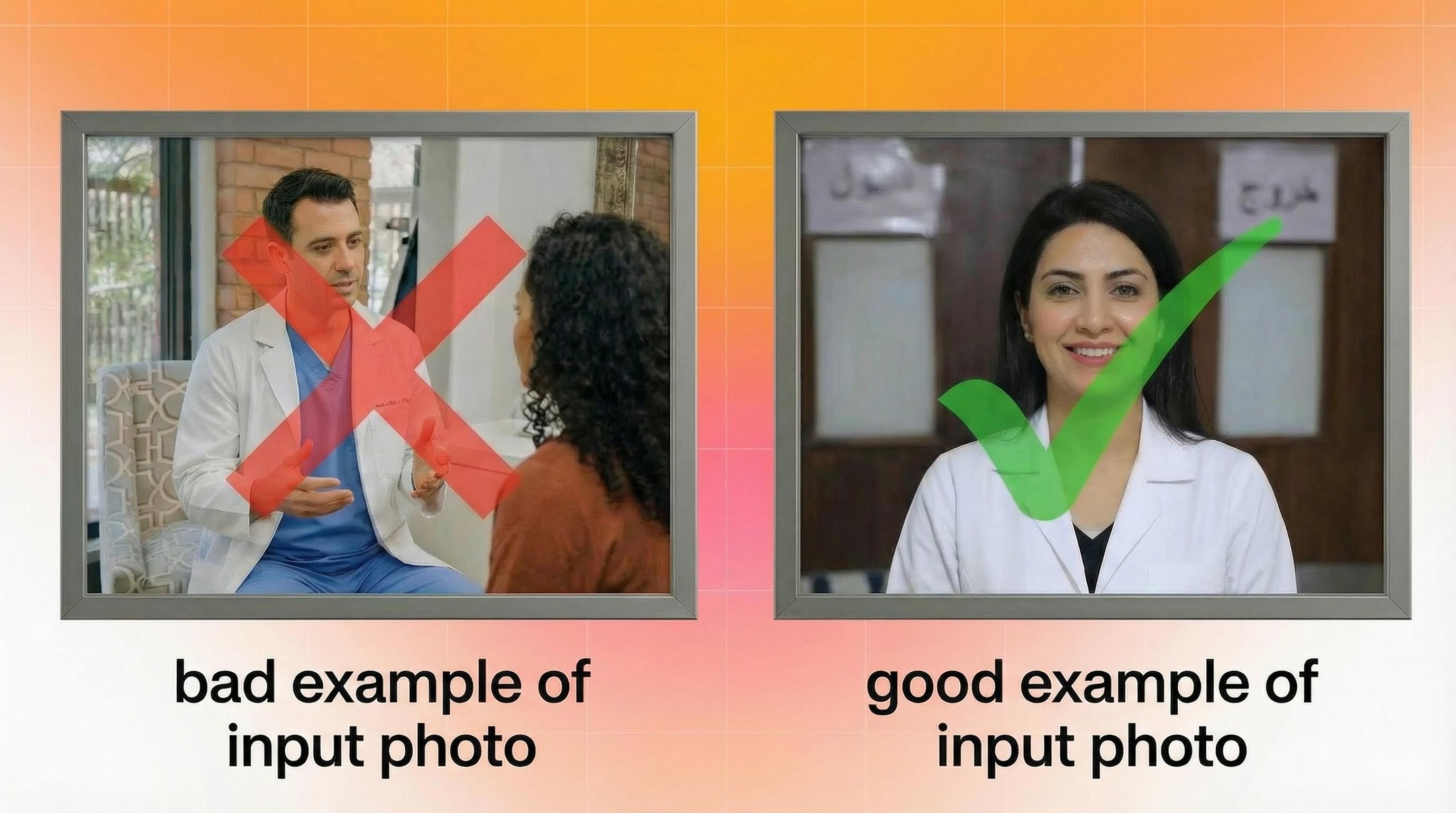
Upload a clear, front-facing photo. The image quality matters here — a well-lit, sharp photo with the face clearly visible will produce significantly better lip-sync and animation than a blurry or angled shot. Creatify's Aurora model (its proprietary diffusion transformer) does the heavy lifting, but it works best with clean inputs.
What you get: a digital twin that can speak any script you give it, in any language, with emotional tags controlling delivery tone. This is how you make an avatar from a photo that actually looks and sounds convincing.
Step 3: Write or generate your script
Once your avatar is set up, you have three ways to create your script:
Type it manually if you know exactly what you want to say
Upload audio and Creatify auto-generates a transcript
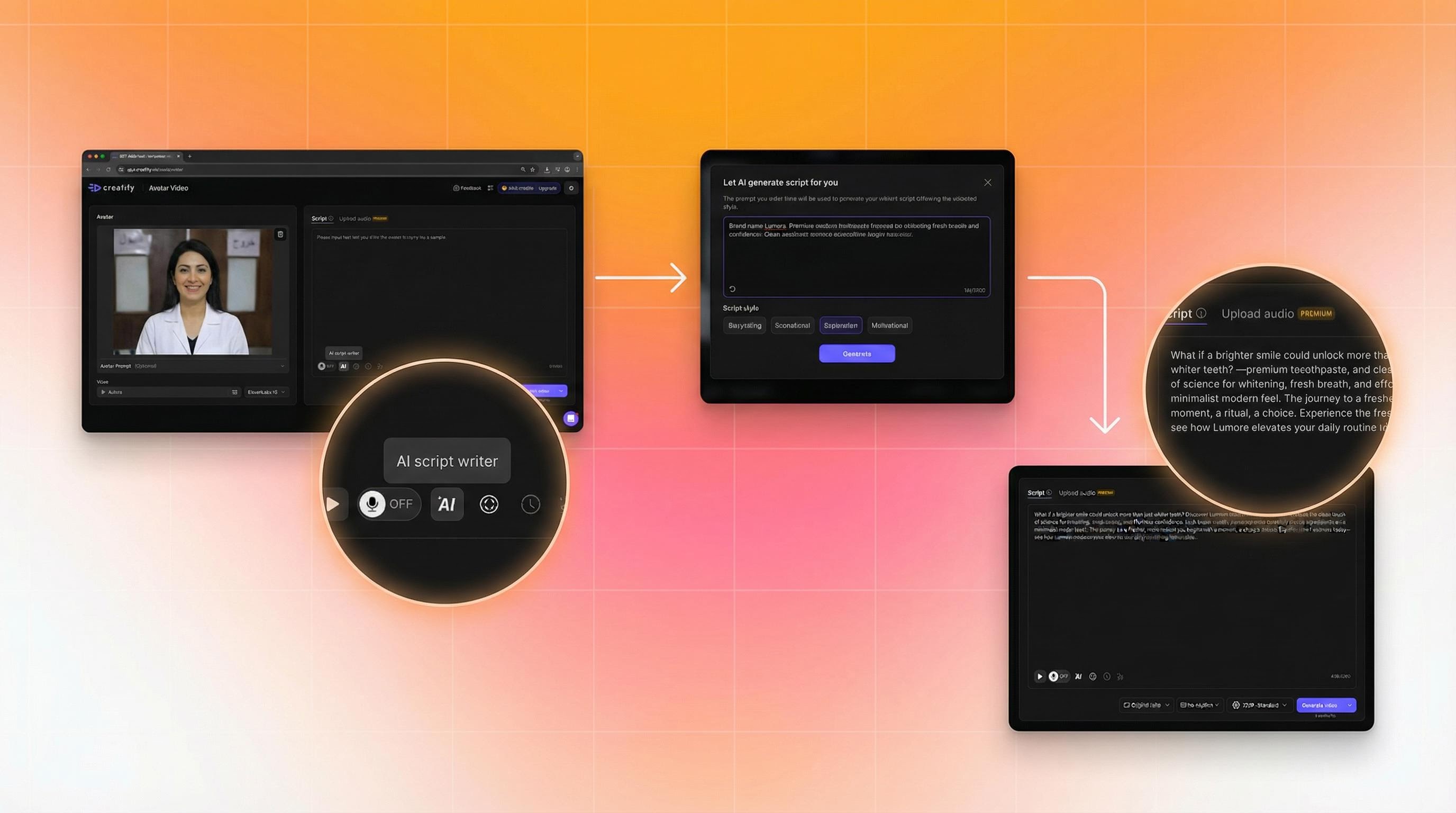
Use the AI script writer — type your product or message brief and get multiple script variations (promotional, storytelling, educational, motivational)
The AI script writer is trained on thousands of high-performing social ads, so the suggestions aren't generic. They're structured for conversion.
Step 4: Add emotional tags
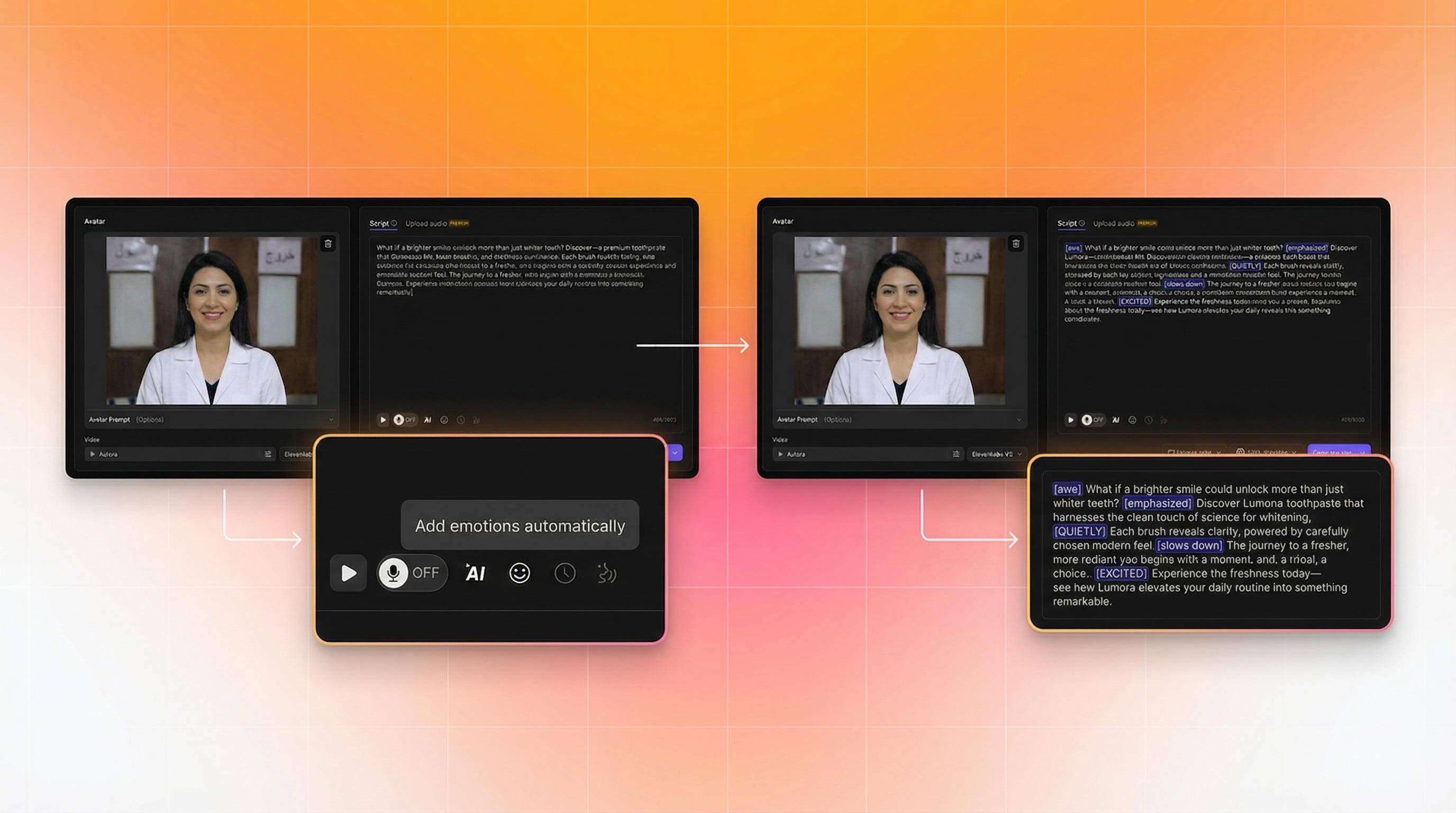
This is where avatar performance goes from robotic to convincing. Creatify's V3 voice model lets you tag individual lines with emotional delivery instructions: [excited], [whispering], [laughing], [serious].
Click the emoji button in the script editor. The AI suggests tags based on context, but you can override them. Changing an opening line from [whispering] to [excited] changes the entire energy of the video. These aren't cosmetic tweaks — the emotional delivery directly affects watch time and engagement.
Step 5: Choose your format and captions
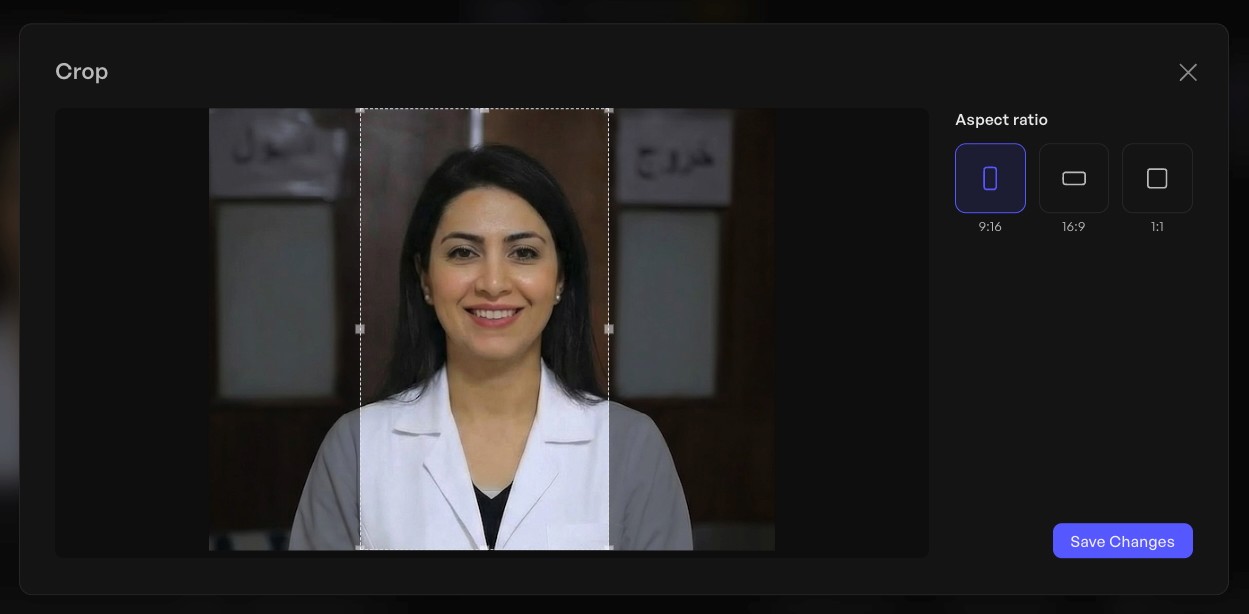
Select your aspect ratio based on where the ad runs:
9:16 for TikTok, Instagram Reels, YouTube Shorts
16:9 for YouTube pre-roll, website embeds
1:1 for feed placements
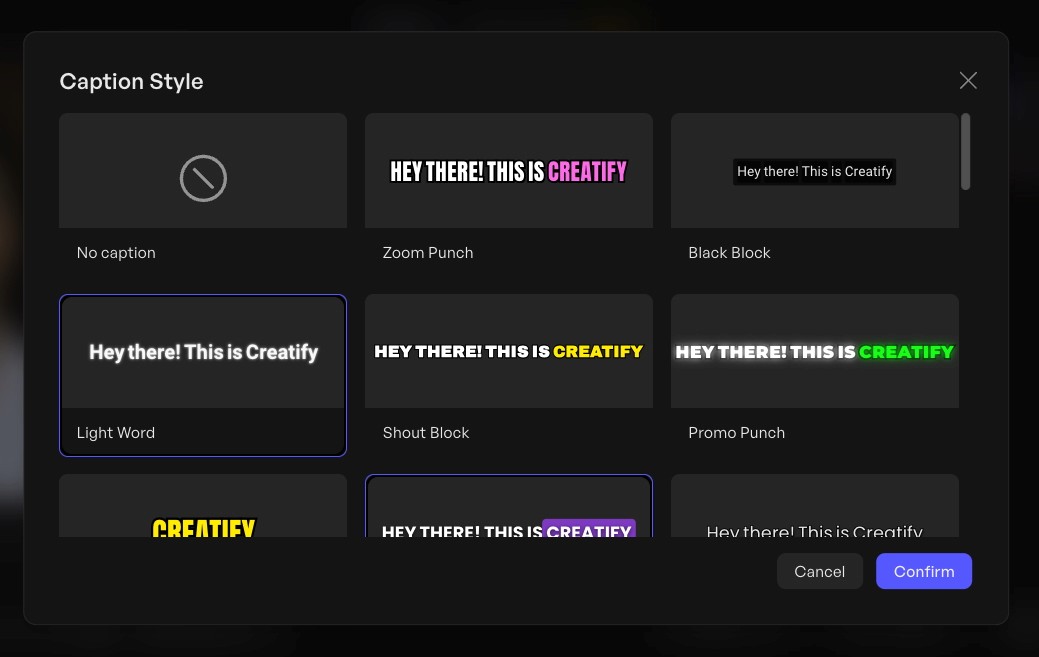
Add captions. Over 85% of social video is watched without sound, so this isn't optional if you want the message to land. Creatify has a caption style library — pick something that fits the platform aesthetic.
Step 6: Generate and review
Hit Generate, then Render. Typical render time is 5–10 minutes. When it's ready, watch it through once: check lip-sync accuracy, emotional delivery, and pacing. Aurora produces consistently high-quality output, but a quick review before launch is worth it.
Step 7: Launch directly to your ad platform
Download for manual upload, or launch directly to Meta, TikTok, or Amazon from within Creatify. Direct platform launch skips the manual formatting and uploading step entirely.
The part most guides don't mention
Here's where it gets interesting.
The same technology that lets you create an avatar from your own photo can animate anyone's photo. That's not a hypothetical. It's how the technology works - it doesn't know whose face it's animating. It just follows the instruction.
This creates a responsibility gap that most "how to create an avatar from a photo" tutorials glide past entirely.
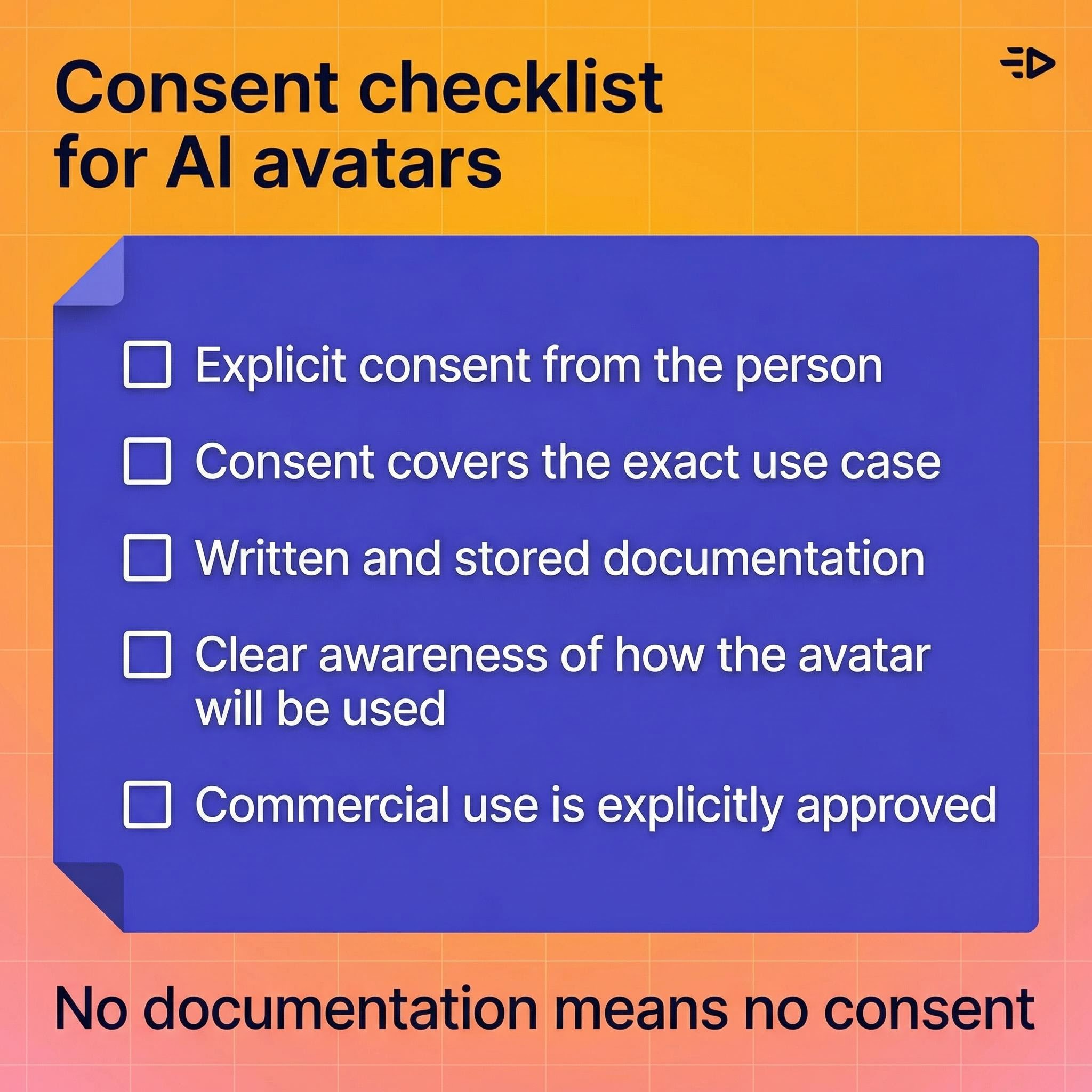
Using AI to create a talking avatar of a real person - even a public figure, even a team member who "seemed fine with it," even someone who gave casual verbal permission - without documented, explicit consent for the specific use case is ethically fraught and increasingly legally risky. Regulators in the US and EU are actively developing rules around synthetic likenesses. Several major platforms already prohibit AI-generated content featuring real individuals without disclosure.
The practical implication: if you're using photo-based avatars for marketing, ads, or any commercial purpose, the consent documentation needs to be explicit, scoped to the use, and stored. "They said yes in a Slack message" doesn't hold up.
The cleaner alternative: generate people and characters who don't exist
This is where the technology does something even more interesting.
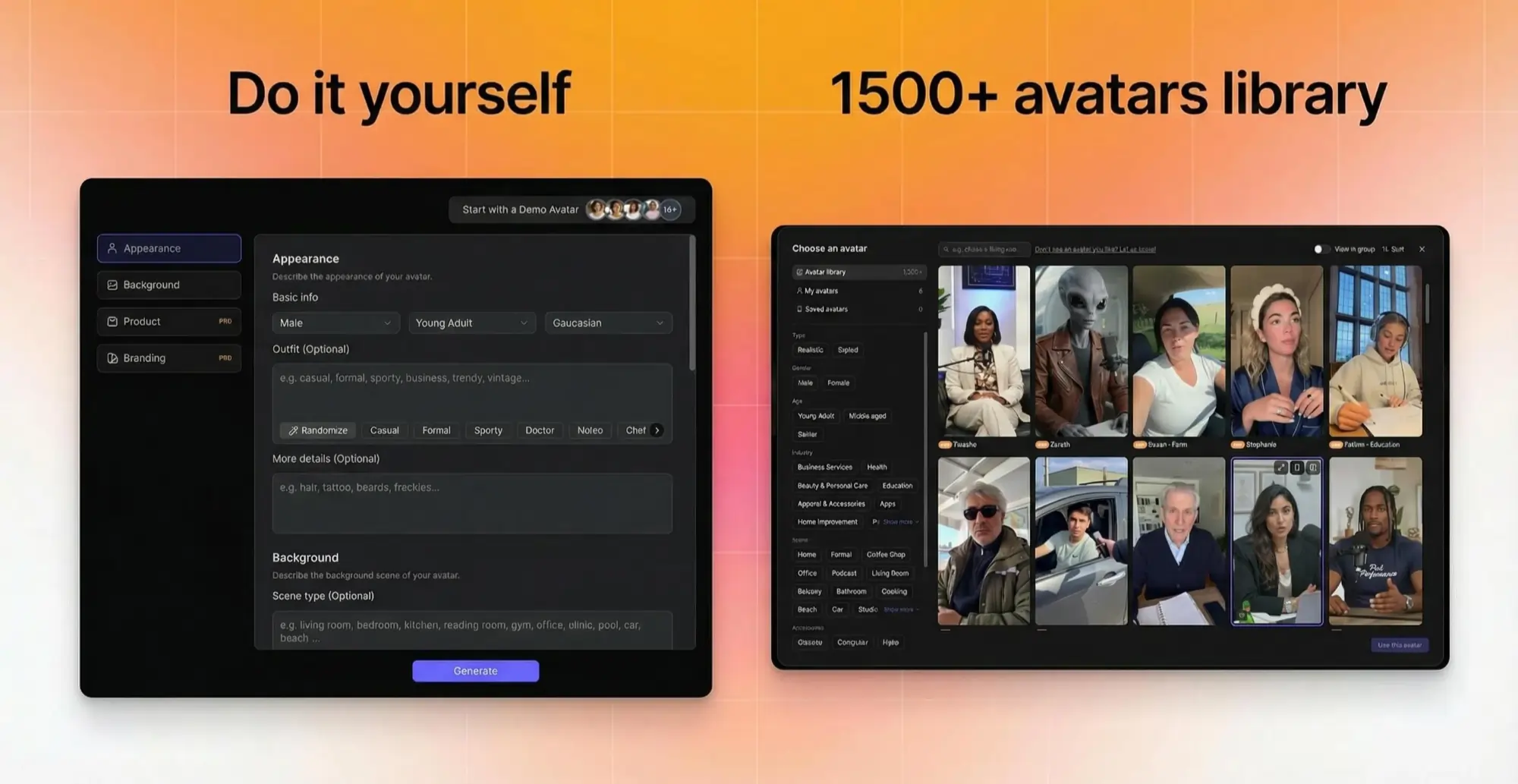
Creatify's DYOA (Design Your Own Avatar) feature generates entirely fictional human avatars from a text description. Describe the demographic, style, energy, and industry of the avatar you need — and Creatify generates a photorealistic digital human that doesn't correspond to any real person.
No consent issues. No likeness rights. No actor fees. No risk of an influencer's personal brand becoming a liability for yours.
You can also work from Creatify's library of 1,500+ pre-built avatars — all designed specifically for commercial use, cleared for ad placements, and built to perform on paid social. These avatars have been tested across thousands of campaigns. The most popular ones tend to perform well precisely because they have. Filtering by age, gender, industry, and shooting style gives you a cast of digital talent purpose-built for performance marketing.
For marketers, the fictional avatar approach is often better than a real-person avatar in every dimension except one: personal brand equity. If you're building around a specific person's identity (a founder, a spokesperson, a creator who consented and is actively involved), a real-person avatar makes sense. For everything else — product ads, ecommerce creative, UGC-style content at scale — a fictional avatar with the right demographic and aesthetic is lower friction, lower risk, and just as effective.
Read also: How to create an AI version of yourself: 2026 guide
Going further: generate a character from nothing
DYOA gets you a photorealistic fictional human. But the creative ceiling doesn't stop there.
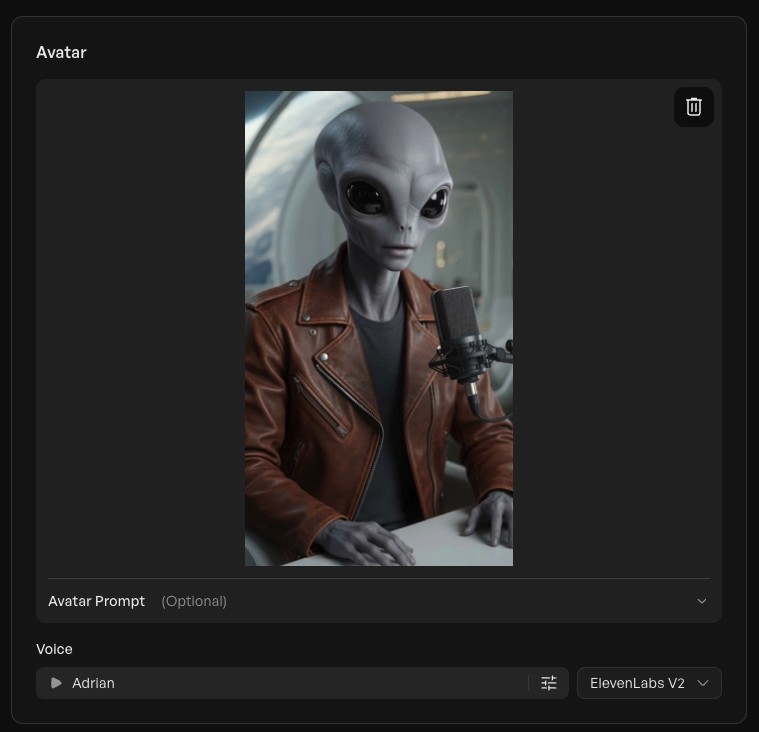
Creatify's Asset Generator — which includes 23+ AI models including Sora 2 Pro, Veo 3.1, and Minimax — lets you generate images and visuals from text prompts. Which means you can create a completely original character: a stylized illustration, a cartoon mascot, a fantastical figure, an anime-inspired presenter, a brand character that looks like nothing else in your category.
Generate the image. Use it as your avatar. Animate it. Give it a voice.
The character doesn't need to look human. It doesn't need to look like anything that exists. It just needs to fit your brand and your audience — and you control both of those things entirely.
This is where AI avatar creation stops being a production shortcut and becomes a genuine creative tool. A DTC brand could build a signature animated character that appears across every ad. A game studio could create an in-universe presenter. A product brand could develop an illustrated mascot with a consistent personality, voice, and visual identity — generated, animated, and deployed without a single illustrator, actor, or rights negotiation.
No likeness issues. No consent complexity. No limits on what the character looks like or how it behaves. Just a prompt, a generation, and a creative direction that's entirely yours.
What this technology actually represents
The ability to convert a picture to a talking avatar used to cost thousands of dollars and require a VFX team. Today it takes 10 minutes and $19/month.
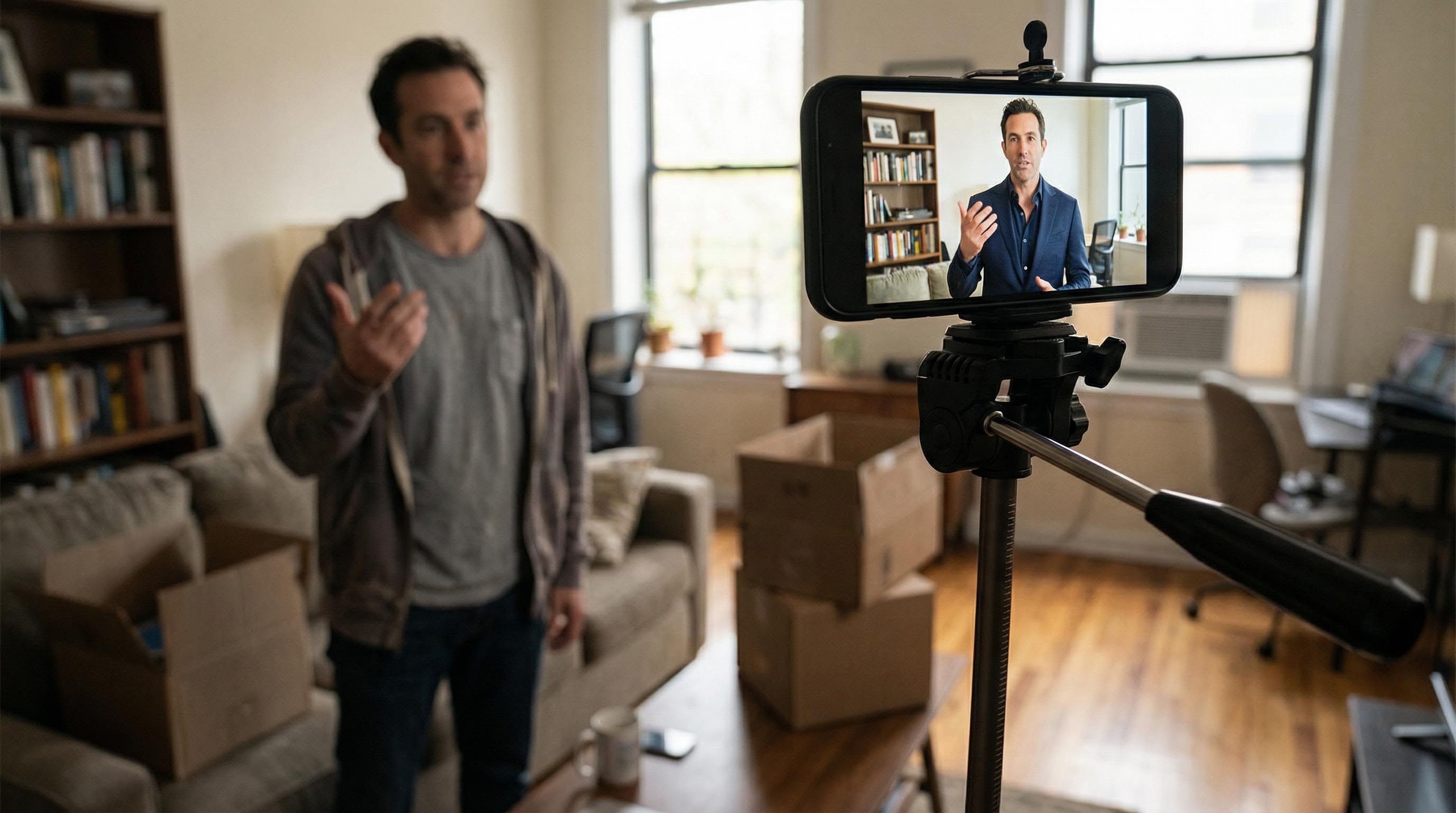
That accessibility is genuinely useful for marketers. It's also genuinely significant in a broader sense. When the barrier to creating synthetic video of a real person drops to "upload a photo," the norms around consent and disclosure can't stay where they were when this was hard. The technology moved. The responsibility has to move with it.
Creatify's approach reflects this: the platform's AI ethics policy explicitly prohibits creating non-consensual likeness content, and the BYOA workflow requires that users confirm they have rights to the likeness they're uploading. That's not a legal disclaimer buried in the terms — it's a design decision.
Read also: How to create an AI influencer in 2026: Step-by-step guide
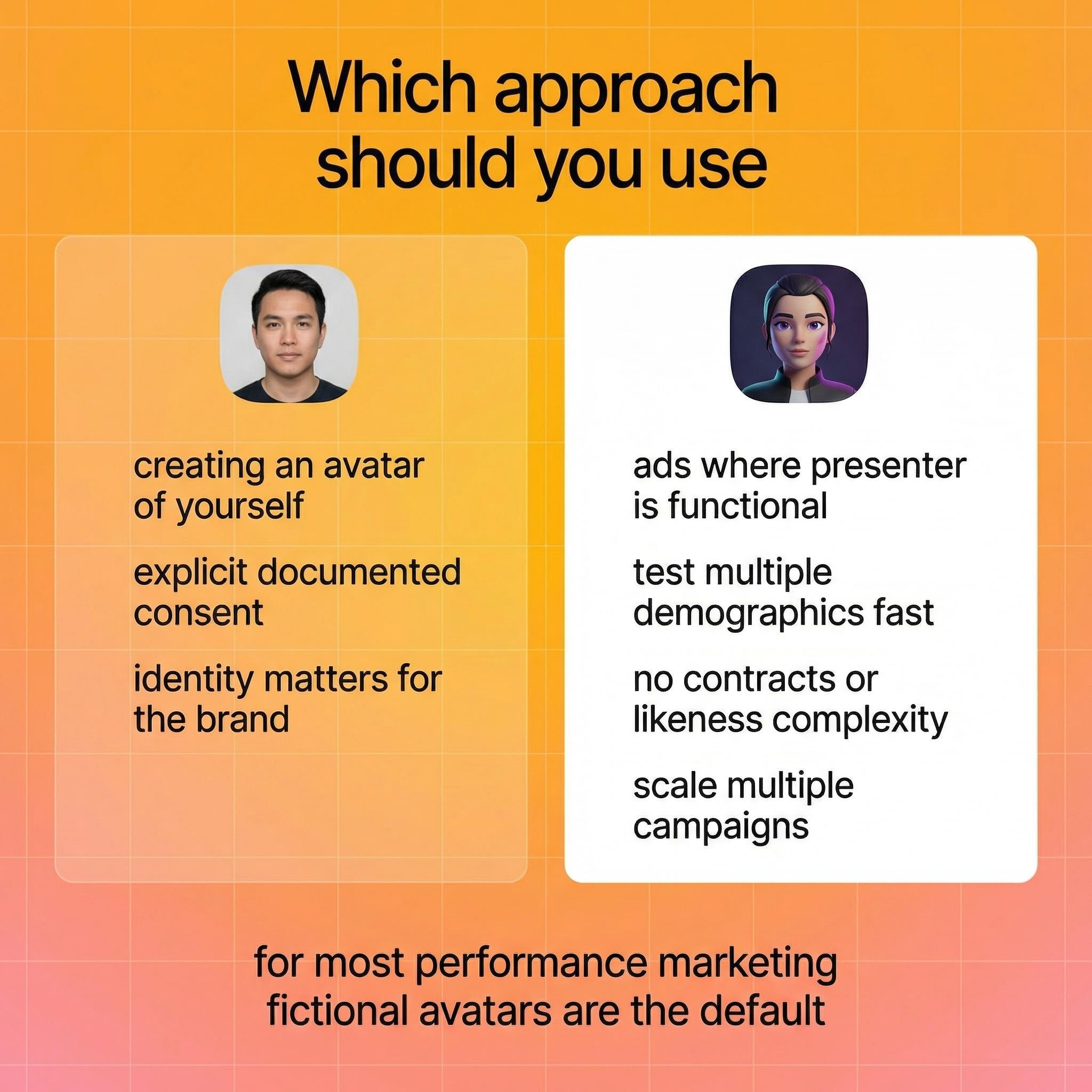
Which approach should you use?
A quick decision framework:
Use a photo-based avatar (BYOA) when:
You're creating an avatar of yourself for your own brand or content
You have explicit, documented consent from the person being animated
You're building around a specific person's identity that matters to the brand
Use a fictional avatar (library or DYOA) when:
You're producing ecommerce or DTC ads where the presenter is functional, not personal
You need to test multiple demographics quickly without contracts
You want commercial flexibility without likeness rights complexity
You're building at scale — dozens of variations, multiple campaigns
For most performance marketers, the fictional avatar path is the right default. The 1,500+ library avatars and DYOA-generated characters exist precisely for this use case.
Frequently asked questions
How do I create an avatar from a photo?
In Creatify, go to Avatar Video and select the custom avatar upload option. Upload a clear, front-facing photo. Creatify's Aurora model animates the face and enables lip-synced video generation from any script. The custom avatar feature is available on Starter plan (1 custom avatar) and Pro plan (3 custom avatars).
Can I create an avatar from any photo?
Technically, yes. Practically and ethically, only from photos where you have the rights. That means photos of yourself, or photos of someone who has given explicit consent for their likeness to be used in AI-generated video for your specific purpose. Using a photo of a real person without their consent for commercial content creates legal and ethical risk that's growing as regulations tighten.
What is an avatar image?
An avatar image is a digital representation of a person used in place of a real-person video or photo. In AI video creation, an avatar is a fully animated, photorealistic digital human that can speak, emote, and deliver scripted content. The term covers both static profile representations and dynamic AI-animated characters used in video ads and content.
What's the difference between BYOA and DYOA in Creatify?
BYOA (Bring Your Own Avatar) creates a custom digital twin from a photo or video you upload — animating a real person's likeness. DYOA (Design Your Own Avatar) generates an entirely fictional human avatar from a text description. DYOA produces a photorealistic person who doesn't exist, which avoids consent and likeness rights issues entirely.
How do I make an avatar from a photo for free?
Creatify's free plan (10 credits/month) includes access to the avatar library but not custom avatar creation — that starts on the Starter plan at $19/month. You can use the free plan to test avatar video creation using the existing library of 100+ avatars before upgrading to create a custom photo-based avatar.
Is creating an avatar from someone else's photo legal?
It depends on jurisdiction and use case, and the rules are evolving fast. In most contexts, creating AI-generated video featuring someone's likeness without their explicit consent is legally risky and increasingly prohibited by platform policies and emerging regulation (EU AI Act, state-level laws in the US). For commercial use — ads, marketing content, anything public-facing — documented consent is essential.
How do I convert a picture to an avatar that talks?
Upload your photo to Creatify's BYOA feature. Write or generate a script using Creatify's AI script writer. Add emotional delivery tags to control how the avatar speaks. Select your aspect ratio and caption style. Render the video. The output is a lip-synced, animated version of the photo — ready to deploy to Meta, TikTok, or other platforms directly from Creatify.
Why would I use a fictional AI avatar instead of a real person?
For most ecommerce and performance marketing use cases, fictional avatars perform just as well as real-person avatars — sometimes better, because you can test multiple demographics simultaneously without contracts or scheduling. They carry no likeness rights risk, no consent complexity, and no risk of an individual's personal reputation affecting your brand. Creatify's 1,500+ library avatars are pre-cleared for commercial use and built for paid social performance.
Upload a photo. Get a talking, moving, lip-synced video of that person in seconds.
That sentence would have sounded like science fiction five years ago. In 2026, it's a Tuesday afternoon for anyone with a Creatify account. The technology to animate a face from a single still image is no longer the exclusive domain of film studios or government research labs. It's a browser tab.
That's remarkable. It's also where things get genuinely interesting, because "can I create an avatar from a photo" and "should I create an avatar from a photo" are two different questions. This guide covers both — the technical how-to, the creative possibilities, and the part most tutorials skip entirely: what this technology means when it's in everyone's hands.
What is an avatar image, exactly?
An avatar image is a digital representation of a person — static or animated — used in place of a real-person video or photo. In the context of AI video creation, an avatar isn't just a profile picture. It's a fully animated digital character that can speak, emote, move its head, hold products, and deliver a scripted message in any of dozens of languages.
The difference between a traditional avatar (a cartoon icon) and an AI avatar (a photorealistic animated human) is the difference between a sketch and a deepfake — and that gap closed faster than most people noticed.
How to create an avatar from a photo in Creatify
Here's the step-by-step process for creating a custom avatar from a photo using Creatify's BYOA (Bring Your Own Avatar) feature.
Step 1: Go to Avatar Video
From Creatify's dashboard, click Avatar Video in the navigation. You'll see two options at the top: use the existing avatar library, or upload an image to create a custom avatar.
For a photo-based avatar, select the custom upload path.
Step 2: Upload your photo
Upload a clear, front-facing photo. The image quality matters here — a well-lit, sharp photo with the face clearly visible will produce significantly better lip-sync and animation than a blurry or angled shot. Creatify's Aurora model (its proprietary diffusion transformer) does the heavy lifting, but it works best with clean inputs.
What you get: a digital twin that can speak any script you give it, in any language, with emotional tags controlling delivery tone. This is how you make an avatar from a photo that actually looks and sounds convincing.
Step 3: Write or generate your script
Once your avatar is set up, you have three ways to create your script:
Type it manually if you know exactly what you want to say
Upload audio and Creatify auto-generates a transcript
Use the AI script writer — type your product or message brief and get multiple script variations (promotional, storytelling, educational, motivational)
The AI script writer is trained on thousands of high-performing social ads, so the suggestions aren't generic. They're structured for conversion.
Step 4: Add emotional tags
This is where avatar performance goes from robotic to convincing. Creatify's V3 voice model lets you tag individual lines with emotional delivery instructions: [excited], [whispering], [laughing], [serious].
Click the emoji button in the script editor. The AI suggests tags based on context, but you can override them. Changing an opening line from [whispering] to [excited] changes the entire energy of the video. These aren't cosmetic tweaks — the emotional delivery directly affects watch time and engagement.
Step 5: Choose your format and captions
Select your aspect ratio based on where the ad runs:
9:16 for TikTok, Instagram Reels, YouTube Shorts
16:9 for YouTube pre-roll, website embeds
1:1 for feed placements
Add captions. Over 85% of social video is watched without sound, so this isn't optional if you want the message to land. Creatify has a caption style library — pick something that fits the platform aesthetic.
Step 6: Generate and review
Hit Generate, then Render. Typical render time is 5–10 minutes. When it's ready, watch it through once: check lip-sync accuracy, emotional delivery, and pacing. Aurora produces consistently high-quality output, but a quick review before launch is worth it.
Step 7: Launch directly to your ad platform
Download for manual upload, or launch directly to Meta, TikTok, or Amazon from within Creatify. Direct platform launch skips the manual formatting and uploading step entirely.
The part most guides don't mention
Here's where it gets interesting.
The same technology that lets you create an avatar from your own photo can animate anyone's photo. That's not a hypothetical. It's how the technology works - it doesn't know whose face it's animating. It just follows the instruction.
This creates a responsibility gap that most "how to create an avatar from a photo" tutorials glide past entirely.
Using AI to create a talking avatar of a real person - even a public figure, even a team member who "seemed fine with it," even someone who gave casual verbal permission - without documented, explicit consent for the specific use case is ethically fraught and increasingly legally risky. Regulators in the US and EU are actively developing rules around synthetic likenesses. Several major platforms already prohibit AI-generated content featuring real individuals without disclosure.
The practical implication: if you're using photo-based avatars for marketing, ads, or any commercial purpose, the consent documentation needs to be explicit, scoped to the use, and stored. "They said yes in a Slack message" doesn't hold up.
The cleaner alternative: generate people and characters who don't exist
This is where the technology does something even more interesting.
Creatify's DYOA (Design Your Own Avatar) feature generates entirely fictional human avatars from a text description. Describe the demographic, style, energy, and industry of the avatar you need — and Creatify generates a photorealistic digital human that doesn't correspond to any real person.
No consent issues. No likeness rights. No actor fees. No risk of an influencer's personal brand becoming a liability for yours.
You can also work from Creatify's library of 1,500+ pre-built avatars — all designed specifically for commercial use, cleared for ad placements, and built to perform on paid social. These avatars have been tested across thousands of campaigns. The most popular ones tend to perform well precisely because they have. Filtering by age, gender, industry, and shooting style gives you a cast of digital talent purpose-built for performance marketing.
For marketers, the fictional avatar approach is often better than a real-person avatar in every dimension except one: personal brand equity. If you're building around a specific person's identity (a founder, a spokesperson, a creator who consented and is actively involved), a real-person avatar makes sense. For everything else — product ads, ecommerce creative, UGC-style content at scale — a fictional avatar with the right demographic and aesthetic is lower friction, lower risk, and just as effective.
Read also: How to create an AI version of yourself: 2026 guide
Going further: generate a character from nothing
DYOA gets you a photorealistic fictional human. But the creative ceiling doesn't stop there.
Creatify's Asset Generator — which includes 23+ AI models including Sora 2 Pro, Veo 3.1, and Minimax — lets you generate images and visuals from text prompts. Which means you can create a completely original character: a stylized illustration, a cartoon mascot, a fantastical figure, an anime-inspired presenter, a brand character that looks like nothing else in your category.
Generate the image. Use it as your avatar. Animate it. Give it a voice.
The character doesn't need to look human. It doesn't need to look like anything that exists. It just needs to fit your brand and your audience — and you control both of those things entirely.
This is where AI avatar creation stops being a production shortcut and becomes a genuine creative tool. A DTC brand could build a signature animated character that appears across every ad. A game studio could create an in-universe presenter. A product brand could develop an illustrated mascot with a consistent personality, voice, and visual identity — generated, animated, and deployed without a single illustrator, actor, or rights negotiation.
No likeness issues. No consent complexity. No limits on what the character looks like or how it behaves. Just a prompt, a generation, and a creative direction that's entirely yours.
What this technology actually represents
The ability to convert a picture to a talking avatar used to cost thousands of dollars and require a VFX team. Today it takes 10 minutes and $19/month.
That accessibility is genuinely useful for marketers. It's also genuinely significant in a broader sense. When the barrier to creating synthetic video of a real person drops to "upload a photo," the norms around consent and disclosure can't stay where they were when this was hard. The technology moved. The responsibility has to move with it.
Creatify's approach reflects this: the platform's AI ethics policy explicitly prohibits creating non-consensual likeness content, and the BYOA workflow requires that users confirm they have rights to the likeness they're uploading. That's not a legal disclaimer buried in the terms — it's a design decision.
Read also: How to create an AI influencer in 2026: Step-by-step guide
Which approach should you use?
A quick decision framework:
Use a photo-based avatar (BYOA) when:
You're creating an avatar of yourself for your own brand or content
You have explicit, documented consent from the person being animated
You're building around a specific person's identity that matters to the brand
Use a fictional avatar (library or DYOA) when:
You're producing ecommerce or DTC ads where the presenter is functional, not personal
You need to test multiple demographics quickly without contracts
You want commercial flexibility without likeness rights complexity
You're building at scale — dozens of variations, multiple campaigns
For most performance marketers, the fictional avatar path is the right default. The 1,500+ library avatars and DYOA-generated characters exist precisely for this use case.
Frequently asked questions
How do I create an avatar from a photo?
In Creatify, go to Avatar Video and select the custom avatar upload option. Upload a clear, front-facing photo. Creatify's Aurora model animates the face and enables lip-synced video generation from any script. The custom avatar feature is available on Starter plan (1 custom avatar) and Pro plan (3 custom avatars).
Can I create an avatar from any photo?
Technically, yes. Practically and ethically, only from photos where you have the rights. That means photos of yourself, or photos of someone who has given explicit consent for their likeness to be used in AI-generated video for your specific purpose. Using a photo of a real person without their consent for commercial content creates legal and ethical risk that's growing as regulations tighten.
What is an avatar image?
An avatar image is a digital representation of a person used in place of a real-person video or photo. In AI video creation, an avatar is a fully animated, photorealistic digital human that can speak, emote, and deliver scripted content. The term covers both static profile representations and dynamic AI-animated characters used in video ads and content.
What's the difference between BYOA and DYOA in Creatify?
BYOA (Bring Your Own Avatar) creates a custom digital twin from a photo or video you upload — animating a real person's likeness. DYOA (Design Your Own Avatar) generates an entirely fictional human avatar from a text description. DYOA produces a photorealistic person who doesn't exist, which avoids consent and likeness rights issues entirely.
How do I make an avatar from a photo for free?
Creatify's free plan (10 credits/month) includes access to the avatar library but not custom avatar creation — that starts on the Starter plan at $19/month. You can use the free plan to test avatar video creation using the existing library of 100+ avatars before upgrading to create a custom photo-based avatar.
Is creating an avatar from someone else's photo legal?
It depends on jurisdiction and use case, and the rules are evolving fast. In most contexts, creating AI-generated video featuring someone's likeness without their explicit consent is legally risky and increasingly prohibited by platform policies and emerging regulation (EU AI Act, state-level laws in the US). For commercial use — ads, marketing content, anything public-facing — documented consent is essential.
How do I convert a picture to an avatar that talks?
Upload your photo to Creatify's BYOA feature. Write or generate a script using Creatify's AI script writer. Add emotional delivery tags to control how the avatar speaks. Select your aspect ratio and caption style. Render the video. The output is a lip-synced, animated version of the photo — ready to deploy to Meta, TikTok, or other platforms directly from Creatify.
Why would I use a fictional AI avatar instead of a real person?
For most ecommerce and performance marketing use cases, fictional avatars perform just as well as real-person avatars — sometimes better, because you can test multiple demographics simultaneously without contracts or scheduling. They carry no likeness rights risk, no consent complexity, and no risk of an individual's personal reputation affecting your brand. Creatify's 1,500+ library avatars are pre-cleared for commercial use and built for paid social performance.