

Comment créer des créatifs publicitaires Meta et des assets Google PMax avec l'IA
Comment créer des créatifs publicitaires Meta et des assets Google PMax avec l'IA


Équipe Creatify
PARTAGER


DANS CET ARTICLE
👉🏻 Essayez Creatify gratuitement : https://creatify.ai/?utm_source=yt&utm_medium=sm_organic&utm_campaign=vs&utm_content=50
Comment créer des visuels publicitaires pour Meta et des assets Google PMax avec l'IA — en quelques minutes, sans designer, sans Canva, et sans aucun redimensionnement manuel.
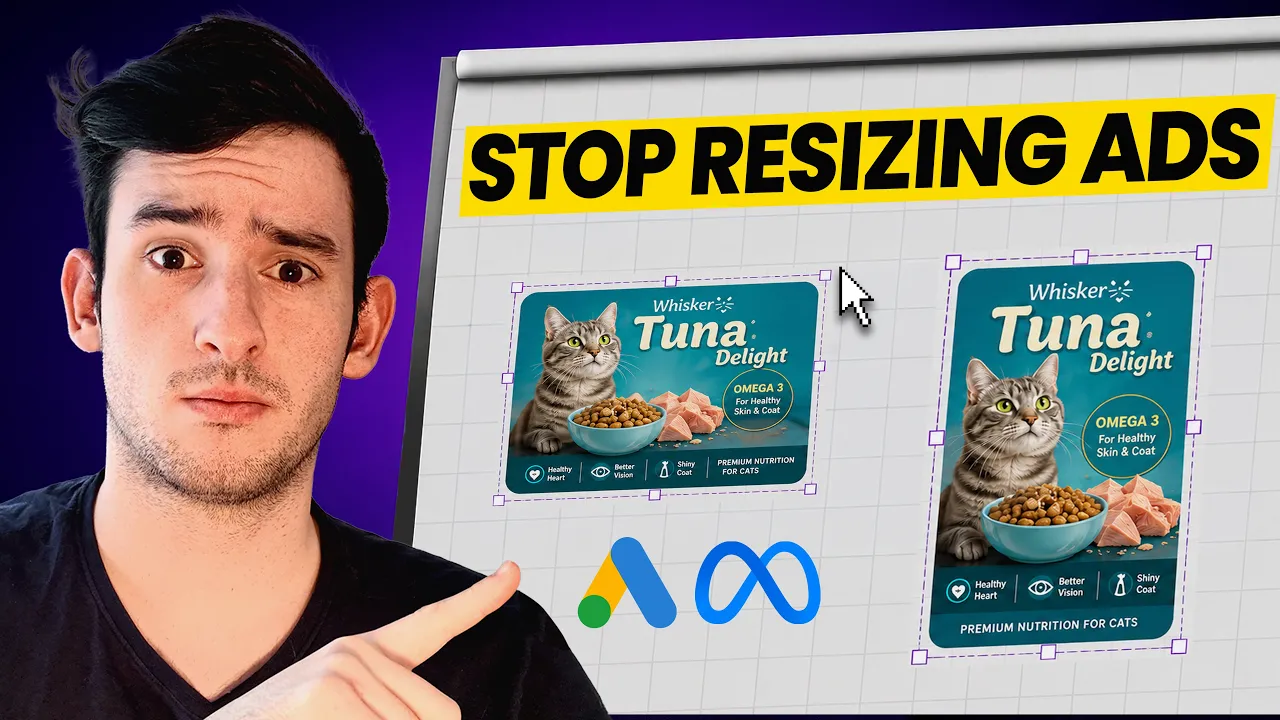
Si vous diffusez des publicités Meta et Google PMax et que vous perdez votre temps à créer un seul format de visuel ou à payer quelqu'un pour redimensionner chaque asset manuellement, ce workflow IA va vous sauver la mise. Dans la vidéo, je pars d'un simple lien produit et d'un prompt basique pour générer un format statique 1:1 (1080x1080) et une vidéo 1080x1920. À partir de là, l'IA les adapte dans tous les formats requis par Meta et Google PMax — transformant un simple brief en un pack créatif complet prêt à être importé sur les plateformes publicitaires.
L'outil que j'utilise est Creatify — l'agent adapte ce même visuel dans les autres dimensions, telles que 1200x628 et 1080x1920, optimisées pour les placements Google PMax. Il conserve la direction artistique et ajuste simplement la mise en page pour s'adapter à chaque format.
Je suis passé de la création d'un seul format de visuel à un pack complet de plus de cinq assets à partir d'un seul brief initial, réduisant ce qui prenait autrefois des heures de redimensionnement à seulement quelques minutes. Si vous voulez éviter de payer un designer ou de recréer des publicités à partir de zéro, c'est le chemin le plus rapide que j'ai trouvé.
L'approche :
1. Commencer par générer un visuel statique carré 1:1 qui fonctionne à la fois sur Meta et Google PMax
2. Adapter ce visuel statique en formats horizontal et vertical avec un simple prompt
3. Tester et scaler les visuels publicitaires gagnants
Fonctionne pour les marques e-commerce, les marketeurs et les agences qui font du testing publicitaire sur plusieurs plateformes — toutes les entreprises DTC qui diffusent des publicités Meta et Google PMax.
Merci d'avoir regardé !
-- Joel
Time-stamps :
0:00 - Intro
0:54 - Pourquoi la taille des visuels publicitaires importe
1:18 - Commencez ici : le carré 1:1
4:01 - Vos deux premiers visuels publicitaires
4:17 - Adaptation dans tous les formats Meta & PMax
6:22 - Pourquoi commencer par le 1:1
6:51 - Que télécharger en premier
7:27 - Récapitulatif du workflow complet
7:50 - Outro
#MetaAds #GooglePMax #AIAdCreatives
👉🏻 Essayez Creatify gratuitement : https://creatify.ai/?utm_source=yt&utm_medium=sm_organic&utm_campaign=vs&utm_content=50
Comment créer des visuels publicitaires pour Meta et des assets Google PMax avec l'IA — en quelques minutes, sans designer, sans Canva, et sans aucun redimensionnement manuel.
Si vous diffusez des publicités Meta et Google PMax et que vous perdez votre temps à créer un seul format de visuel ou à payer quelqu'un pour redimensionner chaque asset manuellement, ce workflow IA va vous sauver la mise. Dans la vidéo, je pars d'un simple lien produit et d'un prompt basique pour générer un format statique 1:1 (1080x1080) et une vidéo 1080x1920. À partir de là, l'IA les adapte dans tous les formats requis par Meta et Google PMax — transformant un simple brief en un pack créatif complet prêt à être importé sur les plateformes publicitaires.
L'outil que j'utilise est Creatify — l'agent adapte ce même visuel dans les autres dimensions, telles que 1200x628 et 1080x1920, optimisées pour les placements Google PMax. Il conserve la direction artistique et ajuste simplement la mise en page pour s'adapter à chaque format.
Je suis passé de la création d'un seul format de visuel à un pack complet de plus de cinq assets à partir d'un seul brief initial, réduisant ce qui prenait autrefois des heures de redimensionnement à seulement quelques minutes. Si vous voulez éviter de payer un designer ou de recréer des publicités à partir de zéro, c'est le chemin le plus rapide que j'ai trouvé.
L'approche :
1. Commencer par générer un visuel statique carré 1:1 qui fonctionne à la fois sur Meta et Google PMax
2. Adapter ce visuel statique en formats horizontal et vertical avec un simple prompt
3. Tester et scaler les visuels publicitaires gagnants
Fonctionne pour les marques e-commerce, les marketeurs et les agences qui font du testing publicitaire sur plusieurs plateformes — toutes les entreprises DTC qui diffusent des publicités Meta et Google PMax.
Merci d'avoir regardé !
-- Joel
Time-stamps :
0:00 - Intro
0:54 - Pourquoi la taille des visuels publicitaires importe
1:18 - Commencez ici : le carré 1:1
4:01 - Vos deux premiers visuels publicitaires
4:17 - Adaptation dans tous les formats Meta & PMax
6:22 - Pourquoi commencer par le 1:1
6:51 - Que télécharger en premier
7:27 - Récapitulatif du workflow complet
7:50 - Outro
#MetaAds #GooglePMax #AIAdCreatives

Prêt à transformer votre produit en une vidéo captivante ?
Vous pourriez aussi aimer


Prêt à accélérer votre marketing ?
Testez vos nouvelles idées de produits en quelques minutes avec des publicités vidéo générées par l'IA

Prêt à accélérer votre marketing ?
Testez vos nouvelles idées de produits en quelques minutes avec des publicités vidéo générées par l'IA
Prêt à accélérer votre marketing ?
Testez vos nouvelles idées de produits en quelques minutes avec des publicités vidéo générées par l'IA
Prêt à accélérer votre marketing ?
Testez vos nouvelles idées de produits en quelques minutes avec des publicités vidéo générées par l'IA

Générez des publicités vidéo engageantes pour vos produits
à partir de n'importe quelle URL



Creatify Lab • Copyright © 2026
Langue
French
Caractéristiques
Outils
Cas d'utilisation
Générez des publicités vidéo engageantes pour vos produits
à partir de n'importe quelle URL
Creatify Lab • Copyright © 2026
Langue
French
Caractéristiques
Outils
Cas d'utilisation
Générez des publicités vidéo engageantes pour vos produits
à partir de n'importe quelle URL
Creatify Lab • Copyright © 2026
Langue
French
Caractéristiques
Outils
Cas d'utilisation
YouTube
Snapchat
Shopify
Créer un Avatar IA
OTT et CTV
Génération de leads
Générez des publicités vidéo engageantes pour vos produits
à partir de n'importe quelle URL
Creatify Lab • Copyright © 2026
Langue
French
Caractéristiques
Outils
Cas d'utilisation
