
Creatify Team
SHARE


IN THIS ARTICLE
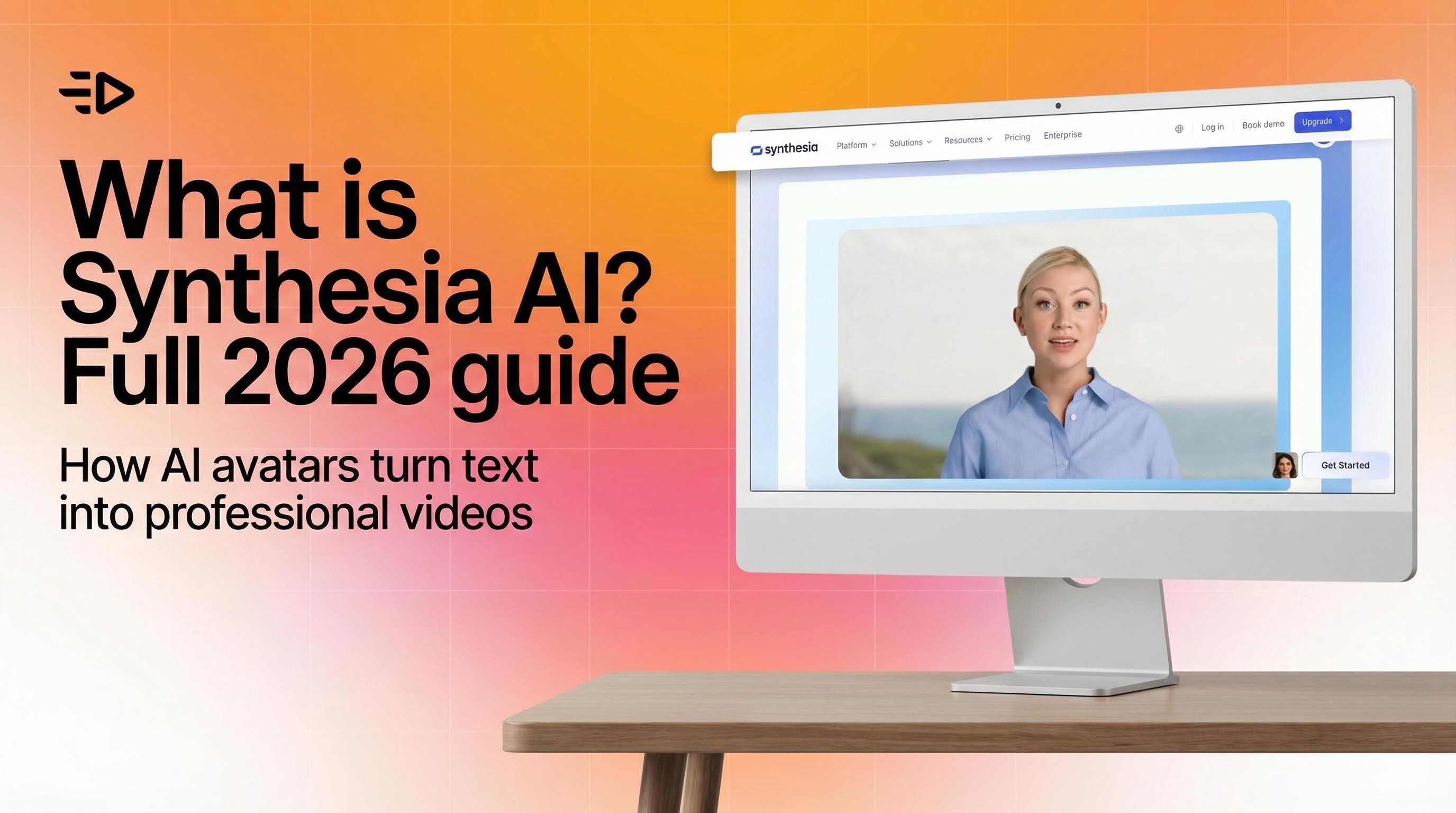
Synthesia is a browser-based AI video platform that turns text, documents, and URLs into videos using AI avatars and synthetic voices. It was founded in 2017 in London and has grown into one of the most recognized names in AI video generation, now serving tens of thousands of business customers including a significant share of Fortune 100 companies.
This guide covers everything you need to evaluate it: what the platform actually does, the technology behind it, where it excels, where it falls short, and whether it's the right fit for your specific use case.
What is Synthesia AI?
Synthesia AI is a video creation platform designed to replace traditional camera-and-studio workflows with AI-generated video. The core idea: you write a script (or provide a document, URL, or PowerPoint), and Synthesia produces a finished video with an AI avatar speaking your words, complete with lip-synced animation, background visuals, and text overlays.
The company's stated mission is to make video creation as simple as writing an email. It's backed by investors including Mark Cuban Companies and has raised significant venture funding to build what it positions as the leading enterprise AI video tool.
In 2026, Synthesia primarily serves learning and development teams, HR departments, internal communications, and enterprise training operations. Its sweet spot is scalable, multilingual corporate content - onboarding modules, compliance training, product walkthroughs, executive updates, and support documentation.

How Synthesia works: from text to video
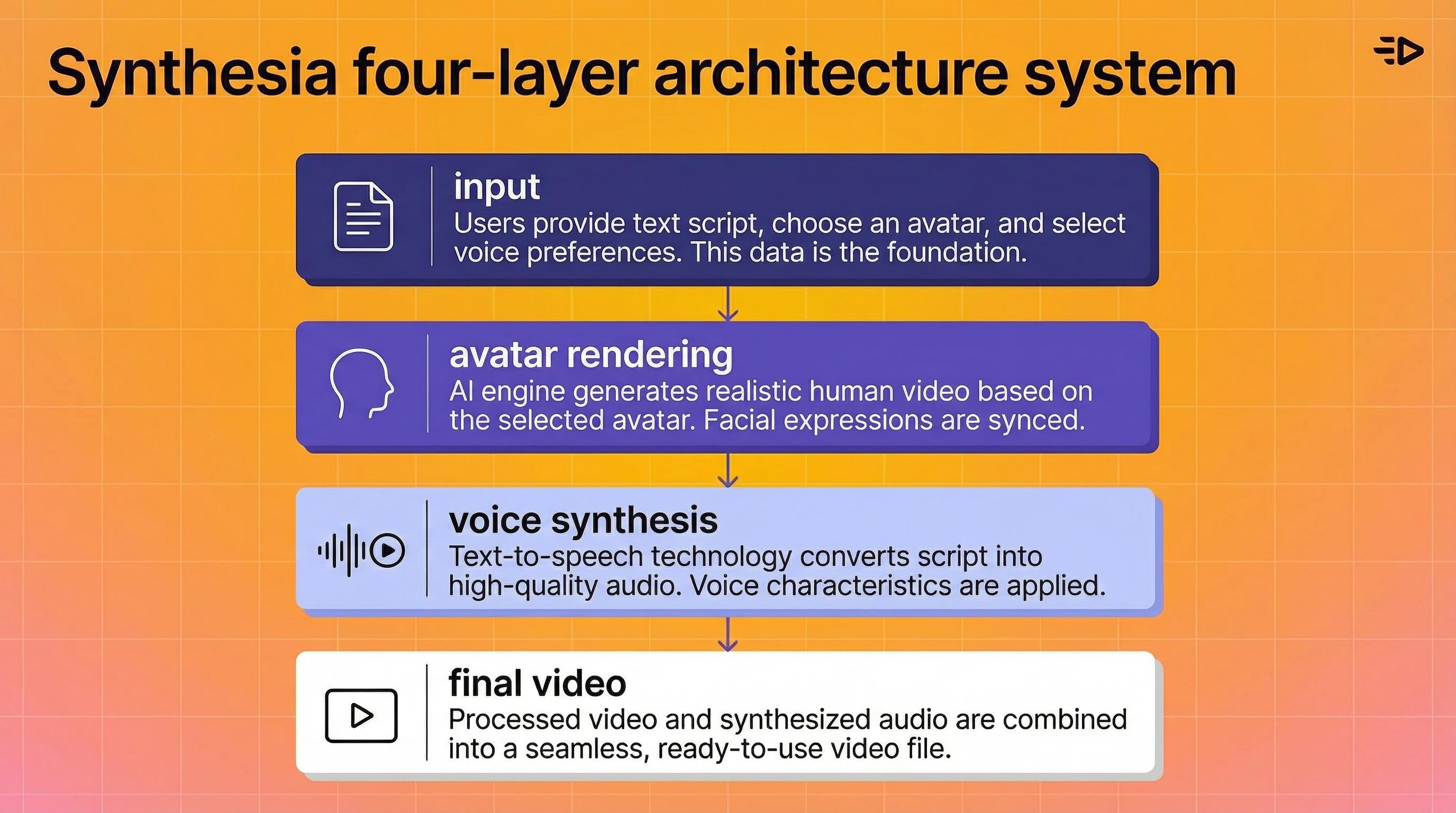
Understanding how Synthesia works requires looking at four interconnected layers.
The workflow
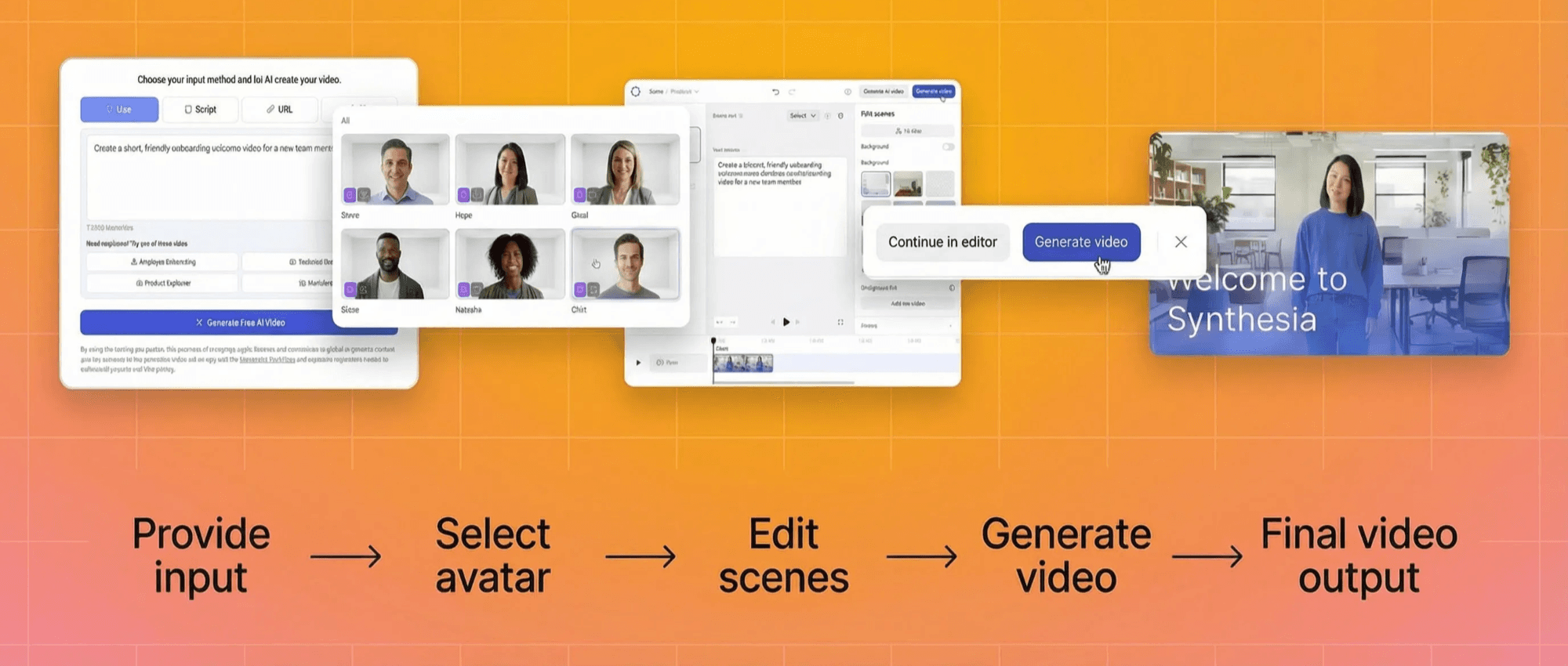
You start by providing an input: a text prompt, a written script, a PowerPoint file, or a PDF. Synthesia's AI video assistant processes this input and drafts a video structure, organizing your content into scenes with suggested avatar placements, voiceover text, and visual elements. You review, edit, and generate the final video.
The entire process happens in-browser. No downloads, no external software, no video editing experience required.
AI avatars and visual rendering
Synthesia's avatars are computer-generated presenters that simulate human appearance, speech, and facial expressions. They're trained on curated human performance data from actors, and licensed media. Deep learning models generate facial movements and lip sync aligned to the speech output, creating talking-head or full-body performances.
The platform offers a library of stock avatars across its plans (limited selection on free/Starter, full library on Enterprise). Users can also create custom "digital twin" avatars built from their own likeness, though custom avatar creation is a paid add-on ($1,000/year) on non-Enterprise plans and can take up to 10 days to process.
Voice synthesis
Synthesia provides access to over 1,000 AI voices supporting 160+ languages and accents. Users can also clone their own voice and use it with any avatar across multiple languages through cross-lingual synthesis.
The text-to-speech system synchronizes with facial animation and lip sync to produce natural-looking delivery. Voice quality varies by language and accent, but for major languages the output is generally strong enough for corporate communications and training content.
Localization at scale
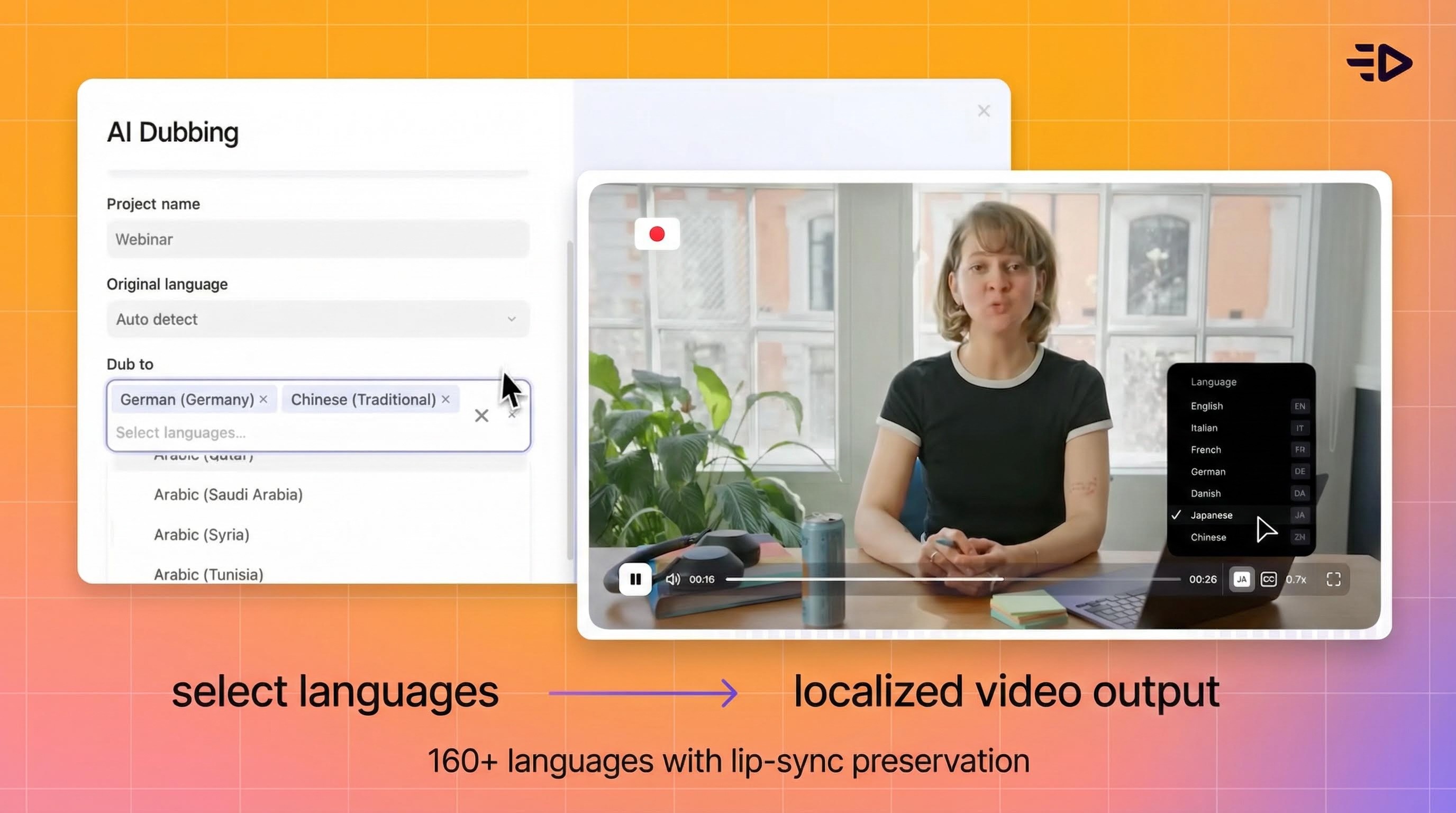
This is one of Synthesia's genuine differentiators for enterprise teams. You can translate video scripts and voiceovers into 160+ languages with lip-sync preservation, reusing the same avatar across locales. For global organizations producing training content that needs to reach employees in dozens of countries, this eliminates the need to reshoot or re-record for each market.
Enterprise plans include 1-click translation to 80+ languages and template management systems for standardizing content across regions.
What Synthesia is used for
Learning and development
This is Synthesia's primary domain. Onboarding modules, compliance training, sales enablement, product education, and micro-learning content are the core use cases the platform optimizes for. L&D teams use it to produce training videos that would otherwise require scheduling presenters, booking studios, and coordinating production across multiple languages.
Internal communications
Executive updates, policy changes, organizational announcements, and knowledge-sharing content that would typically go out as text emails or static documents. Synthesia positions video as higher-engagement than text for distributed and non-desk workforces.
Marketing and product content
Synthesia supports product explainers, how-to videos, FAQ responses, and support content. However, this is where the platform's limitations become relevant for marketers - which we'll cover in the limitations section below.
Synthesia pricing in 2026
Synthesia uses a tiered credit-based system:
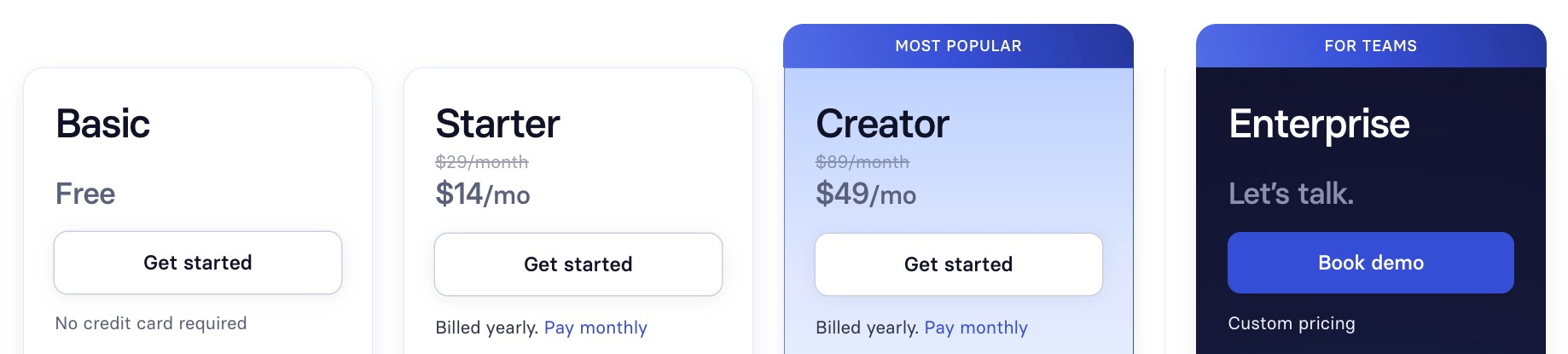
Basic (Free): $0, 1 editor, limited avatar selection (9 avatars), approximately 3 minutes of video per month, watermarked exports.
Starter: $18/month billed annually ($29/month billed monthly), 1 editor, 10 minutes of video per month, limited avatar library, personal avatar available as add-on.
Creator: $64/month billed annually, expanded minutes and features, more avatars, enhanced customization.
Enterprise: Custom pricing, unlimited video minutes, full avatar library, brand kits, SSO, team collaboration, AI screen recording, bulk personalization, Video Agents (interactive avatar experiences), and dedicated support.
The credit system is the shared currency across all AI features. Custom avatar creation ("digital twin") costs $1,000/year as an add-on for non-Enterprise users, and Studio Express avatars take up to 10 days to process.
What Synthesia does well
Speed and accessibility
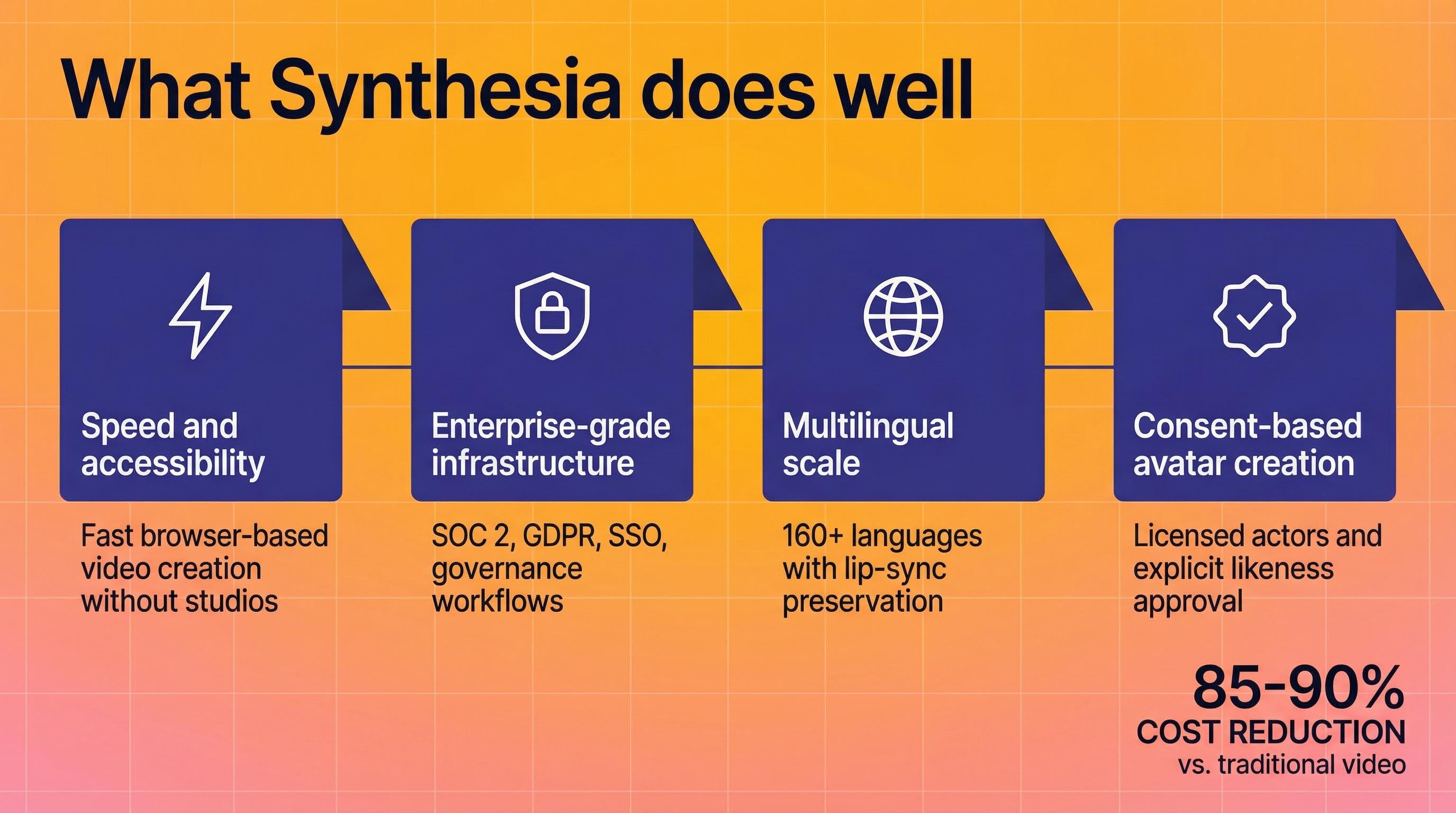
Synthesia genuinely delivers on its promise of making video creation faster. Non-technical users can produce professional-looking training and explainer videos in a browser without cameras, studios, or editing software. For L&D teams that previously relied on agencies or internal AV departments, this is a meaningful capability shift.
Enterprise-grade infrastructure
SOC 2 Type II compliance, GDPR compliance, SSO, team collaboration features, approval workflows, and version control. For organizations with strict security and governance requirements, Synthesia has invested heavily in enterprise readiness.
Multilingual scale
The ability to produce the same training video in dozens of languages from a single script, using the same avatar with localized voice and lip sync, is genuinely valuable for global organizations. Few platforms match the breadth of Synthesia's language support (160+ languages).
Consent-based avatar creation
Synthesia uses actors and licensed content for its stock avatars, with explicit consent required for custom likeness creation. Customer data is not reused for base-model training without written approval. This consent-first approach is an important differentiator in a market where synthetic media ethics are under increasing scrutiny.
Limitations, risks, and common complaints
Avatar customization and expressiveness
Independent reviews consistently flag limited avatar customization as a pain point. Options for adjusting appearance, attire, and gestures are restricted compared to what many brands need for their visual identity. Emotional expressiveness and subtle body language still lag behind human presenters, which can limit effectiveness for high-stakes or emotionally nuanced content.
Enterprise plans offer more customization (outfit changes, logo placement, background control), but basic and mid-tier plans have meaningful restrictions.
Content moderation friction
This is one of the most frequently cited complaints in user reviews on Software Advice and other platforms. Synthesia's combined AI and human content moderation system can be unpredictable - users report having videos approved and then nearly identical versions flagged without clear explanation. Scientific and medical content is particularly prone to being blocked, and the appeal process is described as opaque.
For marketing teams that need to produce high volumes of varied creative quickly, this moderation friction can become a significant workflow bottleneck.
Advertising and commercial use restrictions
This is the biggest gap for marketers evaluating Synthesia. The platform is primarily designed for internal communications and training, not performance marketing. Stock avatars come with licensing restrictions for paid advertising and broadcast use. If your primary goal is producing video ads at scale for Meta, TikTok, or YouTube campaigns, Synthesia wasn't built for that workflow.
There's no URL-to-Video feature for automatically generating product ads from ecommerce listings. No built-in ad platform integrations for launching directly to Meta or TikTok. No batch production system optimized for generating dozens of ad variations for A/B testing. No creative testing or performance analytics. These are fundamentally different product design choices reflecting Synthesia's enterprise L&D focus.
Perception and trust
Analysts and educators have raised concerns about the broader trust implications of human-like synthetic presenters. Despite Synthesia's responsible media approach, some audiences find AI presenters impersonal or question their authenticity, particularly when AI use isn't clearly disclosed. The platform's association with "deepfake-style" technology - however unfair - creates perception risk for some brands.
When Synthesia is the right choice
Synthesia makes the most sense when your primary use case is internal content at scale. Specifically:
You need to produce high volumes of training, onboarding, or compliance content across multiple languages. You don't have access to studios, cameras, or production resources. Your content is primarily informational and instructional rather than performance-driven. Your organization requires enterprise-grade security, collaboration, and approval workflows. Your videos are for internal audiences (employees, partners) rather than paid advertising channels.
If that describes your situation, Synthesia is a strong choice.
When to look at alternatives
Synthesia's design choices make it less suited for several common marketing scenarios. If your primary need is any of the following, a purpose-built alternative will likely serve you better:
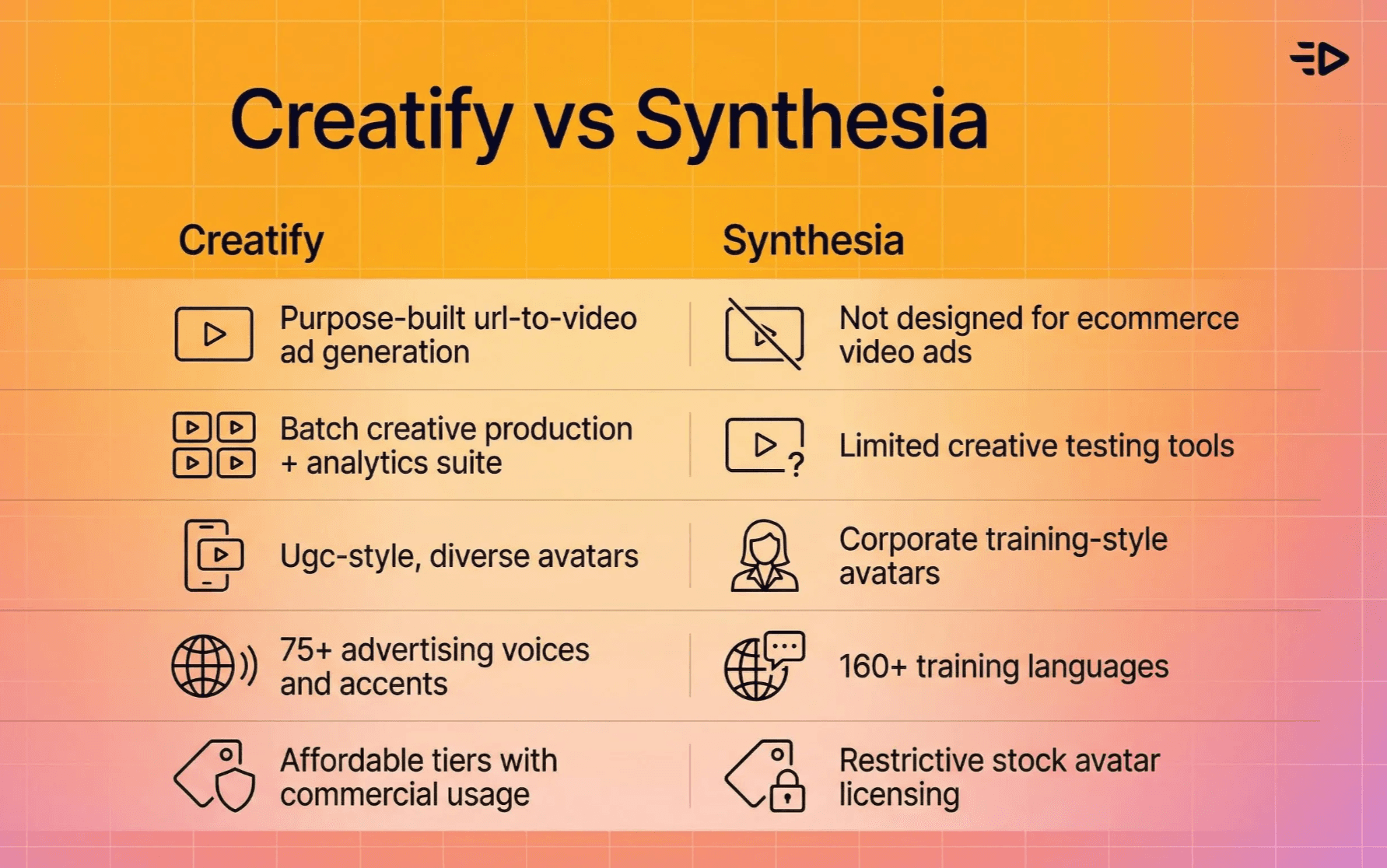
Video ads for e-commerce and performance marketing. You need a platform that ingests product URLs and generates ad-ready video variations optimized for conversion on social platforms. Creatify's URL-to-Video feature does exactly this - paste a Shopify, Amazon, or product page URL and get finished video ads with AI avatars, scripts, product visuals, and platform-specific formatting in minutes. The workflow is built for marketers, not trainers.
High-volume creative testing. Performance marketing demands testing dozens or hundreds of creative variations to find what converts. Creatify supports this with batch production capabilities, direct ad platform integrations (Meta, TikTok, AppLovin), and the AdMax creative testing and analytics suite. Documented results include agencies achieving 3x CTR improvements and 185x cost-per-result reductions through systematic creative testing.
UGC-style content production. AI avatars that look and feel like real user-generated content - casual, authentic, to-camera delivery - require a different approach than corporate training presenters. Creatify's library of 1,500+ avatars includes diverse styles specifically designed for social ad formats, with features like product holding, branded outfits, and emotional expressiveness powered by the proprietary Aurora diffusion transformer model.
Multilingual ad campaigns. While Synthesia leads in language breadth for training content (160+ languages), Creatify supports 75+ languages with 140+ voices specifically optimized for advertising delivery - including emotional tags, multiple accents per voice, and platform-specific tone calibration. For marketing use cases, voice quality and emotional range matter more than raw language count.
Budget-conscious teams. Creatify's free plan includes 10 credits with no credit card required. Paid plans start at $19/month (Starter) and $49/month (Pro) with access to 1,500+ avatars, 22+ AI models including Sora 2 Pro and Veo 3.1, and commercial usage rights on all paid content. Custom avatars are included starting from the Starter plan (1 custom avatar) rather than requiring a $1,000/year add-on.
Best practices if you use Synthesia AI
Match the tool to the use case. Synthesia excels at content where clarity, consistency, and localization matter more than creative flair or conversion optimization. Training, compliance, internal comms - that's the sweet spot.
Write scripts for AI delivery. Keep sentences concise, avoid complex jargon, and structure content into short scenes. AI avatars handle clear, direct language better than nuanced or emotionally complex delivery.
Establish governance early. Set internal policies on when and how to use AI avatars, including disclosure requirements for employees and external audiences. Build review workflows that include legal, compliance, and brand teams before publishing.
Test before committing. Use the free plan to validate that avatar quality, voice naturalness, and overall production value meet your standards for the specific content types you need before investing in paid plans.
FAQs
What is Synthesia AI?
Synthesia AI is a browser-based video creation platform that uses artificial intelligence to generate videos from text scripts, documents, or URLs. It produces videos featuring AI avatars that speak with synthetic voices, synchronized with facial animation and lip movements. The platform is primarily used by enterprise teams for training, onboarding, internal communications, and support content.
How does Synthesia work?
Synthesia works by processing a text input (script, document, PowerPoint, or URL) through its AI video assistant, which organizes the content into scenes with AI avatar presenters, voiceovers, and visual elements. Deep learning models generate facial movements and lip sync aligned to the speech, and the system renders a finished video that can be exported and shared. The entire process happens in-browser without cameras or editing software.
What is Synthesia used for?
Synthesia is primarily used for enterprise learning and development (onboarding, compliance training, product education), internal communications (executive updates, policy announcements), and support content (how-to videos, FAQ responses). Its strongest use case is producing high volumes of multilingual training content for global organizations.
How much does Synthesia cost?
Synthesia offers a free Basic plan with limited features and watermarked exports. Paid plans start at $18/month (Starter, billed annually) and $64/month (Creator, billed annually). Enterprise plans have custom pricing with unlimited video minutes. Custom avatar creation ("digital twin") costs $1,000/year as an add-on on non-Enterprise plans.
Can Synthesia be used for video ads and marketing?
Synthesia can produce marketing-adjacent content like product explainers and how-to videos, but it was not designed for performance marketing. Stock avatars come with licensing restrictions for paid advertising, there are no ad platform integrations (Meta, TikTok), no batch production for A/B testing, and no URL-to-Video workflow for ecommerce. Platforms like Creatify are purpose-built for video ad creation and offer features specifically designed for marketing and advertising use cases.
What are the main limitations of Synthesia?
Common limitations include restricted avatar customization on non-Enterprise plans, unpredictable content moderation that can block legitimate content without clear explanation, limited advertising and commercial use rights for stock avatars, and avatar expressiveness that doesn't match human presenters for emotionally nuanced content. Some users also report that the editing tools are intentionally simple, requiring external editors for more complex video production.
Is Synthesia AI safe and ethical?
Synthesia takes a consent-first approach to avatar creation, using paid actors and licensed content for stock avatars and requiring explicit consent for custom likeness creation. The platform is SOC 2 Type II and GDPR compliant, with combined AI and human content moderation. However, the broader ethical questions around synthetic presenters - including audience trust, disclosure obligations, and the potential for misuse - apply to Synthesia as they do to all AI avatar platforms.
What languages does Synthesia support?
Synthesia supports over 160 languages and accents for text-to-speech, AI dubbing for 30+ languages with lip-sync preservation, and 1-click translation to 80+ languages on Enterprise plans. The same avatar can speak any supported language, making it particularly useful for global organizations needing multilingual training and communications content.
Synthesia is a browser-based AI video platform that turns text, documents, and URLs into videos using AI avatars and synthetic voices. It was founded in 2017 in London and has grown into one of the most recognized names in AI video generation, now serving tens of thousands of business customers including a significant share of Fortune 100 companies.
This guide covers everything you need to evaluate it: what the platform actually does, the technology behind it, where it excels, where it falls short, and whether it's the right fit for your specific use case.
What is Synthesia AI?
Synthesia AI is a video creation platform designed to replace traditional camera-and-studio workflows with AI-generated video. The core idea: you write a script (or provide a document, URL, or PowerPoint), and Synthesia produces a finished video with an AI avatar speaking your words, complete with lip-synced animation, background visuals, and text overlays.
The company's stated mission is to make video creation as simple as writing an email. It's backed by investors including Mark Cuban Companies and has raised significant venture funding to build what it positions as the leading enterprise AI video tool.
In 2026, Synthesia primarily serves learning and development teams, HR departments, internal communications, and enterprise training operations. Its sweet spot is scalable, multilingual corporate content - onboarding modules, compliance training, product walkthroughs, executive updates, and support documentation.
How Synthesia works: from text to video
Understanding how Synthesia works requires looking at four interconnected layers.
The workflow
You start by providing an input: a text prompt, a written script, a PowerPoint file, or a PDF. Synthesia's AI video assistant processes this input and drafts a video structure, organizing your content into scenes with suggested avatar placements, voiceover text, and visual elements. You review, edit, and generate the final video.
The entire process happens in-browser. No downloads, no external software, no video editing experience required.
AI avatars and visual rendering
Synthesia's avatars are computer-generated presenters that simulate human appearance, speech, and facial expressions. They're trained on curated human performance data from actors, and licensed media. Deep learning models generate facial movements and lip sync aligned to the speech output, creating talking-head or full-body performances.
The platform offers a library of stock avatars across its plans (limited selection on free/Starter, full library on Enterprise). Users can also create custom "digital twin" avatars built from their own likeness, though custom avatar creation is a paid add-on ($1,000/year) on non-Enterprise plans and can take up to 10 days to process.
Voice synthesis
Synthesia provides access to over 1,000 AI voices supporting 160+ languages and accents. Users can also clone their own voice and use it with any avatar across multiple languages through cross-lingual synthesis.
The text-to-speech system synchronizes with facial animation and lip sync to produce natural-looking delivery. Voice quality varies by language and accent, but for major languages the output is generally strong enough for corporate communications and training content.
Localization at scale
This is one of Synthesia's genuine differentiators for enterprise teams. You can translate video scripts and voiceovers into 160+ languages with lip-sync preservation, reusing the same avatar across locales. For global organizations producing training content that needs to reach employees in dozens of countries, this eliminates the need to reshoot or re-record for each market.
Enterprise plans include 1-click translation to 80+ languages and template management systems for standardizing content across regions.
What Synthesia is used for
Learning and development
This is Synthesia's primary domain. Onboarding modules, compliance training, sales enablement, product education, and micro-learning content are the core use cases the platform optimizes for. L&D teams use it to produce training videos that would otherwise require scheduling presenters, booking studios, and coordinating production across multiple languages.
Internal communications
Executive updates, policy changes, organizational announcements, and knowledge-sharing content that would typically go out as text emails or static documents. Synthesia positions video as higher-engagement than text for distributed and non-desk workforces.
Marketing and product content
Synthesia supports product explainers, how-to videos, FAQ responses, and support content. However, this is where the platform's limitations become relevant for marketers - which we'll cover in the limitations section below.
Synthesia pricing in 2026
Synthesia uses a tiered credit-based system:
Basic (Free): $0, 1 editor, limited avatar selection (9 avatars), approximately 3 minutes of video per month, watermarked exports.
Starter: $18/month billed annually ($29/month billed monthly), 1 editor, 10 minutes of video per month, limited avatar library, personal avatar available as add-on.
Creator: $64/month billed annually, expanded minutes and features, more avatars, enhanced customization.
Enterprise: Custom pricing, unlimited video minutes, full avatar library, brand kits, SSO, team collaboration, AI screen recording, bulk personalization, Video Agents (interactive avatar experiences), and dedicated support.
The credit system is the shared currency across all AI features. Custom avatar creation ("digital twin") costs $1,000/year as an add-on for non-Enterprise users, and Studio Express avatars take up to 10 days to process.
What Synthesia does well
Speed and accessibility
Synthesia genuinely delivers on its promise of making video creation faster. Non-technical users can produce professional-looking training and explainer videos in a browser without cameras, studios, or editing software. For L&D teams that previously relied on agencies or internal AV departments, this is a meaningful capability shift.
Enterprise-grade infrastructure
SOC 2 Type II compliance, GDPR compliance, SSO, team collaboration features, approval workflows, and version control. For organizations with strict security and governance requirements, Synthesia has invested heavily in enterprise readiness.
Multilingual scale
The ability to produce the same training video in dozens of languages from a single script, using the same avatar with localized voice and lip sync, is genuinely valuable for global organizations. Few platforms match the breadth of Synthesia's language support (160+ languages).
Consent-based avatar creation
Synthesia uses actors and licensed content for its stock avatars, with explicit consent required for custom likeness creation. Customer data is not reused for base-model training without written approval. This consent-first approach is an important differentiator in a market where synthetic media ethics are under increasing scrutiny.
Limitations, risks, and common complaints
Avatar customization and expressiveness
Independent reviews consistently flag limited avatar customization as a pain point. Options for adjusting appearance, attire, and gestures are restricted compared to what many brands need for their visual identity. Emotional expressiveness and subtle body language still lag behind human presenters, which can limit effectiveness for high-stakes or emotionally nuanced content.
Enterprise plans offer more customization (outfit changes, logo placement, background control), but basic and mid-tier plans have meaningful restrictions.
Content moderation friction
This is one of the most frequently cited complaints in user reviews on Software Advice and other platforms. Synthesia's combined AI and human content moderation system can be unpredictable - users report having videos approved and then nearly identical versions flagged without clear explanation. Scientific and medical content is particularly prone to being blocked, and the appeal process is described as opaque.
For marketing teams that need to produce high volumes of varied creative quickly, this moderation friction can become a significant workflow bottleneck.
Advertising and commercial use restrictions
This is the biggest gap for marketers evaluating Synthesia. The platform is primarily designed for internal communications and training, not performance marketing. Stock avatars come with licensing restrictions for paid advertising and broadcast use. If your primary goal is producing video ads at scale for Meta, TikTok, or YouTube campaigns, Synthesia wasn't built for that workflow.
There's no URL-to-Video feature for automatically generating product ads from ecommerce listings. No built-in ad platform integrations for launching directly to Meta or TikTok. No batch production system optimized for generating dozens of ad variations for A/B testing. No creative testing or performance analytics. These are fundamentally different product design choices reflecting Synthesia's enterprise L&D focus.
Perception and trust
Analysts and educators have raised concerns about the broader trust implications of human-like synthetic presenters. Despite Synthesia's responsible media approach, some audiences find AI presenters impersonal or question their authenticity, particularly when AI use isn't clearly disclosed. The platform's association with "deepfake-style" technology - however unfair - creates perception risk for some brands.
When Synthesia is the right choice
Synthesia makes the most sense when your primary use case is internal content at scale. Specifically:
You need to produce high volumes of training, onboarding, or compliance content across multiple languages. You don't have access to studios, cameras, or production resources. Your content is primarily informational and instructional rather than performance-driven. Your organization requires enterprise-grade security, collaboration, and approval workflows. Your videos are for internal audiences (employees, partners) rather than paid advertising channels.
If that describes your situation, Synthesia is a strong choice.
When to look at alternatives
Synthesia's design choices make it less suited for several common marketing scenarios. If your primary need is any of the following, a purpose-built alternative will likely serve you better:
Video ads for e-commerce and performance marketing. You need a platform that ingests product URLs and generates ad-ready video variations optimized for conversion on social platforms. Creatify's URL-to-Video feature does exactly this - paste a Shopify, Amazon, or product page URL and get finished video ads with AI avatars, scripts, product visuals, and platform-specific formatting in minutes. The workflow is built for marketers, not trainers.
High-volume creative testing. Performance marketing demands testing dozens or hundreds of creative variations to find what converts. Creatify supports this with batch production capabilities, direct ad platform integrations (Meta, TikTok, AppLovin), and the AdMax creative testing and analytics suite. Documented results include agencies achieving 3x CTR improvements and 185x cost-per-result reductions through systematic creative testing.
UGC-style content production. AI avatars that look and feel like real user-generated content - casual, authentic, to-camera delivery - require a different approach than corporate training presenters. Creatify's library of 1,500+ avatars includes diverse styles specifically designed for social ad formats, with features like product holding, branded outfits, and emotional expressiveness powered by the proprietary Aurora diffusion transformer model.
Multilingual ad campaigns. While Synthesia leads in language breadth for training content (160+ languages), Creatify supports 75+ languages with 140+ voices specifically optimized for advertising delivery - including emotional tags, multiple accents per voice, and platform-specific tone calibration. For marketing use cases, voice quality and emotional range matter more than raw language count.
Budget-conscious teams. Creatify's free plan includes 10 credits with no credit card required. Paid plans start at $19/month (Starter) and $49/month (Pro) with access to 1,500+ avatars, 22+ AI models including Sora 2 Pro and Veo 3.1, and commercial usage rights on all paid content. Custom avatars are included starting from the Starter plan (1 custom avatar) rather than requiring a $1,000/year add-on.
Best practices if you use Synthesia AI
Match the tool to the use case. Synthesia excels at content where clarity, consistency, and localization matter more than creative flair or conversion optimization. Training, compliance, internal comms - that's the sweet spot.
Write scripts for AI delivery. Keep sentences concise, avoid complex jargon, and structure content into short scenes. AI avatars handle clear, direct language better than nuanced or emotionally complex delivery.
Establish governance early. Set internal policies on when and how to use AI avatars, including disclosure requirements for employees and external audiences. Build review workflows that include legal, compliance, and brand teams before publishing.
Test before committing. Use the free plan to validate that avatar quality, voice naturalness, and overall production value meet your standards for the specific content types you need before investing in paid plans.
FAQs
What is Synthesia AI?
Synthesia AI is a browser-based video creation platform that uses artificial intelligence to generate videos from text scripts, documents, or URLs. It produces videos featuring AI avatars that speak with synthetic voices, synchronized with facial animation and lip movements. The platform is primarily used by enterprise teams for training, onboarding, internal communications, and support content.
How does Synthesia work?
Synthesia works by processing a text input (script, document, PowerPoint, or URL) through its AI video assistant, which organizes the content into scenes with AI avatar presenters, voiceovers, and visual elements. Deep learning models generate facial movements and lip sync aligned to the speech, and the system renders a finished video that can be exported and shared. The entire process happens in-browser without cameras or editing software.
What is Synthesia used for?
Synthesia is primarily used for enterprise learning and development (onboarding, compliance training, product education), internal communications (executive updates, policy announcements), and support content (how-to videos, FAQ responses). Its strongest use case is producing high volumes of multilingual training content for global organizations.
How much does Synthesia cost?
Synthesia offers a free Basic plan with limited features and watermarked exports. Paid plans start at $18/month (Starter, billed annually) and $64/month (Creator, billed annually). Enterprise plans have custom pricing with unlimited video minutes. Custom avatar creation ("digital twin") costs $1,000/year as an add-on on non-Enterprise plans.
Can Synthesia be used for video ads and marketing?
Synthesia can produce marketing-adjacent content like product explainers and how-to videos, but it was not designed for performance marketing. Stock avatars come with licensing restrictions for paid advertising, there are no ad platform integrations (Meta, TikTok), no batch production for A/B testing, and no URL-to-Video workflow for ecommerce. Platforms like Creatify are purpose-built for video ad creation and offer features specifically designed for marketing and advertising use cases.
What are the main limitations of Synthesia?
Common limitations include restricted avatar customization on non-Enterprise plans, unpredictable content moderation that can block legitimate content without clear explanation, limited advertising and commercial use rights for stock avatars, and avatar expressiveness that doesn't match human presenters for emotionally nuanced content. Some users also report that the editing tools are intentionally simple, requiring external editors for more complex video production.
Is Synthesia AI safe and ethical?
Synthesia takes a consent-first approach to avatar creation, using paid actors and licensed content for stock avatars and requiring explicit consent for custom likeness creation. The platform is SOC 2 Type II and GDPR compliant, with combined AI and human content moderation. However, the broader ethical questions around synthetic presenters - including audience trust, disclosure obligations, and the potential for misuse - apply to Synthesia as they do to all AI avatar platforms.
What languages does Synthesia support?
Synthesia supports over 160 languages and accents for text-to-speech, AI dubbing for 30+ languages with lip-sync preservation, and 1-click translation to 80+ languages on Enterprise plans. The same avatar can speak any supported language, making it particularly useful for global organizations needing multilingual training and communications content.