
Creatify Team
SHARE


IN THIS ARTICLE
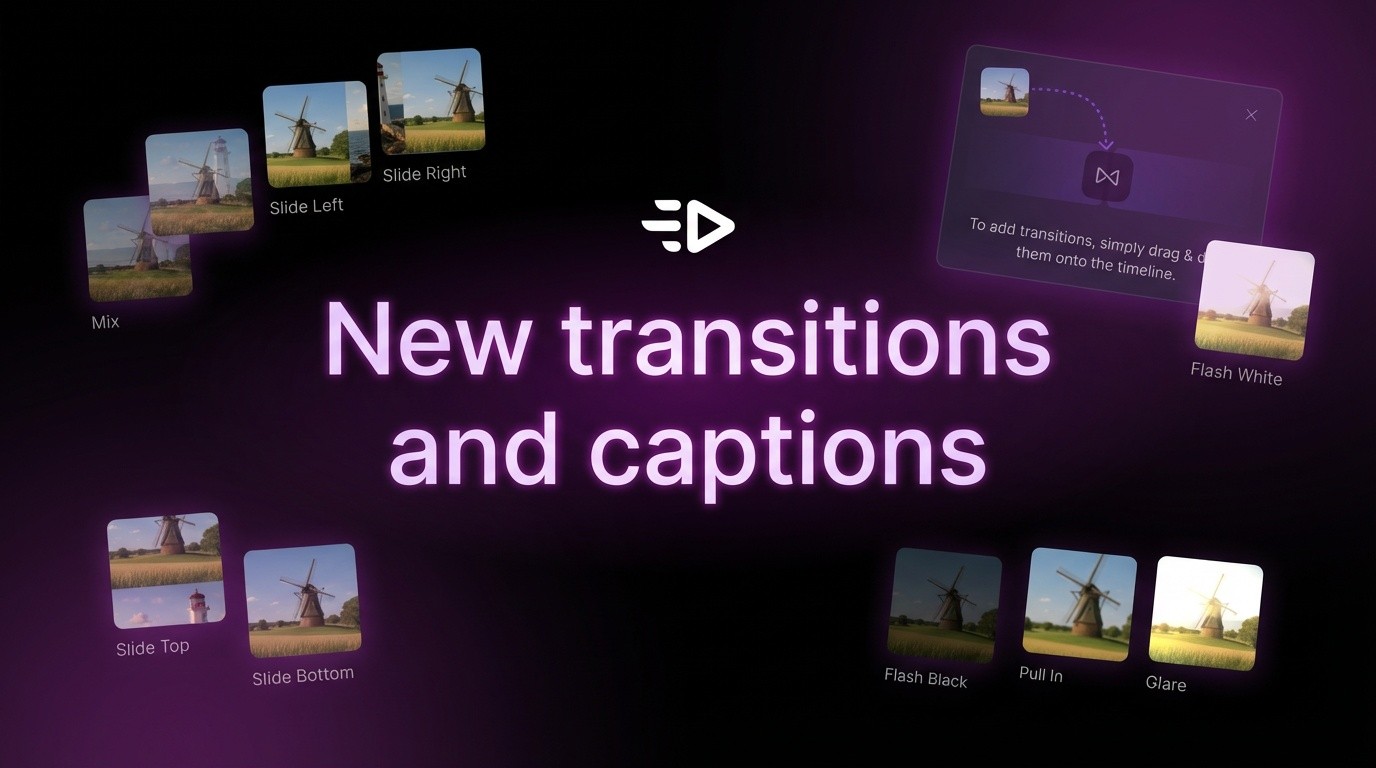
The video editor now includes scene transitions and caption styling options. Add professional polish to AI-generated ads with effects that make videos feel hand-edited, not auto-generated.
Scene transitions
Click the transition icon (diamond symbol) between any two scenes in your timeline to open the effects panel.
Sample transitions include:
Mix (cross-dissolve)
Slide Left, Right, Top, Bottom
Flash White
Plus many more creative effects
Each transition takes 0.5-1 second. The timeline shows exactly where transitions occur, making it easy to preview pacing.
Caption styling
Click any caption block, then select the "Style" tab to change visual appearance.
Sample caption styles include:
Comic Shadow - bold text with drop shadow
Clean Bold - thick letters for readability
Soft Pill - text in rounded background shape
Underline Bold - heavy text with emphasis line
Plus many more styles for different tones
Switch between "Style" and "Content" tabs to change appearance or edit text. All changes update in real-time.
Why this matters
Smooth transitions and styled captions improve platform performance. TikTok and Instagram favor professional-looking content that holds attention. Jarring cuts signal low production quality, styled captions are easier to read on mobile.
Transitions let you match brand tone - Slide feels modern and energetic, Mix feels subtle and professional. Caption styles help key messages stand out from supporting text.
FAQs
Can I use different transitions between different scenes?
Yes. Each transition point is independently customizable - use different effects throughout one video.
Do caption styles work with auto-generated captions?
Yes. AI-generated captions can be styled immediately. Text content stays the same while visual presentation changes.
Will transitions slow down video generation?
No. Transitions are applied during final render, not during AI generation. Adding transitions doesn't increase processing time.
Can I preview effects before exporting?
Yes. The editor shows all transitions and styled captions in real-time playback.
The video editor now includes scene transitions and caption styling options. Add professional polish to AI-generated ads with effects that make videos feel hand-edited, not auto-generated.
Scene transitions
Click the transition icon (diamond symbol) between any two scenes in your timeline to open the effects panel.
Sample transitions include:
Mix (cross-dissolve)
Slide Left, Right, Top, Bottom
Flash White
Plus many more creative effects
Each transition takes 0.5-1 second. The timeline shows exactly where transitions occur, making it easy to preview pacing.
Caption styling
Click any caption block, then select the "Style" tab to change visual appearance.
Sample caption styles include:
Comic Shadow - bold text with drop shadow
Clean Bold - thick letters for readability
Soft Pill - text in rounded background shape
Underline Bold - heavy text with emphasis line
Plus many more styles for different tones
Switch between "Style" and "Content" tabs to change appearance or edit text. All changes update in real-time.
Why this matters
Smooth transitions and styled captions improve platform performance. TikTok and Instagram favor professional-looking content that holds attention. Jarring cuts signal low production quality, styled captions are easier to read on mobile.
Transitions let you match brand tone - Slide feels modern and energetic, Mix feels subtle and professional. Caption styles help key messages stand out from supporting text.
FAQs
Can I use different transitions between different scenes?
Yes. Each transition point is independently customizable - use different effects throughout one video.
Do caption styles work with auto-generated captions?
Yes. AI-generated captions can be styled immediately. Text content stays the same while visual presentation changes.
Will transitions slow down video generation?
No. Transitions are applied during final render, not during AI generation. Adding transitions doesn't increase processing time.
Can I preview effects before exporting?
Yes. The editor shows all transitions and styled captions in real-time playback.