DYOA revamp: Design custom avatars from text descriptions

DYOA revamp: Design custom avatars from text descriptions

Written by

Creatify Team

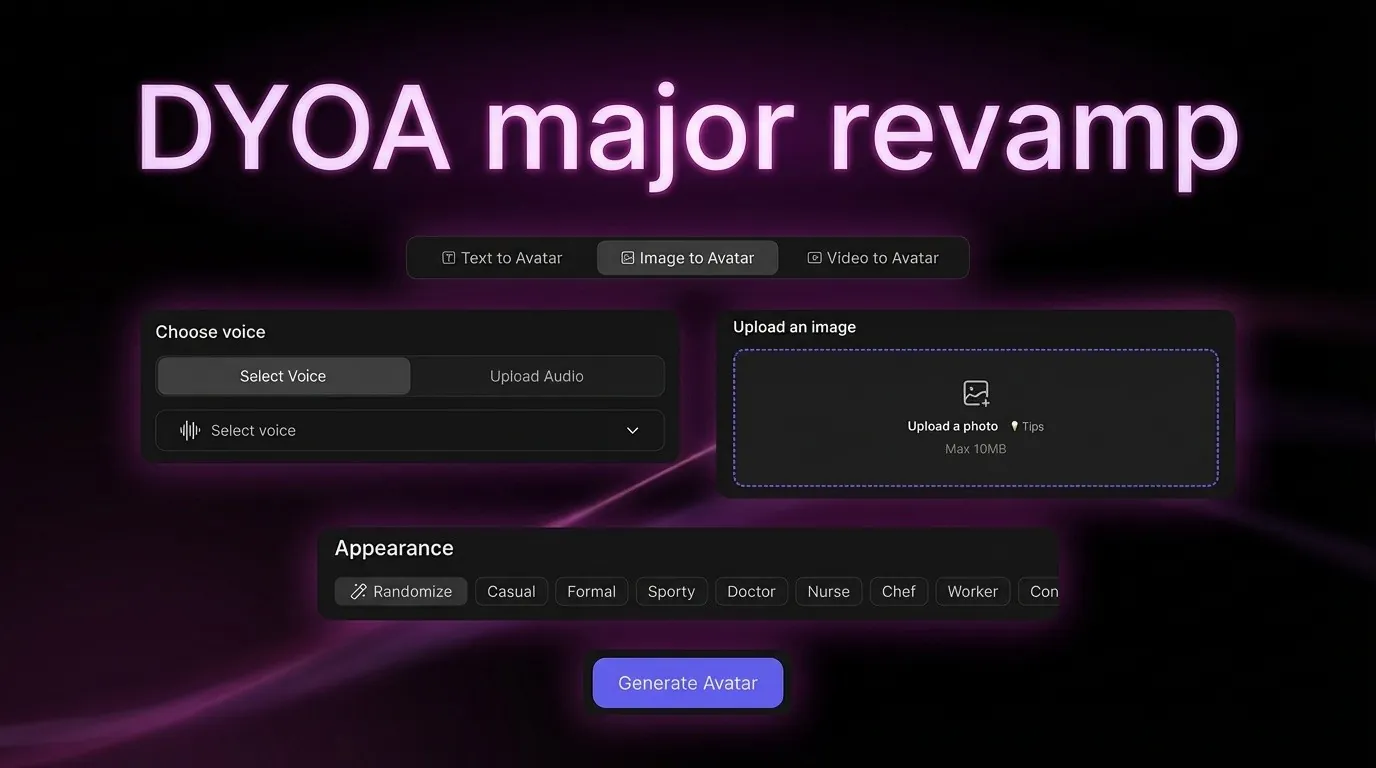
DYOA feature major revamp - feature interface elements floating around the title
Creatify logo

Creatify Team

SHARE

LinkedIn icon
X icon
Facebook icon

IN THIS ARTICLE

Design Your Own Avatar (DYOA) now creates custom avatars entirely from text descriptions. No photos, no video uploads, no existing footage required. Just describe the avatar you want - "30-year-old woman with short black hair in casual streetwear" or "male fitness instructor in his 40s with athletic build" - and Creatify generates a unique character you can use across unlimited ads.

This changes custom avatar creation. Previously, BYOA (Bring Your Own Avatar) required uploading 2-5 minutes of video footage to create a digital twin. DYOA eliminates this requirement entirely. Design brand spokespersons, UGC-style creators, or unique characters without filming anyone.

What you can design

Brand spokespersons - Create consistent characters using outfit presets (Formal, Business casual) or custom descriptions. Avatar can hold your product with natural gestures for product demos.

UGC-style creators - Use Casual outfit preset with lifestyle backgrounds (Kitchen, Living room, Gym). Design authentic-looking creators that match UGC aesthetic without filming anyone.

Professional characters - Doctor, Nurse, Chef presets create industry-specific avatars. Medical avatars in clinical settings, culinary characters in kitchen environments.

Branded avatars - Upload your logo, place it on the avatar's clothing or as a hat. Create characters that literally wear your brand across all campaigns.

Every designed avatar saves to Smart Assets and works across URL-to-Video, AI Avatar, and Batch Mode.

How DYOA works

Access DYOA through the avatar creation interface. Start with demo avatars - click any example to auto-fill the prompt, then customize from there. Or build from scratch:

Appearance - Select basic info (gender, age, ethnicity), then choose outfit presets: Casual, Formal, Sporty, Doctor, Nurse, Chef, or write custom descriptions. Add specific details like hair style, tattoos, or accessories in the "More details" field.

Background - Pick scene presets (Living room, Bedroom, Kitchen, Home office, Gym) or describe custom environments. Control lighting style (Day/Night/Golden hour) and camera distance (Wide/Middle shots).

Product (Pro) - Upload your product image. Avatar automatically holds it with natural gestures, or choose specific hand positions.

Branding (Pro) - Upload your logo. Place it on the avatar's clothing or as a hat/cap for consistent brand representation.

The AI generates the avatar based on all settings. Preview it, adjust any parameters, then save to Smart Assets. The avatar maintains consistent appearance across all videos - same face, same style, same character identity.

Once created, use your DYOA avatar exactly like library avatars: select it when creating ads, write scripts, generate videos with full-body expressiveness and lip-sync powered by Aurora.

Why custom avatars matter

Library avatars work for most use cases, but sometimes you need something specific. A character that matches your exact brand aesthetic. An avatar that represents your target demographic precisely. A spokesperson that looks like your ideal customer.

DYOA lets you design this without hiring actors, coordinating photo shoots, or managing video uploads. Describe exactly what you need, generate it, and reuse it across campaigns for consistent brand representation.

For agencies managing multiple clients, DYOA means creating unique brand characters for each client without video production. For DTC brands, it means having a consistent spokesperson without retention contracts or actor availability issues.

Integration with Creatify workflow

Combine with Veo 3 - Use DYOA for custom avatars, Veo 3 for cinematic backgrounds. Create your branded character walking through Times Square or presenting from a luxury office.

Batch Mode variations - Design one avatar, then create hundreds of ad variations with different scripts, products, and messaging while maintaining consistent character representation.

Multi-language campaigns - One DYOA avatar speaks all 75+ languages. Design once, then generate ads in English, Spanish, French, Mandarin with the same character.

Smart Assets storage - All DYOA avatars save automatically to Smart Assets. Access them across projects without recreating.


Frequently Asked Questions

What's the difference between DYOA and BYOA?

DYOA (Design Your Own Avatar) creates avatars from text descriptions - no photos or video required. BYOA (Bring Your Own Avatar) creates digital twins from uploaded video footage of real people. DYOA is for designing fictional characters, BYOA is for replicating real people.


Can I use DYOA avatars for UGC-style ads?

Yes. Design casual, authentic-looking characters that match UGC creator aesthetics. Describe the style you want - "young woman in casual streetwear, natural lighting, lifestyle influencer vibe" - and DYOA generates it.


How many DYOA avatars can I create?

Limits vary by plan tier. Pro plans include 3 custom avatars. Enterprise plans support custom avatar allocation based on needs.


Do DYOA avatars have the same capabilities as library avatars?

Yes. DYOA avatars include full-body expressiveness, Aurora-powered lip-sync, hand gestures, emotional expressions, and support for all 75+ languages and 140+ voices.


What are demo avatars?

Demo avatars are pre-configured examples you can click to auto-fill the DYOA prompt. Instead of writing descriptions from scratch, click a demo avatar that's close to what you need, then customize the outfit, background, or details. Speeds up avatar creation significantly.


Can I modify a DYOA avatar after creating it?

Currently, you create new avatars rather than modifying existing ones. Refine your text description and generate a new version if the first doesn't match your vision.


Do DYOA avatars work across all aspect ratios?

Yes. Export DYOA avatar videos in 9:16 (TikTok, Reels), 16:9 (YouTube, Facebook), or 1:1 (feeds). The avatar automatically adjusts to each format.
Design Your Own Avatar (DYOA) now creates custom avatars entirely from text descriptions. No photos, no video uploads, no existing footage required. Just describe the avatar you want - "30-year-old woman with short black hair in casual streetwear" or "male fitness instructor in his 40s with athletic build" - and Creatify generates a unique character you can use across unlimited ads.

This changes custom avatar creation. Previously, BYOA (Bring Your Own Avatar) required uploading 2-5 minutes of video footage to create a digital twin. DYOA eliminates this requirement entirely. Design brand spokespersons, UGC-style creators, or unique characters without filming anyone.

What you can design

Brand spokespersons - Create consistent characters using outfit presets (Formal, Business casual) or custom descriptions. Avatar can hold your product with natural gestures for product demos.

UGC-style creators - Use Casual outfit preset with lifestyle backgrounds (Kitchen, Living room, Gym). Design authentic-looking creators that match UGC aesthetic without filming anyone.

Professional characters - Doctor, Nurse, Chef presets create industry-specific avatars. Medical avatars in clinical settings, culinary characters in kitchen environments.

Branded avatars - Upload your logo, place it on the avatar's clothing or as a hat. Create characters that literally wear your brand across all campaigns.

Every designed avatar saves to Smart Assets and works across URL-to-Video, AI Avatar, and Batch Mode.

How DYOA works

Access DYOA through the avatar creation interface. Start with demo avatars - click any example to auto-fill the prompt, then customize from there. Or build from scratch:

Appearance - Select basic info (gender, age, ethnicity), then choose outfit presets: Casual, Formal, Sporty, Doctor, Nurse, Chef, or write custom descriptions. Add specific details like hair style, tattoos, or accessories in the "More details" field.

Background - Pick scene presets (Living room, Bedroom, Kitchen, Home office, Gym) or describe custom environments. Control lighting style (Day/Night/Golden hour) and camera distance (Wide/Middle shots).

Product (Pro) - Upload your product image. Avatar automatically holds it with natural gestures, or choose specific hand positions.

Branding (Pro) - Upload your logo. Place it on the avatar's clothing or as a hat/cap for consistent brand representation.

The AI generates the avatar based on all settings. Preview it, adjust any parameters, then save to Smart Assets. The avatar maintains consistent appearance across all videos - same face, same style, same character identity.

Once created, use your DYOA avatar exactly like library avatars: select it when creating ads, write scripts, generate videos with full-body expressiveness and lip-sync powered by Aurora.

Why custom avatars matter

Library avatars work for most use cases, but sometimes you need something specific. A character that matches your exact brand aesthetic. An avatar that represents your target demographic precisely. A spokesperson that looks like your ideal customer.

DYOA lets you design this without hiring actors, coordinating photo shoots, or managing video uploads. Describe exactly what you need, generate it, and reuse it across campaigns for consistent brand representation.

For agencies managing multiple clients, DYOA means creating unique brand characters for each client without video production. For DTC brands, it means having a consistent spokesperson without retention contracts or actor availability issues.

Integration with Creatify workflow

Combine with Veo 3 - Use DYOA for custom avatars, Veo 3 for cinematic backgrounds. Create your branded character walking through Times Square or presenting from a luxury office.

Batch Mode variations - Design one avatar, then create hundreds of ad variations with different scripts, products, and messaging while maintaining consistent character representation.

Multi-language campaigns - One DYOA avatar speaks all 75+ languages. Design once, then generate ads in English, Spanish, French, Mandarin with the same character.

Smart Assets storage - All DYOA avatars save automatically to Smart Assets. Access them across projects without recreating.


Frequently Asked Questions

What's the difference between DYOA and BYOA?

DYOA (Design Your Own Avatar) creates avatars from text descriptions - no photos or video required. BYOA (Bring Your Own Avatar) creates digital twins from uploaded video footage of real people. DYOA is for designing fictional characters, BYOA is for replicating real people.


Can I use DYOA avatars for UGC-style ads?

Yes. Design casual, authentic-looking characters that match UGC creator aesthetics. Describe the style you want - "young woman in casual streetwear, natural lighting, lifestyle influencer vibe" - and DYOA generates it.


How many DYOA avatars can I create?

Limits vary by plan tier. Pro plans include 3 custom avatars. Enterprise plans support custom avatar allocation based on needs.


Do DYOA avatars have the same capabilities as library avatars?

Yes. DYOA avatars include full-body expressiveness, Aurora-powered lip-sync, hand gestures, emotional expressions, and support for all 75+ languages and 140+ voices.


What are demo avatars?

Demo avatars are pre-configured examples you can click to auto-fill the DYOA prompt. Instead of writing descriptions from scratch, click a demo avatar that's close to what you need, then customize the outfit, background, or details. Speeds up avatar creation significantly.


Can I modify a DYOA avatar after creating it?

Currently, you create new avatars rather than modifying existing ones. Refine your text description and generate a new version if the first doesn't match your vision.


Do DYOA avatars work across all aspect ratios?

Yes. Export DYOA avatar videos in 9:16 (TikTok, Reels), 16:9 (YouTube, Facebook), or 1:1 (feeds). The avatar automatically adjusts to each format.
Icon
Icon

Ready to turn your product into an engaging video?

Ready to speed up your marketing?

Test your new product ideas in minutes with AI-generated video ads

Arrow icon.
Gradient

Ready to speed up your marketing?

Test your new product ideas in minutes with AI-generated video ads

Arrow icon.
Gradient

Ready to speed up your marketing?

Test your new product ideas in minutes with AI-generated video ads

Arrow icon.
Gradient

Ready to speed up your marketing?

Test your new product ideas in minutes with AI-generated video ads

Arrow icon.
Gradient
Gradient