
Avatar outfit and background customization: Style avatars for any campaign

Avatar outfit and background customization: Style avatars for any campaign

Written by

Creatify Team

Creatify logo

Creatify Team

SHARE

LinkedIn icon
X icon
Facebook icon

IN THIS ARTICLE

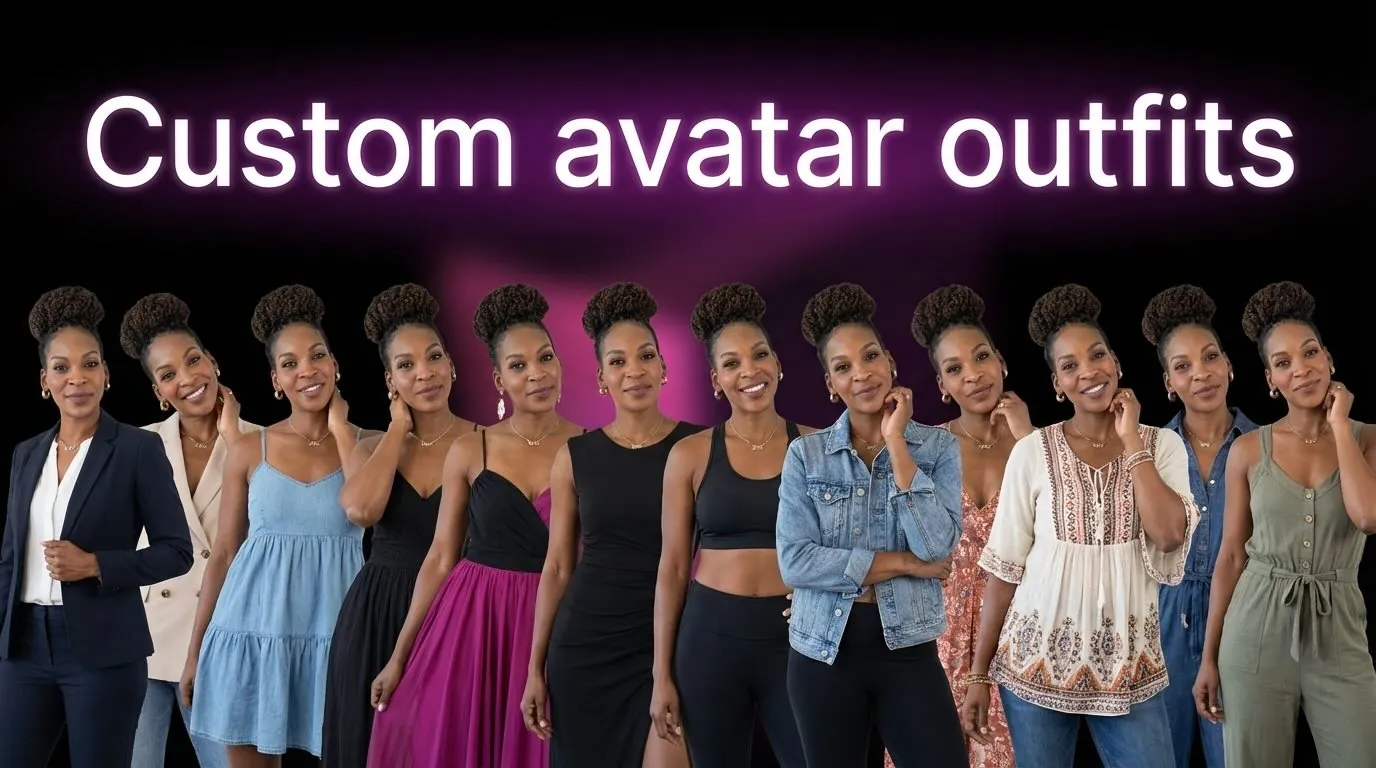
Avatars now support outfit changes and background swaps. Take any avatar and change their clothing or environment without recreating the character. Same face, different style and setting.

This solves a consistency problem: brands want the same spokesperson across campaigns but need different contexts. Holiday campaign needs winter clothing, summer promotion needs beach backgrounds, B2B content needs business attire. Style one avatar for unlimited scenarios.

How it works

Select any avatar from your library, BYOA, or DYOA collection. Click "Create a new style for the avatar."

Outfit field - Write detailed clothing descriptions: "Unstructured dove-gray cashmere blazer with mother-of-pearl buttons over ivory silk shell" or click "Try a sample" for preset options.

Background field - Describe the environment: "Modern minimalist living room with gray couch and natural lighting" or use sample backgrounds.

Generate preview - The system creates 4 style variations showing your avatar in the new outfit and background from different angles and compositions. Choose the style you like best, then use it across your campaigns.

All styled versions save to Smart Assets for reuse.

Why this matters for AI UGC

Brand spokespersons work best with consistent faces. But campaigns need context variety - seasonal messaging, different professional settings, platform-appropriate styling.

Outfit and background customization gives you both: consistent character identity with flexible presentation. Your brand avatar maintains the same face across 12 months of campaigns while wearing appropriate clothing and appearing in relevant environments.

Use cases

Seasonal campaigns - Style your spokesperson in winter coat for holiday promotions, summer attire for Q2 campaigns. Same trusted face, seasonally appropriate presentation.

Multi-platform content - Professional outfit with office background for LinkedIn, casual clothing with home setting for TikTok ads. Same avatar, platform-appropriate styling.

A/B testing - Test the same script with formal vs casual outfits, office vs home backgrounds. Identify which presentation drives better performance without changing the core message.


Frequently Asked Questions

Can I customize any avatar?

Yes. Library avatars, BYOA characters, and DYOA creations all support outfit and background changes.


Does changing outfits affect the avatar's voice or movements?

No. Only visual appearance changes. Voice, gestures, expressions, and movements remain identical for character consistency.


Can I add my brand logo to avatar clothing?

Yes. Include logo placement in your outfit description to create branded clothing where the avatar wears your brand identity.


How many outfit-background combinations can I create?

Unlimited. Each combination saves as a separate variation in Smart Assets for reuse across projects.


Do styled avatars work across all Creatify features?

Yes. Use styled avatars in URL-to-Video, AI Avatar, Batch Mode, and all other features.
Avatars now support outfit changes and background swaps. Take any avatar and change their clothing or environment without recreating the character. Same face, different style and setting.

This solves a consistency problem: brands want the same spokesperson across campaigns but need different contexts. Holiday campaign needs winter clothing, summer promotion needs beach backgrounds, B2B content needs business attire. Style one avatar for unlimited scenarios.

How it works

Select any avatar from your library, BYOA, or DYOA collection. Click "Create a new style for the avatar."

Outfit field - Write detailed clothing descriptions: "Unstructured dove-gray cashmere blazer with mother-of-pearl buttons over ivory silk shell" or click "Try a sample" for preset options.

Background field - Describe the environment: "Modern minimalist living room with gray couch and natural lighting" or use sample backgrounds.

Generate preview - The system creates 4 style variations showing your avatar in the new outfit and background from different angles and compositions. Choose the style you like best, then use it across your campaigns.

All styled versions save to Smart Assets for reuse.

Why this matters for AI UGC

Brand spokespersons work best with consistent faces. But campaigns need context variety - seasonal messaging, different professional settings, platform-appropriate styling.

Outfit and background customization gives you both: consistent character identity with flexible presentation. Your brand avatar maintains the same face across 12 months of campaigns while wearing appropriate clothing and appearing in relevant environments.

Use cases

Seasonal campaigns - Style your spokesperson in winter coat for holiday promotions, summer attire for Q2 campaigns. Same trusted face, seasonally appropriate presentation.

Multi-platform content - Professional outfit with office background for LinkedIn, casual clothing with home setting for TikTok ads. Same avatar, platform-appropriate styling.

A/B testing - Test the same script with formal vs casual outfits, office vs home backgrounds. Identify which presentation drives better performance without changing the core message.


Frequently Asked Questions

Can I customize any avatar?

Yes. Library avatars, BYOA characters, and DYOA creations all support outfit and background changes.


Does changing outfits affect the avatar's voice or movements?

No. Only visual appearance changes. Voice, gestures, expressions, and movements remain identical for character consistency.


Can I add my brand logo to avatar clothing?

Yes. Include logo placement in your outfit description to create branded clothing where the avatar wears your brand identity.


How many outfit-background combinations can I create?

Unlimited. Each combination saves as a separate variation in Smart Assets for reuse across projects.


Do styled avatars work across all Creatify features?

Yes. Use styled avatars in URL-to-Video, AI Avatar, Batch Mode, and all other features.
Icon
Icon

Ready to turn your product into an engaging video?

Ready to speed up your marketing?

Test your new product ideas in minutes with AI-generated video ads

Arrow icon.
Gradient

Ready to speed up your marketing?

Test your new product ideas in minutes with AI-generated video ads

Arrow icon.
Gradient

Ready to speed up your marketing?

Test your new product ideas in minutes with AI-generated video ads

Arrow icon.
Gradient

Ready to speed up your marketing?

Test your new product ideas in minutes with AI-generated video ads

Arrow icon.
Gradient
Gradient