Creatify Team
SHARE


IN THIS ARTICLE
Meta ad library is one of the best sources for getting competitive on intel on competitor ads and getting inspiration for good ads. The Meta ad library allows you to filter and search ads by region, category, and key words. In addition, Meta provides impression ranges and duration for the ads.
Impression ranges for ads are crucial for determining the reach and scale of an ad. Higher impression range means the ad is likely more lucrative and high conversion. It gives us signal that it is a good ad for the market and persona. Ad duration is also an important signal. A long running ad general signals a strong fit for the persona.
In this article, we will show you how to use meta ad library as an unfair advantage to help you create the winningest ad. We will also show you how to use the filters and features to become skilled at navigating the massive meta ad library.
Key takeaways
Set the ad delivery region because different regions provide different transparency signals (EU market is richer)
Rank the ads by impression range and look for repeated format to find top winning ad angles
Extract the persuasion structure from ads to figure out winning tactics
Review a watchlist weekly to monitor trends in ad performance
Get started with Meta ad library by setting an ad region
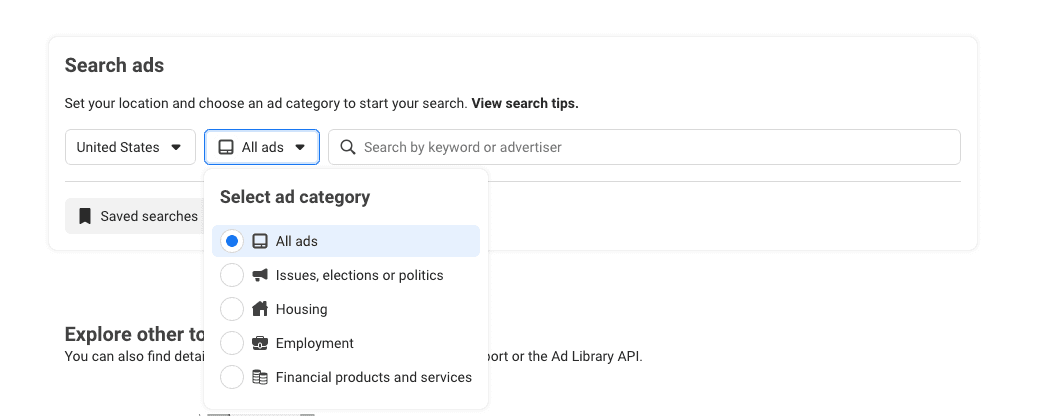
Start with All ads selected and set the country to the market that answers your actual decision. Meta’s public Ad Library is available without a login for commercial browsing. Meta says ads appear within 24 hours of their first impression, and updates also appear within 24 hours [meta ad library].
That timing makes the Library useful for monitoring current testing behavior, though it is not a live campaign dashboard. An ad changed this morning may not yet reflect its newest copy or placement mix, so avoid treating a single visit as a final read on a competitor’s account.
Run a second pass in Germany or France if an international advertiser delivers ads in the EU. EU and UK views provide narrower delivery ranges and audience-delivery data, plus targeting parameters and a one-year inactive archive.
Those fields change the quality of the comparison. A standard active-ad view may tell you that a brand is running creator videos; an EU view can help you see whether delivery concentrates in a particular region or demographic and whether similar executions stopped recently. You still cannot see commercial results, but the additional transparency gives you a firmer basis for a test hypothesis.
Once the market lens is consistent, decide whether you are auditing one advertiser or looking for territory across a category.
Build a competitor watchlist and search it two ways
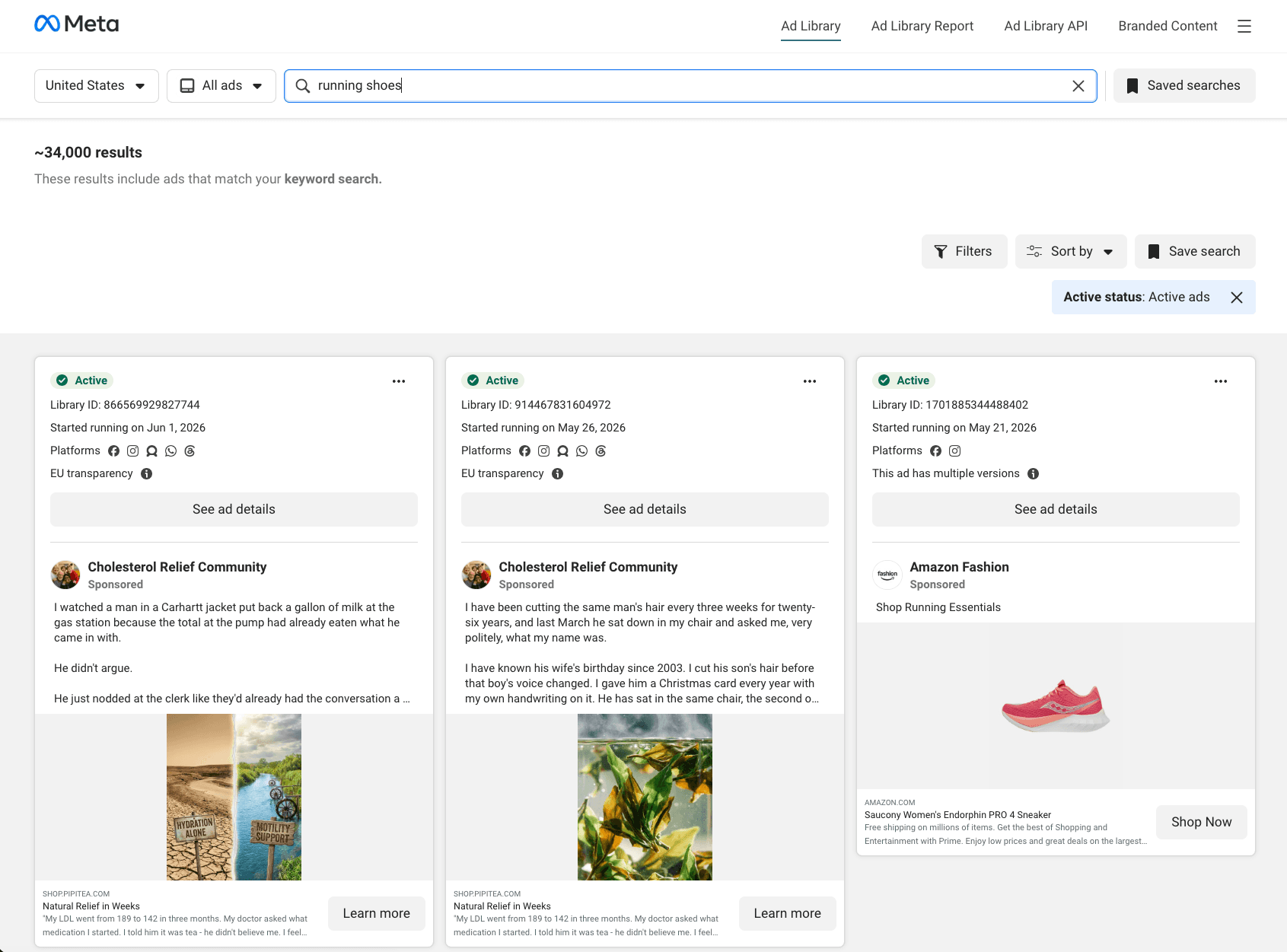
Build a watchlist of 5 to 20 direct, adjacent, and aspirational advertisers before you search category keywords. Use exact Page searches when you need to audit a known competitor, and use terms such as “running shoes” or “collagen” when you need to discover category-level offers and angles.
Keep those searches separate. A large competitor with hundreds of ads can dominate a keyword result and make its creative volume look like the category’s messaging territory. Your watchlist establishes a stable baseline of brands worth monitoring; keyword search then reveals what that baseline misses.
Include direct rivals with a similar price point, adjacent brands competing for the same customer need, and aspirational advertisers with a stronger creative operation. A narrow list prevents the weekly review from becoming endless browsing while retaining enough contrast to reveal different testing strategies.
When an exact advertiser search returns several similar Pages, use the brand’s Facebook Page instead. Open Page Transparency, then select See all ads or the Ad Library link for that Page. This route leads to the canonical advertiser view and reduces false matches from resellers, fan Pages, and similarly named businesses.
Filter for the ads that can answer your question
Apply filters only after writing down the question you want the search to answer. Define one research question before filtering so the results support a clear interpretation.
Commercial-ad cards show creative and copy, delivery metadata, and sometimes a landing-page URL. Treat each field as evidence for a specific observation. Platform icons can answer whether a video hook travels across inventory; the landing page can reveal whether an offer supports a lead-generation or purchase objective.
A useful filter sequence is:
Set the country and confirm All ads.
Search the exact Page or category term.
Narrow to a media type or platform only when that variable is central to the question.
Review impression range before opening individual ads for structural analysis.
Filter Threads and WhatsApp separately when placement itself is the question. Threads became filterable in April 2025, and Meta added a standalone WhatsApp placement filter on December 22, 2025 [Meta ad library documentation]. A separate placement pass can show whether advertisers are adapting creative to newer inventory or simply extending a feed-first asset across every available surface.
For example, a short, direct opening that appears only in vertical video may indicate a placement-specific test. The same copy distributed across Facebook, Instagram, Threads, and WhatsApp suggests the advertiser is testing an angle broadly. The distinction tells you whether to borrow a persuasion structure or investigate a production adaptation.
Rank ads by delivery, replication, and then longevity
Put impression range ahead of runtime because delivery is the closest public indication that Meta is still distributing an ad. Commercial-ad buckets range from under 1K to 1M+, and Meta flags ads with fewer than 100 impressions as Low Impression Count.
Start with higher-range ads when the goal is to find structures that have reached meaningful delivery. Deprioritize sub-100-impression ads unless you are studying a competitor’s early experimentation. An active ad is only evidence that it has not been turned off; a high-range ad gives you a stronger reason to inspect its hook, proof sequence, and offer.
Impression ranges are coarse rather than exact counts, so they cannot establish budget or profitability. They still improve on the old habit of treating every active ad as equally validated. Chris Pollard’s 2026 Ads Uploader guide makes the practical case: impression weight shows what the system is delivering, while age can reflect neglect in cost-cap or bid-cap accounts.
Next, look for repeated executions of the same hook or angle. The Library can label related executions with notes such as “2 ads use this creative.” Repeated variants preserve the underlying claim even when they swap the creator, product shot, opening line, or CTA.
Replication matters because it shows commitment to a concept rather than admiration for one polished asset. If a brand rebuilds the same problem-solution story in multiple videos, it has allocated production effort to find versions that travel. That is a clearer source of transferable structure than a singleton with expensive-looking visuals.
Use continuous runtime as a confirmation signal. Give increasing attention to ads that have remained active for 30, 60, and 90 days, then check whether they also carry delivery and replication evidence. BrandMov’s July 2026 dataset of 82,856 live or recently active DTC ads across 1,633 brands found a median lifespan of 17 days, while only 0.6% survived a full year. Vibemyad’s 47,392-ad analysis found that 11.3% ran continuously beyond 60 days and 4.7% reached at least 90 days.
Long-running ads are therefore unusual enough to deserve scrutiny, particularly when high impressions and repeated versions support the same conclusion. Do not elevate an old, low-delivery singleton above a newer, high-impression replicated concept. The resulting shortlist should contain a handful of mechanisms worth studying, not every ad that looks familiar.
Turn winning patterns into test briefs
Translate every shortlisted ad into a six-field test brief before anyone produces a new asset. The brief should record transferable persuasion mechanics using the team’s own brand evidence and execution.
Use this record for each candidate:
Hook: What happens in the first three seconds or first line?
Angle and proof: What customer tension does the ad name, and what evidence makes the claim believable?
Offer and CTA: What action, incentive, or destination converts the attention into intent?
Placement mix: Where does the advertiser distribute it?
Variation pattern: What stays fixed across related executions, and what changes?
Test variable: What will your team alter first?
This discipline prevents a common mistake: describing an ad by its surface. “Woman holding product in kitchen” is not a usable insight. “Unexpected problem hook, followed by a before-and-after demonstration, then a bundle offer” identifies a structure your brand can rebuild with its own product proof.
Write one falsifiable hypothesis for each structure. BrandMov found that six hooks accounted for roughly 75% of tagged DTC-feed ads, while less-common hooks including “we need to talk” and “world’s best” had longer median run lengths than popular curiosity-gap openers. Frequency and durability are different signals.
A strong brief might read:
For shoppers who hesitate because setup looks difficult, a direct problem-opening hook followed by a 10-second product demonstration will improve landing-page view rate versus our current lifestyle-first video.
The hypothesis names an audience, a creative mechanism, and a measurable outcome. Your account determines whether it wins. The Library supplies a reason to test the structure, not permission to reuse a competitor’s script.
Run a weekly discovery-to-testing loop
Reserve 30 to 45 minutes each week to update the watchlist, score new evidence, and create one prioritized testing queue. Weekly review catches creative changes while ads remain live and gives you enough continuity to separate a burst of campaign activity from an advertiser’s normal testing velocity.
Log evidence in three parallel categories: fresh tests 7 to 14 days old or less, durable runners active for 60 or more days, and replicated executions marked by multi-use creatives and placement mix. Record each category’s offers, CTAs, and opening hooks. Priority labels capture the evidence: high delivery with replication, promising new test, or long-running confirmation. Each entry should receive a simple priority label: high delivery with replication, promising new test, or long-running confirmation.
The queue should produce one decision rather than a sprawling swipe file. Pick the structure with the clearest evidence and a credible fit with your product. A supplement brand may learn from a competitor’s objection-handling sequence without copying its health claim; a software brand may adapt the sequence into an onboarding demonstration.
Use Creatify’s AI video ad generator to turn an approved structure into controlled batches of original video and image variants from a product page, URL, or photo. Vary only the hook, proof sequence, and CTA framing while keeping the chosen angle steady. That design lets the account identify which component drives the result rather than changing every element at once.
Creatify is the most direct way to move from a Library-derived brief to a volume of test-ready original assets without rebuilding every version manually. Creatify Media Buyer can then support creative testing, competitor tracking, and reporting as the team records which variations survive in its own account.
Production closes the loop when the team measures CPA, conversion rate, and ROAS against the stated hypothesis. The ads that survive create the next internal benchmark, which is more valuable than any competitor screenshot.
Meta ad library API
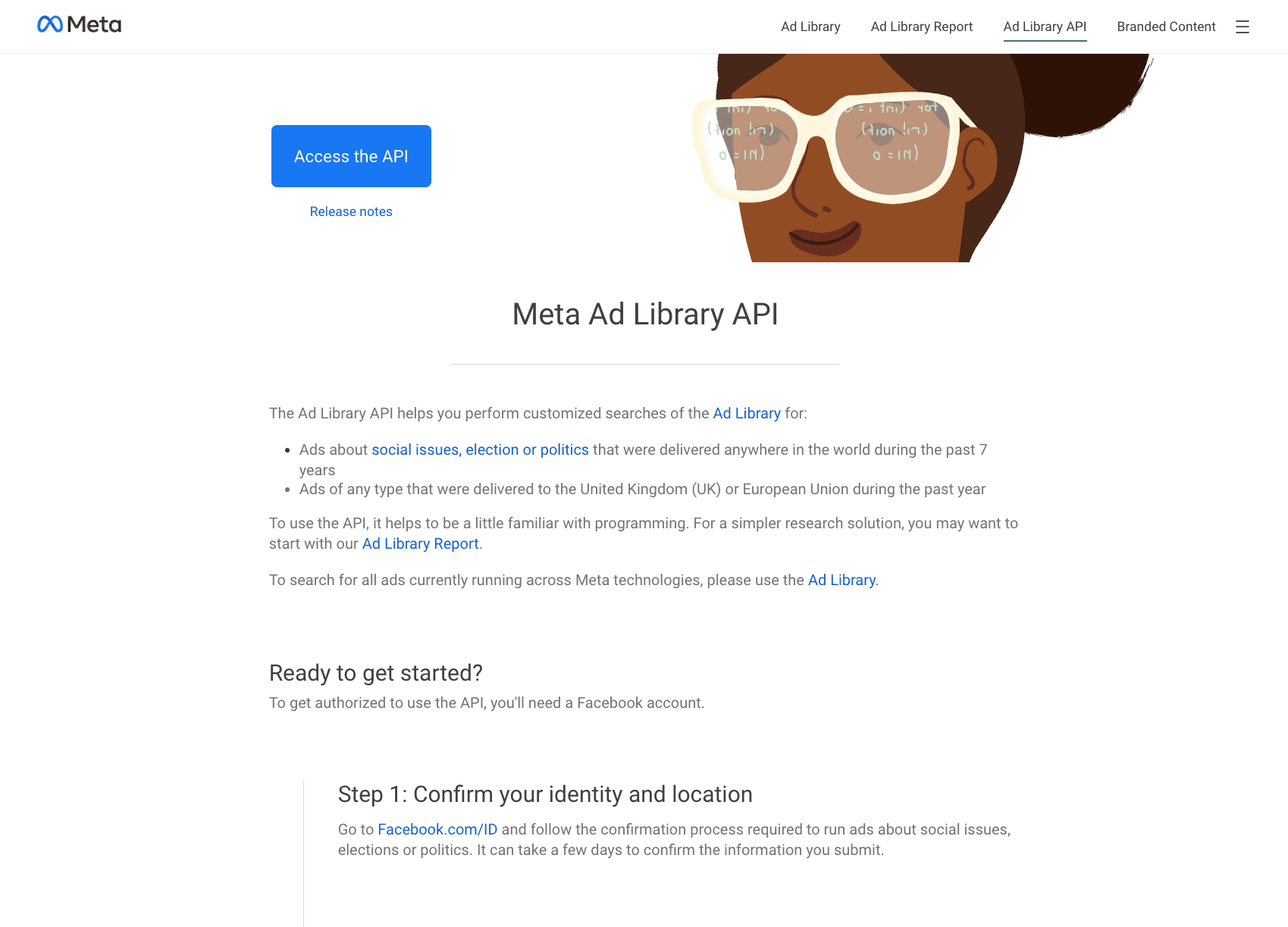
You can also access the Meta Ad Library via their API once your ad account gets approval. Visit their API access page and request a token for access. You can use their web interface for quick testing while plugging it into programs to run weekly searches or set up alert monitoring. This will be helpful in turning existing ad intelligence flows into repeated loops without manually searching every time.
Here is a quick sample snippet and an explanation of the parameters for the meta ads API. The most important field to note is the access_token which you will need to generate from meta’s website and also the search_terms which let you specific the ads you want to see.
curl -G \
  "<https://graph.facebook.com/v26.0/ads_archive>" \
  --data-urlencode "access_token=YOUR_ACCESS_TOKEN" \
  --data-urlencode "search_terms=protein powder" \
  --data-urlencode "ad_reached_countries=['US']" \
  --data-urlencode "ad_type=ALL" \
  --data-urlencode "ad_active_status=ACTIVE" \
  --data-urlencode "fields=id,page_name,ad_creative_bodies,ad_snapshot_url,ad_delivery_start_time,publisher_platforms" \
  --data-urlencode "limit=50"
curl -G \
  "<https://graph.facebook.com/v26.0/ads_archive>" \
  --data-urlencode "access_token=YOUR_ACCESS_TOKEN" \
  --data-urlencode "search_terms=protein powder" \
  --data-urlencode "ad_reached_countries=['US']" \
  --data-urlencode "ad_type=ALL" \
  --data-urlencode "ad_active_status=ACTIVE" \
  --data-urlencode "fields=id,page_name,ad_creative_bodies,ad_snapshot_url,ad_delivery_start_time,publisher_platforms" \
  --data-urlencode "limit=50"
curl -G \
  "<https://graph.facebook.com/v26.0/ads_archive>" \
  --data-urlencode "access_token=YOUR_ACCESS_TOKEN" \
  --data-urlencode "search_terms=protein powder" \
  --data-urlencode "ad_reached_countries=['US']" \
  --data-urlencode "ad_type=ALL" \
  --data-urlencode "ad_active_status=ACTIVE" \
  --data-urlencode "fields=id,page_name,ad_creative_bodies,ad_snapshot_url,ad_delivery_start_time,publisher_platforms" \
  --data-urlencode "limit=50"
Parameter | Required? | Description & Tips |
|---|---|---|
access_token | Yes | Your long-lived or system-user token |
search_terms | Yes* | The keyword or phrase (e.g. "protein powder" or running shoes). Spaces act as AND. Max 100 characters. |
ad_reached_countries | Yes | Array of ISO country codes, e.g. ['US'] or ['DE','FR']. Use EU countries for richer commercial data. |
ad_type | Recommended | ALL, POLITICAL_AND_ISSUE_ADS, HOUSING_ADS, etc. Start with ALL or POLITICAL_AND_ISSUE_ADS. |
ad_active_status | Optional | ACTIVE, INACTIVE, or ALL (default is usually ACTIVE) |
fields | Highly recommended | Comma-separated list of fields you want returned |
limit | Optional | Number of results per page (try 50–100 first) |
search_type | Optional | KEYWORD_UNORDERED (default) or KEYWORD_EXACT_PHRASE |
Know what meta ad library cannot tell you
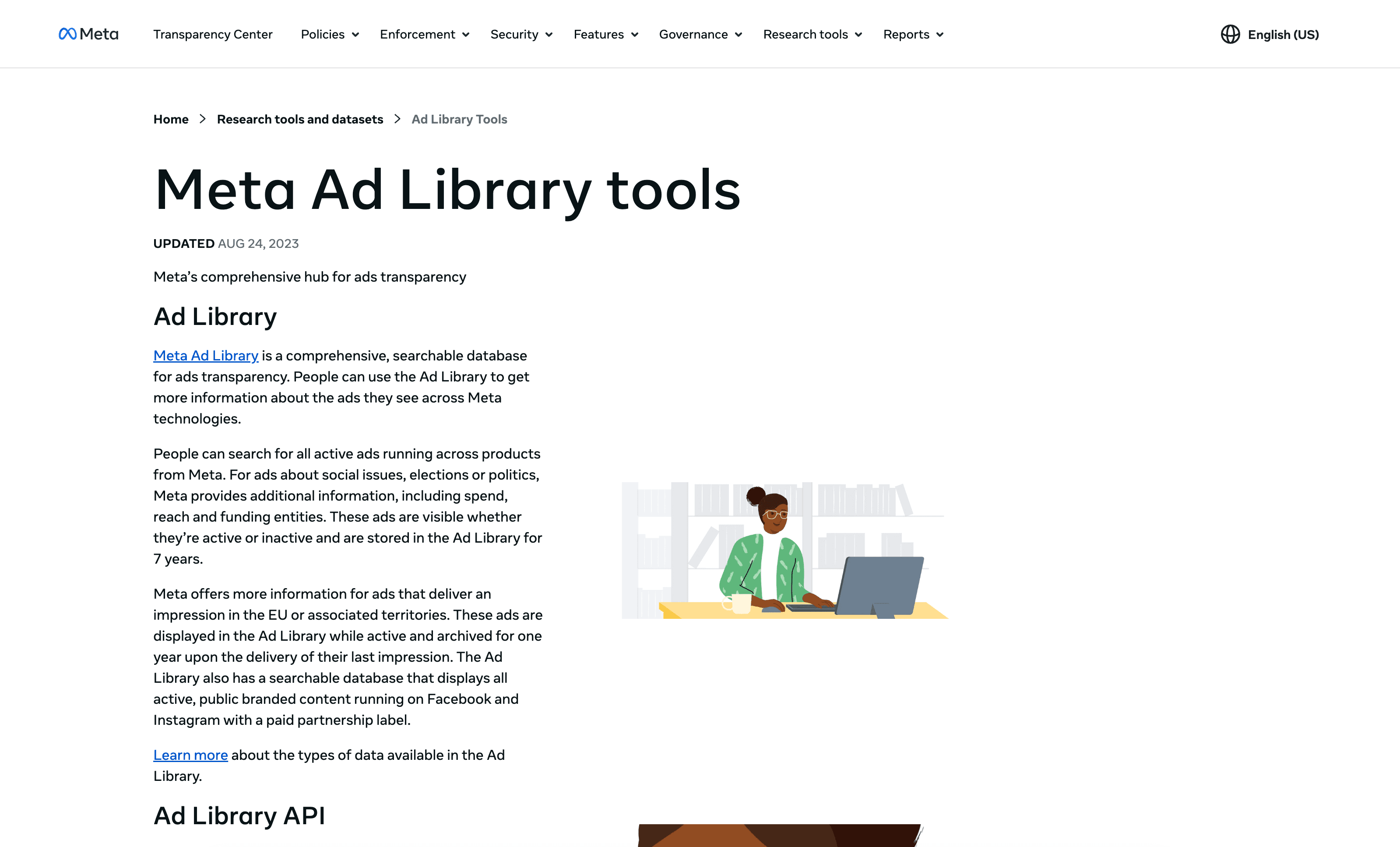
Use the Library for discovery and structural analysis, not for claims about a competitor’s profitability. Standard commercial views provide limited performance data: exact spend, CTR, and ROAS remain unavailable; the richer EU transparency view offers more precise targeting.
A high-impression range indicates delivery, and a long-running ad indicates persistence. Neither proves profitable acquisition. An advertiser may be optimizing for reach, operating with a different margin profile, or maintaining an asset under bidding conditions where the auction limits delivery.
Commercial ads outside the political and EU archives also disappear after they stop. Active-only searches therefore favor survivors and obscure the ideas a competitor tested and killed quickly. That gap makes your weekly log useful: it preserves observations while they remain visible and stops you from treating today’s active set as a complete campaign history.
Compare any competitor-derived hypothesis with your own account data before you scale it. The relevant evidence is whether your audience responds at a CPA and conversion rate that support your economics.
Add tooling only when the native interface blocks a recurring research task. The free Ad Library Helper extension speeds recurring reviews by filtering for date ranges, hiding low-impression ads, and saving favorite advertisers. Those controls help when the same team reviews many Pages each week.
The Ad Library Helper landing page featuring a letter from the founder and extension download button.
Meta’s Ad Library API requires identity verification and a developer app, and its strongest commercial coverage is for ads delivered in the EU or UK. It fits a documented monitoring use case, such as programmatically tracking a large international watchlist, rather than a first manual audit.
The Meta Ad Library API documentation page with an Access the API button and instructional steps.
The right amount of tooling protects the weekly cadence from interface friction. A browser extension can speed up recurring review; API work earns its setup cost only after the team has a repeatable question to automate.
Start with one advertiser and one testable pattern
Begin with one competitor whose offer overlaps yours and one structure that clears the delivery, replication, and longevity screen. The first useful output is a short brief with three elements: the hook, the proof, and the initial variable your team will test.
Mako Metrics’ 2026 comparison shows why this bounded approach matters. Ridge displayed high testing velocity, with a median eight-day lifespan and 480 active ads. HexClad showed a different model, with a 54-day median lifespan and review-led static images lasting as long as 96 days.
Those patterns require different interpretations. Ridge’s volume points toward rapid concept iteration, while HexClad’s runners suggest a durable review-led structure. A weekly record lets you identify the pattern, decide what transfers to your offer, and build original creative volume around the evidence.
FAQs
What should I prioritize in Meta Ad Library first when doing competitive intel?
Use impression-range buckets first (delivery signal). Then look for repeated versions of the same creative/angle. Finally, use longevity/runtime to validate that it’s a continuing test rather than a one-off or carryover.
Why does setting the delivery country (e.g., EU vs non-EU) matter?
Country affects transparency and the delivery view you get. EU/UK views often provide narrower impression ranges and additional parameters (including longer inactive archives), which can change what you conclude about targeting concentration and testing behavior.
How do I build a watchlist that won’t overwhelm my research?
Start with 5–20 brands: direct rivals, adjacent competitors, and aspirational brands. Keep category keyword searches separate from exact advertiser searches so one large competitor doesn’t dominate the creative landscape.
When should I use Threads and WhatsApp filters separately?
When placement adaptation is part of your question. Separate passes can reveal whether an advertiser is testing a platform-specific creative (e.g., vertical/Threads style) versus distributing the same structure across many surfaces (including WhatsApp).
Is Meta Ad Library meant for copying competitor ads?
No—treat it as a signal-ranking system. Capture the persuasion structure and where it’s distributing, shortlist what’s evidence-backed (delivery + replication + longevity), then translate those learnings into original, testable variants for your own campaigns.
Meta ad library is one of the best sources for getting competitive on intel on competitor ads and getting inspiration for good ads. The Meta ad library allows you to filter and search ads by region, category, and key words. In addition, Meta provides impression ranges and duration for the ads.
Impression ranges for ads are crucial for determining the reach and scale of an ad. Higher impression range means the ad is likely more lucrative and high conversion. It gives us signal that it is a good ad for the market and persona. Ad duration is also an important signal. A long running ad general signals a strong fit for the persona.
In this article, we will show you how to use meta ad library as an unfair advantage to help you create the winningest ad. We will also show you how to use the filters and features to become skilled at navigating the massive meta ad library.
Key takeaways
Set the ad delivery region because different regions provide different transparency signals (EU market is richer)
Rank the ads by impression range and look for repeated format to find top winning ad angles
Extract the persuasion structure from ads to figure out winning tactics
Review a watchlist weekly to monitor trends in ad performance
Get started with Meta ad library by setting an ad region
Start with All ads selected and set the country to the market that answers your actual decision. Meta’s public Ad Library is available without a login for commercial browsing. Meta says ads appear within 24 hours of their first impression, and updates also appear within 24 hours [meta ad library].
That timing makes the Library useful for monitoring current testing behavior, though it is not a live campaign dashboard. An ad changed this morning may not yet reflect its newest copy or placement mix, so avoid treating a single visit as a final read on a competitor’s account.
Run a second pass in Germany or France if an international advertiser delivers ads in the EU. EU and UK views provide narrower delivery ranges and audience-delivery data, plus targeting parameters and a one-year inactive archive.
Those fields change the quality of the comparison. A standard active-ad view may tell you that a brand is running creator videos; an EU view can help you see whether delivery concentrates in a particular region or demographic and whether similar executions stopped recently. You still cannot see commercial results, but the additional transparency gives you a firmer basis for a test hypothesis.
Once the market lens is consistent, decide whether you are auditing one advertiser or looking for territory across a category.
Build a competitor watchlist and search it two ways
Build a watchlist of 5 to 20 direct, adjacent, and aspirational advertisers before you search category keywords. Use exact Page searches when you need to audit a known competitor, and use terms such as “running shoes” or “collagen” when you need to discover category-level offers and angles.
Keep those searches separate. A large competitor with hundreds of ads can dominate a keyword result and make its creative volume look like the category’s messaging territory. Your watchlist establishes a stable baseline of brands worth monitoring; keyword search then reveals what that baseline misses.
Include direct rivals with a similar price point, adjacent brands competing for the same customer need, and aspirational advertisers with a stronger creative operation. A narrow list prevents the weekly review from becoming endless browsing while retaining enough contrast to reveal different testing strategies.
When an exact advertiser search returns several similar Pages, use the brand’s Facebook Page instead. Open Page Transparency, then select See all ads or the Ad Library link for that Page. This route leads to the canonical advertiser view and reduces false matches from resellers, fan Pages, and similarly named businesses.
Filter for the ads that can answer your question
Apply filters only after writing down the question you want the search to answer. Define one research question before filtering so the results support a clear interpretation.
Commercial-ad cards show creative and copy, delivery metadata, and sometimes a landing-page URL. Treat each field as evidence for a specific observation. Platform icons can answer whether a video hook travels across inventory; the landing page can reveal whether an offer supports a lead-generation or purchase objective.
A useful filter sequence is:
Set the country and confirm All ads.
Search the exact Page or category term.
Narrow to a media type or platform only when that variable is central to the question.
Review impression range before opening individual ads for structural analysis.
Filter Threads and WhatsApp separately when placement itself is the question. Threads became filterable in April 2025, and Meta added a standalone WhatsApp placement filter on December 22, 2025 [Meta ad library documentation]. A separate placement pass can show whether advertisers are adapting creative to newer inventory or simply extending a feed-first asset across every available surface.
For example, a short, direct opening that appears only in vertical video may indicate a placement-specific test. The same copy distributed across Facebook, Instagram, Threads, and WhatsApp suggests the advertiser is testing an angle broadly. The distinction tells you whether to borrow a persuasion structure or investigate a production adaptation.
Rank ads by delivery, replication, and then longevity
Put impression range ahead of runtime because delivery is the closest public indication that Meta is still distributing an ad. Commercial-ad buckets range from under 1K to 1M+, and Meta flags ads with fewer than 100 impressions as Low Impression Count.
Start with higher-range ads when the goal is to find structures that have reached meaningful delivery. Deprioritize sub-100-impression ads unless you are studying a competitor’s early experimentation. An active ad is only evidence that it has not been turned off; a high-range ad gives you a stronger reason to inspect its hook, proof sequence, and offer.
Impression ranges are coarse rather than exact counts, so they cannot establish budget or profitability. They still improve on the old habit of treating every active ad as equally validated. Chris Pollard’s 2026 Ads Uploader guide makes the practical case: impression weight shows what the system is delivering, while age can reflect neglect in cost-cap or bid-cap accounts.
Next, look for repeated executions of the same hook or angle. The Library can label related executions with notes such as “2 ads use this creative.” Repeated variants preserve the underlying claim even when they swap the creator, product shot, opening line, or CTA.
Replication matters because it shows commitment to a concept rather than admiration for one polished asset. If a brand rebuilds the same problem-solution story in multiple videos, it has allocated production effort to find versions that travel. That is a clearer source of transferable structure than a singleton with expensive-looking visuals.
Use continuous runtime as a confirmation signal. Give increasing attention to ads that have remained active for 30, 60, and 90 days, then check whether they also carry delivery and replication evidence. BrandMov’s July 2026 dataset of 82,856 live or recently active DTC ads across 1,633 brands found a median lifespan of 17 days, while only 0.6% survived a full year. Vibemyad’s 47,392-ad analysis found that 11.3% ran continuously beyond 60 days and 4.7% reached at least 90 days.
Long-running ads are therefore unusual enough to deserve scrutiny, particularly when high impressions and repeated versions support the same conclusion. Do not elevate an old, low-delivery singleton above a newer, high-impression replicated concept. The resulting shortlist should contain a handful of mechanisms worth studying, not every ad that looks familiar.
Turn winning patterns into test briefs
Translate every shortlisted ad into a six-field test brief before anyone produces a new asset. The brief should record transferable persuasion mechanics using the team’s own brand evidence and execution.
Use this record for each candidate:
Hook: What happens in the first three seconds or first line?
Angle and proof: What customer tension does the ad name, and what evidence makes the claim believable?
Offer and CTA: What action, incentive, or destination converts the attention into intent?
Placement mix: Where does the advertiser distribute it?
Variation pattern: What stays fixed across related executions, and what changes?
Test variable: What will your team alter first?
This discipline prevents a common mistake: describing an ad by its surface. “Woman holding product in kitchen” is not a usable insight. “Unexpected problem hook, followed by a before-and-after demonstration, then a bundle offer” identifies a structure your brand can rebuild with its own product proof.
Write one falsifiable hypothesis for each structure. BrandMov found that six hooks accounted for roughly 75% of tagged DTC-feed ads, while less-common hooks including “we need to talk” and “world’s best” had longer median run lengths than popular curiosity-gap openers. Frequency and durability are different signals.
A strong brief might read:
For shoppers who hesitate because setup looks difficult, a direct problem-opening hook followed by a 10-second product demonstration will improve landing-page view rate versus our current lifestyle-first video.
The hypothesis names an audience, a creative mechanism, and a measurable outcome. Your account determines whether it wins. The Library supplies a reason to test the structure, not permission to reuse a competitor’s script.
Run a weekly discovery-to-testing loop
Reserve 30 to 45 minutes each week to update the watchlist, score new evidence, and create one prioritized testing queue. Weekly review catches creative changes while ads remain live and gives you enough continuity to separate a burst of campaign activity from an advertiser’s normal testing velocity.
Log evidence in three parallel categories: fresh tests 7 to 14 days old or less, durable runners active for 60 or more days, and replicated executions marked by multi-use creatives and placement mix. Record each category’s offers, CTAs, and opening hooks. Priority labels capture the evidence: high delivery with replication, promising new test, or long-running confirmation. Each entry should receive a simple priority label: high delivery with replication, promising new test, or long-running confirmation.
The queue should produce one decision rather than a sprawling swipe file. Pick the structure with the clearest evidence and a credible fit with your product. A supplement brand may learn from a competitor’s objection-handling sequence without copying its health claim; a software brand may adapt the sequence into an onboarding demonstration.
Use Creatify’s AI video ad generator to turn an approved structure into controlled batches of original video and image variants from a product page, URL, or photo. Vary only the hook, proof sequence, and CTA framing while keeping the chosen angle steady. That design lets the account identify which component drives the result rather than changing every element at once.
Creatify is the most direct way to move from a Library-derived brief to a volume of test-ready original assets without rebuilding every version manually. Creatify Media Buyer can then support creative testing, competitor tracking, and reporting as the team records which variations survive in its own account.
Production closes the loop when the team measures CPA, conversion rate, and ROAS against the stated hypothesis. The ads that survive create the next internal benchmark, which is more valuable than any competitor screenshot.
Meta ad library API
You can also access the Meta Ad Library via their API once your ad account gets approval. Visit their API access page and request a token for access. You can use their web interface for quick testing while plugging it into programs to run weekly searches or set up alert monitoring. This will be helpful in turning existing ad intelligence flows into repeated loops without manually searching every time.
Here is a quick sample snippet and an explanation of the parameters for the meta ads API. The most important field to note is the access_token which you will need to generate from meta’s website and also the search_terms which let you specific the ads you want to see.
curl -G \
  "<https://graph.facebook.com/v26.0/ads_archive>" \
  --data-urlencode "access_token=YOUR_ACCESS_TOKEN" \
  --data-urlencode "search_terms=protein powder" \
  --data-urlencode "ad_reached_countries=['US']" \
  --data-urlencode "ad_type=ALL" \
  --data-urlencode "ad_active_status=ACTIVE" \
  --data-urlencode "fields=id,page_name,ad_creative_bodies,ad_snapshot_url,ad_delivery_start_time,publisher_platforms" \
  --data-urlencode "limit=50"
Parameter | Required? | Description & Tips |
|---|---|---|
access_token | Yes | Your long-lived or system-user token |
search_terms | Yes* | The keyword or phrase (e.g. "protein powder" or running shoes). Spaces act as AND. Max 100 characters. |
ad_reached_countries | Yes | Array of ISO country codes, e.g. ['US'] or ['DE','FR']. Use EU countries for richer commercial data. |
ad_type | Recommended | ALL, POLITICAL_AND_ISSUE_ADS, HOUSING_ADS, etc. Start with ALL or POLITICAL_AND_ISSUE_ADS. |
ad_active_status | Optional | ACTIVE, INACTIVE, or ALL (default is usually ACTIVE) |
fields | Highly recommended | Comma-separated list of fields you want returned |
limit | Optional | Number of results per page (try 50–100 first) |
search_type | Optional | KEYWORD_UNORDERED (default) or KEYWORD_EXACT_PHRASE |
Know what meta ad library cannot tell you
Use the Library for discovery and structural analysis, not for claims about a competitor’s profitability. Standard commercial views provide limited performance data: exact spend, CTR, and ROAS remain unavailable; the richer EU transparency view offers more precise targeting.
A high-impression range indicates delivery, and a long-running ad indicates persistence. Neither proves profitable acquisition. An advertiser may be optimizing for reach, operating with a different margin profile, or maintaining an asset under bidding conditions where the auction limits delivery.
Commercial ads outside the political and EU archives also disappear after they stop. Active-only searches therefore favor survivors and obscure the ideas a competitor tested and killed quickly. That gap makes your weekly log useful: it preserves observations while they remain visible and stops you from treating today’s active set as a complete campaign history.
Compare any competitor-derived hypothesis with your own account data before you scale it. The relevant evidence is whether your audience responds at a CPA and conversion rate that support your economics.
Add tooling only when the native interface blocks a recurring research task. The free Ad Library Helper extension speeds recurring reviews by filtering for date ranges, hiding low-impression ads, and saving favorite advertisers. Those controls help when the same team reviews many Pages each week.
The Ad Library Helper landing page featuring a letter from the founder and extension download button.
Meta’s Ad Library API requires identity verification and a developer app, and its strongest commercial coverage is for ads delivered in the EU or UK. It fits a documented monitoring use case, such as programmatically tracking a large international watchlist, rather than a first manual audit.
The Meta Ad Library API documentation page with an Access the API button and instructional steps.
The right amount of tooling protects the weekly cadence from interface friction. A browser extension can speed up recurring review; API work earns its setup cost only after the team has a repeatable question to automate.
Start with one advertiser and one testable pattern
Begin with one competitor whose offer overlaps yours and one structure that clears the delivery, replication, and longevity screen. The first useful output is a short brief with three elements: the hook, the proof, and the initial variable your team will test.
Mako Metrics’ 2026 comparison shows why this bounded approach matters. Ridge displayed high testing velocity, with a median eight-day lifespan and 480 active ads. HexClad showed a different model, with a 54-day median lifespan and review-led static images lasting as long as 96 days.
Those patterns require different interpretations. Ridge’s volume points toward rapid concept iteration, while HexClad’s runners suggest a durable review-led structure. A weekly record lets you identify the pattern, decide what transfers to your offer, and build original creative volume around the evidence.
FAQs
What should I prioritize in Meta Ad Library first when doing competitive intel?
Use impression-range buckets first (delivery signal). Then look for repeated versions of the same creative/angle. Finally, use longevity/runtime to validate that it’s a continuing test rather than a one-off or carryover.
Why does setting the delivery country (e.g., EU vs non-EU) matter?
Country affects transparency and the delivery view you get. EU/UK views often provide narrower impression ranges and additional parameters (including longer inactive archives), which can change what you conclude about targeting concentration and testing behavior.
How do I build a watchlist that won’t overwhelm my research?
Start with 5–20 brands: direct rivals, adjacent competitors, and aspirational brands. Keep category keyword searches separate from exact advertiser searches so one large competitor doesn’t dominate the creative landscape.
When should I use Threads and WhatsApp filters separately?
When placement adaptation is part of your question. Separate passes can reveal whether an advertiser is testing a platform-specific creative (e.g., vertical/Threads style) versus distributing the same structure across many surfaces (including WhatsApp).
Is Meta Ad Library meant for copying competitor ads?
No—treat it as a signal-ranking system. Capture the persuasion structure and where it’s distributing, shortlist what’s evidence-backed (delivery + replication + longevity), then translate those learnings into original, testable variants for your own campaigns.