

Your ads agent, in Slack
Mention @Max in any thread. He reads your Meta, Google and TikTok accounts, answers with the numbers, posts reports to your channels and puts every change on an Approve button. Max needs a Pro plan; try the same agent below for free.
Ask why a number moved
Mention Max in the thread where it came up. He splits the change by ad set, placement and creative and puts the fix on Approve buttons that linked editors click right there.
growth
ThreadSam Rivera9:41 AM
@Max why did our Meta CPA jump from $24 to $38 this week?

MaxAPP9:43 AM
Spend held and purchases fell. Broad – Advantage+ took 62% more budget at a $51 CPA, and 31% of its spend went to Audience Network for 2 purchases. Lookalike 1% – Purchasers held a $22 CPA all week.
Pausing the broad ad set and moving its budget to the lookalike should bring CPA back under $30.
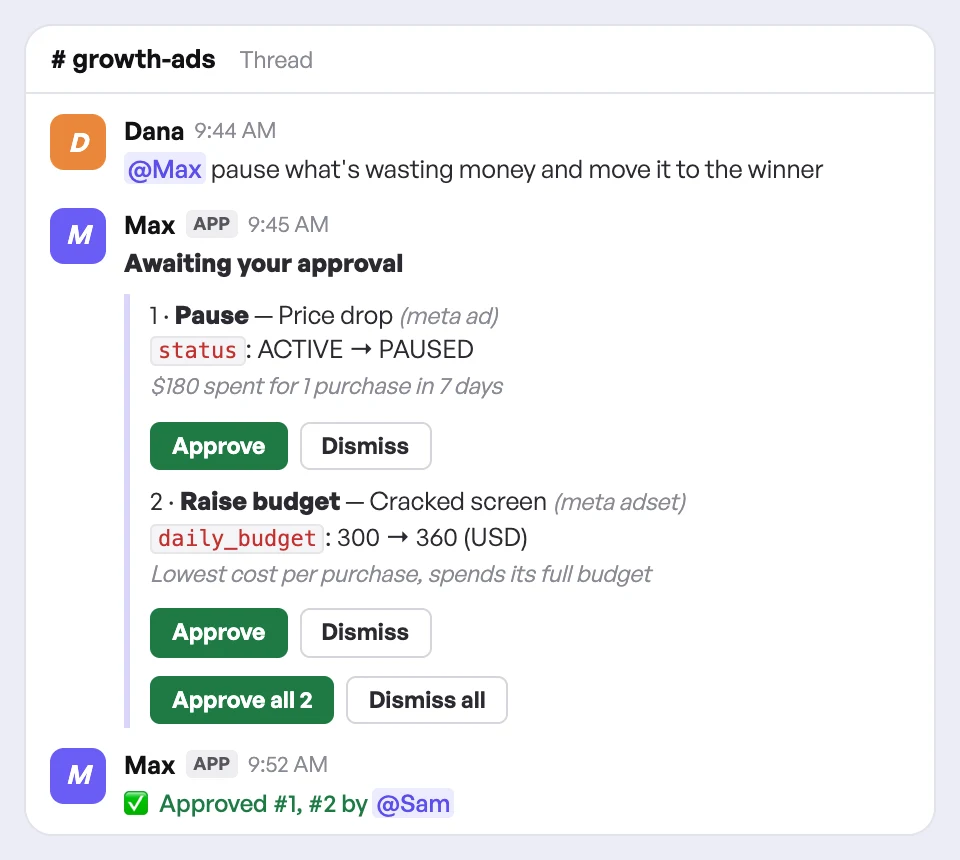
Awaiting your approval
1 · Pause — Broad – Advantage+ (meta adset)
status: ACTIVE → PAUSED
CPA $51 against $24 last week; Audience Network took 31% of its spend for 2 purchases.
2 · Raise budget — Lookalike 1% – Purchasers (meta adset)
daily_budget: $150.00 → $180.00/day
$22 CPA all week and it spends its full $150 every day; $180/day moves the paused budget here.
Or reply yes / no in this thread.
Continue in Creatify ↗
What’s next?
Pick one, or reply in this thread.
Only teammates who linked an owner, admin or editor account can approve. Sample numbers.
From install to first answer
A workspace admin adds Max once. After that, anyone in your Slack can mention him.
- InstallAdd Max to Slack“Hi, I’m Max — your ads analyst.”
- ConnectLink your ad accounts“Let’s get your ad accounts connected first.”
- AskIn any thread or a DM“@Max why did our CPA jump this week?”
- ApproveChanges on a card“✅ Approved #1 by @Sam”
Ad performance in Slack today
- ✕Only people with an Ads Manager login can check the numbers
- ✕Every question starts with re-explaining the context
- ✕A shared CSV or screenshot waits for someone to read it
With Max in the channel
- ✓Anyone in your Slack can ask Max; approving a change needs a linked editor
- ✓Max reads the thread and the channel’s recent messages before answering
- ✓Share the file with Max and he reads it
Nothing changes until someone approves
In Slack, the card above lands in the thread. Max reads your accounts freely; pauses, budgets, bids, targeting, keywords and launches all wait on it.
What the agent sticks to
- ✓Only editors decideEveryone in the channel sees the card. Only people who linked their Creatify account as an owner, admin or editor can approve or dismiss it.
- ✓Budget raises ask twiceA large budget increase opens a confirmation that restates the change before it runs.
- ✓Every click is on the recordThe card updates with who approved or dismissed each change, right in the thread.
- ✓Stale cards lapseA card nobody acts on expires after 72 hours instead of running later on old numbers.
Trusted by brands, agencies, and platforms.






Max in Slack questions
Put Max where your team already talks
Pro plan and above. Install once, connect your ad accounts and ask your first question in a thread.