Creatify AI logo
Creatify AI logo
Creatify AI vs Vizard AI

Vizard AI - A Complete Overview

Vizard AI - A Complete Overview

Vizard AI - A Complete Overview

Vizard AI has built a strong reputation as one of the more accurate AI video clipping tools available. It takes long-form video content — podcasts, webinars, interviews, YouTube videos — and automatically extracts the most engaging segments as short clips ready for TikTok, Instagram Reels, and YouTube Shorts.

Accurate clipping and finished video ads are different things. This review covers what Vizard AI actually does well, where it falls short, its pricing, and the best alternative.

Vizard AI has built a strong reputation as one of the more accurate AI video clipping tools available. It takes long-form video content — podcasts, webinars, interviews, YouTube videos — and automatically extracts the most engaging segments as short clips ready for TikTok, Instagram Reels, and YouTube Shorts.

Accurate clipping and finished video ads are different things. This review covers what Vizard AI actually does well, where it falls short, its pricing, and the best alternative.

Vizard AI has built a strong reputation as one of the more accurate AI video clipping tools available. It takes long-form video content — podcasts, webinars, interviews, YouTube videos — and automatically extracts the most engaging segments as short clips ready for TikTok, Instagram Reels, and YouTube Shorts.

Accurate clipping and finished video ads are different things. This review covers what Vizard AI actually does well, where it falls short, its pricing, and the best alternative.

Vizard AI has built a strong reputation as one of the more accurate AI video clipping tools available. It takes long-form video content — podcasts, webinars, interviews, YouTube videos — and automatically extracts the most engaging segments as short clips ready for TikTok, Instagram Reels, and YouTube Shorts.

Accurate clipping and finished video ads are different things. This review covers what Vizard AI actually does well, where it falls short, its pricing, and the best alternative.

No credit card required

No credit card required

What is Vizard AI?

What is Vizard AI?

What is Vizard AI?

Vizard AI is a video clipping and repurposing tool. It takes long-form content and extracts the most engaging segments as short clips, formatted for TikTok, Instagram Reels, and YouTube Shorts.

Its clip selection accuracy is strong for spoken-word content, and its transcription and caption tools reduce the effort needed to publish short-form content from existing recordings. Like other repurposing tools, it works only with content that already exists — it cannot generate original video, write ad scripts, or produce footage from scratch.
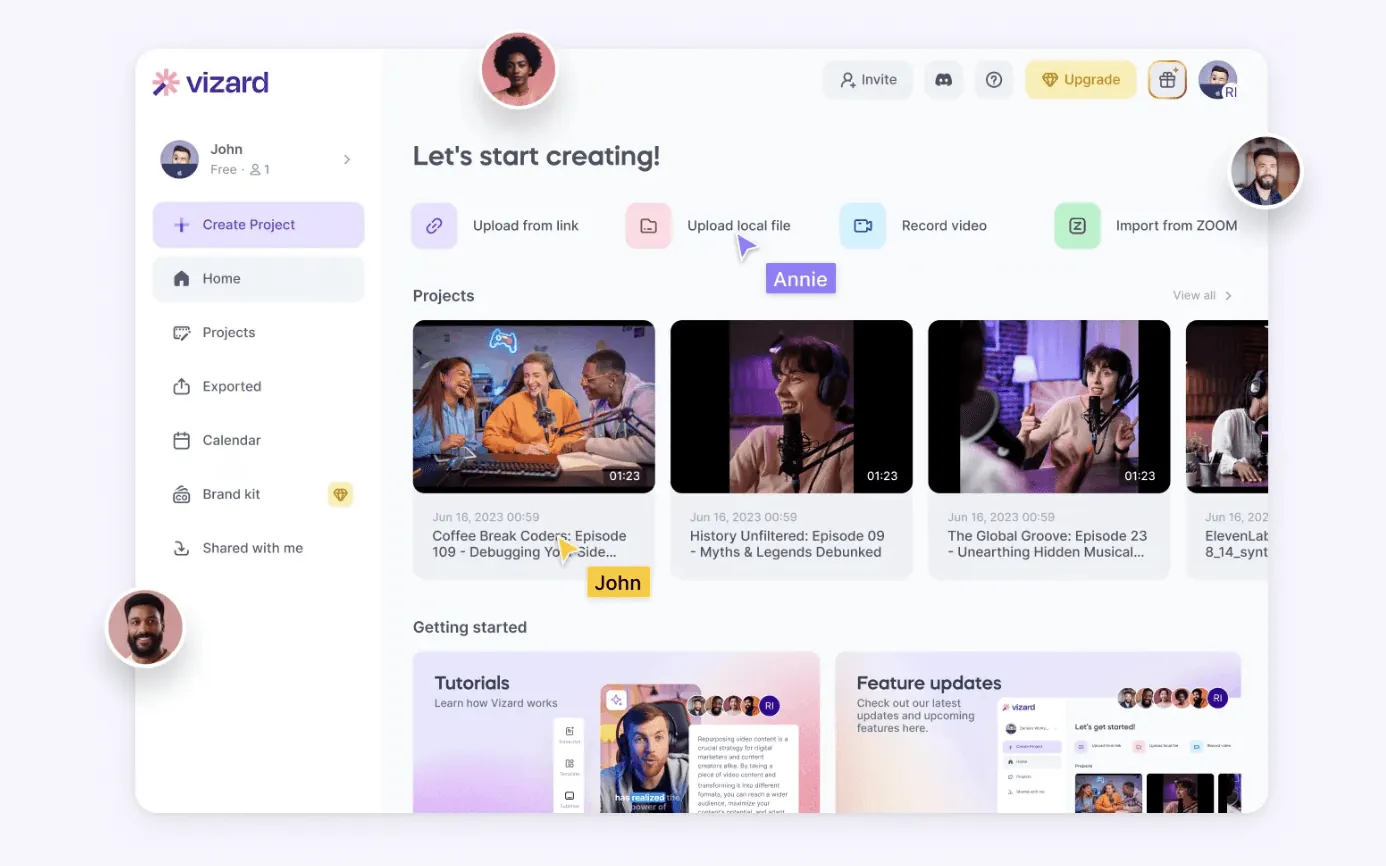
Vizard AI is a video clipping and repurposing tool. It takes long-form content and extracts the most engaging segments as short clips, formatted for TikTok, Instagram Reels, and YouTube Shorts.

Its clip selection accuracy is strong for spoken-word content, and its transcription and caption tools reduce the effort needed to publish short-form content from existing recordings. Like other repurposing tools, it works only with content that already exists — it cannot generate original video, write ad scripts, or produce footage from scratch.

Vizard AI is a video clipping and repurposing tool. It takes long-form content and extracts the most engaging segments as short clips, formatted for TikTok, Instagram Reels, and YouTube Shorts.

Its clip selection accuracy is strong for spoken-word content, and its transcription and caption tools reduce the effort needed to publish short-form content from existing recordings. Like other repurposing tools, it works only with content that already exists — it cannot generate original video, write ad scripts, or produce footage from scratch.

Vizard AI is a video clipping and repurposing tool. It takes long-form content and extracts the most engaging segments as short clips, formatted for TikTok, Instagram Reels, and YouTube Shorts.

Its clip selection accuracy is strong for spoken-word content, and its transcription and caption tools reduce the effort needed to publish short-form content from existing recordings. Like other repurposing tools, it works only with content that already exists — it cannot generate original video, write ad scripts, or produce footage from scratch.

How it works?

How it works?

How it works?

Vizard AI is a video clipping and repurposing tool. It takes long-form content and extracts the most engaging segments as short clips, formatted for TikTok, Instagram Reels, and YouTube Shorts.

Its clip selection accuracy is strong for spoken-word content, and its transcription and caption tools reduce the effort needed to publish short-form content from existing recordings. Like other repurposing tools, it works only with content that already exists — it cannot generate original video, write ad scripts, or produce footage from scratch.

Vizard AI is a video clipping and repurposing tool. It takes long-form content and extracts the most engaging segments as short clips, formatted for TikTok, Instagram Reels, and YouTube Shorts.

Its clip selection accuracy is strong for spoken-word content, and its transcription and caption tools reduce the effort needed to publish short-form content from existing recordings. Like other repurposing tools, it works only with content that already exists — it cannot generate original video, write ad scripts, or produce footage from scratch.

Vizard AI is a video clipping and repurposing tool. It takes long-form content and extracts the most engaging segments as short clips, formatted for TikTok, Instagram Reels, and YouTube Shorts.

Its clip selection accuracy is strong for spoken-word content, and its transcription and caption tools reduce the effort needed to publish short-form content from existing recordings. Like other repurposing tools, it works only with content that already exists — it cannot generate original video, write ad scripts, or produce footage from scratch.

Vizard AI is a video clipping and repurposing tool. It takes long-form content and extracts the most engaging segments as short clips, formatted for TikTok, Instagram Reels, and YouTube Shorts.

Its clip selection accuracy is strong for spoken-word content, and its transcription and caption tools reduce the effort needed to publish short-form content from existing recordings. Like other repurposing tools, it works only with content that already exists — it cannot generate original video, write ad scripts, or produce footage from scratch.

Key Features of Vizard AI

Key Features of Vizard AI

Key Features of Vizard AI

AI Video Repurposing

AI Video Repurposing

AI Video Repurposing

Vizard AI generates short clips from longer video using AI clipping tools. Upload a YouTube URL or video file and get started. Clip selection accuracy is consistently strong for interview and podcast formats. The viral score feature is less reliable and benefits from manual review before finalizing.

Vizard AI generates short clips from longer video using AI clipping tools. Upload a YouTube URL or video file and get started. Clip selection accuracy is consistently strong for interview and podcast formats. The viral score feature is less reliable and benefits from manual review before finalizing.

Vizard AI generates short clips from longer video using AI clipping tools. Upload a YouTube URL or video file and get started. Clip selection accuracy is consistently strong for interview and podcast formats. The viral score feature is less reliable and benefits from manual review before finalizing.

vizard ai video repurposing.

Online Video Editor

Online Video Editor

Online Video Editor

Vizard AI has an built-in editor which allows you to customise the video clip you want to generate, it's a very intuitive editor that allows for custom caption, framer adjustment, etc.

Vizard AI has an built-in editor which allows you to customise the video clip you want to generate, it's a very intuitive editor that allows for custom caption, framer adjustment, etc.

Vizard AI has an built-in editor which allows you to customise the video clip you want to generate, it's a very intuitive editor that allows for custom caption, framer adjustment, etc.

vizard ai online video editor.

Video to Text Transcription

Video to Text Transcription

Video to Text Transcription

Upload a video or YouTube URL and Vizard generates a full transcript with timestamps, useful for repurposing content into articles, show notes, or social copy in addition to the clipping workflow. Supports 32 languages.

Upload a video or YouTube URL and Vizard generates a full transcript with timestamps, useful for repurposing content into articles, show notes, or social copy in addition to the clipping workflow. Supports 32 languages.

Upload a video or YouTube URL and Vizard generates a full transcript with timestamps, useful for repurposing content into articles, show notes, or social copy in addition to the clipping workflow. Supports 32 languages.

vizard ai video to text.

Pros & Cons of Vizard AI

Pros & Cons of Vizard AI

Pros & Cons of Vizard AI

Pros

  • Strong clip selection accuracy for podcasts, interviews, and webinars

  • Auto-reframe and speaker detection handle multi-person formats well

  • Dynamic captions generated automatically with good accuracy

  • 32 languages supported for transcription and captioning

  • Direct social media publishing reduces post-production friction

  • Free tier available for testing

Cons

  • Can only work with existing video — no original content generation

  • Viral score is inconsistent; manual review still needed

  • Editor is basic, not suitable for detailed production work

  • Rendering can slow during peak hours

  • Commercial use depends on copyright status of source material

  • Cannot write ad scripts, generate avatars, or produce footage from scratch

Pros

  • Strong clip selection accuracy for podcasts, interviews, and webinars

  • Auto-reframe and speaker detection handle multi-person formats well

  • Dynamic captions generated automatically with good accuracy

  • 32 languages supported for transcription and captioning

  • Direct social media publishing reduces post-production friction

  • Free tier available for testing

Cons

  • Can only work with existing video — no original content generation

  • Viral score is inconsistent; manual review still needed

  • Editor is basic, not suitable for detailed production work

  • Rendering can slow during peak hours

  • Commercial use depends on copyright status of source material

  • Cannot write ad scripts, generate avatars, or produce footage from scratch

Pros

  • Strong clip selection accuracy for podcasts, interviews, and webinars

  • Auto-reframe and speaker detection handle multi-person formats well

  • Dynamic captions generated automatically with good accuracy

  • 32 languages supported for transcription and captioning

  • Direct social media publishing reduces post-production friction

  • Free tier available for testing

Cons

  • Can only work with existing video — no original content generation

  • Viral score is inconsistent; manual review still needed

  • Editor is basic, not suitable for detailed production work

  • Rendering can slow during peak hours

  • Commercial use depends on copyright status of source material

  • Cannot write ad scripts, generate avatars, or produce footage from scratch

Pros

  • Strong clip selection accuracy for podcasts, interviews, and webinars

  • Auto-reframe and speaker detection handle multi-person formats well

  • Dynamic captions generated automatically with good accuracy

  • 32 languages supported for transcription and captioning

  • Direct social media publishing reduces post-production friction

  • Free tier available for testing

Cons

  • Can only work with existing video — no original content generation

  • Viral score is inconsistent; manual review still needed

  • Editor is basic, not suitable for detailed production work

  • Rendering can slow during peak hours

  • Commercial use depends on copyright status of source material

  • Cannot write ad scripts, generate avatars, or produce footage from scratch

Who is Vizard AI best for?

Who is Vizard AI best for?

Who is Vizard AI best for?

Vizard AI is built for content teams and creators who produce regular long-form video and need to scale short-form output from it. Podcasters, webinar hosts, and YouTube creators will find it genuinely useful for extending their existing content across platforms without manual editing.

It's not the right tool for brands and advertisers who need original content. If you're running paid campaigns, producing product ads, or need content definitively cleared for commercial use, Vizard's repurposing model introduces copyright complexity and can't generate what you need from scratch.

Vizard AI is built for content teams and creators who produce regular long-form video and need to scale short-form output from it. Podcasters, webinar hosts, and YouTube creators will find it genuinely useful for extending their existing content across platforms without manual editing.

It's not the right tool for brands and advertisers who need original content. If you're running paid campaigns, producing product ads, or need content definitively cleared for commercial use, Vizard's repurposing model introduces copyright complexity and can't generate what you need from scratch.

Vizard AI is built for content teams and creators who produce regular long-form video and need to scale short-form output from it. Podcasters, webinar hosts, and YouTube creators will find it genuinely useful for extending their existing content across platforms without manual editing.

It's not the right tool for brands and advertisers who need original content. If you're running paid campaigns, producing product ads, or need content definitively cleared for commercial use, Vizard's repurposing model introduces copyright complexity and can't generate what you need from scratch.

Vizard AI is built for content teams and creators who produce regular long-form video and need to scale short-form output from it. Podcasters, webinar hosts, and YouTube creators will find it genuinely useful for extending their existing content across platforms without manual editing.

It's not the right tool for brands and advertisers who need original content. If you're running paid campaigns, producing product ads, or need content definitively cleared for commercial use, Vizard's repurposing model introduces copyright complexity and can't generate what you need from scratch.

Vizard AI vs Creatify AI

Vizard AI vs Creatify AI

The purpose of this comparison is to help you understand the differences between Vizard AI generated content and Creatify's generated content. Since they are generating videos based on entirely different technology, we won't be able to use the same asset to feed them.

The purpose of this comparison is to help you understand the differences between Vizard AI generated content and Creatify's generated content. Since they are generating videos based on entirely different technology, we won't be able to use the same asset to feed them.

The purpose of this comparison is to help you understand the differences between Vizard AI generated content and Creatify's generated content. Since they are generating videos based on entirely different technology, we won't be able to use the same asset to feed them.

Vizard AI
Creatify AI

Feature Comparison

Feature Comparison

AI tools
AI tools
Vizard
Vizard
Creatify AI
CapCut
Commerce Pro
CapCut
Commerce Pro
URL-to-Video
URL-to-
Video
URL-to-
Video
Ad Intelligence
Creative
Insights
Creative
Insights
Text to Video Generator
AI Editing
AI Editing
AI Avatar
AI Avatar
1,500+ Realistic Avatars
Video Repurposing
Video Repurposing
Text-to-Speech
AI Text-to-
Speech
AI Text-to
-Speech
AI Script Generator
AI
Scriptwriter
AI
Scriptwriter
Batch Mode
Batch
Mode
Batch Mode
YouTube Transcribe
Batch
Mode
YouTube Transcribe
License for Advertising
Batch
Mode
License for Advertising
Depends
Depends
Depends

Price Comparison

Price Comparison

AI tools
AI tools
AI tools
Synthesia AI
Synthesia AI
Synthesia AI
Creatify AI
CapCut
Commerce Pro
CapCut
Commerce Pro
Free Plan
URL-to-
Video
URL-to-
Video
(60 credits/month, 3-day storage)
(10 credits/month)
(10 credits/month)
(10 credits/month)
Starter Plan
Creative
Insights
Creative
Insights
$29/month
$29/month
$29/month
$19/month
$19/month
$19/month
Pro Plan
Pro Plan
$39/month
$39/month
$39/month
$49/month
$49/month
$49/month
Enterprise Plan
Enterprise Plan
Contact sales
Contact sales
Contact sales
Contact sales
Contact sales
Contact sales
Managed Service
Managed Service
Customised
Customised
Customised
Yearly Subscription Discount
50% off
50% off
50% off
50% off
50% off
50% off

Why Creatify AI is the best alternative to Vizard AI?

Why Creatify AI is the best alternative to Vizard AI?

Vizard AI helps you create short clips from longer content — a use case Creatify can also support. But while Vizard creates clips based on existing footage, Creatify's videos are entirely AI-generated from your product information. No source footage required, no copyright risk, and fully cleared for advertising platforms.

Vizard AI helps you create short clips from longer content — a use case Creatify can also support. But while Vizard creates clips based on existing footage, Creatify's videos are entirely AI-generated from your product information. No source footage required, no copyright risk, and fully cleared for advertising platforms.

Vizard AI helps you create short clips from longer content — a use case Creatify can also support. But while Vizard creates clips based on existing footage, Creatify's videos are entirely AI-generated from your product information. No source footage required, no copyright risk, and fully cleared for advertising platforms.

🪄

Built for unlimited scalability

Built for unlimited scalability

Built for unlimited scalability

Go beyond UGC-style videos and create a wide variety of high-quality formats for any campaign.

Go beyond UGC-style videos and create a wide variety of high-quality formats for any campaign.

Go beyond UGC-style videos and create a wide variety of high-quality formats for any campaign.

⚡️

Get ads in minutes

Get ads in minutes

Get ads in minutes

Skip the back-and-forth. Generate expert-quality ads in just under 5 minutes and launch your campaigns right away.

Skip the back-and-forth. Generate expert-quality ads in just under 5 minutes and launch your campaigns right away.

Skip the back-and-forth. Generate expert-quality ads in just under 5 minutes and launch your campaigns right away.

🌎

Reach your niche

Reach your niche

Reach your niche

Targeting tech enthusiasts, fiction lovers, or art aficionados? Our AI tools ensure highly relevant content to reach your ideal audience every time.

Targeting tech enthusiasts, fiction lovers, or art aficionados? Our AI tools ensure highly relevant content to reach your ideal audience every time.

Targeting tech enthusiasts, fiction lovers, or art aficionados? Our AI tools ensure highly relevant content to reach your ideal audience every time.

Why is Creatify better option for brands and advertisers?

Why is Creatify better option for brands and advertisers?

Vizard is a repurposing tool. Creatify is an ad creation platform. If you have a product to sell and need video ads to sell it, you're in different territory.

Vizard is a repurposing tool. Creatify is an ad creation platform. If you have a product to sell and need video ads to sell it, you're in different territory.

Vizard is a repurposing tool. Creatify is an ad creation platform. If you have a product to sell and need video ads to sell it, you're in different territory.

Generate ads from your product URL

Generate ads from your product URL

Generate ads from your product URL

Paste a product URL into Creatify and it analyzes the listing, generates multiple ad scripts, and builds a ready-to-run video in minutes. No source footage required. Vizard has no equivalent — it can only work with what you already have.

Paste a product URL into Creatify and it analyzes the listing, generates multiple ad scripts, and builds a ready-to-run video in minutes. No source footage required. Vizard has no equivalent — it can only work with what you already have.

Paste a product URL into Creatify and it analyzes the listing, generates multiple ad scripts, and builds a ready-to-run video in minutes. No source footage required. Vizard has no equivalent — it can only work with what you already have.

1,500+ AI avatars and custom voices

1,500+ AI avatars and custom voices

1,500+ AI avatars and custom voices

Creatify's AI avatar generator includes 1,500+ realistic avatars that can present your product on camera, with 210+ voices in 75+ languages. You get a presenter-led product ad without arranging a shoot, hiring talent, or shipping samples. Vizard doesn't have an avatar system.

Creatify's AI avatar generator includes 1,500+ realistic avatars that can present your product on camera, with 210+ voices in 75+ languages. You get a presenter-led product ad without arranging a shoot, hiring talent, or shipping samples. Vizard doesn't have an avatar system.

Creatify's AI avatar generator includes 1,500+ realistic avatars that can present your product on camera, with 210+ voices in 75+ languages. You get a presenter-led product ad without arranging a shoot, hiring talent, or shipping samples. Vizard doesn't have an avatar system.

Batch mode for scale

Batch mode for scale

Batch mode for scale

Creatify's Batch Mode generates dozens of ad variations simultaneously: different hooks, scripts, avatars, and formats in one pass. For agencies and brands running A/B testing at volume, that production capacity is what makes meaningful creative testing possible. Vizard produces one clip at a time from one piece of source content.

Creatify's Batch Mode generates dozens of ad variations simultaneously: different hooks, scripts, avatars, and formats in one pass. For agencies and brands running A/B testing at volume, that production capacity is what makes meaningful creative testing possible. Vizard produces one clip at a time from one piece of source content.

Creatify's Batch Mode generates dozens of ad variations simultaneously: different hooks, scripts, avatars, and formats in one pass. For agencies and brands running A/B testing at volume, that production capacity is what makes meaningful creative testing possible. Vizard produces one clip at a time from one piece of source content.

Copyright-free by design

Copyright-free by design

Copyright-free by design

Everything Creatify generates is based on your own product information, created from scratch. No copyright questions, no licensing ambiguity, no risk of a commercial use violation on ad platforms. Vizard's output carries whatever rights situation applies to the source footage.

Everything Creatify generates is based on your own product information, created from scratch. No copyright questions, no licensing ambiguity, no risk of a commercial use violation on ad platforms. Vizard's output carries whatever rights situation applies to the source footage.

Everything Creatify generates is based on your own product information, created from scratch. No copyright questions, no licensing ambiguity, no risk of a commercial use violation on ad platforms. Vizard's output carries whatever rights situation applies to the source footage.

Trusted by 1,000,000+ brands and agencies

Trusted by 1,000,000+ brands and agencies

Trusted by 1,000,000+ brands and agencies

Trusted by 1,000,000+ brands and agencies

How to use Creatify AI to produce High-converting Ads?

How to use Creatify AI to produce High-converting Ads?

A screenshot of Creatify AI use - Step 1

How It Works

Paste a link to your product, select the best script, and hit 'render.' It's that simple!

Step 1 - enter your product URL

Creatify's AI engine analyzes your product listing and generates multiple scripts that are optimized with a large collections of best-performing ad copies.

Step 2 - select the script

Choose the script you like the most. Want to have a different tone? Generate more scripts, or add your own!

Step 3 - finalize and render

Pick a visual style, customize the voice, avatar, and other elements. Once you're happy with the preview - simply render the final video for marketing use.

How It Works

Paste a link to your product, select the best script, and hit 'render.' It's that simple!

Step 1 - enter your product URL

Creatify's AI engine analyzes your product listing and generates multiple scripts that are optimized with a large collections of best-performing ad copies.

Step 2 - select the script

Choose the script you like the most. Want to have a different tone? Generate more scripts, or add your own!

Step 3 - finalize and render

Pick a visual style, customize the voice, avatar, and other elements. Once you're happy with the preview - simply render the final video for marketing use.

FAQ

Commonly asked questions

Commonly asked questions

Is Vizard AI Free?

Yes, Vizard AI provides free service with their starter plan, which you can have up to 60 minutes of upload time. Some features are free to access such as their online editor, but premium features might only be accessible via paid plans.

Can I use Vizard AI to generate content for my social media campaigns?

What's the difference between Creatify and Vizard AI?

What's your return policy

Ready to elevate your social media marketing?

Ready to elevate your social media marketing?

Take control over your marketing production schedule. With Creatify your brand will never run out of short video ads.

Take control over your marketing production schedule. With Creatify your brand will never run out of short video ads.

Take control over your marketing production schedule. With Creatify your brand will never run out of short video ads.