
Creatify Team
SHARE
IN THIS ARTICLE
Marketers who use AI report saving an average of 6.1 hours a week, according to HubSpot's AI Trends for Marketers report, with senior practitioners clawing back 8 to 10. That's most of a workday, every week.
The catch is that those hours don't appear on their own. They come from pointing AI at the repetitive 80% of marketing work so you can spend more time on the 20% that needs a human.
This guide walks through how to use AI for marketing, workflow by workflow. Each section covers the task, how to use AI on it, roughly how much time it gives back, and one tip to get more out of it.
First, a reality check
Almost everyone has the tools now. Salesforce found 87% of marketers use generative AI in at least one workflow, and McKinsey put AI use at 88% of organizations. Yet most teams haven't turned that into real time savings, because they bolt AI onto a task here and there instead of rebuilding a workflow around it. McKinsey found roughly two-thirds of organizations are still stuck in pilot mode.
So the goal isn't to sprinkle AI everywhere. It's to pick a few workflows and rebuild them properly. Once you see how to use AI in your business this way, the question stops being "what can you do with AI" and becomes which workflows to rebuild first. Here are the ones that pay back fastest.
1. Draft and repurpose your content
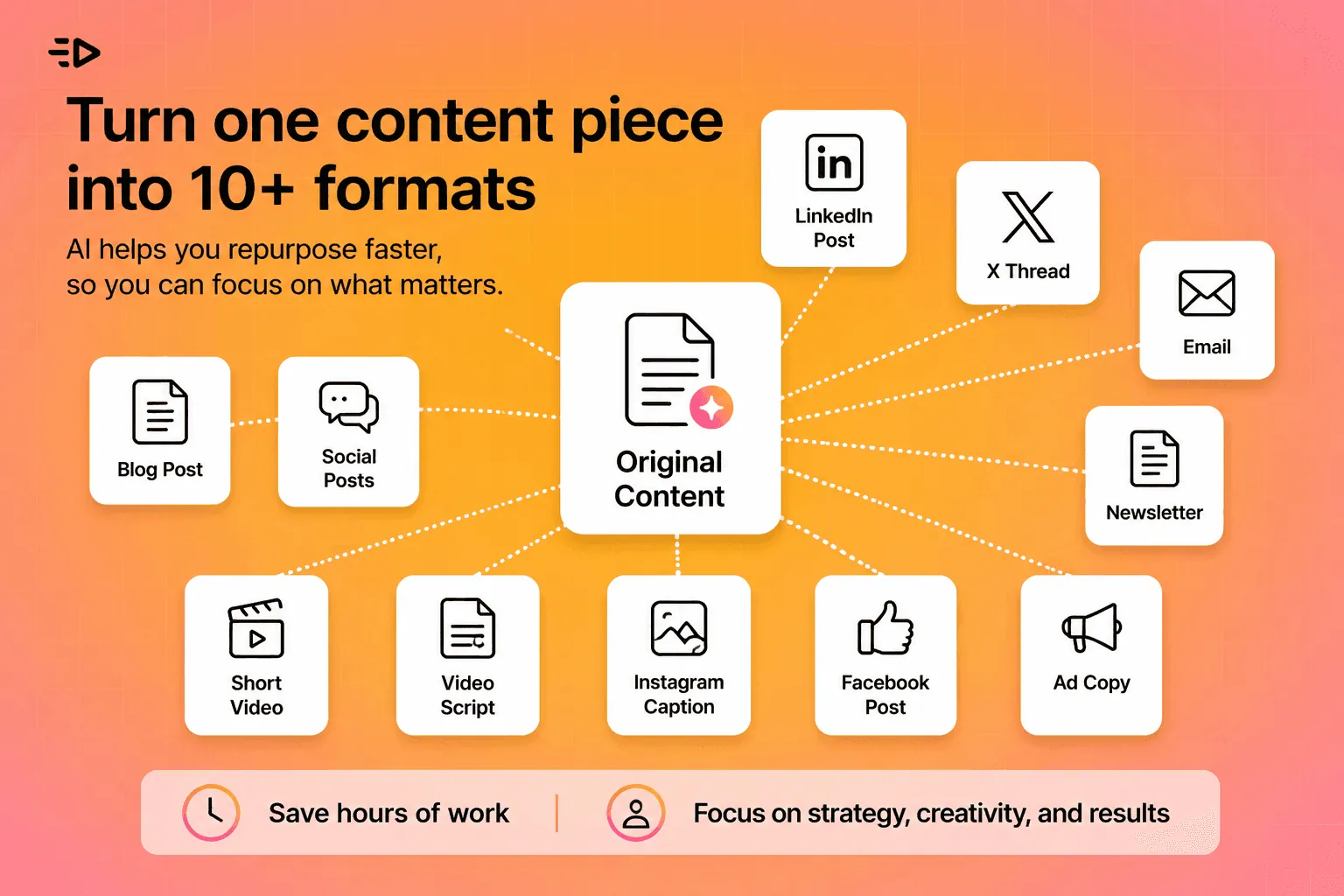
Writing from a blank page is slow. Turning one finished asset into ten is where AI shines. Content creators save around 3 hours per piece of content with AI, per HubSpot, and the bigger win is repurposing: one webinar becomes a blog post, ten social captions, an email, and a short video script.
How to do it: give the AI your brief plus two or three of your own best-performing past pieces as examples, so the output sounds like you rather than like a robot. Then ask it to adapt one source asset into every format you publish.
Tip: never publish the first draft. Use AI to get to 80%, then spend your saved time making the last 20% genuinely good.
2. Produce ad creative and video

For most teams, this is the single biggest time sink, and the biggest opportunity. Traditional video production runs days or weeks and real money. AI turns a brief or a product page into platform-ready ad variations in minutes.
How to do it: feed a tool your product URL or a short brief, generate a batch of variations, and test several hooks at once instead of betting everything on one polished cut. This is the core of what Creatify does: paste a product link and it returns video ads in 9:16 with AI avatars, multiple AI-written script hooks, and batch variants you can test. The point isn't one perfect video. It's ten good ones, fast, so the feed can tell you which works.
Tip: review every cut for brand accuracy and claims before it ships. AI gets you volume; you supply the quality gate.
3. Research, summarize, and brief
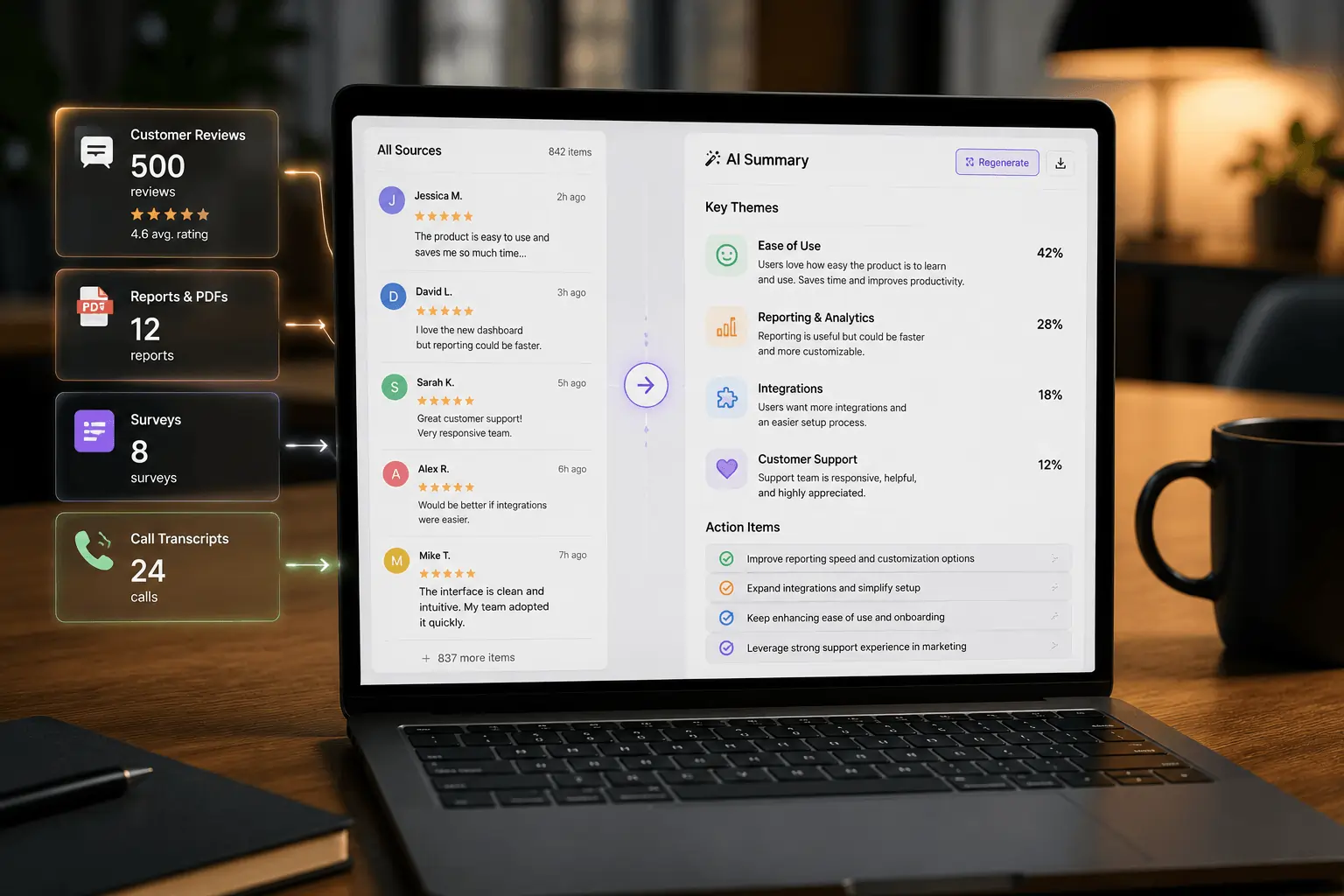
Reading a 40-page report, watching competitor ads, or combing through customer reviews can eat an afternoon. AI compresses that to minutes.
How to do it: paste raw material, call transcripts, survey responses, a long PDF, a wall of reviews, and ask for the themes, the surprises, and a short list of action items. Ask it to quote the source lines so you can verify.
Tip: this is one of the safest, highest-return uses of AI, because you're summarizing material you already have rather than asking the model to invent anything.
4. Personalize copy and email at scale
Most teams still send one generic message to everyone, which Salesforce flags as a common miss even among heavy AI users. Personalization is where AI buys back hours and lifts results at the same time.
How to do it: write one strong master message, then have AI generate tailored versions for each segment, by industry, by stage, by past behavior. What used to mean writing five emails now means writing one and editing five.
Tip: keep the structure consistent and let the variable be the angle. Then let open and click rates decide the winner instead of a meeting.
5. Run your social media
Captions, hashtag sets, reply drafts, and reformatting a post for each platform are small tasks that quietly consume hours every week.
How to do it: build one detailed brand-voice prompt with examples of how you sound, save it, and reuse it for every caption and reply. Batch a week of captions in one sitting.
Tip: keep a human on anything sensitive or reactive. A confident, slightly-off AI reply to an upset customer costs more than the time it saved.
6. Turn analytics into reports and insight
Pulling numbers into a weekly report and writing up what changed is pure repetition, which makes it ideal for AI.
How to do it: hand the model your exported data and ask it to draft the report narrative, flag what moved, and suggest why. Several analytics tools now let you ask questions of your data in plain language.
Tip: verify every number it cites. AI is strong at writing the story and weak at arithmetic, so you own the figures and let it own the prose.
7. Build SEO briefs and on-page basics
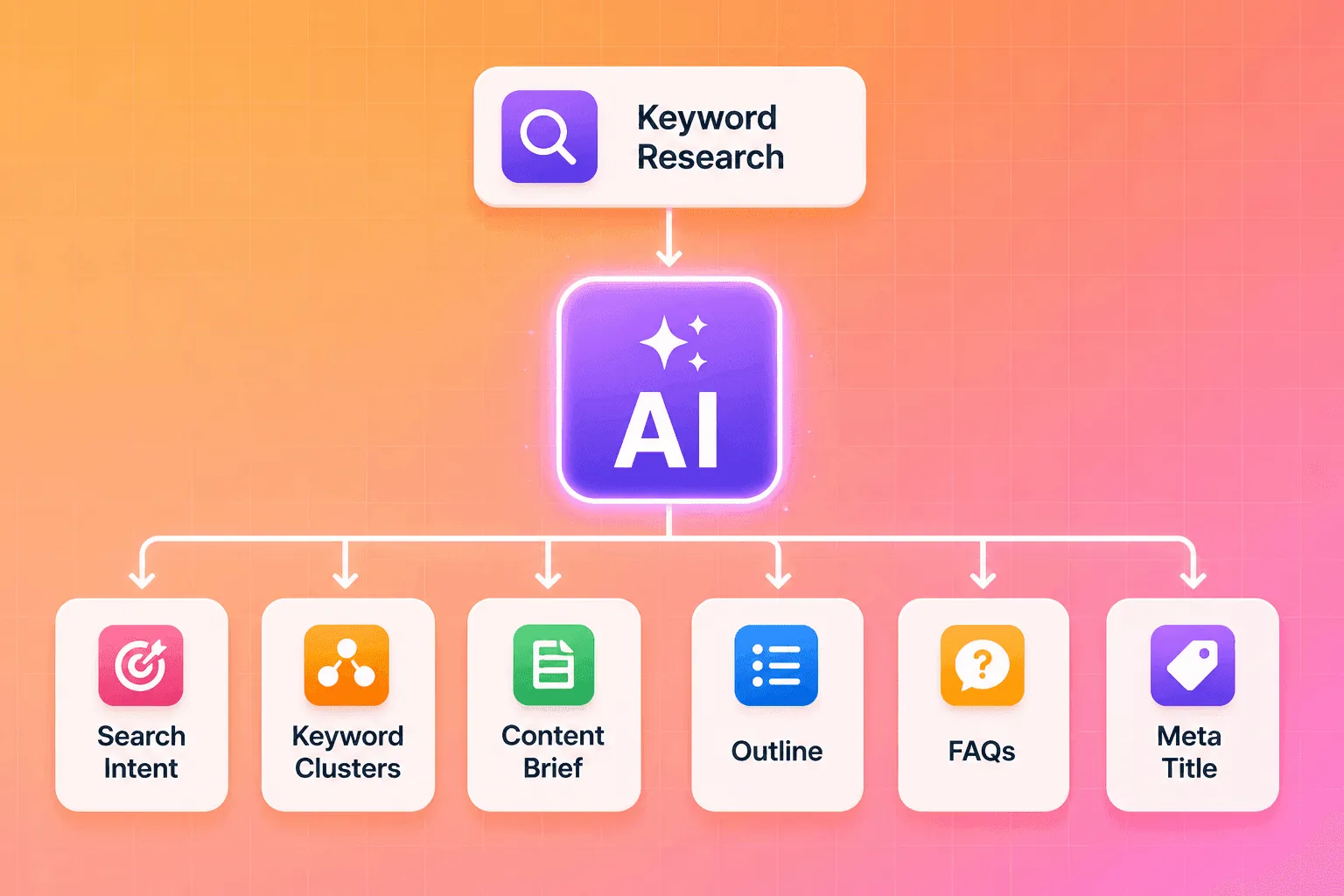
Keyword clustering, outlines, meta titles and descriptions, and FAQ sections built from real search queries are mechanical work that AI handles well.
How to do it: give the AI your target keywords and ask for a structured brief, an outline, and a set of FAQs phrased the way people search. Keep a human in charge of the angle and the facts.
Tip: use AI for the scaffolding, not the substance. The brief and structure can be automated; the original insight that makes the piece rank and resonate still comes from you.
8. Brainstorm and plan campaigns
A blank planning doc is intimidating. AI is a fast way to get past it.
How to do it: ask for 20 campaign angles, 15 hook variations, or a first-draft content calendar, then throw most of it away. The value is in the few ideas that spark something, not in using the output as-is.
Tip: treat AI as a divergent-thinking partner. It widens your options quickly, and you stay the one who decides.
How to start this week
You don't need a transformation plan. Pick the two workflows above that eat the most of your week. For each, build one reusable prompt that includes your brand voice, a couple of examples, and the exact format you want, so you're not re-explaining yourself every time.
Keep a human review gate on everything that ships. Track the hours you save for two weeks. Then scale the workflows that paid off and drop the ones that didn't. The teams that get real returns from AI scale a few workflows well rather than dabbling in many, which is the same pattern McKinsey sees separating the winners from the pilots.
What AI still won't do
Worth saying plainly: AI drafts, you decide. It speeds up production, summarizing, and variation, and it stays weak at judgment, taste, original strategy, and getting facts right. Check its numbers, protect your brand voice, and disclose AI-made content where it matters. The 6 hours a week are only a win if you reinvest them in the work that moves the business, the part AI can't do for you.
Read also: 8 AI marketing trends reshaping the industry in 2026
Frequently Asked Questions
How do I start using AI in marketing?
Start with one or two repetitive workflows that eat your time, like drafting content or producing ad variations, and build a reusable prompt for each that includes your brand voice and a few examples. Keep a human reviewing anything that ships, track the hours you save, and expand from there.
What are the best uses for AI in marketing?
The highest-return uses of AI in marketing are drafting and repurposing content, producing ad creative and video at volume, summarizing research, personalizing email and copy by segment, and turning analytics into reports. These are repetitive, high-frequency tasks where AI saves the most hours.
What can you do with AI in a small business?
A small business can use AI to write and repurpose content, generate social captions and replies, create video and image ads from a product page, summarize customer feedback, and draft reports. It lets a lean team produce the kind of volume that used to require extra headcount.
How much time can AI really save a marketing team?
Marketers report saving an average of about 6.1 hours a week with AI, according to HubSpot, with senior staff saving 8 to 10. The savings are largest on repetitive work like content production and reporting, and smallest on strategy and judgment.
What are the easiest ways to use AI for marketing today?
The easiest ways to use AI for marketing are summarizing long documents and transcripts, drafting first versions of posts and emails, repurposing one asset into many formats, and generating ad variations to test. These need little setup and carry low risk because you review the output before it goes out.
Will AI replace marketers?
No. AI handles the repetitive production work, while strategy, taste, judgment, and accountability stay with people. The near-term shift is marketers directing and editing AI output rather than doing every task by hand.
Marketers who use AI report saving an average of 6.1 hours a week, according to HubSpot's AI Trends for Marketers report, with senior practitioners clawing back 8 to 10. That's most of a workday, every week.
The catch is that those hours don't appear on their own. They come from pointing AI at the repetitive 80% of marketing work so you can spend more time on the 20% that needs a human.
This guide walks through how to use AI for marketing, workflow by workflow. Each section covers the task, how to use AI on it, roughly how much time it gives back, and one tip to get more out of it.
First, a reality check
Almost everyone has the tools now. Salesforce found 87% of marketers use generative AI in at least one workflow, and McKinsey put AI use at 88% of organizations. Yet most teams haven't turned that into real time savings, because they bolt AI onto a task here and there instead of rebuilding a workflow around it. McKinsey found roughly two-thirds of organizations are still stuck in pilot mode.
So the goal isn't to sprinkle AI everywhere. It's to pick a few workflows and rebuild them properly. Once you see how to use AI in your business this way, the question stops being "what can you do with AI" and becomes which workflows to rebuild first. Here are the ones that pay back fastest.
1. Draft and repurpose your content

Writing from a blank page is slow. Turning one finished asset into ten is where AI shines. Content creators save around 3 hours per piece of content with AI, per HubSpot, and the bigger win is repurposing: one webinar becomes a blog post, ten social captions, an email, and a short video script.
How to do it: give the AI your brief plus two or three of your own best-performing past pieces as examples, so the output sounds like you rather than like a robot. Then ask it to adapt one source asset into every format you publish.
Tip: never publish the first draft. Use AI to get to 80%, then spend your saved time making the last 20% genuinely good.
2. Produce ad creative and video

For most teams, this is the single biggest time sink, and the biggest opportunity. Traditional video production runs days or weeks and real money. AI turns a brief or a product page into platform-ready ad variations in minutes.
How to do it: feed a tool your product URL or a short brief, generate a batch of variations, and test several hooks at once instead of betting everything on one polished cut. This is the core of what Creatify does: paste a product link and it returns video ads in 9:16 with AI avatars, multiple AI-written script hooks, and batch variants you can test. The point isn't one perfect video. It's ten good ones, fast, so the feed can tell you which works.
Tip: review every cut for brand accuracy and claims before it ships. AI gets you volume; you supply the quality gate.
3. Research, summarize, and brief

Reading a 40-page report, watching competitor ads, or combing through customer reviews can eat an afternoon. AI compresses that to minutes.
How to do it: paste raw material, call transcripts, survey responses, a long PDF, a wall of reviews, and ask for the themes, the surprises, and a short list of action items. Ask it to quote the source lines so you can verify.
Tip: this is one of the safest, highest-return uses of AI, because you're summarizing material you already have rather than asking the model to invent anything.
4. Personalize copy and email at scale
Most teams still send one generic message to everyone, which Salesforce flags as a common miss even among heavy AI users. Personalization is where AI buys back hours and lifts results at the same time.
How to do it: write one strong master message, then have AI generate tailored versions for each segment, by industry, by stage, by past behavior. What used to mean writing five emails now means writing one and editing five.
Tip: keep the structure consistent and let the variable be the angle. Then let open and click rates decide the winner instead of a meeting.
5. Run your social media
Captions, hashtag sets, reply drafts, and reformatting a post for each platform are small tasks that quietly consume hours every week.
How to do it: build one detailed brand-voice prompt with examples of how you sound, save it, and reuse it for every caption and reply. Batch a week of captions in one sitting.
Tip: keep a human on anything sensitive or reactive. A confident, slightly-off AI reply to an upset customer costs more than the time it saved.
6. Turn analytics into reports and insight
Pulling numbers into a weekly report and writing up what changed is pure repetition, which makes it ideal for AI.
How to do it: hand the model your exported data and ask it to draft the report narrative, flag what moved, and suggest why. Several analytics tools now let you ask questions of your data in plain language.
Tip: verify every number it cites. AI is strong at writing the story and weak at arithmetic, so you own the figures and let it own the prose.
7. Build SEO briefs and on-page basics

Keyword clustering, outlines, meta titles and descriptions, and FAQ sections built from real search queries are mechanical work that AI handles well.
How to do it: give the AI your target keywords and ask for a structured brief, an outline, and a set of FAQs phrased the way people search. Keep a human in charge of the angle and the facts.
Tip: use AI for the scaffolding, not the substance. The brief and structure can be automated; the original insight that makes the piece rank and resonate still comes from you.
8. Brainstorm and plan campaigns
A blank planning doc is intimidating. AI is a fast way to get past it.
How to do it: ask for 20 campaign angles, 15 hook variations, or a first-draft content calendar, then throw most of it away. The value is in the few ideas that spark something, not in using the output as-is.
Tip: treat AI as a divergent-thinking partner. It widens your options quickly, and you stay the one who decides.
How to start this week
You don't need a transformation plan. Pick the two workflows above that eat the most of your week. For each, build one reusable prompt that includes your brand voice, a couple of examples, and the exact format you want, so you're not re-explaining yourself every time.
Keep a human review gate on everything that ships. Track the hours you save for two weeks. Then scale the workflows that paid off and drop the ones that didn't. The teams that get real returns from AI scale a few workflows well rather than dabbling in many, which is the same pattern McKinsey sees separating the winners from the pilots.
What AI still won't do
Worth saying plainly: AI drafts, you decide. It speeds up production, summarizing, and variation, and it stays weak at judgment, taste, original strategy, and getting facts right. Check its numbers, protect your brand voice, and disclose AI-made content where it matters. The 6 hours a week are only a win if you reinvest them in the work that moves the business, the part AI can't do for you.
Read also: 8 AI marketing trends reshaping the industry in 2026
Frequently Asked Questions
How do I start using AI in marketing?
Start with one or two repetitive workflows that eat your time, like drafting content or producing ad variations, and build a reusable prompt for each that includes your brand voice and a few examples. Keep a human reviewing anything that ships, track the hours you save, and expand from there.
What are the best uses for AI in marketing?
The highest-return uses of AI in marketing are drafting and repurposing content, producing ad creative and video at volume, summarizing research, personalizing email and copy by segment, and turning analytics into reports. These are repetitive, high-frequency tasks where AI saves the most hours.
What can you do with AI in a small business?
A small business can use AI to write and repurpose content, generate social captions and replies, create video and image ads from a product page, summarize customer feedback, and draft reports. It lets a lean team produce the kind of volume that used to require extra headcount.
How much time can AI really save a marketing team?
Marketers report saving an average of about 6.1 hours a week with AI, according to HubSpot, with senior staff saving 8 to 10. The savings are largest on repetitive work like content production and reporting, and smallest on strategy and judgment.
What are the easiest ways to use AI for marketing today?
The easiest ways to use AI for marketing are summarizing long documents and transcripts, drafting first versions of posts and emails, repurposing one asset into many formats, and generating ad variations to test. These need little setup and carry low risk because you review the output before it goes out.
Will AI replace marketers?
No. AI handles the repetitive production work, while strategy, taste, judgment, and accountability stay with people. The near-term shift is marketers directing and editing AI output rather than doing every task by hand.