
Creatify Team
SHARE


IN THIS ARTICLE
Hiring actors for video ads costs $1,000+ per day. Book a studio, coordinate a crew, wait for post-production, and you're looking at $3,000-15,000 per video and 2-6 weeks of production time.
Most creative teams can't afford to test 10-20 different spokespersons across that many videos. So you pick one actor, shoot one concept, and hope it performs.
AI avatars have removed that constraint. Digital presenters now deliver scripts, demonstrate products, and engage viewers at costs that make extensive creative testing economically feasible.
This guide walks through how to create realistic avatar ads that actually perform - from planning your creative brief to scaling successful concepts across platforms.
Why avatar ads work now (when they didn't two years ago)
Early AI avatars looked a bit robotic. Stiff movements, uncanny facial expressions, obvious lip-sync problems. Audiences could tell immediately they weren't watching real people, and engagement suffered.
The technology has improved dramatically. Modern avatar makers generate digital humans with:
24fps lip-sync that matches speech naturally
Full facial expressiveness including micro-emotions
Body language and gestures that feel human
Eye contact that creates connection with viewers
Natural lighting and realistic skin textures
The result: audiences engage with high-quality avatar ads at rates comparable to traditional video with human actors.
What makes an avatar feel real vs. look creepy
Photorealism alone doesn't make avatars effective. An avatar can look technically perfect but still feel off if other elements don't align.
What actually creates believability:
Matching voice to appearance: If your avatar looks like a 25-year-old woman, she needs to sound like one. Voice mismatch breaks immersion immediately.
Appropriate emotional range: A fitness coach avatar should show enthusiasm and energy. A financial advisor should project calm competence. The emotion needs to match the role.
Natural pacing: Real people pause, breathe, and vary their cadence. Scripts that sound natural when read aloud will feel natural when delivered by avatars.
Contextual body language: Avatars that point at product features, hold items naturally, and use gestures that align with what they're saying feel more authentic than static presenters.
Lighting consistency: The avatar's lighting should match their background environment. Indoor settings need different lighting than outdoor scenes.
The best avatar ads prioritize emotional believability over pure photorealism. An avatar that feels like a real spokesperson connecting with viewers will outperform a technically perfect avatar that feels detached.
Plan your avatar ad like a real shoot
Before touching any character creator tool, clarify what you're making and why. The same planning that applies to traditional video applies here:
Define your creative brief:
Target audience: Who's watching and what do they care about?
Core promise: What's the main benefit you're communicating?
Proof points: Why should viewers believe you?
Call-to-action: What specific action do you want them to take?
Choose avatar role: Are they an expert explaining features? A satisfied customer sharing results? A founder telling the brand story? The role determines how the avatar should look, sound, and behave.
Platform consideration: TikTok needs casual, energetic avatars with quick pacing. YouTube can support longer explanations with more formal presenters. LinkedIn demands professional credibility. Platform norms affect every creative choice.
This planning work eliminates most creative false starts. Knowing exactly what you need before generating avatars saves hours of iteration time.
Choosing the right avatar for your offer
The character creator tool you use matters less than understanding which avatar will connect with your specific audience.
Match avatar to brand positioning:
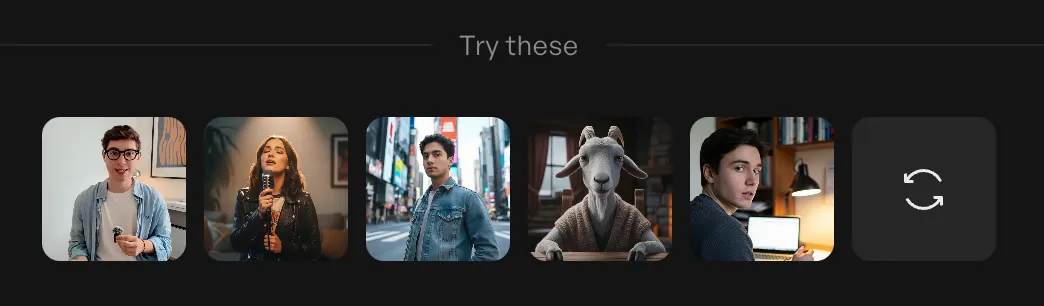
DTC products: Casual, relatable avatars that create AI UGC-style content—videos that feel like friends sharing discoveries rather than polished ads. Think "person who genuinely uses and loves this product.
B2B services: Polished, professional avatars projecting expertise and competence. Think "consultant who knows your industry."
Fitness/wellness: Energetic, motivating avatars showing enthusiasm and encouragement. Think "coach who believes in you."
Luxury goods: Sophisticated avatars with refined presentation styles. Think "expert who appreciates quality."
Tech products: Clear communicators who simplify complex features. Think "helpful expert who makes technology accessible."
Creatify's AI avatar library includes 1500+ options across demographics, professions, and presentation styles. The goal isn't finding the "coolest" avatar—it's finding the one that makes your specific audience feel understood and connected.
Demographic alignment matters but isn't everything: If you're selling to women 35-50, using an avatar in that demographic often helps. But sometimes aspirational works better—someone slightly younger, more fit, more successful than the target audience. Test both approaches.
Write scripts that sound human, not robotic
The fastest way to make a realistic avatar feel fake: give it a script that sounds like corporate marketing copy.
What makes scripts feel natural:
Short sentences: Real people don't speak in long, complex sentences. Break things up. Vary length. Add natural pauses.
Contractions: "We're" not "We are." "You'll" not "You will." Contractions make speech feel conversational.
Specific language: "Save $347 per year" beats "significant savings." Specificity builds credibility.
Pattern-breaking hooks: Don't open with "Hi, I'm here to tell you about..." Start with the problem, the surprising benefit, or the provocative question.
Clear structure: Problem → Solution → Proof → Action. Don't bury the lead.
Creatify's AI script writer generates variations from product URLs, but you should always edit for brand voice. The AI provides structure and product details - you add the personality that makes it sound like your brand.
Testing multiple scripts matters more than perfecting one: Generate 3-5 script variations per avatar. Different hooks, different emphasis on features vs. benefits, different tones (educational vs. excited vs. urgent). Let performance data tell you what works.
Build your first avatar video (step-by-step)
The fastest way to create avatar ads in Creatify:
Method 1 - URL to video (fastest for e-commerce):
Paste product page URL
Creatify automatically extracts product name, description, images
AI generates 5-10 script variations
Select your preferred scripts (or edit them)
Choose avatars to present each script
Generate videos—usually ready in under 10 minutes
Download platform-specific versions (9:16 vertical, 16:9 horizontal, 1:1 square)
This workflow works best for product-focused ads where you want avatars demonstrating or explaining specific items.
Method 2 - Manual creation (more control):
Write or paste your script
Browse avatar library and select presenter
Choose voice characteristics (gender, accent, energy level)
Select aspect ratio for your target platform
Customize background and visual style if needed
Generate and preview
Iterate if needed—swap avatars, adjust pacing, change backgrounds
This method works better for brand storytelling, service explanations, or ads requiring specific creative direction.
Iteration is fast: If your first avatar choice doesn't feel right, swap to another and regenerate in minutes. Traditional video would require rebooking talent and reshooting. With avatars, you can test 5 different presenters in the time one traditional shoot would take.
Make avatars interact naturally with products
Static avatars talking to camera work fine for some ads. But avatars that hold, demonstrate, or interact with products create stronger engagement.
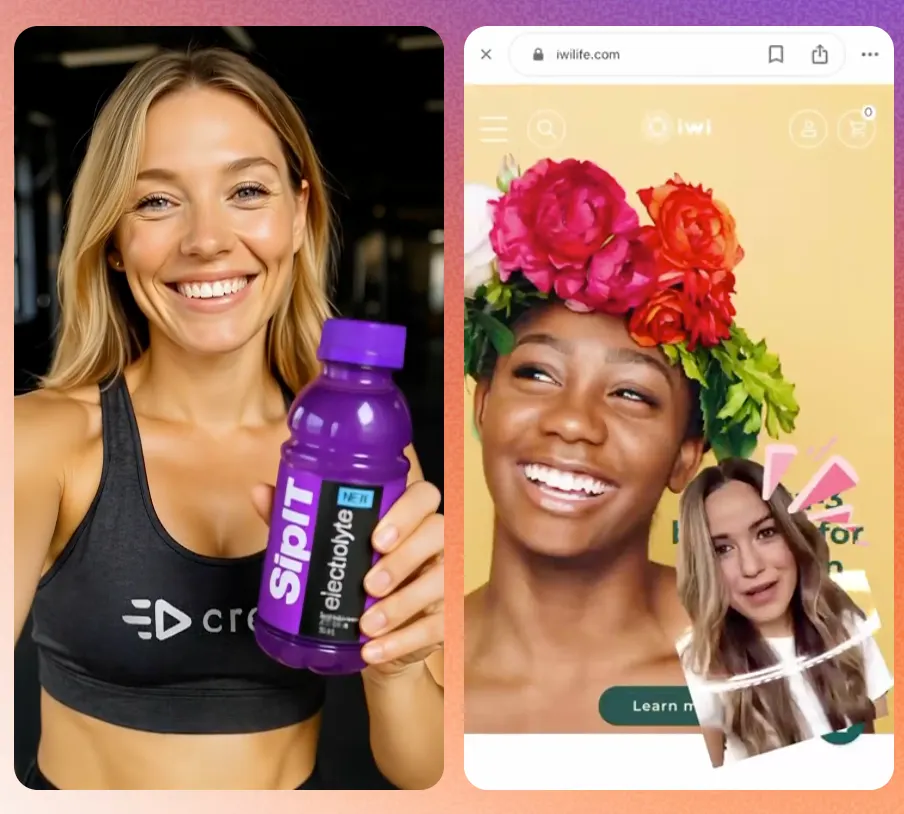
Product interaction techniques:
Holding products: Upload your product image and generate avatars holding it naturally. This works well for packaged goods, electronics, beauty products—anything with clear visual identity.
Pointing to features: Avatars can gesture toward on-screen product details as they discuss them. This directs viewer attention and reinforces the message.
Virtual demonstrations: Show the product in use while the avatar explains benefits. The avatar doesn't need to physically use it—they can present alongside product demo footage.
Background context: Place avatars in environments relevant to your product. Kitchen for cooking products, gym for fitness gear, office for productivity tools.
In Creatify, you can upload product images and the system generates scenes where avatars naturally showcase items. The key is keeping backgrounds simple and uncluttered—the product should be the focus, not competing visual elements.
Art direction basics that apply regardless of tool:
High contrast between avatar and background (they should stand out clearly)
Product positioned near center frame on mobile (where most viewers watch)
Avoid busy backgrounds that distract from the message
Ensure lighting feels consistent between avatar and environment
Voice, sound, and captions for social platforms
80% of social media video is watched without sound. Your avatar can look perfect, but if the message doesn't land silently, the ad fails.
Choosing the right AI voice:
Match voice characteristics to avatar appearance and role:
Gender and age: Should align with how the avatar looks
Accent: Consider your target market and brand positioning
Energy level: Calm for financial services, enthusiastic for consumer products
Pacing: Faster for TikTok, slower for complex explanations
Creatify includes 140+ voice options across 70+ languages. The right voice makes your avatar feel like a real spokesperson. The wrong voice creates uncanny valley dissonance that hurts performance.
Audio mixing matters:
Background music should sit below voice level (15-20% of voice volume)
Voice should be clear and prominent
Avoid music that competes with or contradicts the message tone
Captions are non-negotiable:
Since most viewers watch without sound, burned-in captions are essential:
Auto-generated captions save time but should be reviewed for accuracy
Keep text readable on mobile (large enough, high contrast)
Consider highlighting key phrases for emphasis
Caption timing should match speech rhythm naturally
Brand safety and ethical considerations
AI avatars can generate unlimited content quickly. This capability requires guardrails.
If using custom avatars based on real people:
Get explicit consent and establish clear usage guidelines:
What types of products/messages are allowed?
What topics are off-limits?
How long can the likeness be used?
Who has approval rights over generated content?
What happens if the person wants their avatar retired?
Document these agreements formally. Verbal permission isn't sufficient when you're creating digital replicas of real people.
Consider disclosure:
While not legally required in most cases, light disclosure can build trust:
"Meet our AI spokesperson..."
Footer text: "AI-generated presenter"
Brand-appropriate transparency about production methods
Brand voice consistency at scale:
When generating dozens of avatar videos quickly, ensure consistent brand voice:
Establish brand-specific language guidelines
Create approved phrase lists and banned terms
Review generated scripts before publishing
Have human oversight for customer-facing content
The speed of AI content creation makes quality control more important, not less. Read more about Creatify’s AI ethics here.
Test systematically, scale what works
The economic advantage of avatar ads is testing volume. When each video costs dollars instead of thousands, you can test aggressively.
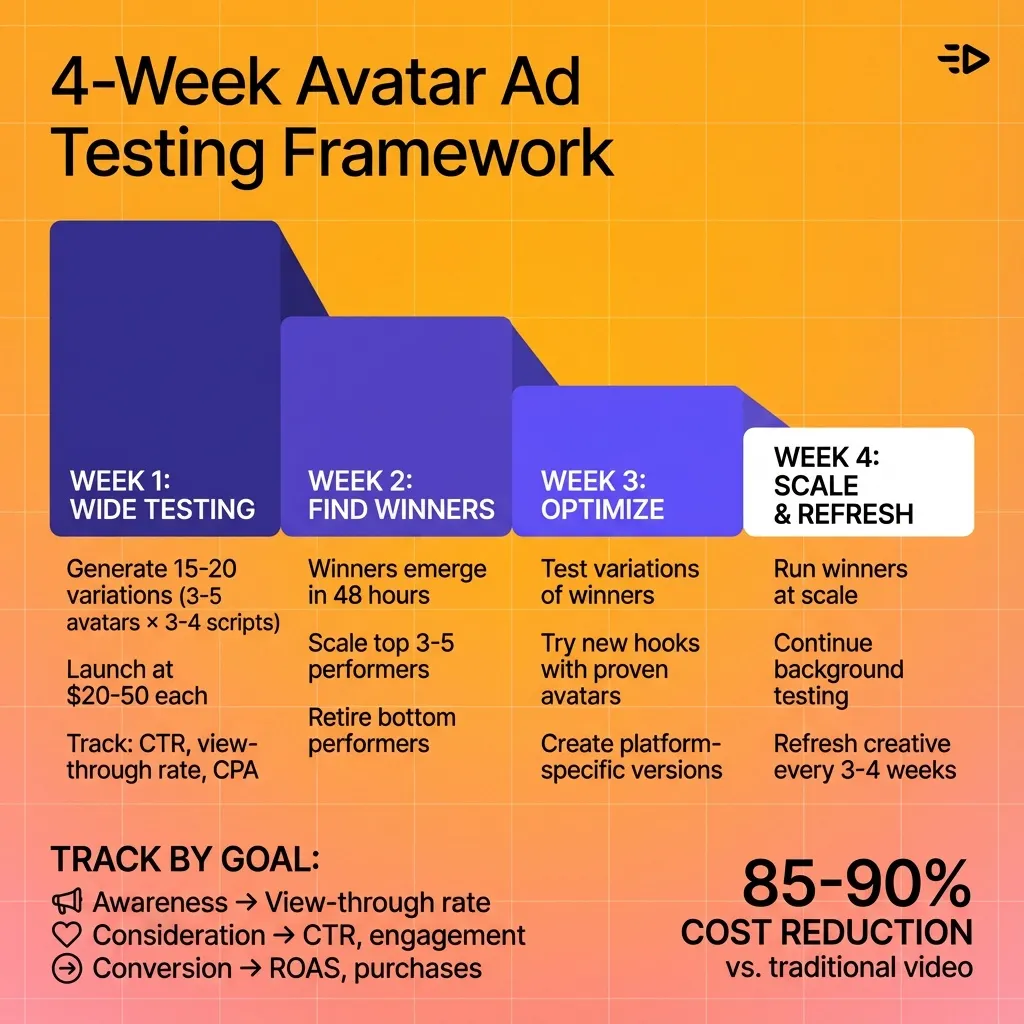
Simple testing framework:
Week 1 - Wide testing:
Generate 15-20 variations: 3-5 avatars × 3-4 scripts each
Launch all with $20-50 test budgets
Track: view-through rate, thumb-stop rate, CTR, CPA
Week 2 - Identify winners:
Clear winners usually emerge within 48 hours
Scale budget on top 3-5 performers
Retire bottom performers
Generate new variations building on what worked
Week 3 - Optimize winners:
Test variations of successful avatars (different backgrounds, pacing adjustments)
Try different hooks while keeping successful avatars
Test platform-specific versions (TikTok casual vs. YouTube polished)
Week 4 - Scale and refresh:
Run proven concepts at scale
Continue background testing of new approaches
Plan for creative refresh (even winners fatigue after 3-4 weeks heavy spend)
This continuous testing reveals what actually resonates with your audience rather than relying on creative intuition.
Metrics that matter:
Different platforms and objectives require different success metrics:
Awareness campaigns: View-through rate, 3-second views
Consideration: Click-through rate, engagement rate
Conversion: Add-to-cart, purchase, ROAS
Track appropriate metrics for your goal. An avatar that drives high CTR but low conversion isn't a winner for direct-response campaigns.
When avatars aren't the answer
Avatar ads work exceptionally well for most performance marketing, but they're not universal solutions.
Situations where avatars typically underperform:
Highly sensitive topics: Health conditions, financial hardship, personal trauma—audiences often want to see real people sharing authentic experiences, not AI presenters.
Complex live demonstrations: If the product requires intricate physical demonstrations, real hands-on video often works better. Real hands-on demo footage can be mixed with AI avatar narrating the process.
Influencer-driven audiences: Communities that value creator connections may respond better to creators with large following.
Multi-language expansion without multi-language budgets
One of the most powerful applications: creating the same ad in dozens of languages without hiring multilingual talent.
Traditional multilingual video requires:
Finding native-speaking actors for each market ($1,000+ per language)
Coordinating separate shoots or expensive dubbing
Managing different asset versions for different regions
With AI avatars:
One avatar presents the same script in 70+ languages
Appearance stays consistent across all versions
Regenerate in minutes, not weeks
Cost is identical regardless of number of languages
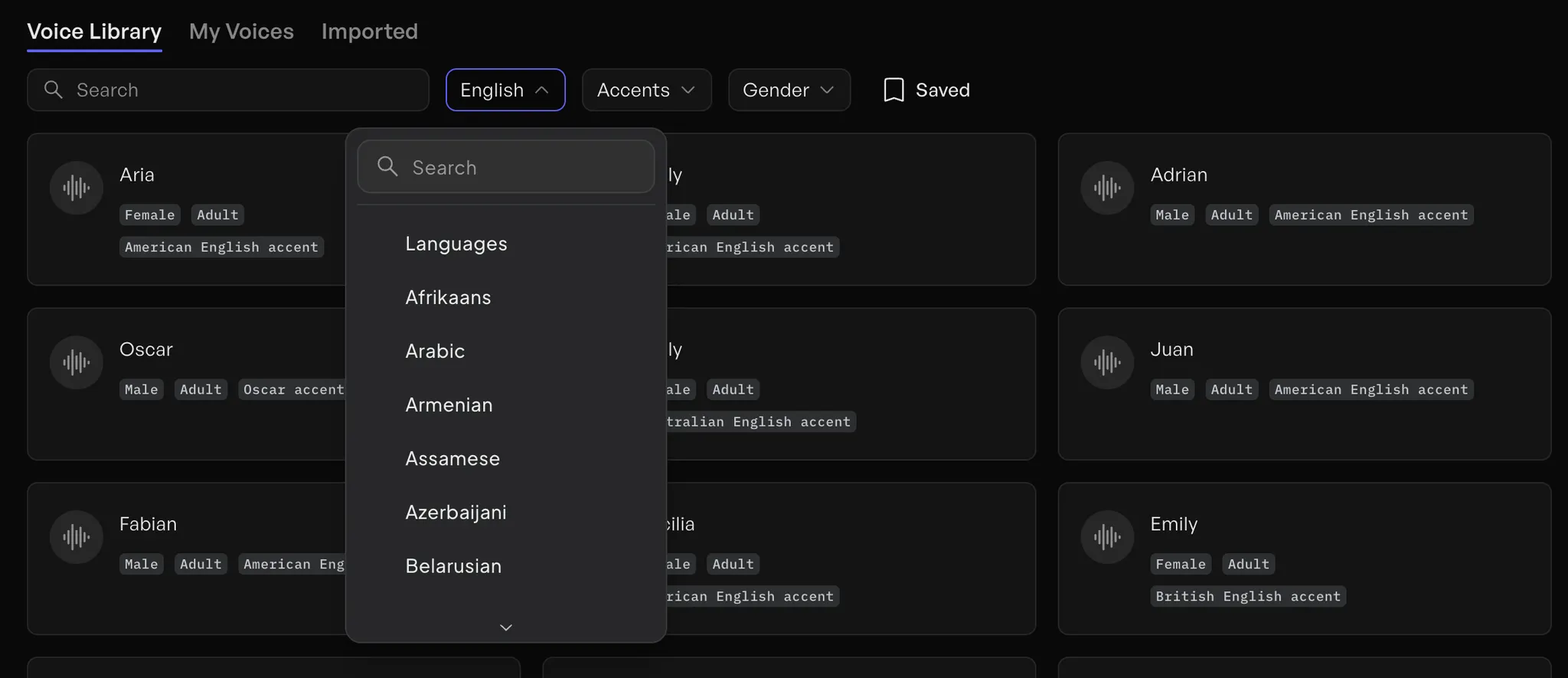
This makes international expansion accessible to brands that couldn't previously afford multilingual video content.
Localization best practices:
Don't just translate scripts - adapt them for cultural context
Consider using different avatars for different markets if cultural expectations vary
Test which language versions perform best before scaling spend
Use platform targeting to ensure each version reaches appropriate audiences
The practical reality of avatar advertising
Avatar ads haven't replaced traditional video production. High-budget brand films, influencer partnerships, and content requiring specific creative vision still benefit from traditional approaches.
But for performance marketing, product launches, creative testing, and any scenario requiring volume—avatars have become the more practical option.
The shift happening:
Creative teams that once produced 10-15 videos per quarter are now testing 50-100 avatar variations per month. The volume enables discovery of what actually works rather than betting big on creative intuition.
Brands using avatar makers and character creators report:
85-90% reduction in per-video production costs
10-20x more creative concepts tested per campaign
2-3 week head start on competitors still using traditional production
Ability to respond to trends within hours instead of weeks
What we've learned
Creating realistic avatar ads comes down to five core principles:
1. Planning beats tools: Clarify your creative brief, target audience, and avatar role before touching any character creator. Clear strategy eliminates wasted iteration time.
2. Believability trumps photorealism: Match voice to appearance, align emotion with message, write conversational scripts. Technical perfection without emotional authenticity fails.
3. Test volume wins: Generate 15-20 avatar variations per campaign. Let performance data reveal what works instead of betting on creative intuition. Winners usually emerge within 48 hours.
4. Platform optimization matters: TikTok needs casual energy with burned-in captions. YouTube supports longer explanations. LinkedIn demands professional credibility. Optimize for where your audience watches.
5. Avatars are tools, not replacements: Use them alongside real UGC, product videos, and motion graphics. They excel at performance marketing and creative testing, not every use case.
The economic shift is clear: avatar ads cost 85-90% less than traditional production and generate in under 10 minutes instead of 2-6 weeks. This pricing makes extensive creative testing feasible for the first time.
Creative teams using avatars are testing 10-20x more concepts per campaign, discovering what actually resonates with audiences, and scaling winners before competitors finish their first production cycle.
Ready to test avatar ads for your brand? Try Creatify's library of 1,500+ realistic avatars today—generate your first video in under 10 minutes and see which avatars connect with your audience.
Frequently asked questions
How much do AI avatars cost compared to hiring real actors?
Professional actors cost $1,000-5,000 per day plus studio fees, crew, and post-production—typically $3,000-15,000 total per video. AI avatars cost under $4 per video or unlimited creation for $39-99 monthly subscriptions. The 85-90% cost reduction makes testing 10-20 avatar variations economically feasible where you could previously only afford 1-2 actor shoots.
Can I create an avatar that looks like me or someone on my team?
Yes. Platforms like Creatify allow you to create custom digital twins from 2-5 minutes of video footage. You'll need explicit consent from the person, clear usage guidelines, and documentation of what content the avatar can present. Custom avatars maintain consistent brand presence across unlimited videos without requiring the person to be on camera repeatedly.
Do avatar ads perform as well as videos with real people?
Performance data shows high-quality avatar ads generate comparable engagement rates to traditional video when the avatar feels authentic and the script is strong. The key is emotional believability—matching voice to appearance, using natural scripts, and choosing avatars appropriate for your brand positioning. Testing multiple avatars reveals which ones connect best with your specific audience.
How long does it take to create an avatar video ad?
With tools like Creatify, finished videos generate in under 10 minutes. The URL-to-video workflow is fastest for product ads—paste a product link and get 5-10 video variations automatically. Manual creation (writing custom scripts, selecting specific avatars, adjusting visuals) typically takes 15-20 minutes per video. Traditional video production takes 2-6 weeks by comparison.
Can avatars speak multiple languages?
Yes. AI avatars can present the same script in 70+ languages without changing appearance or requiring additional production. One avatar becomes globally accessible immediately—no need to hire native-speaking actors for each market or pay for dubbing services. This makes international expansion feasible for brands that couldn't previously afford multilingual video content.
What's AI UGC and when should I use it?
AI UGC (user-generated content) refers to avatar videos styled to look like casual customer testimonials or authentic product reviews rather than polished brand ads. This style works exceptionally well on TikTok and Instagram Reels where audiences prefer authentic-feeling content. Use AI UGC-style avatars when targeting younger demographics or platforms where polished ads feel out of place. Test against more formal presenter styles to see what your audience responds to.
What platforms work best for avatar ads?
Avatar ads work across all major platforms but perform best on TikTok, Instagram Reels, YouTube, and Facebook where video content dominates. Success depends on matching avatar style to platform norms—casual and energetic for TikTok, polished but authentic for Instagram, educational for YouTube. Most avatar tools automatically render videos in platform-specific formats (9:16 vertical, 16:9 horizontal, 1:1 square).
When should I use real actors instead of AI avatars?
Use real actors for highly sensitive topics where authenticity matters most, complex physical demonstrations that require real hands-on interaction, and influencer-driven audiences that value creator connections. Avatar ads work best as part of a creative mix alongside real UGC and traditional video, not as complete replacements.
How do I know which avatar will work best for my brand?
Test multiple options. Generate 3-5 different avatars presenting the same script, run each with $20-50 test budgets, and let performance data decide. Winners typically emerge within 48 hours based on view-through rates and CTR. Match avatar demographics to your target audience but also test aspirational options—sometimes avatars slightly younger, more energetic, or more polished than your audience perform better than exact demographic matches.
Hiring actors for video ads costs $1,000+ per day. Book a studio, coordinate a crew, wait for post-production, and you're looking at $3,000-15,000 per video and 2-6 weeks of production time.
Most creative teams can't afford to test 10-20 different spokespersons across that many videos. So you pick one actor, shoot one concept, and hope it performs.
AI avatars have removed that constraint. Digital presenters now deliver scripts, demonstrate products, and engage viewers at costs that make extensive creative testing economically feasible.
This guide walks through how to create realistic avatar ads that actually perform - from planning your creative brief to scaling successful concepts across platforms.
Why avatar ads work now (when they didn't two years ago)
Early AI avatars looked a bit robotic. Stiff movements, uncanny facial expressions, obvious lip-sync problems. Audiences could tell immediately they weren't watching real people, and engagement suffered.
The technology has improved dramatically. Modern avatar makers generate digital humans with:
24fps lip-sync that matches speech naturally
Full facial expressiveness including micro-emotions
Body language and gestures that feel human
Eye contact that creates connection with viewers
Natural lighting and realistic skin textures
The result: audiences engage with high-quality avatar ads at rates comparable to traditional video with human actors.
What makes an avatar feel real vs. look creepy
Photorealism alone doesn't make avatars effective. An avatar can look technically perfect but still feel off if other elements don't align.
What actually creates believability:
Matching voice to appearance: If your avatar looks like a 25-year-old woman, she needs to sound like one. Voice mismatch breaks immersion immediately.
Appropriate emotional range: A fitness coach avatar should show enthusiasm and energy. A financial advisor should project calm competence. The emotion needs to match the role.
Natural pacing: Real people pause, breathe, and vary their cadence. Scripts that sound natural when read aloud will feel natural when delivered by avatars.
Contextual body language: Avatars that point at product features, hold items naturally, and use gestures that align with what they're saying feel more authentic than static presenters.
Lighting consistency: The avatar's lighting should match their background environment. Indoor settings need different lighting than outdoor scenes.
The best avatar ads prioritize emotional believability over pure photorealism. An avatar that feels like a real spokesperson connecting with viewers will outperform a technically perfect avatar that feels detached.
Plan your avatar ad like a real shoot
Before touching any character creator tool, clarify what you're making and why. The same planning that applies to traditional video applies here:
Define your creative brief:
Target audience: Who's watching and what do they care about?
Core promise: What's the main benefit you're communicating?
Proof points: Why should viewers believe you?
Call-to-action: What specific action do you want them to take?
Choose avatar role: Are they an expert explaining features? A satisfied customer sharing results? A founder telling the brand story? The role determines how the avatar should look, sound, and behave.
Platform consideration: TikTok needs casual, energetic avatars with quick pacing. YouTube can support longer explanations with more formal presenters. LinkedIn demands professional credibility. Platform norms affect every creative choice.
This planning work eliminates most creative false starts. Knowing exactly what you need before generating avatars saves hours of iteration time.
Choosing the right avatar for your offer
The character creator tool you use matters less than understanding which avatar will connect with your specific audience.
Match avatar to brand positioning:
DTC products: Casual, relatable avatars that create AI UGC-style content—videos that feel like friends sharing discoveries rather than polished ads. Think "person who genuinely uses and loves this product.
B2B services: Polished, professional avatars projecting expertise and competence. Think "consultant who knows your industry."
Fitness/wellness: Energetic, motivating avatars showing enthusiasm and encouragement. Think "coach who believes in you."
Luxury goods: Sophisticated avatars with refined presentation styles. Think "expert who appreciates quality."
Tech products: Clear communicators who simplify complex features. Think "helpful expert who makes technology accessible."
Creatify's AI avatar library includes 1500+ options across demographics, professions, and presentation styles. The goal isn't finding the "coolest" avatar—it's finding the one that makes your specific audience feel understood and connected.
Demographic alignment matters but isn't everything: If you're selling to women 35-50, using an avatar in that demographic often helps. But sometimes aspirational works better—someone slightly younger, more fit, more successful than the target audience. Test both approaches.
Write scripts that sound human, not robotic
The fastest way to make a realistic avatar feel fake: give it a script that sounds like corporate marketing copy.
What makes scripts feel natural:
Short sentences: Real people don't speak in long, complex sentences. Break things up. Vary length. Add natural pauses.
Contractions: "We're" not "We are." "You'll" not "You will." Contractions make speech feel conversational.
Specific language: "Save $347 per year" beats "significant savings." Specificity builds credibility.
Pattern-breaking hooks: Don't open with "Hi, I'm here to tell you about..." Start with the problem, the surprising benefit, or the provocative question.
Clear structure: Problem → Solution → Proof → Action. Don't bury the lead.
Creatify's AI script writer generates variations from product URLs, but you should always edit for brand voice. The AI provides structure and product details - you add the personality that makes it sound like your brand.
Testing multiple scripts matters more than perfecting one: Generate 3-5 script variations per avatar. Different hooks, different emphasis on features vs. benefits, different tones (educational vs. excited vs. urgent). Let performance data tell you what works.
Build your first avatar video (step-by-step)
The fastest way to create avatar ads in Creatify:
Method 1 - URL to video (fastest for e-commerce):
Paste product page URL
Creatify automatically extracts product name, description, images
AI generates 5-10 script variations
Select your preferred scripts (or edit them)
Choose avatars to present each script
Generate videos—usually ready in under 10 minutes
Download platform-specific versions (9:16 vertical, 16:9 horizontal, 1:1 square)
This workflow works best for product-focused ads where you want avatars demonstrating or explaining specific items.
Method 2 - Manual creation (more control):
Write or paste your script
Browse avatar library and select presenter
Choose voice characteristics (gender, accent, energy level)
Select aspect ratio for your target platform
Customize background and visual style if needed
Generate and preview
Iterate if needed—swap avatars, adjust pacing, change backgrounds
This method works better for brand storytelling, service explanations, or ads requiring specific creative direction.
Iteration is fast: If your first avatar choice doesn't feel right, swap to another and regenerate in minutes. Traditional video would require rebooking talent and reshooting. With avatars, you can test 5 different presenters in the time one traditional shoot would take.
Make avatars interact naturally with products
Static avatars talking to camera work fine for some ads. But avatars that hold, demonstrate, or interact with products create stronger engagement.
Product interaction techniques:
Holding products: Upload your product image and generate avatars holding it naturally. This works well for packaged goods, electronics, beauty products—anything with clear visual identity.
Pointing to features: Avatars can gesture toward on-screen product details as they discuss them. This directs viewer attention and reinforces the message.
Virtual demonstrations: Show the product in use while the avatar explains benefits. The avatar doesn't need to physically use it—they can present alongside product demo footage.
Background context: Place avatars in environments relevant to your product. Kitchen for cooking products, gym for fitness gear, office for productivity tools.
In Creatify, you can upload product images and the system generates scenes where avatars naturally showcase items. The key is keeping backgrounds simple and uncluttered—the product should be the focus, not competing visual elements.
Art direction basics that apply regardless of tool:
High contrast between avatar and background (they should stand out clearly)
Product positioned near center frame on mobile (where most viewers watch)
Avoid busy backgrounds that distract from the message
Ensure lighting feels consistent between avatar and environment
Voice, sound, and captions for social platforms
80% of social media video is watched without sound. Your avatar can look perfect, but if the message doesn't land silently, the ad fails.
Choosing the right AI voice:
Match voice characteristics to avatar appearance and role:
Gender and age: Should align with how the avatar looks
Accent: Consider your target market and brand positioning
Energy level: Calm for financial services, enthusiastic for consumer products
Pacing: Faster for TikTok, slower for complex explanations
Creatify includes 140+ voice options across 70+ languages. The right voice makes your avatar feel like a real spokesperson. The wrong voice creates uncanny valley dissonance that hurts performance.
Audio mixing matters:
Background music should sit below voice level (15-20% of voice volume)
Voice should be clear and prominent
Avoid music that competes with or contradicts the message tone
Captions are non-negotiable:
Since most viewers watch without sound, burned-in captions are essential:
Auto-generated captions save time but should be reviewed for accuracy
Keep text readable on mobile (large enough, high contrast)
Consider highlighting key phrases for emphasis
Caption timing should match speech rhythm naturally
Brand safety and ethical considerations
AI avatars can generate unlimited content quickly. This capability requires guardrails.
If using custom avatars based on real people:
Get explicit consent and establish clear usage guidelines:
What types of products/messages are allowed?
What topics are off-limits?
How long can the likeness be used?
Who has approval rights over generated content?
What happens if the person wants their avatar retired?
Document these agreements formally. Verbal permission isn't sufficient when you're creating digital replicas of real people.
Consider disclosure:
While not legally required in most cases, light disclosure can build trust:
"Meet our AI spokesperson..."
Footer text: "AI-generated presenter"
Brand-appropriate transparency about production methods
Brand voice consistency at scale:
When generating dozens of avatar videos quickly, ensure consistent brand voice:
Establish brand-specific language guidelines
Create approved phrase lists and banned terms
Review generated scripts before publishing
Have human oversight for customer-facing content
The speed of AI content creation makes quality control more important, not less. Read more about Creatify’s AI ethics here.
Test systematically, scale what works
The economic advantage of avatar ads is testing volume. When each video costs dollars instead of thousands, you can test aggressively.
Simple testing framework:
Week 1 - Wide testing:
Generate 15-20 variations: 3-5 avatars × 3-4 scripts each
Launch all with $20-50 test budgets
Track: view-through rate, thumb-stop rate, CTR, CPA
Week 2 - Identify winners:
Clear winners usually emerge within 48 hours
Scale budget on top 3-5 performers
Retire bottom performers
Generate new variations building on what worked
Week 3 - Optimize winners:
Test variations of successful avatars (different backgrounds, pacing adjustments)
Try different hooks while keeping successful avatars
Test platform-specific versions (TikTok casual vs. YouTube polished)
Week 4 - Scale and refresh:
Run proven concepts at scale
Continue background testing of new approaches
Plan for creative refresh (even winners fatigue after 3-4 weeks heavy spend)
This continuous testing reveals what actually resonates with your audience rather than relying on creative intuition.
Metrics that matter:
Different platforms and objectives require different success metrics:
Awareness campaigns: View-through rate, 3-second views
Consideration: Click-through rate, engagement rate
Conversion: Add-to-cart, purchase, ROAS
Track appropriate metrics for your goal. An avatar that drives high CTR but low conversion isn't a winner for direct-response campaigns.
When avatars aren't the answer
Avatar ads work exceptionally well for most performance marketing, but they're not universal solutions.
Situations where avatars typically underperform:
Highly sensitive topics: Health conditions, financial hardship, personal trauma—audiences often want to see real people sharing authentic experiences, not AI presenters.
Complex live demonstrations: If the product requires intricate physical demonstrations, real hands-on video often works better. Real hands-on demo footage can be mixed with AI avatar narrating the process.
Influencer-driven audiences: Communities that value creator connections may respond better to creators with large following.
Multi-language expansion without multi-language budgets
One of the most powerful applications: creating the same ad in dozens of languages without hiring multilingual talent.
Traditional multilingual video requires:
Finding native-speaking actors for each market ($1,000+ per language)
Coordinating separate shoots or expensive dubbing
Managing different asset versions for different regions
With AI avatars:
One avatar presents the same script in 70+ languages
Appearance stays consistent across all versions
Regenerate in minutes, not weeks
Cost is identical regardless of number of languages
This makes international expansion accessible to brands that couldn't previously afford multilingual video content.
Localization best practices:
Don't just translate scripts - adapt them for cultural context
Consider using different avatars for different markets if cultural expectations vary
Test which language versions perform best before scaling spend
Use platform targeting to ensure each version reaches appropriate audiences
The practical reality of avatar advertising
Avatar ads haven't replaced traditional video production. High-budget brand films, influencer partnerships, and content requiring specific creative vision still benefit from traditional approaches.
But for performance marketing, product launches, creative testing, and any scenario requiring volume—avatars have become the more practical option.
The shift happening:
Creative teams that once produced 10-15 videos per quarter are now testing 50-100 avatar variations per month. The volume enables discovery of what actually works rather than betting big on creative intuition.
Brands using avatar makers and character creators report:
85-90% reduction in per-video production costs
10-20x more creative concepts tested per campaign
2-3 week head start on competitors still using traditional production
Ability to respond to trends within hours instead of weeks
What we've learned
Creating realistic avatar ads comes down to five core principles:
1. Planning beats tools: Clarify your creative brief, target audience, and avatar role before touching any character creator. Clear strategy eliminates wasted iteration time.
2. Believability trumps photorealism: Match voice to appearance, align emotion with message, write conversational scripts. Technical perfection without emotional authenticity fails.
3. Test volume wins: Generate 15-20 avatar variations per campaign. Let performance data reveal what works instead of betting on creative intuition. Winners usually emerge within 48 hours.
4. Platform optimization matters: TikTok needs casual energy with burned-in captions. YouTube supports longer explanations. LinkedIn demands professional credibility. Optimize for where your audience watches.
5. Avatars are tools, not replacements: Use them alongside real UGC, product videos, and motion graphics. They excel at performance marketing and creative testing, not every use case.
The economic shift is clear: avatar ads cost 85-90% less than traditional production and generate in under 10 minutes instead of 2-6 weeks. This pricing makes extensive creative testing feasible for the first time.
Creative teams using avatars are testing 10-20x more concepts per campaign, discovering what actually resonates with audiences, and scaling winners before competitors finish their first production cycle.
Ready to test avatar ads for your brand? Try Creatify's library of 1,500+ realistic avatars today—generate your first video in under 10 minutes and see which avatars connect with your audience.
Frequently asked questions
How much do AI avatars cost compared to hiring real actors?
Professional actors cost $1,000-5,000 per day plus studio fees, crew, and post-production—typically $3,000-15,000 total per video. AI avatars cost under $4 per video or unlimited creation for $39-99 monthly subscriptions. The 85-90% cost reduction makes testing 10-20 avatar variations economically feasible where you could previously only afford 1-2 actor shoots.
Can I create an avatar that looks like me or someone on my team?
Yes. Platforms like Creatify allow you to create custom digital twins from 2-5 minutes of video footage. You'll need explicit consent from the person, clear usage guidelines, and documentation of what content the avatar can present. Custom avatars maintain consistent brand presence across unlimited videos without requiring the person to be on camera repeatedly.
Do avatar ads perform as well as videos with real people?
Performance data shows high-quality avatar ads generate comparable engagement rates to traditional video when the avatar feels authentic and the script is strong. The key is emotional believability—matching voice to appearance, using natural scripts, and choosing avatars appropriate for your brand positioning. Testing multiple avatars reveals which ones connect best with your specific audience.
How long does it take to create an avatar video ad?
With tools like Creatify, finished videos generate in under 10 minutes. The URL-to-video workflow is fastest for product ads—paste a product link and get 5-10 video variations automatically. Manual creation (writing custom scripts, selecting specific avatars, adjusting visuals) typically takes 15-20 minutes per video. Traditional video production takes 2-6 weeks by comparison.
Can avatars speak multiple languages?
Yes. AI avatars can present the same script in 70+ languages without changing appearance or requiring additional production. One avatar becomes globally accessible immediately—no need to hire native-speaking actors for each market or pay for dubbing services. This makes international expansion feasible for brands that couldn't previously afford multilingual video content.
What's AI UGC and when should I use it?
AI UGC (user-generated content) refers to avatar videos styled to look like casual customer testimonials or authentic product reviews rather than polished brand ads. This style works exceptionally well on TikTok and Instagram Reels where audiences prefer authentic-feeling content. Use AI UGC-style avatars when targeting younger demographics or platforms where polished ads feel out of place. Test against more formal presenter styles to see what your audience responds to.
What platforms work best for avatar ads?
Avatar ads work across all major platforms but perform best on TikTok, Instagram Reels, YouTube, and Facebook where video content dominates. Success depends on matching avatar style to platform norms—casual and energetic for TikTok, polished but authentic for Instagram, educational for YouTube. Most avatar tools automatically render videos in platform-specific formats (9:16 vertical, 16:9 horizontal, 1:1 square).
When should I use real actors instead of AI avatars?
Use real actors for highly sensitive topics where authenticity matters most, complex physical demonstrations that require real hands-on interaction, and influencer-driven audiences that value creator connections. Avatar ads work best as part of a creative mix alongside real UGC and traditional video, not as complete replacements.
How do I know which avatar will work best for my brand?
Test multiple options. Generate 3-5 different avatars presenting the same script, run each with $20-50 test budgets, and let performance data decide. Winners typically emerge within 48 hours based on view-through rates and CTR. Match avatar demographics to your target audience but also test aspirational options—sometimes avatars slightly younger, more energetic, or more polished than your audience perform better than exact demographic matches.