
Creatify-Team
TEILEN


IN DIESEM ARTIKEL
Ein Produktvideo muss nicht teuer sein, um gut zu funktionieren. Es muss klar, schnell und auf eine Idee ausgerichtet sein. Zuschauer entscheiden innerhalb von Sekunden, ob sie weitersehen. Wenn dein Video diese Aufmerksamkeit nicht verdient, spielt die Produktionsqualität keine Rolle.
Die gute Nachricht: Die Hürde für die Produktion von Produktvideos ist deutlich gesunken. Ein gut beleuchtetes Handy-Video, sauberer Ton und präzises Editing können einen Dreh für 10.000 Dollar mit dem falschen Skript schlagen. Und KI-gestützte Workflows haben den gesamten Prozess in jeder Phase schneller gemacht, vom Skripting bis zum Final Cut.
Dieser Leitfaden zeigt, wie man ein Produktvideo von Anfang bis Ende erstellt - Planung, Skripting, Drehen, Editing und Distribution - ganz ohne Studio.
Warum Produktvideos immer noch wichtig sind
Statische Bilder zeigen, wie ein Produkt aussieht. Video zeigt, was es kann, für wen es gedacht ist und warum es den Kauf wert ist. Das ist eine andere Ebene der Überzeugungskraft.
HubSpots Marketingforschung zeigt durchgehend, dass Video eines der leistungsstärksten Content-Formate für Marketer ist, wobei ein hoher Anteil der Verbraucher Produkt- oder Erklärvideos nutzt, um Kaufentscheidungen zu treffen. Die Funktion ist einfach: Video reduziert Unsicherheit. Käufer, die ein Produkt verstehen, kaufen es eher und senden es seltener zurück.
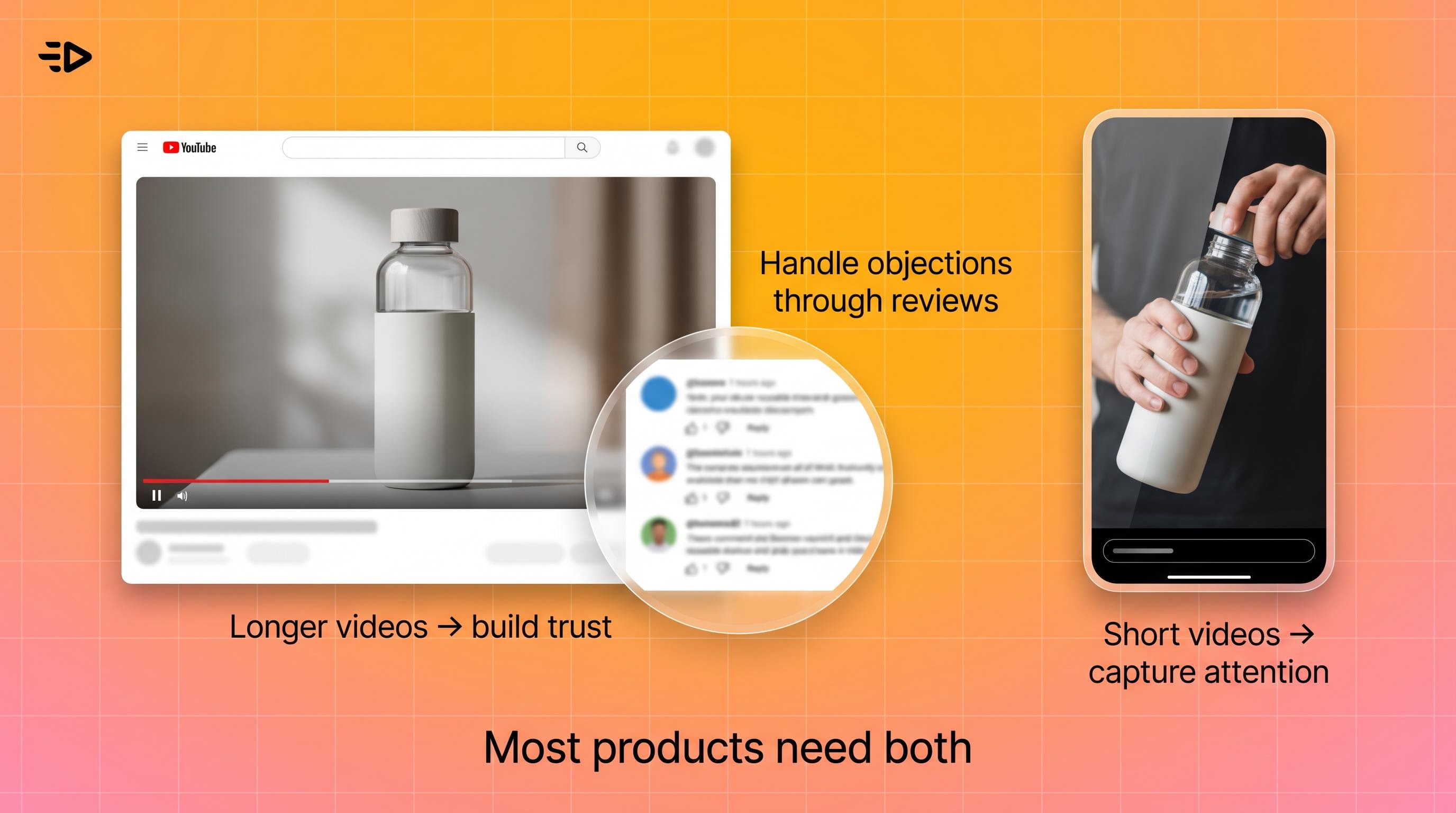
Was sich 2026 geändert hat, ist der Format-Mix. Kurze vertikale Clips sorgen für Reichweite und Entdeckung. Längere Anchor-Videos auf Produktseiten und YouTube schaffen Vertrauen und räumen Einwände aus dem Weg. Die meisten Produkte brauchen beides, und mit kluger Planung kommst du oft aus einem einzigen Dreh dorthin.
Wähle zuerst deinen Videotyp
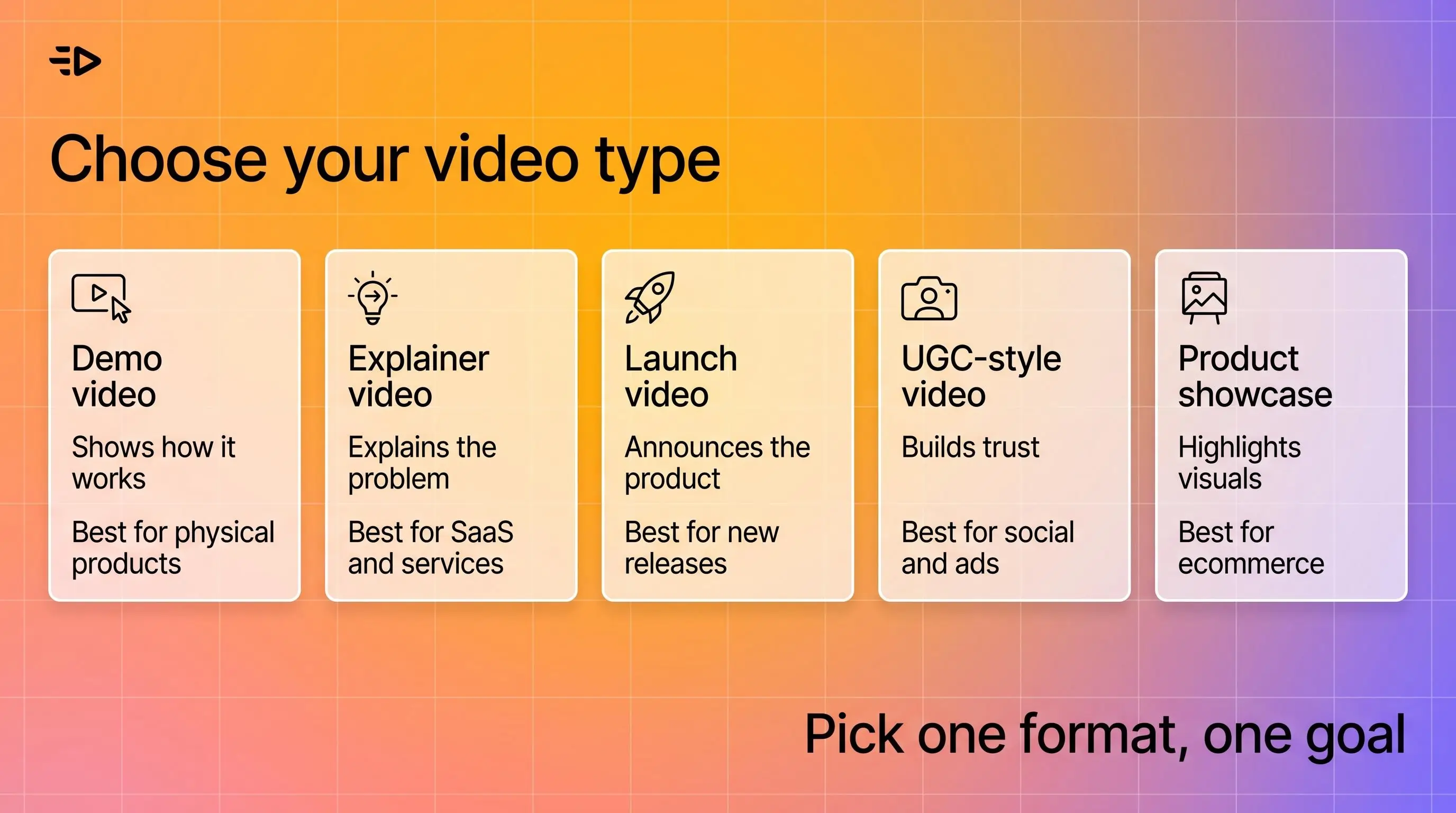
Bevor du eine Kamera anfasst oder ein Bearbeitungstool öffnest, entscheide, welche Art von Produktvideo du erstellst. Das Format bestimmt alles: Skriptstruktur, Shot-Liste, Länge und Einsatzort.
Demovideo. Zeigt das Produkt im Einsatz. Am besten für physische Produkte, Apps oder alles mit einem klaren Workflow. Mid-to-lower funnel.
Erklärvideo. Konzentriert sich auf das Problem und darauf, wie das Produkt es löst. Funktioniert gut für SaaS, Services und Produkte mit Lernkurve. Gut für Landingpages und Paid Ads.
Launch-Video. Ankündigungsorientiert, meist kürzer und stärker auf die Marke ausgerichtet. Für Reichweite in den sozialen Medien zum Launch gebaut.
Video im UGC-Stil. Creator oder Kunde spricht in die Kamera, oft handgehalten und locker. Starkes Vertrauenssignal. Funktioniert gut auf TikTok, Instagram Reels und in Ad Creative.
Produkt-Showcase-Video. Visuell zuerst, mit wenig Sprache. Zeigt das Produkt aus mehreren Blickwinkeln, oft mit Bewegung oder cinematischem Framing. Stark für Lifestyle-Marken und E-Commerce.
Der häufigste Fehler in dieser Phase: ein Produktvideo zu machen, das all das auf einmal erledigen soll. Wähle ein Format, bediene eine Zielgruppe, mache einen Kernpunkt.
Plane, bevor du filmst
Gute Produktvideografie beginnt mit einem Briefing, nicht mit einer Kamera. Beantworte zuerst diese Fragen:
Was soll der Zuschauer nach dem Ansehen tun?
Wer ist der Zuschauer, und was weiß er bereits?
Was ist die eine wichtigste Sache, die er verstehen muss?
Wo wird das Video veröffentlicht, und wie lange?
Die letzte Frage ist wichtiger, als viele denken. Ein Produktvideo für eine TikTok-Anzeige hat andere Anforderungen als eines für eine Produktseite. Plattform, Zielgruppe und Funnel-Phase sollten das Briefing prägen, bevor du eine einzige Zeile Skript schreibst.
Schreibe ein Skript, das funktioniert
Wistias Leitfaden zu Erklärvideos verweist auf eine verlässliche Struktur: Starte mit dem Problem des Zuschauers, halte das Skript gesprächig und bleib knapp. Das gilt für fast jedes Produktvideo-Format.
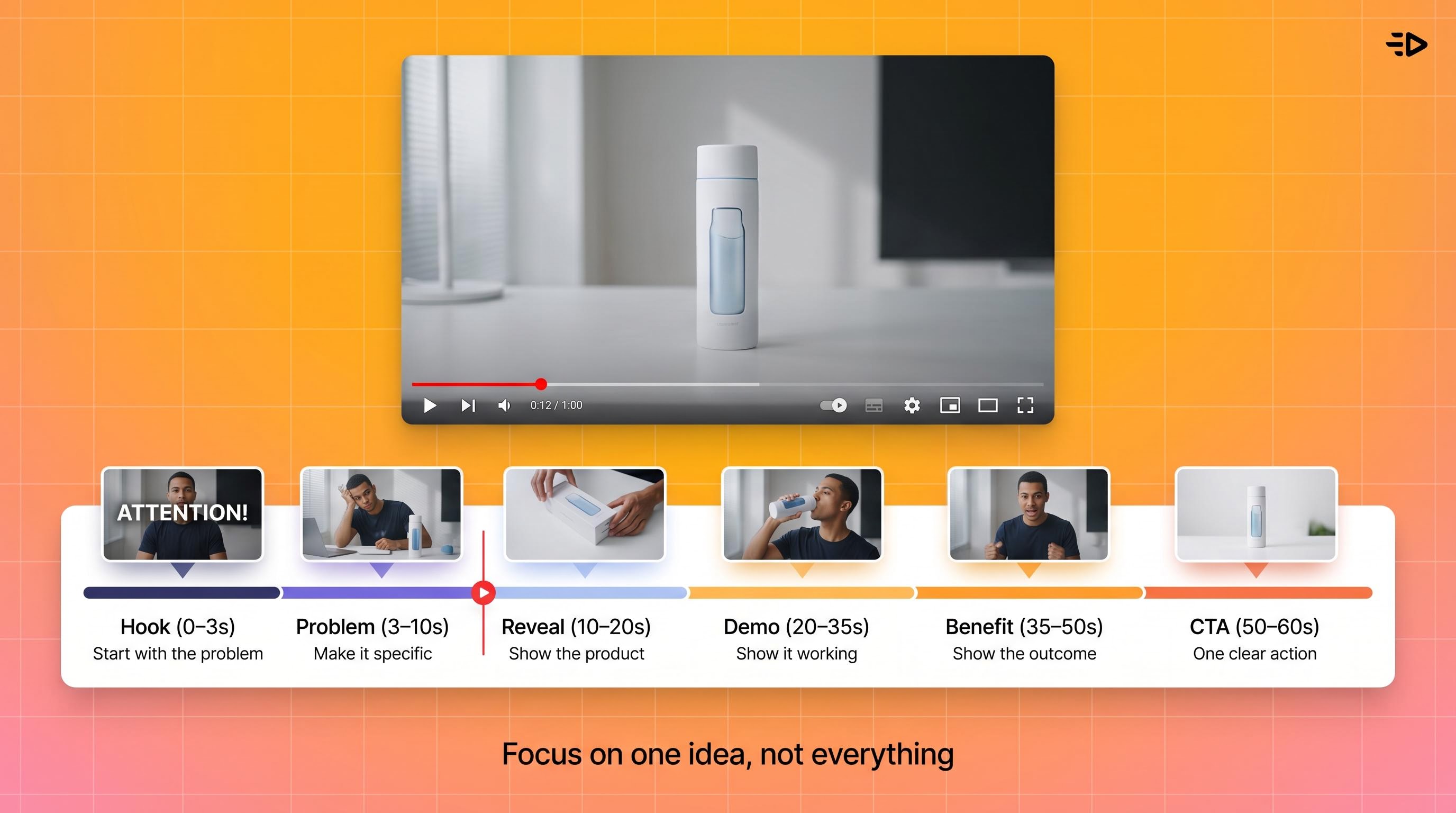
Ein einfaches Framework, das funktioniert:
Hook (0-3 Sekunden): starte mit dem Problem oder einer überraschenden Aussage, nicht mit deinem Markennamen
Problem (3-10 Sekunden): mach es so konkret, dass sich der Zuschauer wiedererkennt
Produktenthüllung: zeig, was es ist, nicht nur, wie es heißt
Demo oder Beweis: zeig, dass es funktioniert, nicht nur dass es existiert
Nutzen: was sich für den Zuschauer ändert
CTA: eine Aktion, klar formuliert
Der häufigste Fehler beim Skripting ist, zu viele Features abzudecken. Ein engeres Video, das eine Sache gut erklärt, überzeugt mehr als ein Rundgang durch einen Katalog. Wenn du fünf Dinge sagen willst, mach fünf kurze Videos.
Lies dein Skript vor dem Dreh laut vor. Wenn es wie eine Broschüre klingt, schreibe es um, bis es wie gesprochene Sprache klingt.
Aufbau ohne Studio
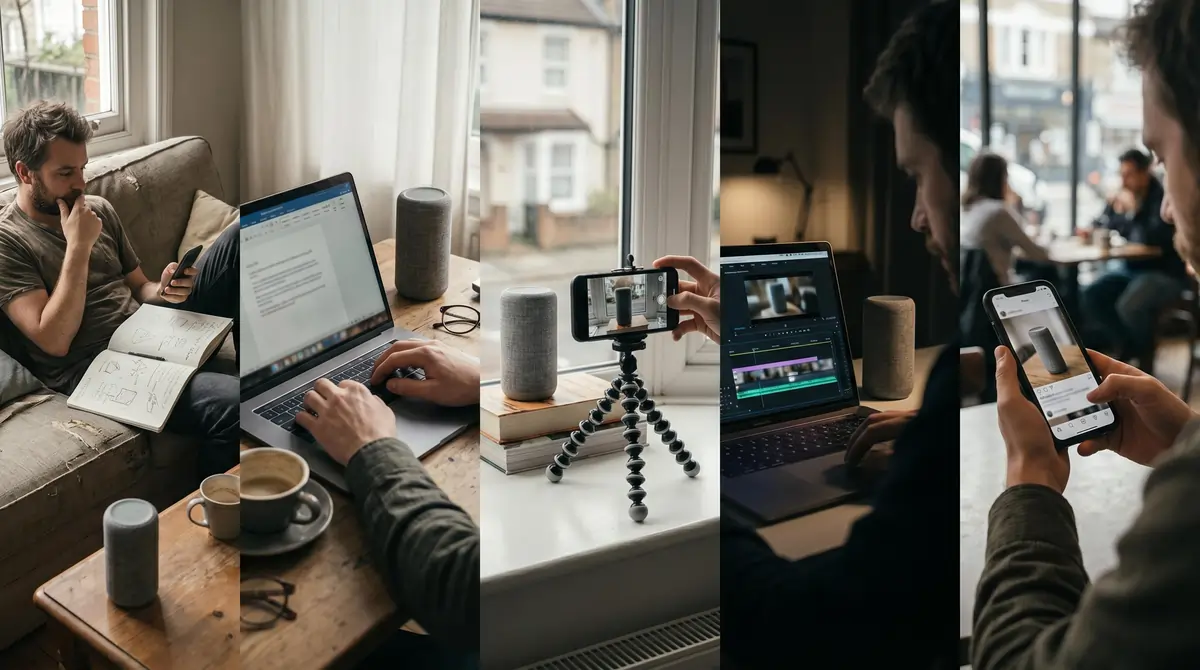
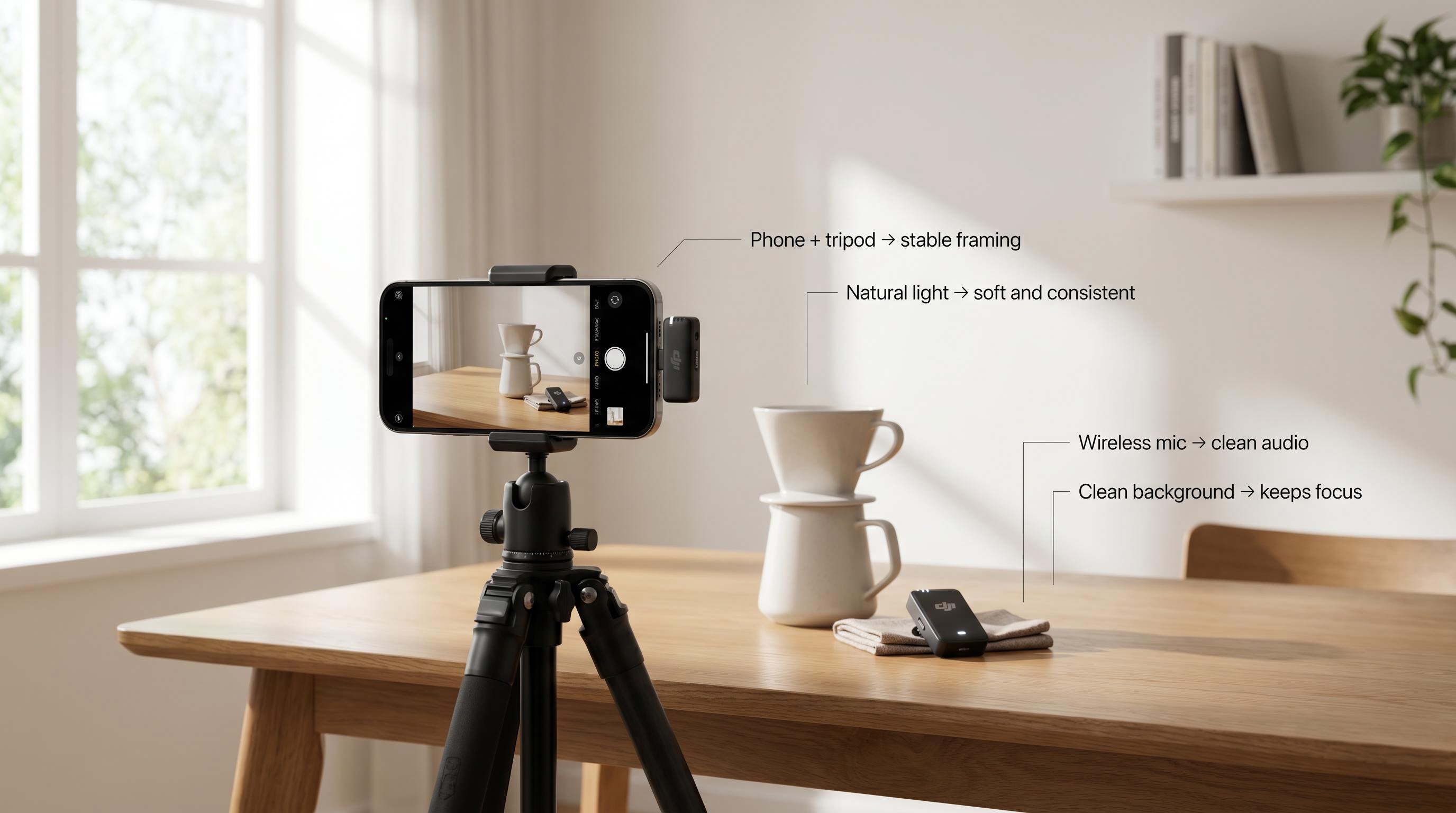
Du brauchst kein Studio. Du brauchst kontrolliertes Licht, stabile Kadrierung und sauberen Ton. Diese drei Dinge decken den Großteil dessen ab, was ein gutes Produktvideo von einem schlechten unterscheidet.
Licht. Natürliches Fensterlicht ist dein bester Ausgangspunkt. Positioniere dein Produkt oder Motiv so, dass es zum Fenster schaut, nicht mit dem Fenster im Rücken. Vermeide das Mischen von Lichtquellen: Tageslicht und Deckenleuchtstoffröhren zusammen erzeugen Farbstiche, die sich in der Nachbearbeitung schwer korrigieren lassen. Ein günstiges LED-Panel gibt dir mehr Konsistenz, wenn natürliches Licht nicht verfügbar ist.
Kamera. Ein modernes Smartphone auf einem Stativ reicht für die meisten Produktvideos. Wenn du eine spiegellose Kamera nutzt, sorgt ein 35-mm- oder 50-mm-Objektiv mit großer Blendenöffnung für saubere Trennung vom Hintergrund, ohne viel Aufwand. Sperre deine Belichtungseinstellungen und verlasse dich bei Nahaufnahmen von Produkten nicht auf Autofokus.
Hintergrund. Sauber und schlicht. Ein nahtloser weißer Hintergrund, eine Holzoberfläche, ein zum Lifestyle passender Kontext. Der Hintergrund sollte das Produkt unterstützen, nicht mit ihm konkurrieren.
Audio. Hier scheitern die meisten DIY-Produktvideos. Schlechter Ton zerstört Glaubwürdigkeit schneller als unperfekte Bilder. Wenn jemand vor der Kamera spricht, nutze ein Lavaliermikrofon oder ein gerichtetes Shotgun-Mikrofon. Nimm in einem ruhigen Raum auf. Weiche Einrichtungsgegenstände (Teppiche, Vorhänge, Sofas) absorbieren Echo. Harte Oberflächen (Fliesenböden, kahle Wände) nicht.
Wenn du nur ein Lieferantenfoto hast
Die meisten Leitfäden für Produktvideos gehen davon aus, dass du etwas zur Hand hast: eine polierte Produktaufnahme, Lifestyle-Bilder, vielleicht etwas Material von einem Shooting. Viele Gründer und Early-Stage-E-Commerce-Marken haben davon nichts.
Was sie haben, ist ein verschwommenes JPEG von ihrem Hersteller. Drei Blickwinkel, weißer Hintergrund, niedrige Auflösung. Das war in der E-Mail mit der Rechnung dabei.
Früher war das ein harter Stopp. Produktvideos mit irgendeiner Glaubwürdigkeit aus Lieferantenbildern zu erstellen, ohne zuerst einen Fotografen zu engagieren, war nicht möglich - und das bedeutete Kosten, Vorlaufzeit und das Verschicken von Samples, auf die man vielleicht nicht verzichten konnte.
KI-Bildgenerierung ändert das. Mit Creatifys Asset-Generator kannst du diese minderwertigen Quellbilder nehmen und in stilisierte Produktaufnahmen verwandeln: verschiedene Hintergründe, Lichtsituationen, Themen und Umgebungen, alles aus dem Originalfoto generiert. Aus einer schlichten Lieferantenaufnahme auf weißem Hintergrund wird ein dunkles Lifestyle-Bild, ein Studio-Gradient, ein Outdoor-Kontext - was auch immer zur Marke passt. Von dort aus gehen diese generierten Bilder direkt in die Videoerstellung.
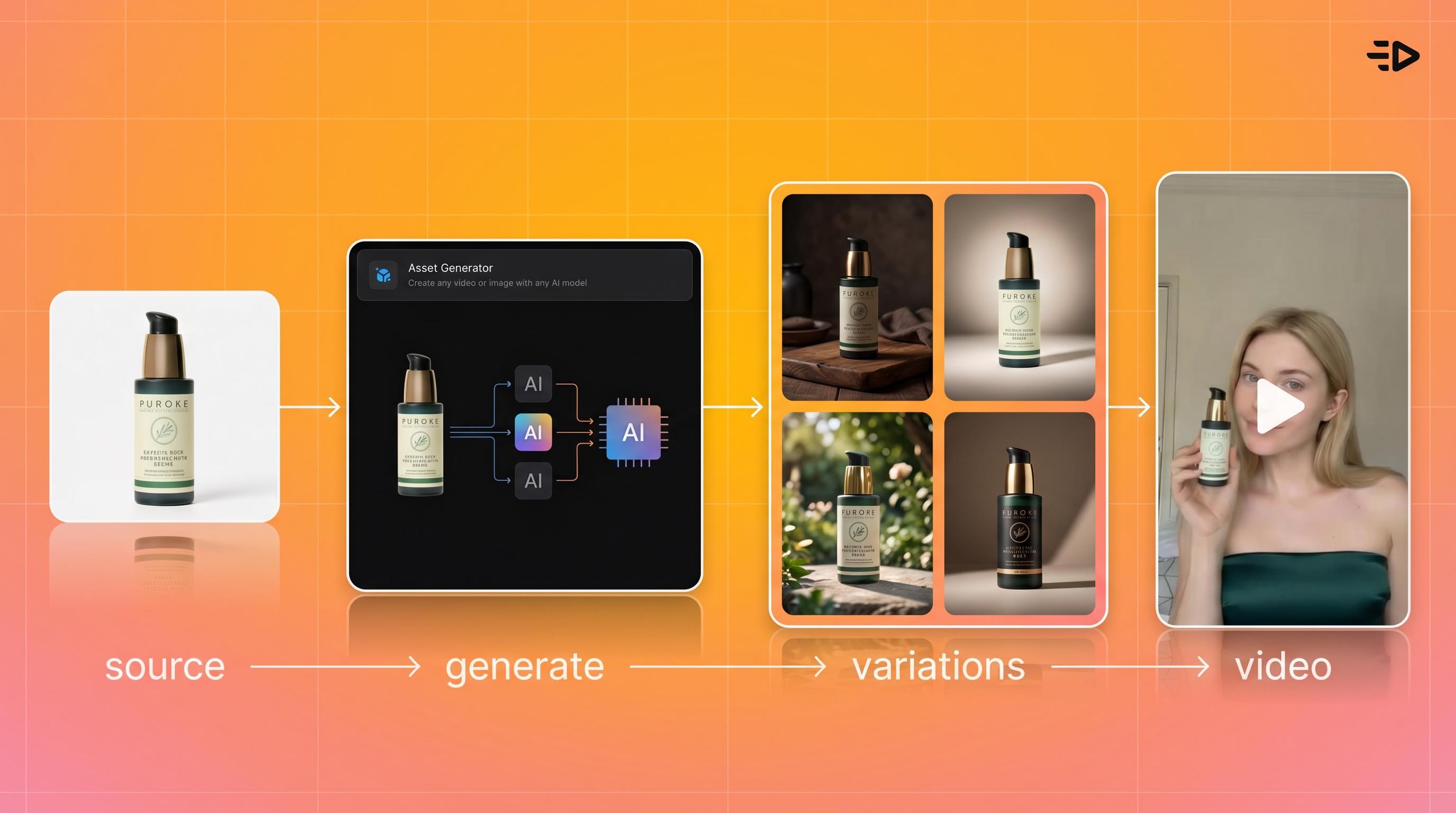
Das ist kein Workaround. Für viele DTC-Founder ist es der einzige praktikable Weg zu einem professionell wirkenden Produktvideo, bevor die Marke Budget für einen echten Dreh hat.
So drehst du es
Plane deine Shots, bevor du mit dem Filmen beginnst. Eine grundlegende Shot-Liste für ein Produktvideo:
Hero-Shot: das Produkt sauber präsentiert, im Mittelpunkt
Close-ups: Textur, Details, Kernfeatures
Feature-Inserts: bestimmte Funktionen oder Komponenten in Aktion
Einsatz im Kontext: das Produkt wird von einer realen Person in einer realen Umgebung genutzt
Hands-on-Demo: jemand interagiert damit, hält es nicht nur in der Hand
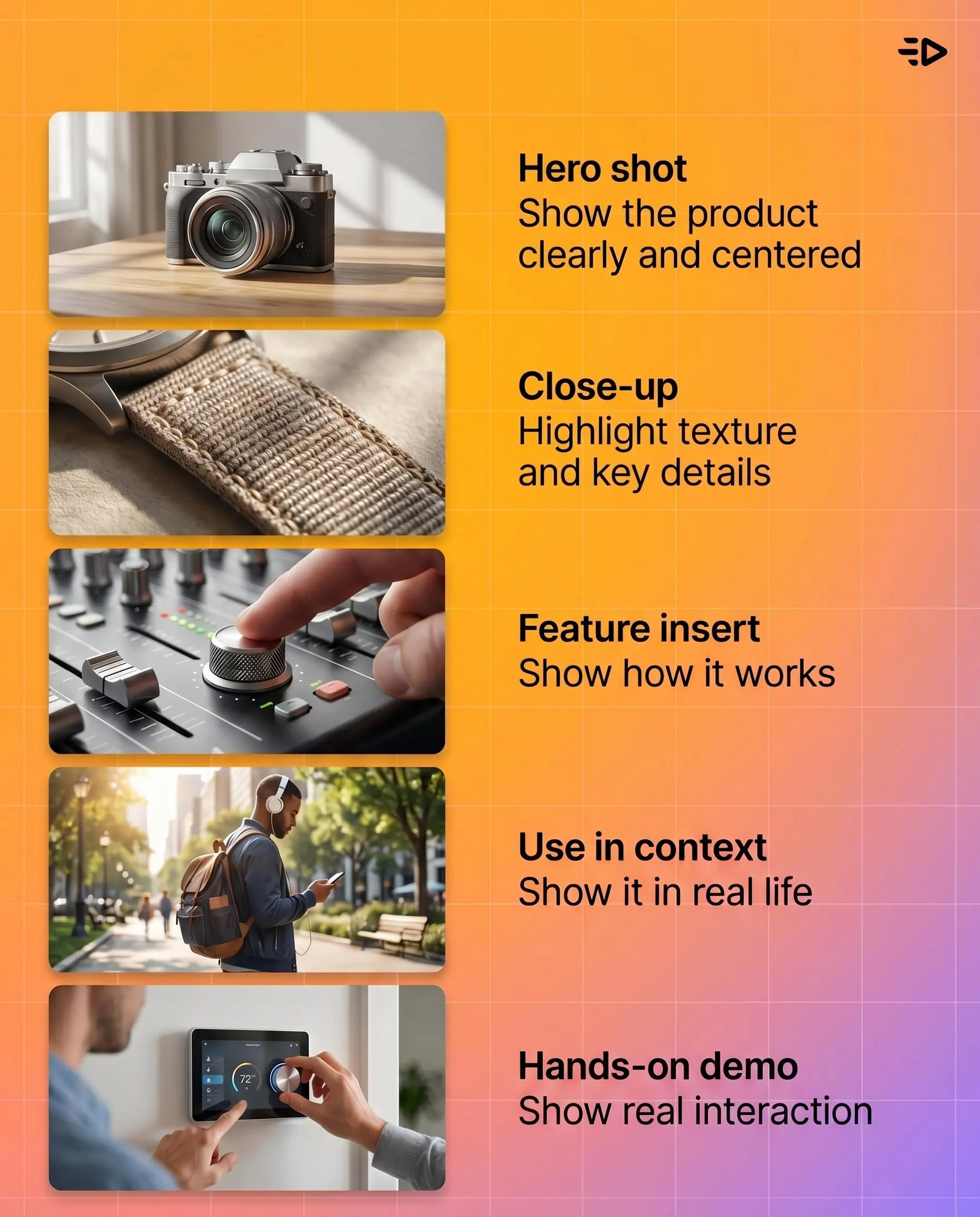
Decke jede Einstellung aus mindestens zwei Winkeln ab. Beim Schnitt wirst du dir dafür danken.
Für das Pacing empfiehlt Wistia, weder ein gehetztes Gefühl noch den Eindruck zu erzeugen, man schaue in eine Produktanleitung. Gib jeder Einstellung genug Zeit, um sie lesen zu können, und schneide dann. Zuschauer im Jahr 2026 sind schnelles Editing gewohnt, brauchen aber trotzdem einen Moment, um das Gesehene zu verarbeiten.
Wenn du Content im UGC-Stil filmst, sind kleine Unperfektheiten in Ordnung. Handgeführte Bewegungen, natürliche Lichtschwankungen und ein gesprächiger Ton sind Features, keine Bugs. Zu glatt polierter UGC sieht aus wie eine Anzeige, die versucht, wie UGC auszusehen - und das fällt dem Publikum auf.
Schnitt mit Wirkung
Der Schnitt ist der Punkt, an dem die meisten Produktvideos gewonnen oder verloren werden.
Schneide aggressiv. Wenn eine Einstellung keine Information hinzufügt, schneide sie raus. Tote Luft am Anfang eines Videos ist einer der häufigsten Gründe, warum Zuschauer abspringen.
Pack den Nutzen nach vorne. Der Hook muss in den ersten 2-3 Sekunden sitzen. Heb dir den besten Teil nicht für die Mitte auf.
Füge Untertitel hinzu. Ein großer Teil von Social Video wird ohne Ton angesehen. Untertitel sind nicht mehr optional.
Mach die CTA sichtbar. Verlass dich nicht darauf, dass Zuschauer wissen, was sie als Nächstes tun sollen. Beende mit einer klaren, konkreten Aktion.
Für plattformspezifische Schnitte: Dein Hero-Video ist wahrscheinlich 60-90 Sekunden lang für eine Produktseite oder YouTube. Dein Social-Cut liegt bei 15-30 Sekunden. Dein Paid-Ad-Cut packt den Hook noch stärker nach vorne und kann nur 6-15 Sekunden lang sein. Plane im Schnitt alle drei mit ein, auch wenn du zum Start nur einen veröffentlichst.
KI-gestützte Produktvideoproduktion
Der Workflow hat sich verändert. KI übernimmt jetzt Aufgaben, die früher Spezialistenzeit gebraucht haben: Rough Cuts, Untertitelgenerierung, Skriptentwürfe, Lokalisierung und das Erstellen visueller Varianten.
Der praktischste Einsatz für die meisten Teams ist nicht vollautomatische Videoerstellung. Es geht darum, KI zu nutzen, um die Ausgabemenge in der Variations- und Iterationsphase zu erhöhen - dort, wo du 10 getestete Versionen eines Hooks brauchst, nicht einen polierten Final Cut.
Für E-Commerce- und DTC-Marken ist der Engpass meist die kreative Menge: genug Varianten über Hooks, Formate und Produktwinkel hinweg, um sinnvolle Tests zu fahren. Mit Creatifys Produktvideo-Funktion kannst du ein einzelnes Produktbild in Minuten in mehrere Video-Varianten verwandeln, was nützlich ist, wenn du schnell ein Test-Set füllen musst, statt auf einen Produktionszyklus zu warten.
Ein konkretes Beispiel: Unicorn Marketers nutzte Creatifys Asset-Generator, um in 2 Wochen über 150 Video-Ad-Varianten für einen Kunden zu erstellen, dessen Creative Library ins Stocken geraten war, was zu einer Senkung des CPA um 45 % und einer Verbesserung des ROAS um 73 % führte.
KI unterstützt den Prozess. Sie ersetzt nicht das Briefing, die Strategie oder die Entscheidung darüber, welche kreative Richtung getestet werden soll.
Mehr dazu: KI-generierte Werbung: Alles, was du 2026 wissen musst
Wiederverwendbare Frameworks für Produktvideos
Wenn du strukturell nicht weißt, wo du anfangen sollst, funktionieren diese Frameworks in den meisten Formaten:
Problem-Lösung-Demo-CTA. Die verlässlichste Struktur für Conversion-orientierte Videos. Beginnt mit Schmerz, endet mit Aktion.
Feature-Nutzen-Beweis. Gut für Demos. Benenne das Feature, erkläre, was es für den Zuschauer tut, zeige den Beweis.
Vorher-Nachher-Vergleich. Effektiv für Produkte mit einer klaren Transformation: Hautpflege, Fitness, Produktivitätstools. Unmittelbar und leicht nachzuvollziehen.
Founder-Narrativ + Demo + CTA. Funktioniert gut für Early-Stage-Marken, bei denen Vertrauen erst aufgebaut wird.
UGC-Stil "Warum ich das nutze." Der Zuschauer erzählt seinen eigenen Use Case. Wirkt organisch, baut Social Proof auf und skaliert gut, wenn du mit Creators oder KI-Avataren arbeitest.
Wähle eines. Mische keine Frameworks im selben Video. Wistias Forschung zum Pitchen mit Video verweist immer wieder auf klare Struktur und eine an den Zuschauer gerichtete Perspektive als die wichtigsten Treiber für Engagement.
Häufige Fehler, die du vermeiden solltest
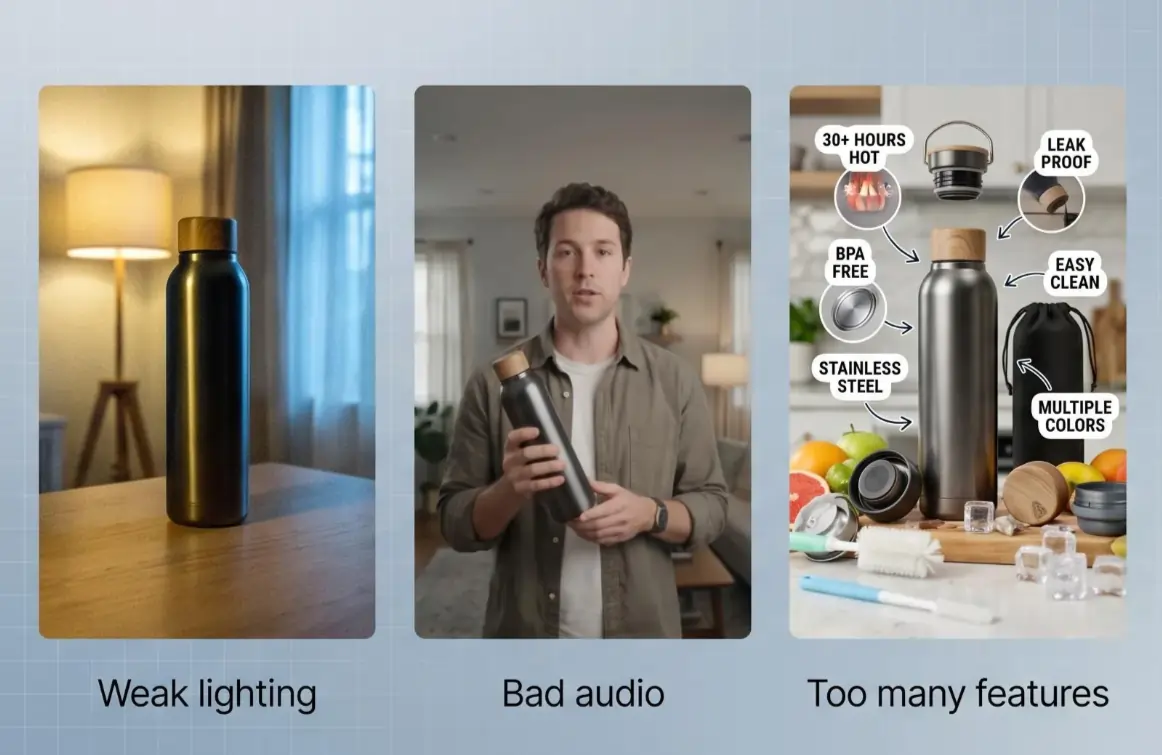
Schwaches oder gemischtes Licht. Der schnellste Weg, ein Produkt billig wirken zu lassen.
Schlechter Ton. Zuschauer tolerieren mittelmäßige Bilder. Sie tolerieren keinen Ton, dem sie mühsam folgen müssen.
Zu viele Features. Alles abzudecken bedeutet meist, nichts zu vermitteln. Ein Video, eine Botschaft.
Keine CTA. Ein Produktvideo ohne klaren nächsten Schritt ist eine verpasste Conversion.
Falsche Länge für die Plattform. Ein 3-minütiges Produkt-Showcase funktioniert nicht als TikTok-Anzeige. Wisse, wohin es geht, bevor du schneidest.
Den Hook verstecken. Wenn dein Video den Wert nicht in den ersten Sekunden signalisiert, erreichen die meisten Zuschauer den guten Teil nicht.
Was du nach dem Veröffentlichen tracken solltest
Veröffentlichen ist nicht das Ende. Starke Produktvideoteams behandeln Distribution als iterativen Kreislauf.
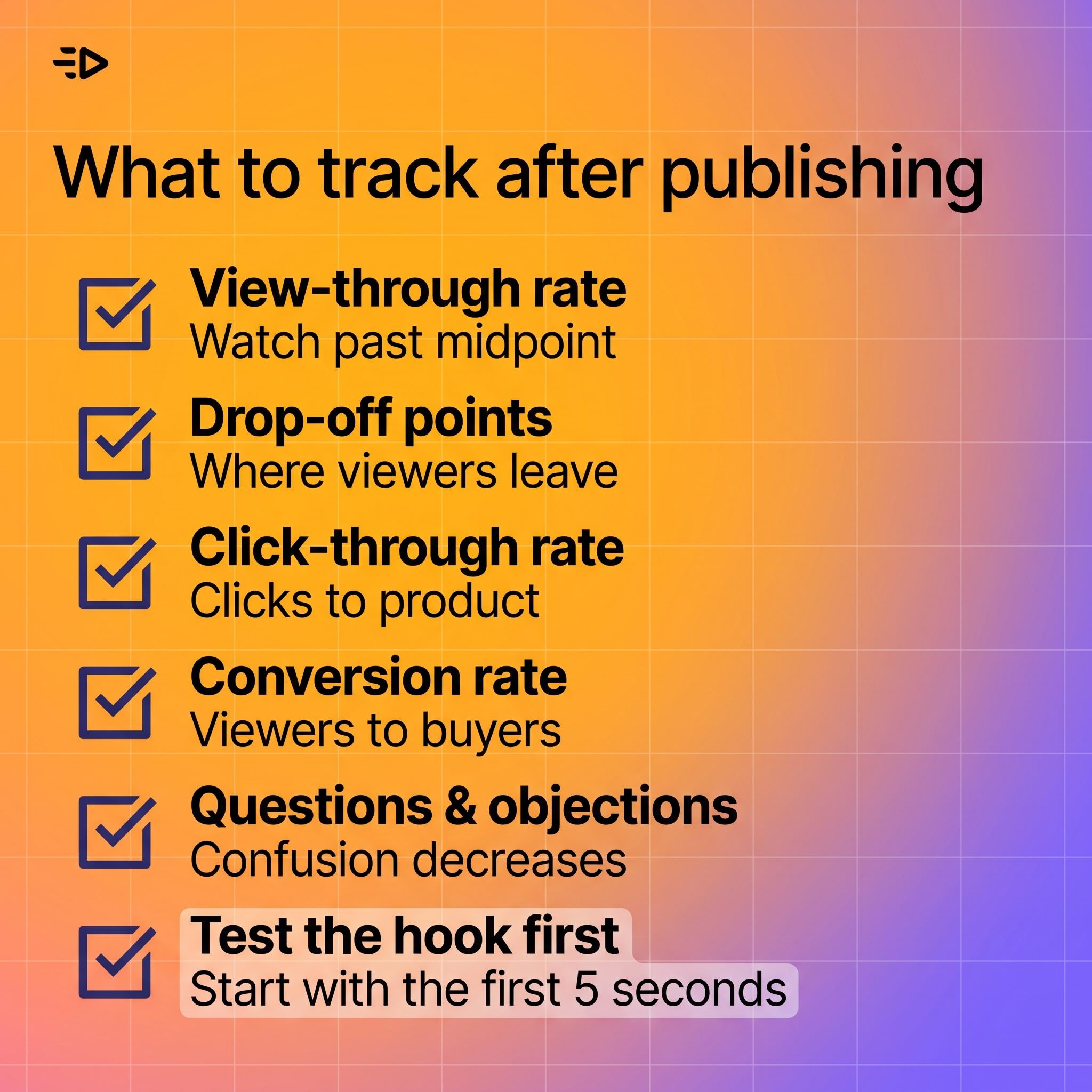
HubSpots Daten zum Videomarketing verweisen auf Engagement- und Conversion-Kennzahlen als die nützlichsten Signale für die Performance von Produktvideos. Sehenswert zu tracken:
View-Through-Rate: wie viele Menschen über die Mitte hinaus schauen
Abbruch pro Sekunde: Wo Zuschauer abspringen, zeigt dir, was nicht funktioniert
Click-Through-Rate: vom Video zur Produktseite oder CTA
Conversion-Rate: von Zuschauern zu Käufern oder Leads
Support-Tickets und Einwände: Wenn ein Video das Produkt gut erklärt, sollten Fragen, die auf Verwirrung beruhen, zurückgehen
Teste mehrere Hooks, bevor du Schlussfolgerungen ziehst. Der Hook ist meist der Bereich, in dem sich die Performance zwischen den Varianten am stärksten unterscheidet. Wenn du zwei Varianten der ersten 5 Sekunden testen kannst, tu das, bevor du sonst irgendetwas änderst.
Mehr dazu: So nutzt du KI im E-Commerce: 15 Beispiele für 2026
Häufig gestellte Fragen
Was ist ein Produktvideo?
Ein Produktvideo ist ein kurzes visuelles Format, das zeigt, was ein Produkt kann, für wen es gedacht ist und warum es den Kauf wert ist. Es wird auf Produktseiten, in sozialen Medien, in bezahlten Anzeigen und in E-Mails eingesetzt, um potenziellen Käufern schneller bei der Entscheidung zu helfen, als statische Bilder es erlauben.
Wie lang sollte ein Produktvideo sein?
Es hängt davon ab, wo es veröffentlicht wird. Für Social Ads sind 15-30 Sekunden ein üblicher Bereich. Für Produktseiten oder YouTube geben 60-90 Sekunden genug Raum, um zu demonstrieren und zu erklären. Die Regel: so kurz wie möglich, aber lang genug, um die wichtigste Frage des Zuschauers zu beantworten.
Brauche ich professionelle Ausrüstung, um ein Produktvideo zu machen?
Nein. Ein Smartphone mit Stativ, gutes Fensterlicht und ein Lavaliermikrofon decken den Großteil dessen ab, was du brauchst. Kontrolliertes Licht, stabile Kadrierung und sauberer Ton sind viel wichtiger als die Kamerqualität.
Was ist das beste Format für ein Produkt-Showcase-Video?
Beginne mit einer klaren Hero-Aufnahme, ergänze Close-ups und Footage im Nutzungskontext und füge Bewegung hinzu, um alles dynamisch zu halten. Für E-Commerce ist es meist überzeugender, das Produkt aus mehreren Blickwinkeln im realen Einsatz zu zeigen als eine polierte Studioaufnahme auf schlichtem Hintergrund.
Wie mache ich ein Produktvideo, ohne etwas zu filmen?
KI-Tools erlauben dir, Produktvideos aus einer Produkt-URL, einem Bild oder einer Textbeschreibung zu generieren. Diese Workflows sind nützlich, wenn du Volumen brauchst, mehrere kreative Ansätze schnell testen musst oder keinen Zugang zu physischer Produktion hast. Sie funktionieren gut für Performance-Tests, müssen aber für das Brand Storytelling möglicherweise mit echtem Footage ergänzt werden.
Was macht ein Produktvideo konvertierend?
Ein starker Hook in den ersten 3 Sekunden, eine klare Nutzenbotschaft, ein Beweis, dass es funktioniert (Demo, Daten oder Testimonial), und ein spezifischer CTA. Videos, die versuchen, zu viele Features abzudecken oder die Kernbotschaft zu verstecken, schneiden in der Regel schlechter ab - unabhängig von der Produktionsqualität.
Wie viele Produktvideos brauche ich?
Mehr als eines. Mindestens: ein Hero-Video für deine Produktseite, ein kurzer Schnitt für Paid Social und mindestens ein UGC- oder Testimonial-Format zum Vertrauensaufbau. Die Teams, die am schnellsten skalieren, behandeln Video als Mengen-Spiel und testen mehrere Hooks und Blickwinkel, statt auf einen einzigen Final Cut zu setzen.
Was ist Produktvideografie?
Produktvideografie ist die Praxis, Produkte in einem kontrollierten oder kontextuellen Setting zu filmen, um Videocontent für Marketingzwecke zu erstellen. Sie umfasst alles von einfachen Tischaufnahmen bis hin zu kompletten Lifestyle-Produktionen und schließt 2026 zunehmend KI-gestützte Workflows ein, die Video aus Bildern oder Produktdaten generieren.
Ein Produktvideo muss nicht teuer sein, um gut zu funktionieren. Es muss klar, schnell und auf eine Idee ausgerichtet sein. Zuschauer entscheiden innerhalb von Sekunden, ob sie weitersehen. Wenn dein Video diese Aufmerksamkeit nicht verdient, spielt die Produktionsqualität keine Rolle.
Die gute Nachricht: Die Hürde für die Produktion von Produktvideos ist deutlich gesunken. Ein gut beleuchtetes Handy-Video, sauberer Ton und präzises Editing können einen Dreh für 10.000 Dollar mit dem falschen Skript schlagen. Und KI-gestützte Workflows haben den gesamten Prozess in jeder Phase schneller gemacht, vom Skripting bis zum Final Cut.
Dieser Leitfaden zeigt, wie man ein Produktvideo von Anfang bis Ende erstellt - Planung, Skripting, Drehen, Editing und Distribution - ganz ohne Studio.
Warum Produktvideos immer noch wichtig sind
Statische Bilder zeigen, wie ein Produkt aussieht. Video zeigt, was es kann, für wen es gedacht ist und warum es den Kauf wert ist. Das ist eine andere Ebene der Überzeugungskraft.
HubSpots Marketingforschung zeigt durchgehend, dass Video eines der leistungsstärksten Content-Formate für Marketer ist, wobei ein hoher Anteil der Verbraucher Produkt- oder Erklärvideos nutzt, um Kaufentscheidungen zu treffen. Die Funktion ist einfach: Video reduziert Unsicherheit. Käufer, die ein Produkt verstehen, kaufen es eher und senden es seltener zurück.
Was sich 2026 geändert hat, ist der Format-Mix. Kurze vertikale Clips sorgen für Reichweite und Entdeckung. Längere Anchor-Videos auf Produktseiten und YouTube schaffen Vertrauen und räumen Einwände aus dem Weg. Die meisten Produkte brauchen beides, und mit kluger Planung kommst du oft aus einem einzigen Dreh dorthin.
Wähle zuerst deinen Videotyp
Bevor du eine Kamera anfasst oder ein Bearbeitungstool öffnest, entscheide, welche Art von Produktvideo du erstellst. Das Format bestimmt alles: Skriptstruktur, Shot-Liste, Länge und Einsatzort.
Demovideo. Zeigt das Produkt im Einsatz. Am besten für physische Produkte, Apps oder alles mit einem klaren Workflow. Mid-to-lower funnel.
Erklärvideo. Konzentriert sich auf das Problem und darauf, wie das Produkt es löst. Funktioniert gut für SaaS, Services und Produkte mit Lernkurve. Gut für Landingpages und Paid Ads.
Launch-Video. Ankündigungsorientiert, meist kürzer und stärker auf die Marke ausgerichtet. Für Reichweite in den sozialen Medien zum Launch gebaut.
Video im UGC-Stil. Creator oder Kunde spricht in die Kamera, oft handgehalten und locker. Starkes Vertrauenssignal. Funktioniert gut auf TikTok, Instagram Reels und in Ad Creative.
Produkt-Showcase-Video. Visuell zuerst, mit wenig Sprache. Zeigt das Produkt aus mehreren Blickwinkeln, oft mit Bewegung oder cinematischem Framing. Stark für Lifestyle-Marken und E-Commerce.
Der häufigste Fehler in dieser Phase: ein Produktvideo zu machen, das all das auf einmal erledigen soll. Wähle ein Format, bediene eine Zielgruppe, mache einen Kernpunkt.
Plane, bevor du filmst
Gute Produktvideografie beginnt mit einem Briefing, nicht mit einer Kamera. Beantworte zuerst diese Fragen:
Was soll der Zuschauer nach dem Ansehen tun?
Wer ist der Zuschauer, und was weiß er bereits?
Was ist die eine wichtigste Sache, die er verstehen muss?
Wo wird das Video veröffentlicht, und wie lange?
Die letzte Frage ist wichtiger, als viele denken. Ein Produktvideo für eine TikTok-Anzeige hat andere Anforderungen als eines für eine Produktseite. Plattform, Zielgruppe und Funnel-Phase sollten das Briefing prägen, bevor du eine einzige Zeile Skript schreibst.
Schreibe ein Skript, das funktioniert
Wistias Leitfaden zu Erklärvideos verweist auf eine verlässliche Struktur: Starte mit dem Problem des Zuschauers, halte das Skript gesprächig und bleib knapp. Das gilt für fast jedes Produktvideo-Format.
Ein einfaches Framework, das funktioniert:
Hook (0-3 Sekunden): starte mit dem Problem oder einer überraschenden Aussage, nicht mit deinem Markennamen
Problem (3-10 Sekunden): mach es so konkret, dass sich der Zuschauer wiedererkennt
Produktenthüllung: zeig, was es ist, nicht nur, wie es heißt
Demo oder Beweis: zeig, dass es funktioniert, nicht nur dass es existiert
Nutzen: was sich für den Zuschauer ändert
CTA: eine Aktion, klar formuliert
Der häufigste Fehler beim Skripting ist, zu viele Features abzudecken. Ein engeres Video, das eine Sache gut erklärt, überzeugt mehr als ein Rundgang durch einen Katalog. Wenn du fünf Dinge sagen willst, mach fünf kurze Videos.
Lies dein Skript vor dem Dreh laut vor. Wenn es wie eine Broschüre klingt, schreibe es um, bis es wie gesprochene Sprache klingt.
Aufbau ohne Studio
Du brauchst kein Studio. Du brauchst kontrolliertes Licht, stabile Kadrierung und sauberen Ton. Diese drei Dinge decken den Großteil dessen ab, was ein gutes Produktvideo von einem schlechten unterscheidet.
Licht. Natürliches Fensterlicht ist dein bester Ausgangspunkt. Positioniere dein Produkt oder Motiv so, dass es zum Fenster schaut, nicht mit dem Fenster im Rücken. Vermeide das Mischen von Lichtquellen: Tageslicht und Deckenleuchtstoffröhren zusammen erzeugen Farbstiche, die sich in der Nachbearbeitung schwer korrigieren lassen. Ein günstiges LED-Panel gibt dir mehr Konsistenz, wenn natürliches Licht nicht verfügbar ist.
Kamera. Ein modernes Smartphone auf einem Stativ reicht für die meisten Produktvideos. Wenn du eine spiegellose Kamera nutzt, sorgt ein 35-mm- oder 50-mm-Objektiv mit großer Blendenöffnung für saubere Trennung vom Hintergrund, ohne viel Aufwand. Sperre deine Belichtungseinstellungen und verlasse dich bei Nahaufnahmen von Produkten nicht auf Autofokus.
Hintergrund. Sauber und schlicht. Ein nahtloser weißer Hintergrund, eine Holzoberfläche, ein zum Lifestyle passender Kontext. Der Hintergrund sollte das Produkt unterstützen, nicht mit ihm konkurrieren.
Audio. Hier scheitern die meisten DIY-Produktvideos. Schlechter Ton zerstört Glaubwürdigkeit schneller als unperfekte Bilder. Wenn jemand vor der Kamera spricht, nutze ein Lavaliermikrofon oder ein gerichtetes Shotgun-Mikrofon. Nimm in einem ruhigen Raum auf. Weiche Einrichtungsgegenstände (Teppiche, Vorhänge, Sofas) absorbieren Echo. Harte Oberflächen (Fliesenböden, kahle Wände) nicht.
Wenn du nur ein Lieferantenfoto hast
Die meisten Leitfäden für Produktvideos gehen davon aus, dass du etwas zur Hand hast: eine polierte Produktaufnahme, Lifestyle-Bilder, vielleicht etwas Material von einem Shooting. Viele Gründer und Early-Stage-E-Commerce-Marken haben davon nichts.
Was sie haben, ist ein verschwommenes JPEG von ihrem Hersteller. Drei Blickwinkel, weißer Hintergrund, niedrige Auflösung. Das war in der E-Mail mit der Rechnung dabei.
Früher war das ein harter Stopp. Produktvideos mit irgendeiner Glaubwürdigkeit aus Lieferantenbildern zu erstellen, ohne zuerst einen Fotografen zu engagieren, war nicht möglich - und das bedeutete Kosten, Vorlaufzeit und das Verschicken von Samples, auf die man vielleicht nicht verzichten konnte.
KI-Bildgenerierung ändert das. Mit Creatifys Asset-Generator kannst du diese minderwertigen Quellbilder nehmen und in stilisierte Produktaufnahmen verwandeln: verschiedene Hintergründe, Lichtsituationen, Themen und Umgebungen, alles aus dem Originalfoto generiert. Aus einer schlichten Lieferantenaufnahme auf weißem Hintergrund wird ein dunkles Lifestyle-Bild, ein Studio-Gradient, ein Outdoor-Kontext - was auch immer zur Marke passt. Von dort aus gehen diese generierten Bilder direkt in die Videoerstellung.
Das ist kein Workaround. Für viele DTC-Founder ist es der einzige praktikable Weg zu einem professionell wirkenden Produktvideo, bevor die Marke Budget für einen echten Dreh hat.
So drehst du es
Plane deine Shots, bevor du mit dem Filmen beginnst. Eine grundlegende Shot-Liste für ein Produktvideo:
Hero-Shot: das Produkt sauber präsentiert, im Mittelpunkt
Close-ups: Textur, Details, Kernfeatures
Feature-Inserts: bestimmte Funktionen oder Komponenten in Aktion
Einsatz im Kontext: das Produkt wird von einer realen Person in einer realen Umgebung genutzt
Hands-on-Demo: jemand interagiert damit, hält es nicht nur in der Hand
Decke jede Einstellung aus mindestens zwei Winkeln ab. Beim Schnitt wirst du dir dafür danken.
Für das Pacing empfiehlt Wistia, weder ein gehetztes Gefühl noch den Eindruck zu erzeugen, man schaue in eine Produktanleitung. Gib jeder Einstellung genug Zeit, um sie lesen zu können, und schneide dann. Zuschauer im Jahr 2026 sind schnelles Editing gewohnt, brauchen aber trotzdem einen Moment, um das Gesehene zu verarbeiten.
Wenn du Content im UGC-Stil filmst, sind kleine Unperfektheiten in Ordnung. Handgeführte Bewegungen, natürliche Lichtschwankungen und ein gesprächiger Ton sind Features, keine Bugs. Zu glatt polierter UGC sieht aus wie eine Anzeige, die versucht, wie UGC auszusehen - und das fällt dem Publikum auf.
Schnitt mit Wirkung
Der Schnitt ist der Punkt, an dem die meisten Produktvideos gewonnen oder verloren werden.
Schneide aggressiv. Wenn eine Einstellung keine Information hinzufügt, schneide sie raus. Tote Luft am Anfang eines Videos ist einer der häufigsten Gründe, warum Zuschauer abspringen.
Pack den Nutzen nach vorne. Der Hook muss in den ersten 2-3 Sekunden sitzen. Heb dir den besten Teil nicht für die Mitte auf.
Füge Untertitel hinzu. Ein großer Teil von Social Video wird ohne Ton angesehen. Untertitel sind nicht mehr optional.
Mach die CTA sichtbar. Verlass dich nicht darauf, dass Zuschauer wissen, was sie als Nächstes tun sollen. Beende mit einer klaren, konkreten Aktion.
Für plattformspezifische Schnitte: Dein Hero-Video ist wahrscheinlich 60-90 Sekunden lang für eine Produktseite oder YouTube. Dein Social-Cut liegt bei 15-30 Sekunden. Dein Paid-Ad-Cut packt den Hook noch stärker nach vorne und kann nur 6-15 Sekunden lang sein. Plane im Schnitt alle drei mit ein, auch wenn du zum Start nur einen veröffentlichst.
KI-gestützte Produktvideoproduktion
Der Workflow hat sich verändert. KI übernimmt jetzt Aufgaben, die früher Spezialistenzeit gebraucht haben: Rough Cuts, Untertitelgenerierung, Skriptentwürfe, Lokalisierung und das Erstellen visueller Varianten.
Der praktischste Einsatz für die meisten Teams ist nicht vollautomatische Videoerstellung. Es geht darum, KI zu nutzen, um die Ausgabemenge in der Variations- und Iterationsphase zu erhöhen - dort, wo du 10 getestete Versionen eines Hooks brauchst, nicht einen polierten Final Cut.
Für E-Commerce- und DTC-Marken ist der Engpass meist die kreative Menge: genug Varianten über Hooks, Formate und Produktwinkel hinweg, um sinnvolle Tests zu fahren. Mit Creatifys Produktvideo-Funktion kannst du ein einzelnes Produktbild in Minuten in mehrere Video-Varianten verwandeln, was nützlich ist, wenn du schnell ein Test-Set füllen musst, statt auf einen Produktionszyklus zu warten.
Ein konkretes Beispiel: Unicorn Marketers nutzte Creatifys Asset-Generator, um in 2 Wochen über 150 Video-Ad-Varianten für einen Kunden zu erstellen, dessen Creative Library ins Stocken geraten war, was zu einer Senkung des CPA um 45 % und einer Verbesserung des ROAS um 73 % führte.
KI unterstützt den Prozess. Sie ersetzt nicht das Briefing, die Strategie oder die Entscheidung darüber, welche kreative Richtung getestet werden soll.
Mehr dazu: KI-generierte Werbung: Alles, was du 2026 wissen musst
Wiederverwendbare Frameworks für Produktvideos
Wenn du strukturell nicht weißt, wo du anfangen sollst, funktionieren diese Frameworks in den meisten Formaten:
Problem-Lösung-Demo-CTA. Die verlässlichste Struktur für Conversion-orientierte Videos. Beginnt mit Schmerz, endet mit Aktion.
Feature-Nutzen-Beweis. Gut für Demos. Benenne das Feature, erkläre, was es für den Zuschauer tut, zeige den Beweis.
Vorher-Nachher-Vergleich. Effektiv für Produkte mit einer klaren Transformation: Hautpflege, Fitness, Produktivitätstools. Unmittelbar und leicht nachzuvollziehen.
Founder-Narrativ + Demo + CTA. Funktioniert gut für Early-Stage-Marken, bei denen Vertrauen erst aufgebaut wird.
UGC-Stil "Warum ich das nutze." Der Zuschauer erzählt seinen eigenen Use Case. Wirkt organisch, baut Social Proof auf und skaliert gut, wenn du mit Creators oder KI-Avataren arbeitest.
Wähle eines. Mische keine Frameworks im selben Video. Wistias Forschung zum Pitchen mit Video verweist immer wieder auf klare Struktur und eine an den Zuschauer gerichtete Perspektive als die wichtigsten Treiber für Engagement.
Häufige Fehler, die du vermeiden solltest
Schwaches oder gemischtes Licht. Der schnellste Weg, ein Produkt billig wirken zu lassen.
Schlechter Ton. Zuschauer tolerieren mittelmäßige Bilder. Sie tolerieren keinen Ton, dem sie mühsam folgen müssen.
Zu viele Features. Alles abzudecken bedeutet meist, nichts zu vermitteln. Ein Video, eine Botschaft.
Keine CTA. Ein Produktvideo ohne klaren nächsten Schritt ist eine verpasste Conversion.
Falsche Länge für die Plattform. Ein 3-minütiges Produkt-Showcase funktioniert nicht als TikTok-Anzeige. Wisse, wohin es geht, bevor du schneidest.
Den Hook verstecken. Wenn dein Video den Wert nicht in den ersten Sekunden signalisiert, erreichen die meisten Zuschauer den guten Teil nicht.
Was du nach dem Veröffentlichen tracken solltest
Veröffentlichen ist nicht das Ende. Starke Produktvideoteams behandeln Distribution als iterativen Kreislauf.
HubSpots Daten zum Videomarketing verweisen auf Engagement- und Conversion-Kennzahlen als die nützlichsten Signale für die Performance von Produktvideos. Sehenswert zu tracken:
View-Through-Rate: wie viele Menschen über die Mitte hinaus schauen
Abbruch pro Sekunde: Wo Zuschauer abspringen, zeigt dir, was nicht funktioniert
Click-Through-Rate: vom Video zur Produktseite oder CTA
Conversion-Rate: von Zuschauern zu Käufern oder Leads
Support-Tickets und Einwände: Wenn ein Video das Produkt gut erklärt, sollten Fragen, die auf Verwirrung beruhen, zurückgehen
Teste mehrere Hooks, bevor du Schlussfolgerungen ziehst. Der Hook ist meist der Bereich, in dem sich die Performance zwischen den Varianten am stärksten unterscheidet. Wenn du zwei Varianten der ersten 5 Sekunden testen kannst, tu das, bevor du sonst irgendetwas änderst.
Mehr dazu: So nutzt du KI im E-Commerce: 15 Beispiele für 2026
Häufig gestellte Fragen
Was ist ein Produktvideo?
Ein Produktvideo ist ein kurzes visuelles Format, das zeigt, was ein Produkt kann, für wen es gedacht ist und warum es den Kauf wert ist. Es wird auf Produktseiten, in sozialen Medien, in bezahlten Anzeigen und in E-Mails eingesetzt, um potenziellen Käufern schneller bei der Entscheidung zu helfen, als statische Bilder es erlauben.
Wie lang sollte ein Produktvideo sein?
Es hängt davon ab, wo es veröffentlicht wird. Für Social Ads sind 15-30 Sekunden ein üblicher Bereich. Für Produktseiten oder YouTube geben 60-90 Sekunden genug Raum, um zu demonstrieren und zu erklären. Die Regel: so kurz wie möglich, aber lang genug, um die wichtigste Frage des Zuschauers zu beantworten.
Brauche ich professionelle Ausrüstung, um ein Produktvideo zu machen?
Nein. Ein Smartphone mit Stativ, gutes Fensterlicht und ein Lavaliermikrofon decken den Großteil dessen ab, was du brauchst. Kontrolliertes Licht, stabile Kadrierung und sauberer Ton sind viel wichtiger als die Kamerqualität.
Was ist das beste Format für ein Produkt-Showcase-Video?
Beginne mit einer klaren Hero-Aufnahme, ergänze Close-ups und Footage im Nutzungskontext und füge Bewegung hinzu, um alles dynamisch zu halten. Für E-Commerce ist es meist überzeugender, das Produkt aus mehreren Blickwinkeln im realen Einsatz zu zeigen als eine polierte Studioaufnahme auf schlichtem Hintergrund.
Wie mache ich ein Produktvideo, ohne etwas zu filmen?
KI-Tools erlauben dir, Produktvideos aus einer Produkt-URL, einem Bild oder einer Textbeschreibung zu generieren. Diese Workflows sind nützlich, wenn du Volumen brauchst, mehrere kreative Ansätze schnell testen musst oder keinen Zugang zu physischer Produktion hast. Sie funktionieren gut für Performance-Tests, müssen aber für das Brand Storytelling möglicherweise mit echtem Footage ergänzt werden.
Was macht ein Produktvideo konvertierend?
Ein starker Hook in den ersten 3 Sekunden, eine klare Nutzenbotschaft, ein Beweis, dass es funktioniert (Demo, Daten oder Testimonial), und ein spezifischer CTA. Videos, die versuchen, zu viele Features abzudecken oder die Kernbotschaft zu verstecken, schneiden in der Regel schlechter ab - unabhängig von der Produktionsqualität.
Wie viele Produktvideos brauche ich?
Mehr als eines. Mindestens: ein Hero-Video für deine Produktseite, ein kurzer Schnitt für Paid Social und mindestens ein UGC- oder Testimonial-Format zum Vertrauensaufbau. Die Teams, die am schnellsten skalieren, behandeln Video als Mengen-Spiel und testen mehrere Hooks und Blickwinkel, statt auf einen einzigen Final Cut zu setzen.
Was ist Produktvideografie?
Produktvideografie ist die Praxis, Produkte in einem kontrollierten oder kontextuellen Setting zu filmen, um Videocontent für Marketingzwecke zu erstellen. Sie umfasst alles von einfachen Tischaufnahmen bis hin zu kompletten Lifestyle-Produktionen und schließt 2026 zunehmend KI-gestützte Workflows ein, die Video aus Bildern oder Produktdaten generieren.

Bereit, Ihr Produkt in ein fesselndes Video zu verwandeln?