

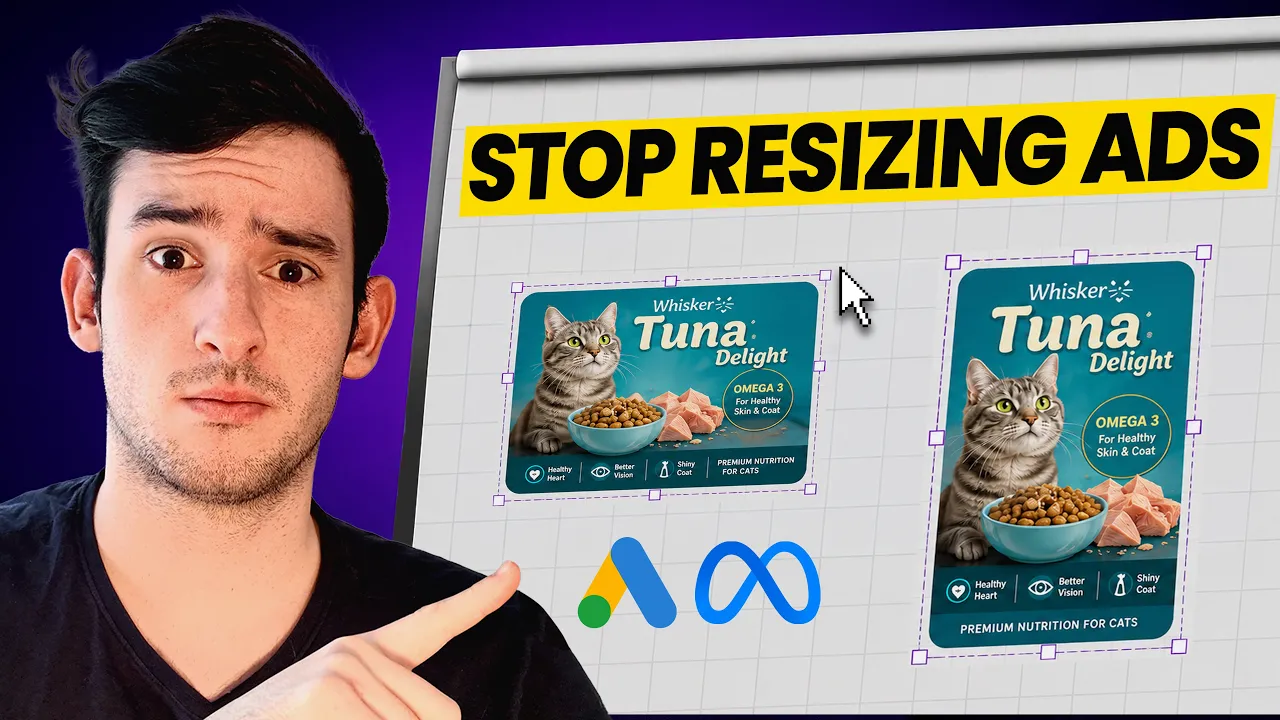
Wie Sie Meta-Ad-Creatives & Google-PMax-Assets mit KI erstellen
Wie Sie Meta-Ad-Creatives & Google-PMax-Assets mit KI erstellen


Creatify-Team
TEILEN


IN DIESEM ARTIKEL
👉🏻 Teste Creatify kostenlos: https://creatify.ai/?utm_source=yt&utm_medium=sm_organic&utm_campaign=vs&utm_content=50
Wie du Meta-Ad-Creatives und Google PMax-Assets mit KI erstellst – in wenigen Minuten, ohne Designer, ohne Canva und ohne manuelles Resizing.
Wenn du Meta- und Google PMax-Anzeigen schaltest und dich damit abmühst, nur eine einzige Creative-Größe zu erstellen, oder jemanden dafür bezahlen musst, jedes Asset manuell anzupassen, löst dieser KI-Workflow dein Problem. Im Video starte ich mit einem Produktlink und einem einfachen Prompt, um ein statisches Bild im Format 1:1 (1080x1080) und ein Video in 1080x1920 zu generieren. Von dort aus passt die KI diese in jede von Meta und Google PMax benötigte Größe an – und verwandelt ein einziges Briefing in ein komplettes Creative-Paket, das direkt in die Werbeplattformen hochgeladen werden kann.
Das Tool, das ich verwende, ist Creatify – der Agent passt dasselbe Creative an die anderen Größen wie 1200x628 und 1080x1920 an, optimiert für Google PMax-Platzierungen. Er behält die kreative Richtung bei und passt lediglich das Layout an die jeweilige Größe an.
Ich habe nicht mehr nur eine einzige Creative-Größe erstellt, sondern ein ganzes Paket von über fünf Assets aus einem einzigen Start-Briefing – und damit das, was früher Stunden für die Größenanpassung dauerte, auf wenige Minuten verkürzt. Wenn du dir das Geld für einen Designer oder das mühsame Neuerstellen von Anzeigen sparen willst, ist das der schnellste Weg, den ich kenne.
Der Ansatz:
1. Starte mit der Erstellung eines quadratischen 1:1-Statics, das sowohl auf Meta als auch auf Google PMax funktioniert
2. Passe dieses Static mit einem einfachen Prompt in horizontale und vertikale Größen an
3. Teste und skaliere die winning Ad-Creatives
Funktioniert für E-Commerce-Marken, Marketer und Agenturen, die Ad-Testing über mehrere Plattformen hinweg betreiben – für jedes DTC-Business, das Meta- und Google PMax-Anzeigen schaltet.
Vielen Dank fürs Zuschauen!
-- Joel
Time-stamps:
0:00 - Intro
0:54 - Warum Ad-Creative-Größen wichtig sind
1:18 - Hier starten: das quadratische 1:1-Format
4:01 - Deine ersten zwei Ad-Creatives
4:17 - Anpassung in jede Meta- & PMax-Größe
6:22 - Warum du mit 1:1 startest
6:51 - Was du zuerst hochladen solltest
7:27 - Zusammenfassung des gesamten Workflows
7:50 - Outro
#MetaAds #GooglePMax #AIAdCreatives
👉🏻 Teste Creatify kostenlos: https://creatify.ai/?utm_source=yt&utm_medium=sm_organic&utm_campaign=vs&utm_content=50
Wie du Meta-Ad-Creatives und Google PMax-Assets mit KI erstellst – in wenigen Minuten, ohne Designer, ohne Canva und ohne manuelles Resizing.
Wenn du Meta- und Google PMax-Anzeigen schaltest und dich damit abmühst, nur eine einzige Creative-Größe zu erstellen, oder jemanden dafür bezahlen musst, jedes Asset manuell anzupassen, löst dieser KI-Workflow dein Problem. Im Video starte ich mit einem Produktlink und einem einfachen Prompt, um ein statisches Bild im Format 1:1 (1080x1080) und ein Video in 1080x1920 zu generieren. Von dort aus passt die KI diese in jede von Meta und Google PMax benötigte Größe an – und verwandelt ein einziges Briefing in ein komplettes Creative-Paket, das direkt in die Werbeplattformen hochgeladen werden kann.
Das Tool, das ich verwende, ist Creatify – der Agent passt dasselbe Creative an die anderen Größen wie 1200x628 und 1080x1920 an, optimiert für Google PMax-Platzierungen. Er behält die kreative Richtung bei und passt lediglich das Layout an die jeweilige Größe an.
Ich habe nicht mehr nur eine einzige Creative-Größe erstellt, sondern ein ganzes Paket von über fünf Assets aus einem einzigen Start-Briefing – und damit das, was früher Stunden für die Größenanpassung dauerte, auf wenige Minuten verkürzt. Wenn du dir das Geld für einen Designer oder das mühsame Neuerstellen von Anzeigen sparen willst, ist das der schnellste Weg, den ich kenne.
Der Ansatz:
1. Starte mit der Erstellung eines quadratischen 1:1-Statics, das sowohl auf Meta als auch auf Google PMax funktioniert
2. Passe dieses Static mit einem einfachen Prompt in horizontale und vertikale Größen an
3. Teste und skaliere die winning Ad-Creatives
Funktioniert für E-Commerce-Marken, Marketer und Agenturen, die Ad-Testing über mehrere Plattformen hinweg betreiben – für jedes DTC-Business, das Meta- und Google PMax-Anzeigen schaltet.
Vielen Dank fürs Zuschauen!
-- Joel
Time-stamps:
0:00 - Intro
0:54 - Warum Ad-Creative-Größen wichtig sind
1:18 - Hier starten: das quadratische 1:1-Format
4:01 - Deine ersten zwei Ad-Creatives
4:17 - Anpassung in jede Meta- & PMax-Größe
6:22 - Warum du mit 1:1 startest
6:51 - Was du zuerst hochladen solltest
7:27 - Zusammenfassung des gesamten Workflows
7:50 - Outro
#MetaAds #GooglePMax #AIAdCreatives

Bereit, Ihr Produkt in ein fesselndes Video zu verwandeln?
Das könnte Ihnen auch gefallen


Bereit, Ihr Marketing zu beschleunigen?
Testen Sie Ihre neuen Produktideen innerhalb von Minuten mit KI-generierten Videoanzeigen


Bereit, Ihr Marketing zu beschleunigen?
Testen Sie Ihre neuen Produktideen innerhalb von Minuten mit KI-generierten Videoanzeigen
Bereit, Ihr Marketing zu beschleunigen?
Testen Sie Ihre neuen Produktideen innerhalb von Minuten mit KI-generierten Videoanzeigen
Bereit, Ihr Marketing zu beschleunigen?
Testen Sie Ihre neuen Produktideen innerhalb von Minuten mit KI-generierten Videoanzeigen

Erstellen Sie ansprechende Videoanzeigen für Ihre Produkte
von jeder URL



Creatify Lab • Urheberrecht © 2026
Sprache
German (Germany)
Features
Tools
Anwendungsfälle
Erstellen Sie ansprechende Videoanzeigen für Ihre Produkte
von jeder URL
Creatify Lab • Urheberrecht © 2026
Sprache
German (Germany)
Features
Tools
Anwendungsfälle
Erstellen Sie ansprechende Videoanzeigen für Ihre Produkte
von jeder URL
Creatify Lab • Urheberrecht © 2026
Sprache
German (Germany)
Features
Tools
Anwendungsfälle
YouTube
Snapchat
Shopify
Erstelle KI-Avatar
OTT & CTV
Lead-Generierung
Erstellen Sie ansprechende Videoanzeigen für Ihre Produkte
von jeder URL
Creatify Lab • Urheberrecht © 2026
Sprache
German (Germany)
Features
Tools
Anwendungsfälle
