Equipe Creatify
COMPARTILHAR


NESTE ARTIGO
A few years ago, learning how to advertise on social media mostly meant learning how to pick audiences: stacking interests, carving out age brackets, building a dozen ad sets to find the people most likely to buy. In 2026, the platforms do that part themselves. Meta, TikTok, and Google now run AI-automated campaign types that find your buyers for you, which means the work has moved somewhere else: to the quality of the data you feed them, the strength of your creative, and how cleanly you set everything up. Worldwide, advertisers pour hundreds of billions of dollars a year into social ads (Statista put 2025 social media ad spending near $277 billion), so the auctions you are entering are crowded and the room for sloppy setup is small.
This guide walks through the whole thing in three parts, the same three every successful campaign moves through: setting it up, targeting the right people, and scaling what works. It covers all the major platforms, so whether you are starting on Meta, TikTok, YouTube, LinkedIn, Pinterest, Snapchat, Reddit, or X, you will know what to do. It assumes you are newer to paid social or leveling up from boosted posts and want to learn how to use social media advertising properly, and it keeps the jargon to a minimum.
The one idea that ties it all together
Before the steps, hold onto a single principle, because it explains almost every decision below: automation amplifies the quality of your inputs, but it cannot repair weak ones. A smart campaign type will spend your budget more efficiently, but it cannot fix broken tracking, a vague offer, or a tired ad. So if you want to know how to make social media advertising pay off, most of the work is making your inputs good: accurate conversion data going in, a clear objective, and creative worth showing. Get those right and the automation does the heavy lifting. Get them wrong and no setting will save you.
Part 1: Setup, the foundation every platform needs
Choose the platform that fits your audience
You do not need to be everywhere when you first figure out how to advertise on social media. Start where your customers already spend time, then expand once something works. Here is the quick version of who is where and what each platform is best at.
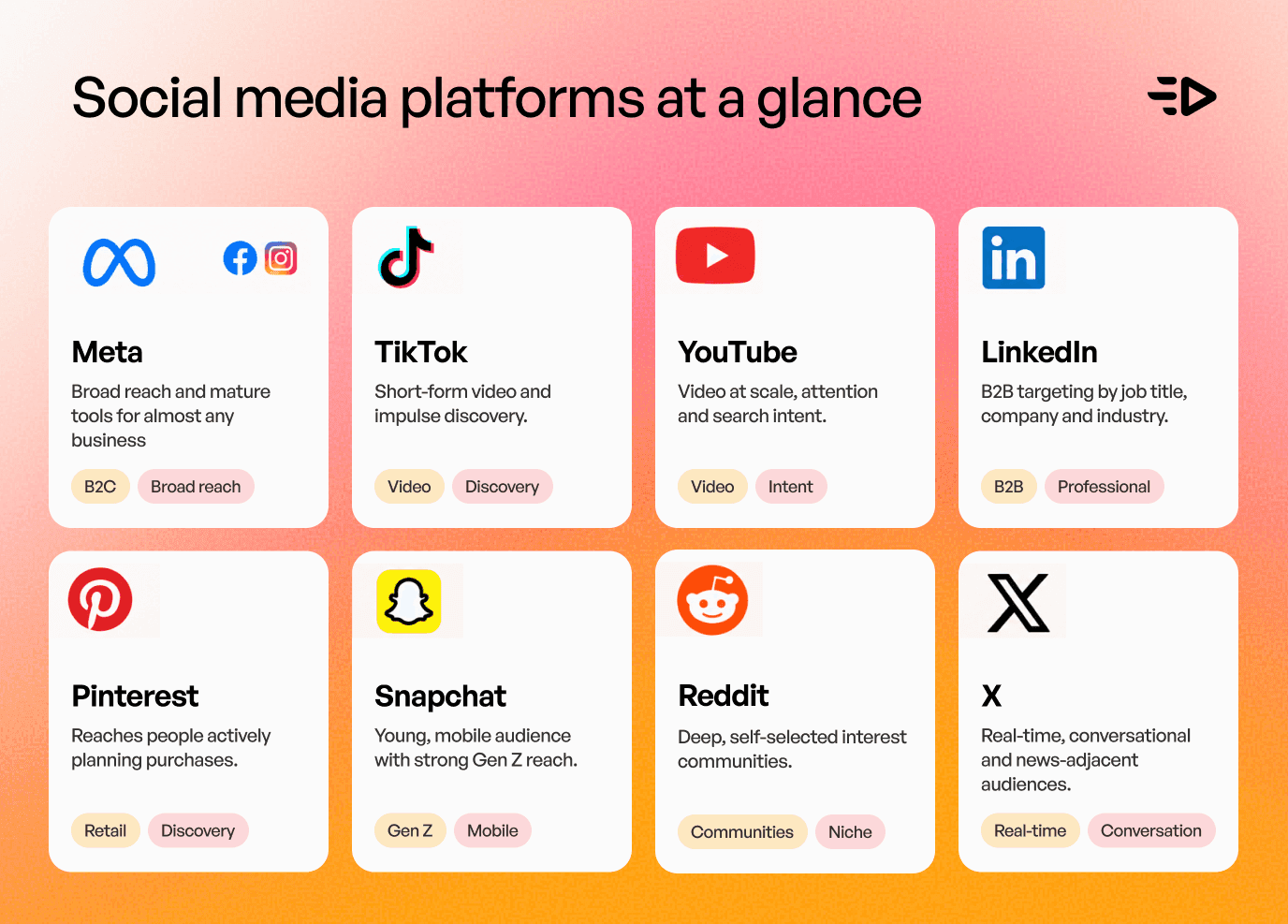
Meta (Facebook and Instagram) is the default starting point for most businesses. It has the broadest reach, the most mature tools, and works for nearly every product, from ecommerce to local services to apps. TikTok is where short-form video and impulse discovery live; it rewards native, entertaining creative and reaches a younger, trend-driven audience, though its user base is broadening every year. YouTube, bought through Google Ads, is unmatched for video at scale and for capturing both attention and, through its connection to Search, intent. LinkedIn is the place for B2B: expensive per impression but able to target by job title, company, and industry in ways no other platform can. Pinterest reaches people actively planning purchases, which makes it strong for retail, home, beauty, and DIY. Snapchat skews young and mobile, good for reach among Gen Z. Reddit reaches deep, self-selected interest communities and rewards ads that respect the room. X works for real-time, conversational, and news-adjacent audiences.
Cost varies a lot by platform, and the number most people ask about is CPM, the price per thousand impressions. As a very rough guide, TikTok tends to run cheapest at around $4 to $8, X and Meta sit in the middle (Meta commonly $8 to $14), YouTube a little higher, and LinkedIn is the most expensive by a wide margin, often $20 to $45, because you are paying for precise professional targeting. Treat these only as loose ballparks; they swing with your industry, audience, objective, and season, and climb in competitive niches, so benchmark against your own account rather than these numbers.
Install measurement before you spend a dollar
This is the least glamorous step and the most important. Before you launch your first advertisement, social media platforms need clean data to work with. The platform's optimization can only be as good as the conversion data you send it, and in 2026 a browser pixel on its own is no longer enough, because ad blockers, browser privacy limits, and cookie restrictions quietly eat a chunk of your data.
The current standard is to run two connections at once: the client-side pixel (Meta Pixel, TikTok Pixel, the Google tag, LinkedIn Insight Tag, Pinterest Tag, Snap Pixel, Reddit Pixel, X Pixel) plus the platform's server-side connection, its Conversions API (Meta's CAPI, TikTok's Events API, LinkedIn's Conversions API, and the equivalents on Pinterest, Snap, and Reddit). The pixel reports from the browser; the API reports from your server, so together they recover events the browser misses. The one rule you must not skip: pass a shared event ID so the two feeds can be deduplicated, or the same purchase gets counted twice and your reporting and optimization both drift.
Then define a short event ladder that mirrors your funnel: a content or product view, add to cart, begin checkout, and purchase for ecommerce, or a lead and the qualified downstream stages (a booked call, an opportunity, closed revenue) for lead generation. Send the useful details with each event, especially value and currency, so the platform can optimize toward revenue rather than raw conversion count.
Choose the objective that matches the real outcome
Every platform makes you pick a campaign objective, and this single choice tells the algorithm who to look for. Pick the actual business result you want. If you want sales, choose the sales or conversions objective. If you want leads, choose lead generation. The common, costly mistake is choosing a traffic or engagement objective because it produces cheap clicks or likes; the system then dutifully finds people who click and engage but rarely buy. Cheap traffic that never converts is the most expensive thing in paid social.
Structure the account simply
Beginners tend to over-build: many campaigns, many ad sets, each sliced by a different audience. In 2026 that works against you, because every ad set needs its own steady stream of conversions to learn, and splitting your data across a dozen of them starves all of them. Consolidate instead. A clean starting structure is roughly one campaign per core objective and market, with only two or three ad sets under it, and your creative concentrated so the platform has enough signal to optimize. You can always expand later; you cannot un-starve a campaign that never gathered enough data.
Set a starting budget
The honest answer to "how much does it cost to advertise on social media" is that you can start with as little as $5 to $10 a day, but a testing budget that truly learns is higher. The reason is the learning phase: Meta's well-known benchmark, which TikTok roughly echoes, is around 50 optimization events per ad set within about a week before delivery stabilizes. Other platforms set their own thresholds, but the pattern holds everywhere. So a useful way to set a starting budget is to work backward from that. If your target action costs about $20, you need to be spending enough to buy around 50 of them a week for the system to find its footing, which for many advertisers lands somewhere around $50 to $100 a day per ad set, and more on high-CPM platforms like LinkedIn. If that is beyond your budget, optimize for a cheaper, earlier event in your funnel (an add to cart or a lead rather than a purchase) so you can still hit the volume the algorithm needs.
Get the creative specs right
Design vertical first. The full-screen 9:16 format is what Reels, TikTok, YouTube Shorts, Snapchat, and Pinterest all use, and it is where most attention now lives, so build for it and keep your logo, captions, and key message inside the safe zones, away from the edges where the platform's buttons and captions sit. Keep a 4:5 and a 1:1 version on hand for feed placements. Design for sound-off with captions, because most feeds autoplay muted, and lead with your hook in the first second or two, before anyone decides to scroll past.
Part 2: Targeting when advertising through social media in 2026
The shift: you set the guardrails, the AI finds the audience

This is the biggest change, and it is why an old how-to on social media advertising will steer you wrong. The platforms now push AI-automated campaign types as the default: Meta Advantage+, TikTok Smart+ (and GMV Max for TikTok Shop sales), and Google's Performance Max and Demand Gen. LinkedIn is a step behind, with no fully hands-off equivalent, but it leans the same way through AI features like Predictive Audiences. In these campaigns you no longer hand-pick a narrow audience. You supply the inputs (your objective, your budget, your creative, and your data signals) and the system decides who to show the ad to, testing across placements and audiences far faster than any human could, working from broad guardrails you set rather than hard targeting.
For a beginner this is good news: it lowers the skill floor. Your job is to give the automation good guardrails and good material, then let it search. Fighting it by forcing narrow manual audiences usually raises your costs and slows learning.
Broad versus detailed targeting
The practical rule in 2026 is to start broad and let the system narrow for you. Broad targeting, meaning little more than a country, an age range, and your creative, gives the AI room to analyze who responds and match your ad to high-intent users, often at a lower cost than tightly defined audiences. Detailed, manual targeting still has its place, but a narrower one: precise B2B targeting on LinkedIn by job title and company, small local businesses that only want a few zip codes, or genuinely niche products where the audience is a rounding error. Outside those cases, the old habit of building ten interest-based ad sets to isolate the perfect segment is mostly wasted effort now.
Feed the machine your first-party data
Since Apple's tracking changes reshaped how much the platforms can see on their own, the data you own has become one of your most valuable inputs. Upload your first-party data (customer email lists, past purchasers, high-value cohorts) and use it two ways: as a seed for the platform to find similar people, and value-based so the system chases your best customers rather than just any converter. Use the same lists as exclusions too, so you stop paying to reach people who already bought. Feeding this data in as a signal that anchors the automation works far better than treating each list as an isolated audience to target on its own.
Creative is the new targeting
Here is the mental shift that ties targeting together: when the platform chooses the audience, your creative becomes the lever that decides which audience it chooses. A hook that speaks to new parents will train the system toward new parents; an ad built around price will pull in deal-seekers. In a very real sense you now target through your creative rather than through a settings menu, which is why the teams winning in 2026 are usually the ones producing the most varied, best-targeted creative, not the ones with the cleverest audience spreadsheet.
Retargeting still matters, in a smaller way
Retargeting people who visited your site or engaged with your content still works and still converts efficiently, but it is a smaller slice than it was, both because tracking is leakier and because the broad automated campaigns now absorb a lot of that warm audience on their own. Keep a retargeting layer, but do not expect it to carry the whole account the way it might have a few years ago.
Part 3: Scaling, turning a winner into growth
Read the right numbers, and give it time
Before you scale anything, make sure you are reading results correctly. Platform-reported metrics are useful but flattering, because every platform claims credit generously. The healthier view is a blended one: your total spend across everything against your total new revenue or leads, sometimes called blended CAC or a marketing efficiency ratio. And give campaigns room to breathe. During the first seven to ten days, while the campaign is in its learning phase gathering the conversions it needs, resist the urge to tweak. Every meaningful edit resets the learning and burns money restarting it.
Scale vertically and horizontally

Once something is clearly working, there are two ways to grow it. Vertical scaling means adding budget to the winner, but gently. A widely used rule of thumb, not a hard law, is to raise the daily budget by roughly 15 to 20 percent every three or four days, which keeps you from shocking the system back into the learning phase; the right pace depends on your conversion volume and bid strategy. The classic beginner error is doubling the budget overnight, which almost always spikes your cost per result. Horizontal scaling means widening rather than deepening: launching new creative angles, testing new customer personas, or duplicating the winning setup into an automated campaign type like Advantage+ or Smart+. Most durable growth comes from horizontal moves, because a single ad set can only absorb so much budget before it saturates.
Treat creative testing as the engine
Scaling is really a creative problem. The single biggest constraint on how far you can grow is how many fresh, good ads you can put in front of the machine. A sustainable habit is an always-on pipeline of new creative, on the order of five to ten new assets or variations per ad set each month, and more if you are feeding an automated campaign that thrives on volume. Test at the level of the hook and the angle, not just the color of a button, because those are what change who responds.
Spot fatigue before it costs you
Every winning ad eventually wears out as the same people see it too many times. The signals are clear: your frequency and your CPM climb while your click-through rate falls. When you see that pattern, the fix is almost always new creative, not a change to your campaign settings. Refresh the hook, the visual, or the format and feed the new version in. Chasing fatigue with bid tweaks instead of fresh ads is one of the most common ways advertisers stall.
Expand to a second platform
Once one platform is profitable and stable, the next lever is a second one. Take the creative and the audience insights that worked, adapt the format to the new platform's native style rather than copying the exact file, and start it as its own small test with its own learning budget. Do not assume a Meta winner will win on TikTok unmodified; the principle travels, the execution has to be rebuilt.
Where Creatify fits
Notice that once targeting is automated, the guide keeps returning to the same bottleneck: creative. When the platform is choosing the audience and the budget, the volume and quality of your ads is the main lever left in your hands, and producing enough good, on-brand creative to feed that machine is exactly the problem we built Creatify to solve.
Creatify Agent turns a product URL or a rough idea into finished, on-brand video and image ads, researching your brand and competitors first and checking every scene against your actual product, logo, and claims so it does not invent details or drift off-brand. That is what makes it usable at the volume paid social now demands: dozens of variations and angles for a few dollars each rather than a few hundred dollars and a week each. From there, our Performance Agent handles the media-buying side, connecting directly to your Meta, Google, TikTok, and AppLovin accounts to audit spend, launch campaigns, and monitor performance, with a brief-to-live campaign in under a minute. In our own testing on the VideoAdAgent benchmark, Creatify Agent won 94% of head-to-head comparisons against the leading AI ad agent, and the platform holds a 4.8 out of 5 on G2 across more than a thousand reviews. Mapped onto this guide, it is a way to make the setup and creative steps fast, and to keep the scaling engine fed without a full production team.
A simple 2026 starting playbook
If you want the whole thing as a short checklist, here it is. Pick one platform where your audience already is. Install both the pixel and the Conversions API, and confirm your events are firing and deduplicated. Choose the objective that matches your real goal, sales or leads, not clicks. Build a lean structure, one campaign and two or three ad sets, and set a budget high enough to reach around 50 conversions a week. Start with broad targeting plus one first-party audience, and let an automated campaign type do the finding. Launch several distinct creative angles, designed vertically and for sound-off. Wait seven to ten days without meddling, read your blended numbers, then scale the winner by 15 to 20 percent every few days while you keep new creative flowing. Watch for rising frequency and falling CTR, refresh creative when you see it, and only then expand to a second platform.
▶ Read also: B2B video marketing is not B2C with a suit on - here's what works instead
Frequently Asked Questions
How much does it cost to advertise on social media?
You can start for as little as $5 to $10 a day on most platforms, but a budget that lets the campaign learn is usually higher, often around $50 to $100 a day per ad set, because the automation needs a steady flow of conversions (Meta's benchmark is about 50 a week) to optimize well. Costs also vary by platform: TikTok tends to be cheapest per thousand impressions and LinkedIn the most expensive. The real driver of your cost, though, is your creative and your offer, not the platform's base rates.
Which platform should I start with?
For most businesses, Meta (Facebook and Instagram) is the safest first platform because of its reach and mature tools. Start on TikTok instead if your product is visual, impulse-driven, and aimed at a younger audience; on LinkedIn if you sell B2B; and on Pinterest if you are in retail, home, or beauty and want to reach people actively planning purchases. Pick one, get it working, then expand.
Do I still need to pick audiences in 2026?
Much less than you used to. The automated campaign types (Meta Advantage+, TikTok Smart+, Google Performance Max) prefer broad targeting and use your creative and conversion data to find buyers. Manual audience selection still helps in specific cases, mainly B2B targeting on LinkedIn, tight local areas, and genuinely niche products, but for most advertisers, going broad and feeding the system good creative and first-party data now beats hand-built audiences.
How long before I see results, and when can I scale?
Give a new campaign about seven to ten days before judging it, since that is roughly how long the learning phase takes, and avoid major edits during that window because they reset it. Once a campaign is clearly profitable on your blended numbers and past learning, you can begin scaling, raising budget by about 15 to 20 percent every three to four days rather than in big jumps.
How many ads do I need to test?
More than most beginners expect. Because creative is now your main lever, plan for an ongoing flow of new ads rather than one or two you run forever, on the order of five to ten fresh assets or variations per ad set each month, and more if you are feeding an automated campaign built for volume. Test different hooks and angles, not just small visual tweaks, because those are what change who responds.
A few years ago, learning how to advertise on social media mostly meant learning how to pick audiences: stacking interests, carving out age brackets, building a dozen ad sets to find the people most likely to buy. In 2026, the platforms do that part themselves. Meta, TikTok, and Google now run AI-automated campaign types that find your buyers for you, which means the work has moved somewhere else: to the quality of the data you feed them, the strength of your creative, and how cleanly you set everything up. Worldwide, advertisers pour hundreds of billions of dollars a year into social ads (Statista put 2025 social media ad spending near $277 billion), so the auctions you are entering are crowded and the room for sloppy setup is small.
This guide walks through the whole thing in three parts, the same three every successful campaign moves through: setting it up, targeting the right people, and scaling what works. It covers all the major platforms, so whether you are starting on Meta, TikTok, YouTube, LinkedIn, Pinterest, Snapchat, Reddit, or X, you will know what to do. It assumes you are newer to paid social or leveling up from boosted posts and want to learn how to use social media advertising properly, and it keeps the jargon to a minimum.
The one idea that ties it all together
Before the steps, hold onto a single principle, because it explains almost every decision below: automation amplifies the quality of your inputs, but it cannot repair weak ones. A smart campaign type will spend your budget more efficiently, but it cannot fix broken tracking, a vague offer, or a tired ad. So if you want to know how to make social media advertising pay off, most of the work is making your inputs good: accurate conversion data going in, a clear objective, and creative worth showing. Get those right and the automation does the heavy lifting. Get them wrong and no setting will save you.
Part 1: Setup, the foundation every platform needs
Choose the platform that fits your audience
You do not need to be everywhere when you first figure out how to advertise on social media. Start where your customers already spend time, then expand once something works. Here is the quick version of who is where and what each platform is best at.
Meta (Facebook and Instagram) is the default starting point for most businesses. It has the broadest reach, the most mature tools, and works for nearly every product, from ecommerce to local services to apps. TikTok is where short-form video and impulse discovery live; it rewards native, entertaining creative and reaches a younger, trend-driven audience, though its user base is broadening every year. YouTube, bought through Google Ads, is unmatched for video at scale and for capturing both attention and, through its connection to Search, intent. LinkedIn is the place for B2B: expensive per impression but able to target by job title, company, and industry in ways no other platform can. Pinterest reaches people actively planning purchases, which makes it strong for retail, home, beauty, and DIY. Snapchat skews young and mobile, good for reach among Gen Z. Reddit reaches deep, self-selected interest communities and rewards ads that respect the room. X works for real-time, conversational, and news-adjacent audiences.
Cost varies a lot by platform, and the number most people ask about is CPM, the price per thousand impressions. As a very rough guide, TikTok tends to run cheapest at around $4 to $8, X and Meta sit in the middle (Meta commonly $8 to $14), YouTube a little higher, and LinkedIn is the most expensive by a wide margin, often $20 to $45, because you are paying for precise professional targeting. Treat these only as loose ballparks; they swing with your industry, audience, objective, and season, and climb in competitive niches, so benchmark against your own account rather than these numbers.
Install measurement before you spend a dollar
This is the least glamorous step and the most important. Before you launch your first advertisement, social media platforms need clean data to work with. The platform's optimization can only be as good as the conversion data you send it, and in 2026 a browser pixel on its own is no longer enough, because ad blockers, browser privacy limits, and cookie restrictions quietly eat a chunk of your data.
The current standard is to run two connections at once: the client-side pixel (Meta Pixel, TikTok Pixel, the Google tag, LinkedIn Insight Tag, Pinterest Tag, Snap Pixel, Reddit Pixel, X Pixel) plus the platform's server-side connection, its Conversions API (Meta's CAPI, TikTok's Events API, LinkedIn's Conversions API, and the equivalents on Pinterest, Snap, and Reddit). The pixel reports from the browser; the API reports from your server, so together they recover events the browser misses. The one rule you must not skip: pass a shared event ID so the two feeds can be deduplicated, or the same purchase gets counted twice and your reporting and optimization both drift.
Then define a short event ladder that mirrors your funnel: a content or product view, add to cart, begin checkout, and purchase for ecommerce, or a lead and the qualified downstream stages (a booked call, an opportunity, closed revenue) for lead generation. Send the useful details with each event, especially value and currency, so the platform can optimize toward revenue rather than raw conversion count.
Choose the objective that matches the real outcome
Every platform makes you pick a campaign objective, and this single choice tells the algorithm who to look for. Pick the actual business result you want. If you want sales, choose the sales or conversions objective. If you want leads, choose lead generation. The common, costly mistake is choosing a traffic or engagement objective because it produces cheap clicks or likes; the system then dutifully finds people who click and engage but rarely buy. Cheap traffic that never converts is the most expensive thing in paid social.
Structure the account simply
Beginners tend to over-build: many campaigns, many ad sets, each sliced by a different audience. In 2026 that works against you, because every ad set needs its own steady stream of conversions to learn, and splitting your data across a dozen of them starves all of them. Consolidate instead. A clean starting structure is roughly one campaign per core objective and market, with only two or three ad sets under it, and your creative concentrated so the platform has enough signal to optimize. You can always expand later; you cannot un-starve a campaign that never gathered enough data.
Set a starting budget
The honest answer to "how much does it cost to advertise on social media" is that you can start with as little as $5 to $10 a day, but a testing budget that truly learns is higher. The reason is the learning phase: Meta's well-known benchmark, which TikTok roughly echoes, is around 50 optimization events per ad set within about a week before delivery stabilizes. Other platforms set their own thresholds, but the pattern holds everywhere. So a useful way to set a starting budget is to work backward from that. If your target action costs about $20, you need to be spending enough to buy around 50 of them a week for the system to find its footing, which for many advertisers lands somewhere around $50 to $100 a day per ad set, and more on high-CPM platforms like LinkedIn. If that is beyond your budget, optimize for a cheaper, earlier event in your funnel (an add to cart or a lead rather than a purchase) so you can still hit the volume the algorithm needs.
Get the creative specs right
Design vertical first. The full-screen 9:16 format is what Reels, TikTok, YouTube Shorts, Snapchat, and Pinterest all use, and it is where most attention now lives, so build for it and keep your logo, captions, and key message inside the safe zones, away from the edges where the platform's buttons and captions sit. Keep a 4:5 and a 1:1 version on hand for feed placements. Design for sound-off with captions, because most feeds autoplay muted, and lead with your hook in the first second or two, before anyone decides to scroll past.
Part 2: Targeting when advertising through social media in 2026
The shift: you set the guardrails, the AI finds the audience
This is the biggest change, and it is why an old how-to on social media advertising will steer you wrong. The platforms now push AI-automated campaign types as the default: Meta Advantage+, TikTok Smart+ (and GMV Max for TikTok Shop sales), and Google's Performance Max and Demand Gen. LinkedIn is a step behind, with no fully hands-off equivalent, but it leans the same way through AI features like Predictive Audiences. In these campaigns you no longer hand-pick a narrow audience. You supply the inputs (your objective, your budget, your creative, and your data signals) and the system decides who to show the ad to, testing across placements and audiences far faster than any human could, working from broad guardrails you set rather than hard targeting.
For a beginner this is good news: it lowers the skill floor. Your job is to give the automation good guardrails and good material, then let it search. Fighting it by forcing narrow manual audiences usually raises your costs and slows learning.
Broad versus detailed targeting
The practical rule in 2026 is to start broad and let the system narrow for you. Broad targeting, meaning little more than a country, an age range, and your creative, gives the AI room to analyze who responds and match your ad to high-intent users, often at a lower cost than tightly defined audiences. Detailed, manual targeting still has its place, but a narrower one: precise B2B targeting on LinkedIn by job title and company, small local businesses that only want a few zip codes, or genuinely niche products where the audience is a rounding error. Outside those cases, the old habit of building ten interest-based ad sets to isolate the perfect segment is mostly wasted effort now.
Feed the machine your first-party data
Since Apple's tracking changes reshaped how much the platforms can see on their own, the data you own has become one of your most valuable inputs. Upload your first-party data (customer email lists, past purchasers, high-value cohorts) and use it two ways: as a seed for the platform to find similar people, and value-based so the system chases your best customers rather than just any converter. Use the same lists as exclusions too, so you stop paying to reach people who already bought. Feeding this data in as a signal that anchors the automation works far better than treating each list as an isolated audience to target on its own.
Creative is the new targeting
Here is the mental shift that ties targeting together: when the platform chooses the audience, your creative becomes the lever that decides which audience it chooses. A hook that speaks to new parents will train the system toward new parents; an ad built around price will pull in deal-seekers. In a very real sense you now target through your creative rather than through a settings menu, which is why the teams winning in 2026 are usually the ones producing the most varied, best-targeted creative, not the ones with the cleverest audience spreadsheet.
Retargeting still matters, in a smaller way
Retargeting people who visited your site or engaged with your content still works and still converts efficiently, but it is a smaller slice than it was, both because tracking is leakier and because the broad automated campaigns now absorb a lot of that warm audience on their own. Keep a retargeting layer, but do not expect it to carry the whole account the way it might have a few years ago.
Part 3: Scaling, turning a winner into growth
Read the right numbers, and give it time
Before you scale anything, make sure you are reading results correctly. Platform-reported metrics are useful but flattering, because every platform claims credit generously. The healthier view is a blended one: your total spend across everything against your total new revenue or leads, sometimes called blended CAC or a marketing efficiency ratio. And give campaigns room to breathe. During the first seven to ten days, while the campaign is in its learning phase gathering the conversions it needs, resist the urge to tweak. Every meaningful edit resets the learning and burns money restarting it.
Scale vertically and horizontally
Once something is clearly working, there are two ways to grow it. Vertical scaling means adding budget to the winner, but gently. A widely used rule of thumb, not a hard law, is to raise the daily budget by roughly 15 to 20 percent every three or four days, which keeps you from shocking the system back into the learning phase; the right pace depends on your conversion volume and bid strategy. The classic beginner error is doubling the budget overnight, which almost always spikes your cost per result. Horizontal scaling means widening rather than deepening: launching new creative angles, testing new customer personas, or duplicating the winning setup into an automated campaign type like Advantage+ or Smart+. Most durable growth comes from horizontal moves, because a single ad set can only absorb so much budget before it saturates.
Treat creative testing as the engine
Scaling is really a creative problem. The single biggest constraint on how far you can grow is how many fresh, good ads you can put in front of the machine. A sustainable habit is an always-on pipeline of new creative, on the order of five to ten new assets or variations per ad set each month, and more if you are feeding an automated campaign that thrives on volume. Test at the level of the hook and the angle, not just the color of a button, because those are what change who responds.
Spot fatigue before it costs you
Every winning ad eventually wears out as the same people see it too many times. The signals are clear: your frequency and your CPM climb while your click-through rate falls. When you see that pattern, the fix is almost always new creative, not a change to your campaign settings. Refresh the hook, the visual, or the format and feed the new version in. Chasing fatigue with bid tweaks instead of fresh ads is one of the most common ways advertisers stall.
Expand to a second platform
Once one platform is profitable and stable, the next lever is a second one. Take the creative and the audience insights that worked, adapt the format to the new platform's native style rather than copying the exact file, and start it as its own small test with its own learning budget. Do not assume a Meta winner will win on TikTok unmodified; the principle travels, the execution has to be rebuilt.
Where Creatify fits
Notice that once targeting is automated, the guide keeps returning to the same bottleneck: creative. When the platform is choosing the audience and the budget, the volume and quality of your ads is the main lever left in your hands, and producing enough good, on-brand creative to feed that machine is exactly the problem we built Creatify to solve.
Creatify Agent turns a product URL or a rough idea into finished, on-brand video and image ads, researching your brand and competitors first and checking every scene against your actual product, logo, and claims so it does not invent details or drift off-brand. That is what makes it usable at the volume paid social now demands: dozens of variations and angles for a few dollars each rather than a few hundred dollars and a week each. From there, our Performance Agent handles the media-buying side, connecting directly to your Meta, Google, TikTok, and AppLovin accounts to audit spend, launch campaigns, and monitor performance, with a brief-to-live campaign in under a minute. In our own testing on the VideoAdAgent benchmark, Creatify Agent won 94% of head-to-head comparisons against the leading AI ad agent, and the platform holds a 4.8 out of 5 on G2 across more than a thousand reviews. Mapped onto this guide, it is a way to make the setup and creative steps fast, and to keep the scaling engine fed without a full production team.
A simple 2026 starting playbook
If you want the whole thing as a short checklist, here it is. Pick one platform where your audience already is. Install both the pixel and the Conversions API, and confirm your events are firing and deduplicated. Choose the objective that matches your real goal, sales or leads, not clicks. Build a lean structure, one campaign and two or three ad sets, and set a budget high enough to reach around 50 conversions a week. Start with broad targeting plus one first-party audience, and let an automated campaign type do the finding. Launch several distinct creative angles, designed vertically and for sound-off. Wait seven to ten days without meddling, read your blended numbers, then scale the winner by 15 to 20 percent every few days while you keep new creative flowing. Watch for rising frequency and falling CTR, refresh creative when you see it, and only then expand to a second platform.
▶ Read also: B2B video marketing is not B2C with a suit on - here's what works instead
Frequently Asked Questions
How much does it cost to advertise on social media?
You can start for as little as $5 to $10 a day on most platforms, but a budget that lets the campaign learn is usually higher, often around $50 to $100 a day per ad set, because the automation needs a steady flow of conversions (Meta's benchmark is about 50 a week) to optimize well. Costs also vary by platform: TikTok tends to be cheapest per thousand impressions and LinkedIn the most expensive. The real driver of your cost, though, is your creative and your offer, not the platform's base rates.
Which platform should I start with?
For most businesses, Meta (Facebook and Instagram) is the safest first platform because of its reach and mature tools. Start on TikTok instead if your product is visual, impulse-driven, and aimed at a younger audience; on LinkedIn if you sell B2B; and on Pinterest if you are in retail, home, or beauty and want to reach people actively planning purchases. Pick one, get it working, then expand.
Do I still need to pick audiences in 2026?
Much less than you used to. The automated campaign types (Meta Advantage+, TikTok Smart+, Google Performance Max) prefer broad targeting and use your creative and conversion data to find buyers. Manual audience selection still helps in specific cases, mainly B2B targeting on LinkedIn, tight local areas, and genuinely niche products, but for most advertisers, going broad and feeding the system good creative and first-party data now beats hand-built audiences.
How long before I see results, and when can I scale?
Give a new campaign about seven to ten days before judging it, since that is roughly how long the learning phase takes, and avoid major edits during that window because they reset it. Once a campaign is clearly profitable on your blended numbers and past learning, you can begin scaling, raising budget by about 15 to 20 percent every three to four days rather than in big jumps.
How many ads do I need to test?
More than most beginners expect. Because creative is now your main lever, plan for an ongoing flow of new ads rather than one or two you run forever, on the order of five to ten fresh assets or variations per ad set each month, and more if you are feeding an automated campaign built for volume. Test different hooks and angles, not just small visual tweaks, because those are what change who responds.

Pronto para transformar seu produto em um vídeo envolvente?