
Creatify チーム
シェア
この記事では
Open any online avatar maker and a strange thing happens: everyone comes out looking the same. The default face, the default hair, the safe colors. People accept what the tool hands them and move on, which is why most avatars are instantly forgettable.
The gap between a forgettable avatar and one people recognize on sight comes down to a handful of small, deliberate choices. The goal is a character memorable enough to stand in for your brand, one people know the instant it appears. This guide is the menu of choices that get you there: what to change to make an avatar unique, how to weave your brand in without slapping a logo on it, and the design decisions most people skip. The ideas work in any online avatar creator, and near the end there's a simple process to create your own avatar from start to finish.
Start with an idea, before you create your avatar

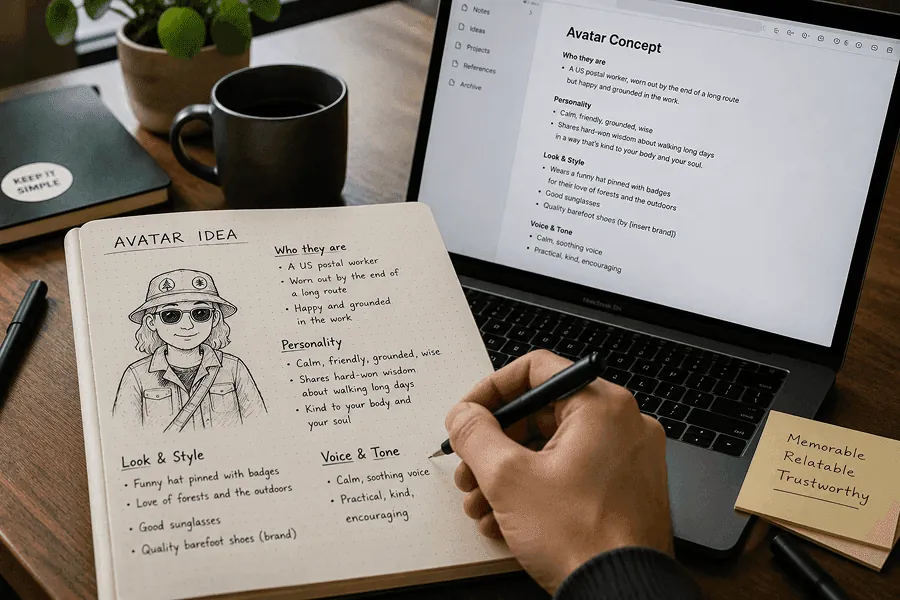
The first mistake is opening the editor before you know what you're making. Spend a few minutes on the concept first, and be specific. Don't stop at a label like "a friendly expert." Sketch the whole person: who they are, how they carry themselves, what they wear, how they talk, and the one thing you want people to remember. Specificity is what separates a character from a stock photo.
Aim for something this vivid: "A US postal worker, worn out by the end of a long route but happy and grounded in the work. They wear a funny hat pinned with badges for their love of forests and the outdoors, good sunglasses, and quality barefoot shoes by [insert brand]. They talk in a calm, soothing voice, sharing hard-won wisdom about how to walk long days in a way that's kind to your body and your soul." Or: "A former line cook turned home-cooking guide, a little chaotic and deeply warm, a dish towel over one shoulder and flour somewhere on the apron, who talks fast, laughs at their own mistakes, and makes you feel like burning the first pancake is part of the fun."
That sketch is your compass. Every choice below gets easier once you have it, because you can ask a simple question of each option: does this serve the character, or fight it?
The levers you can change when you build your own avatar
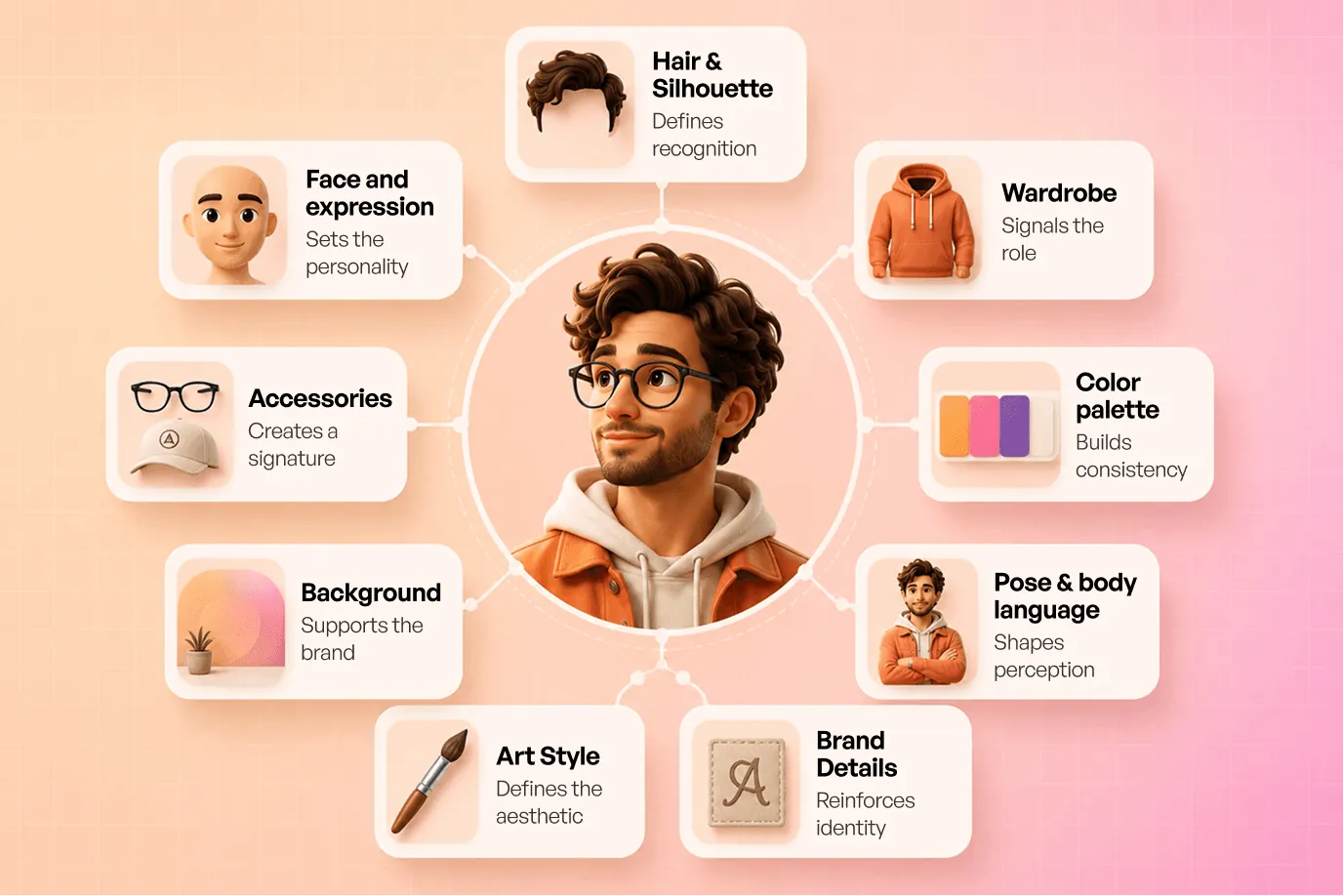
Here's the full menu of levers behind your customized avatar, and every one of them is really a lever for the same goal: making the character memorable. You won't touch all of them, and you shouldn't. Pick the few that carry your idea and push those hard.

Face and expression. This is the single biggest personality lever, and the one people leave on default. A resting warm half-smile reads as approachable. A neutral mouth reads as serious or premium. A slight smirk reads as playful. Then the small stuff: eyebrow angle changes everything from surprised to skeptical, eye shape shifts age and mood, and where the eyes look changes whether the avatar feels engaged or aloof. Decide the emotion you want before you decide the features.
Hair and silhouette. People register the outline before anything else, so the hair is doing more work than you think. A distinctive cut, an unusual color, or a strong shape gives you instant recognition at a glance. Aim for a silhouette you could identify with the details blacked out.
Wardrobe. Clothing signals role and world in a split second: a hoodie says one thing, a blazer another, an apron another. This is also the easiest place to plant a brand color, in a jacket, a collar, or a cap, so your palette shows up without a logo in sight. A signature garment you wear every time becomes part of your identity.
Color palette. Constrain it. One main color, one accent, and a neutral will always look more intentional than a rainbow. Pull the main color from your brand and let it dominate, then use the accent sparingly on one element so it pops. The discipline is the point: repeating that same small palette across your avatar, profiles, and thumbnails is what makes everything feel like one system.
Accessories and props. The fastest route to a visual signature. Glasses, a hat, a single earring, a prop tied to what you do (a mic, a wrench, a paintbrush). Pick one thing, make it slightly distinctive, and keep it in every version. Over time people stop seeing "a person in glasses" and start seeing you.
Background and framing. The space behind the character is free branding real estate most people waste on a gray box. A solid field in your brand color, a soft gradient, or a simple repeating shape ties the avatar to your identity and makes it pop in a busy feed. Framing matters too: a tight crop on the face reads bold and modern, a bit of shoulder reads friendlier.
Pose and body language. If your avatar shows more than a head, posture speaks. Squared shoulders and a level gaze read confident. A slight lean toward the viewer reads engaged and warm. Small adjustments here change the whole impression before a single word is read.
Art style. Illustrated, realistic, or 3D each sends a different signal, and the style you pick matters less than picking one and holding it. A consistent render across everything you make is a big part of looking like a deliberate design.
Brand micro-elements. The subtle stuff that rewards a second look: your initials on a cap, a shape borrowed from your logo worked in as a small detail, a pattern from your brand kit on the clothing. The trick is to weave these in so they read as texture, and the avatar looks designed with the branding built into it.
The decisions most people skip when they create an avatar online
These are the ones that separate an avatar that works from one that only looks good at full size in your editor.
Test it small. Your avatar will live at 32 pixels in a comment thread far more often than at full size. Shrink it down, and if the silhouette and one clear focal point still survive, you're good. If it turns to mush, simplify until it holds.
Give it one focal point. Decide where the eye should land, usually the eyes, sometimes a signature accessory or a spot of accent color, and let everything else support it. When three things compete for attention, none of them win.
Keep a consistent core across platforms. Your avatar needs one identity that survives every crop and format: the face, the palette, and the motif stay fixed. Around that core you can run variations, a seasonal outfit, a game-specific look, a square version for one app and a circle for another, without ever losing the through-line.
Add one weird thing on purpose. Generic is the enemy, and perfectly balanced designs tend to read as generic. A single deliberate oddity, a color that shouldn't work but does, a prop slightly out of place, an exaggerated feature, is often the exact thing people remember. Pick one, commit to it, and let the rest stay clean.
Read also: What is media buying? It used to be about relationships. Now it's about data
How to create your own avatar, step by step
You can run the design thinking in any tool. The fastest way to build the character is to describe it to an AI agent and let it make the changes for you, one instruction at a time. The screenshots here show the process in Creatify.
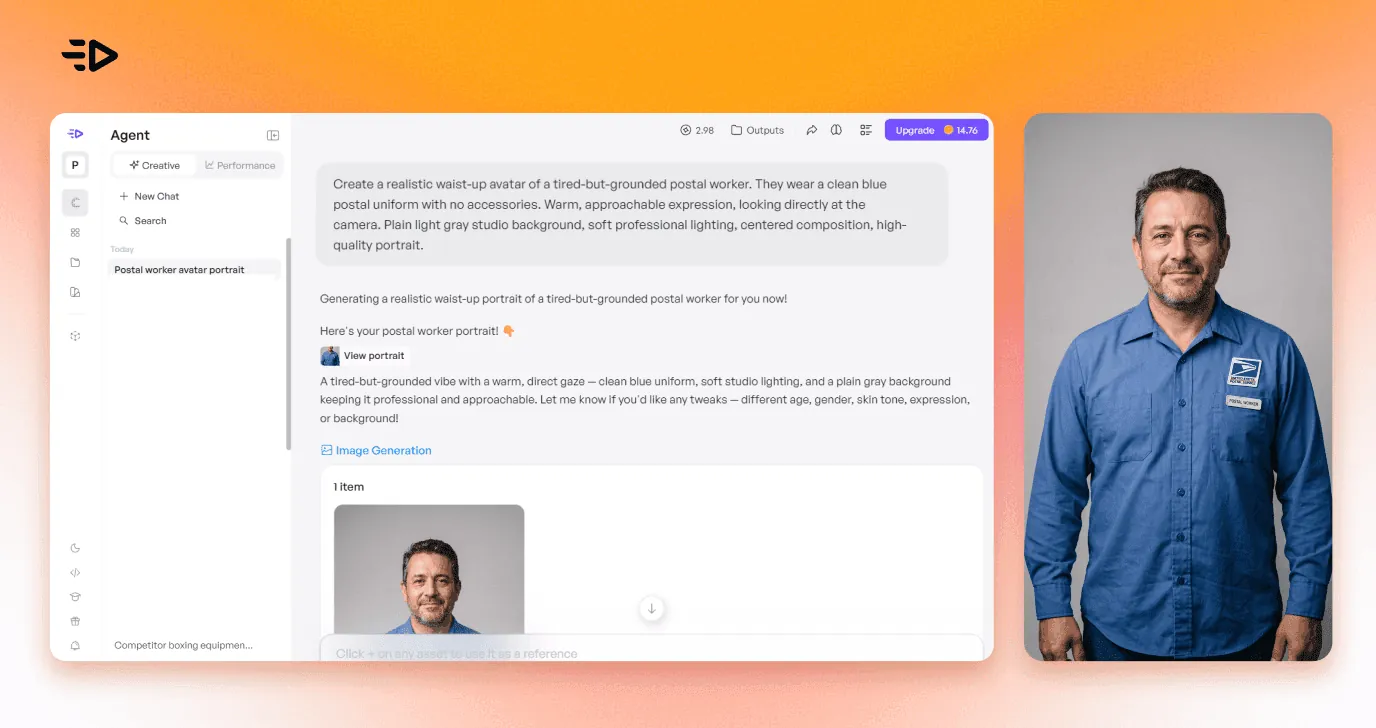
Start by handing the agent your sketch. Paste in the concept you wrote, the tired-but-grounded postal worker, the chaotic-warm cook, and let it generate a first version. You describe the character; the agent draws it.

(Screenshot: the agent chat with the character description and its first render.)
Then adjust by talking. Refine in plain language, one change per message: "give them the funny hat with forest pins," "add good sunglasses," "make the expression calmer," "put them in a sunlit home office." You keep the versions that work and steer from there, which is far faster than hunting through menus.
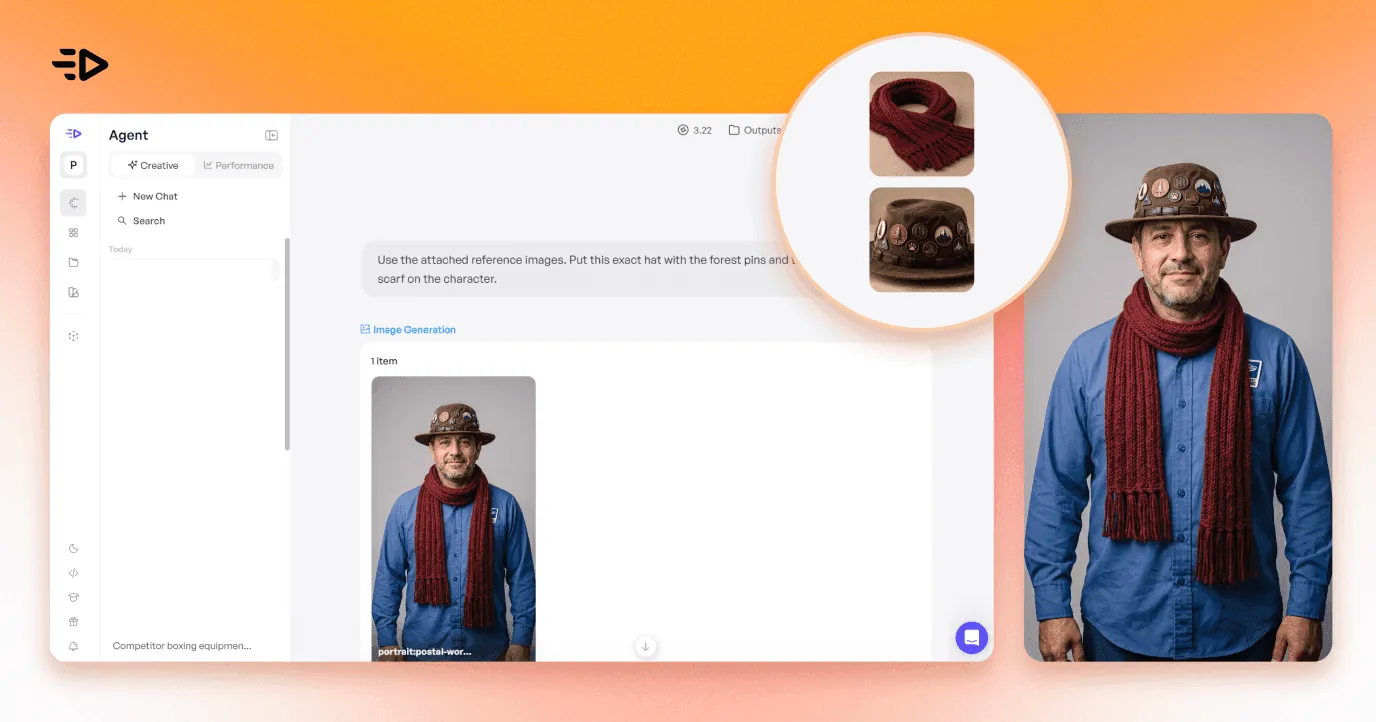
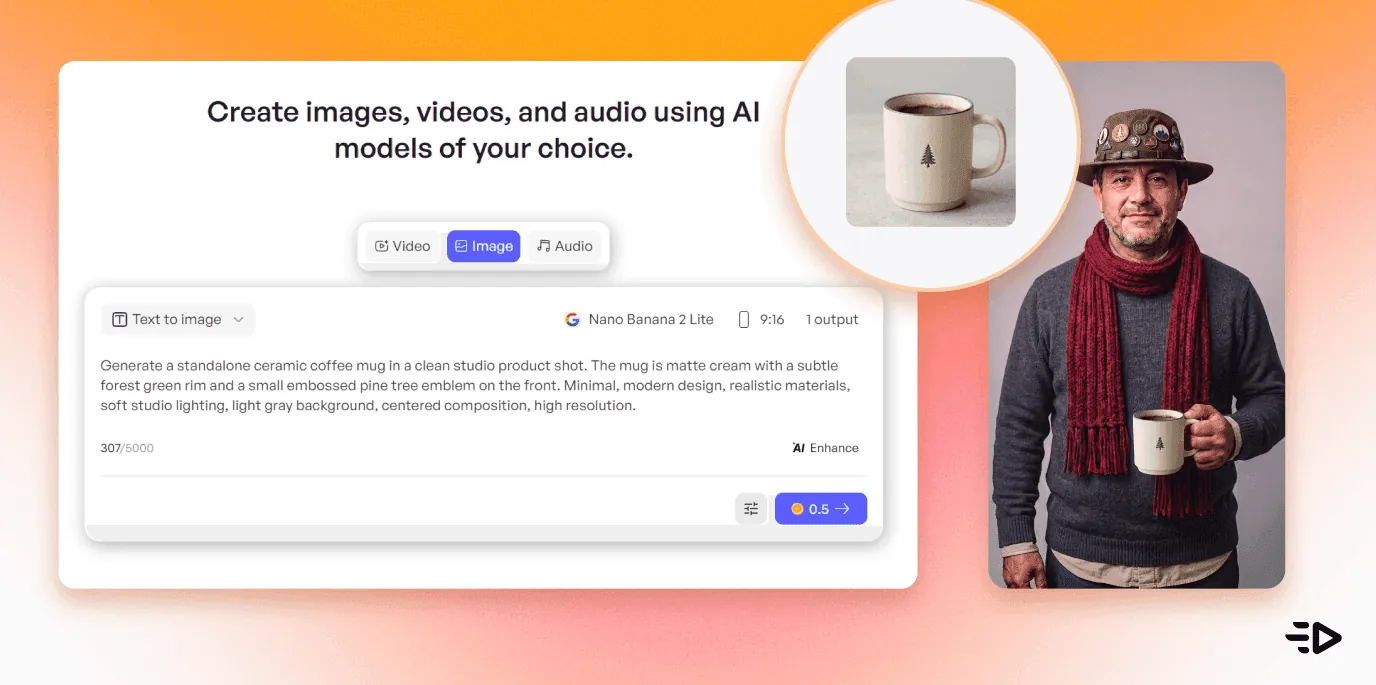
Feed it references when words aren't enough. This is where it gets powerful. Drop in a photo and say "put this exact hat and this scarf on them." Drop a product shot and have the character hold it. You can even drop a few screenshots from a game and ask the agent to build an animated character in that style, turning an existing look into an avatar that's yours.

(Screenshot: a reference photo dropped into chat, and the avatar wearing the hat and scarf.)
Build it up in steps in the Asset Generator. Work image by image: generate the base, then generate a single item, a jacket, a texture, an accessory in your exact shape, as its own static image, feed it back, and tell the agent to apply it. Building one piece at a time is how you push a stock look into something only you have.

(Screenshot: a generated item, then the avatar wearing it.)
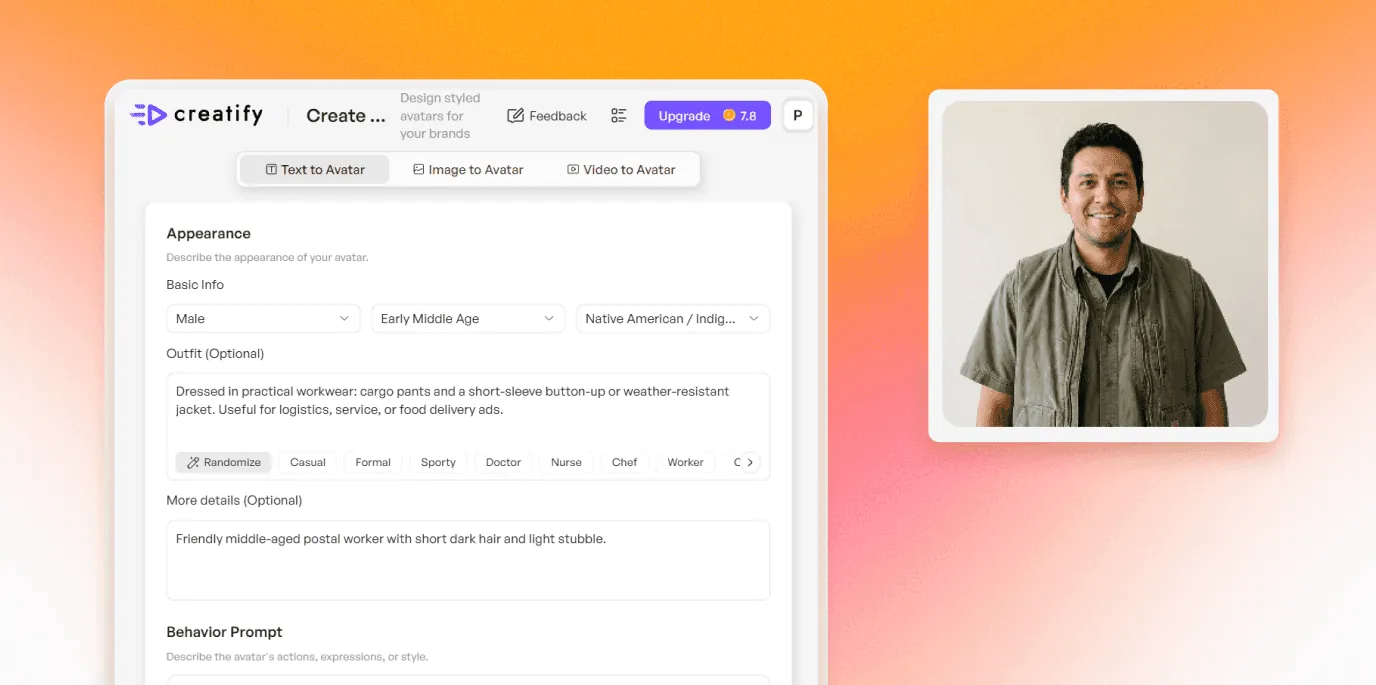
If you'd rather start from controls, Creatify's Design Your Own Avatar gives you a quick form that works like a classic avatar creator: the basics (gender, age, ethnicity), outfit presets, background, lighting, and brand settings that place your logo on a shirt or cap. Use it as a fast starting point, then refine the character in chat.

(Screenshot: the Design Your Own Avatar form as a starting point.)
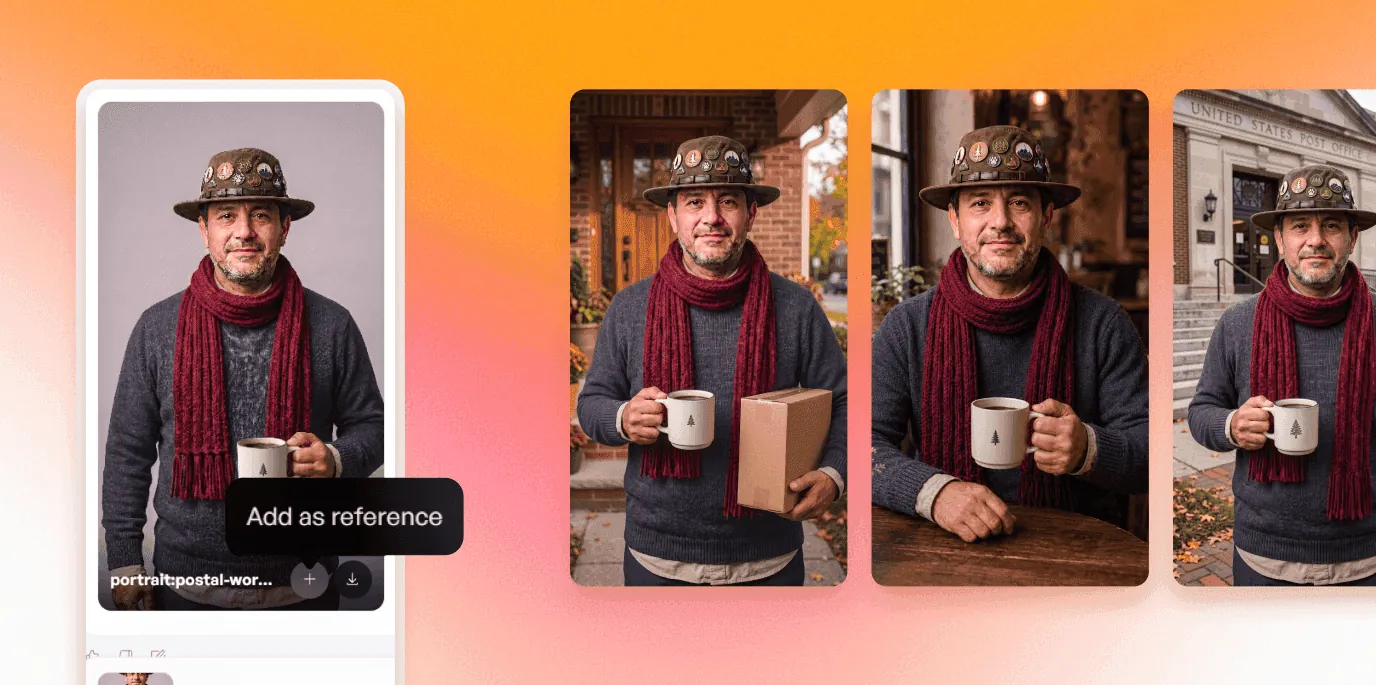
Once you land the version you like, lock a reference set so the agent reproduces the same character every time. A character only becomes memorable if it shows up the same way every time, and keeping it consistent across a whole content calendar is the part the agent handles for you.

(Screenshot: the saved reference set and consistent outputs across scenes.)
Finally, export it and put it to work across your profiles, thumbnails, and video, and write a one-page style guide, the palette, the motif, the signature accessory, so any future version stays recognizably you.
Memorable beats polished
The characters that stick are rarely the most detailed or the most realistic. They win on one unmistakable hook, a hat, a pair of sunglasses, a calm voice, repeated until people can picture the whole character with their eyes closed. That recognition gets built over time, one appearance at a time, so a distinctive-but-simple avatar you use everywhere will always outperform a gorgeous one you tweak every week.
So aim to be describable. Give the character one clear idea, push a couple of levers hard, and commit to a single quirk people will remember you by. Keep it consistent, let it grow up with your brand, and the payoff arrives quietly: one day someone describes your avatar to a friend without needing to look at it. That's the moment it has truly become yours.
Read also: How to create an AI character for ads, content & social
Frequently Asked Questions
How do I make my own avatar?
Start with a one-line concept (who it is, the vibe, the one thing to remember), then choose a few design levers to carry it, expression, hair, color palette, a signature accessory, and a brand motif. Generate a base in an avatar maker or AI tool, tweak one element at a time, and lock a version you can reuse consistently.
How do I make an avatar look unique?
Make an avatar unique by pushing a few specific levers hard: a distinctive silhouette, a constrained two-color palette, one signature accessory, and a single deliberate oddity. Generic comes from accepting defaults; unique comes from a handful of strong, intentional choices.
How do I put my brand into an avatar?
Weave it in so it reads as part of the design. Use your brand's main color as the dominant palette, drop your initials or a logo-derived shape in as a small detail, and add a brand pattern to the clothing or background. The goal is for the branding to read as texture, so the avatar feels designed.
What makes a good avatar?
A good avatar is recognizable at a glance, works at small sizes, has one clear focal point, and stays consistent everywhere it appears. It carries a single clear idea and one memorable detail, and it uses a tight color palette tied to your brand.
How do I keep my avatar consistent across platforms?
Fix a core identity, the face, the palette, and the signature motif, and keep those constant across every crop and format. Save a reference set and a short style guide so future versions match, and allow only controlled variations like seasonal outfits or platform-specific framing around that stable core.
What's the best way to create an avatar online?
Pick a tool that lets you customize the details that matter (expression, palette, accessories) and reproduce the character consistently later, so you get the same avatar each time. Do your design thinking first, then use the tool to execute it, and test the result at small sizes before you commit.
Open any online avatar maker and a strange thing happens: everyone comes out looking the same. The default face, the default hair, the safe colors. People accept what the tool hands them and move on, which is why most avatars are instantly forgettable.
The gap between a forgettable avatar and one people recognize on sight comes down to a handful of small, deliberate choices. The goal is a character memorable enough to stand in for your brand, one people know the instant it appears. This guide is the menu of choices that get you there: what to change to make an avatar unique, how to weave your brand in without slapping a logo on it, and the design decisions most people skip. The ideas work in any online avatar creator, and near the end there's a simple process to create your own avatar from start to finish.
Start with an idea, before you create your avatar

The first mistake is opening the editor before you know what you're making. Spend a few minutes on the concept first, and be specific. Don't stop at a label like "a friendly expert." Sketch the whole person: who they are, how they carry themselves, what they wear, how they talk, and the one thing you want people to remember. Specificity is what separates a character from a stock photo.
Aim for something this vivid: "A US postal worker, worn out by the end of a long route but happy and grounded in the work. They wear a funny hat pinned with badges for their love of forests and the outdoors, good sunglasses, and quality barefoot shoes by [insert brand]. They talk in a calm, soothing voice, sharing hard-won wisdom about how to walk long days in a way that's kind to your body and your soul." Or: "A former line cook turned home-cooking guide, a little chaotic and deeply warm, a dish towel over one shoulder and flour somewhere on the apron, who talks fast, laughs at their own mistakes, and makes you feel like burning the first pancake is part of the fun."
That sketch is your compass. Every choice below gets easier once you have it, because you can ask a simple question of each option: does this serve the character, or fight it?
The levers you can change when you build your own avatar
Here's the full menu of levers behind your customized avatar, and every one of them is really a lever for the same goal: making the character memorable. You won't touch all of them, and you shouldn't. Pick the few that carry your idea and push those hard.

Face and expression. This is the single biggest personality lever, and the one people leave on default. A resting warm half-smile reads as approachable. A neutral mouth reads as serious or premium. A slight smirk reads as playful. Then the small stuff: eyebrow angle changes everything from surprised to skeptical, eye shape shifts age and mood, and where the eyes look changes whether the avatar feels engaged or aloof. Decide the emotion you want before you decide the features.
Hair and silhouette. People register the outline before anything else, so the hair is doing more work than you think. A distinctive cut, an unusual color, or a strong shape gives you instant recognition at a glance. Aim for a silhouette you could identify with the details blacked out.
Wardrobe. Clothing signals role and world in a split second: a hoodie says one thing, a blazer another, an apron another. This is also the easiest place to plant a brand color, in a jacket, a collar, or a cap, so your palette shows up without a logo in sight. A signature garment you wear every time becomes part of your identity.
Color palette. Constrain it. One main color, one accent, and a neutral will always look more intentional than a rainbow. Pull the main color from your brand and let it dominate, then use the accent sparingly on one element so it pops. The discipline is the point: repeating that same small palette across your avatar, profiles, and thumbnails is what makes everything feel like one system.
Accessories and props. The fastest route to a visual signature. Glasses, a hat, a single earring, a prop tied to what you do (a mic, a wrench, a paintbrush). Pick one thing, make it slightly distinctive, and keep it in every version. Over time people stop seeing "a person in glasses" and start seeing you.
Background and framing. The space behind the character is free branding real estate most people waste on a gray box. A solid field in your brand color, a soft gradient, or a simple repeating shape ties the avatar to your identity and makes it pop in a busy feed. Framing matters too: a tight crop on the face reads bold and modern, a bit of shoulder reads friendlier.
Pose and body language. If your avatar shows more than a head, posture speaks. Squared shoulders and a level gaze read confident. A slight lean toward the viewer reads engaged and warm. Small adjustments here change the whole impression before a single word is read.
Art style. Illustrated, realistic, or 3D each sends a different signal, and the style you pick matters less than picking one and holding it. A consistent render across everything you make is a big part of looking like a deliberate design.
Brand micro-elements. The subtle stuff that rewards a second look: your initials on a cap, a shape borrowed from your logo worked in as a small detail, a pattern from your brand kit on the clothing. The trick is to weave these in so they read as texture, and the avatar looks designed with the branding built into it.
The decisions most people skip when they create an avatar online
These are the ones that separate an avatar that works from one that only looks good at full size in your editor.
Test it small. Your avatar will live at 32 pixels in a comment thread far more often than at full size. Shrink it down, and if the silhouette and one clear focal point still survive, you're good. If it turns to mush, simplify until it holds.
Give it one focal point. Decide where the eye should land, usually the eyes, sometimes a signature accessory or a spot of accent color, and let everything else support it. When three things compete for attention, none of them win.
Keep a consistent core across platforms. Your avatar needs one identity that survives every crop and format: the face, the palette, and the motif stay fixed. Around that core you can run variations, a seasonal outfit, a game-specific look, a square version for one app and a circle for another, without ever losing the through-line.
Add one weird thing on purpose. Generic is the enemy, and perfectly balanced designs tend to read as generic. A single deliberate oddity, a color that shouldn't work but does, a prop slightly out of place, an exaggerated feature, is often the exact thing people remember. Pick one, commit to it, and let the rest stay clean.
Read also: What is media buying? It used to be about relationships. Now it's about data
How to create your own avatar, step by step
You can run the design thinking in any tool. The fastest way to build the character is to describe it to an AI agent and let it make the changes for you, one instruction at a time. The screenshots here show the process in Creatify.
Start by handing the agent your sketch. Paste in the concept you wrote, the tired-but-grounded postal worker, the chaotic-warm cook, and let it generate a first version. You describe the character; the agent draws it.

(Screenshot: the agent chat with the character description and its first render.)
Then adjust by talking. Refine in plain language, one change per message: "give them the funny hat with forest pins," "add good sunglasses," "make the expression calmer," "put them in a sunlit home office." You keep the versions that work and steer from there, which is far faster than hunting through menus.
Feed it references when words aren't enough. This is where it gets powerful. Drop in a photo and say "put this exact hat and this scarf on them." Drop a product shot and have the character hold it. You can even drop a few screenshots from a game and ask the agent to build an animated character in that style, turning an existing look into an avatar that's yours.

(Screenshot: a reference photo dropped into chat, and the avatar wearing the hat and scarf.)
Build it up in steps in the Asset Generator. Work image by image: generate the base, then generate a single item, a jacket, a texture, an accessory in your exact shape, as its own static image, feed it back, and tell the agent to apply it. Building one piece at a time is how you push a stock look into something only you have.

(Screenshot: a generated item, then the avatar wearing it.)
If you'd rather start from controls, Creatify's Design Your Own Avatar gives you a quick form that works like a classic avatar creator: the basics (gender, age, ethnicity), outfit presets, background, lighting, and brand settings that place your logo on a shirt or cap. Use it as a fast starting point, then refine the character in chat.

(Screenshot: the Design Your Own Avatar form as a starting point.)
Once you land the version you like, lock a reference set so the agent reproduces the same character every time. A character only becomes memorable if it shows up the same way every time, and keeping it consistent across a whole content calendar is the part the agent handles for you.

(Screenshot: the saved reference set and consistent outputs across scenes.)
Finally, export it and put it to work across your profiles, thumbnails, and video, and write a one-page style guide, the palette, the motif, the signature accessory, so any future version stays recognizably you.
Memorable beats polished
The characters that stick are rarely the most detailed or the most realistic. They win on one unmistakable hook, a hat, a pair of sunglasses, a calm voice, repeated until people can picture the whole character with their eyes closed. That recognition gets built over time, one appearance at a time, so a distinctive-but-simple avatar you use everywhere will always outperform a gorgeous one you tweak every week.
So aim to be describable. Give the character one clear idea, push a couple of levers hard, and commit to a single quirk people will remember you by. Keep it consistent, let it grow up with your brand, and the payoff arrives quietly: one day someone describes your avatar to a friend without needing to look at it. That's the moment it has truly become yours.
Read also: How to create an AI character for ads, content & social
Frequently Asked Questions
How do I make my own avatar?
Start with a one-line concept (who it is, the vibe, the one thing to remember), then choose a few design levers to carry it, expression, hair, color palette, a signature accessory, and a brand motif. Generate a base in an avatar maker or AI tool, tweak one element at a time, and lock a version you can reuse consistently.
How do I make an avatar look unique?
Make an avatar unique by pushing a few specific levers hard: a distinctive silhouette, a constrained two-color palette, one signature accessory, and a single deliberate oddity. Generic comes from accepting defaults; unique comes from a handful of strong, intentional choices.
How do I put my brand into an avatar?
Weave it in so it reads as part of the design. Use your brand's main color as the dominant palette, drop your initials or a logo-derived shape in as a small detail, and add a brand pattern to the clothing or background. The goal is for the branding to read as texture, so the avatar feels designed.
What makes a good avatar?
A good avatar is recognizable at a glance, works at small sizes, has one clear focal point, and stays consistent everywhere it appears. It carries a single clear idea and one memorable detail, and it uses a tight color palette tied to your brand.
How do I keep my avatar consistent across platforms?
Fix a core identity, the face, the palette, and the signature motif, and keep those constant across every crop and format. Save a reference set and a short style guide so future versions match, and allow only controlled variations like seasonal outfits or platform-specific framing around that stable core.
What's the best way to create an avatar online?
Pick a tool that lets you customize the details that matter (expression, palette, accessories) and reproduce the character consistently later, so you get the same avatar each time. Do your design thinking first, then use the tool to execute it, and test the result at small sizes before you commit.