

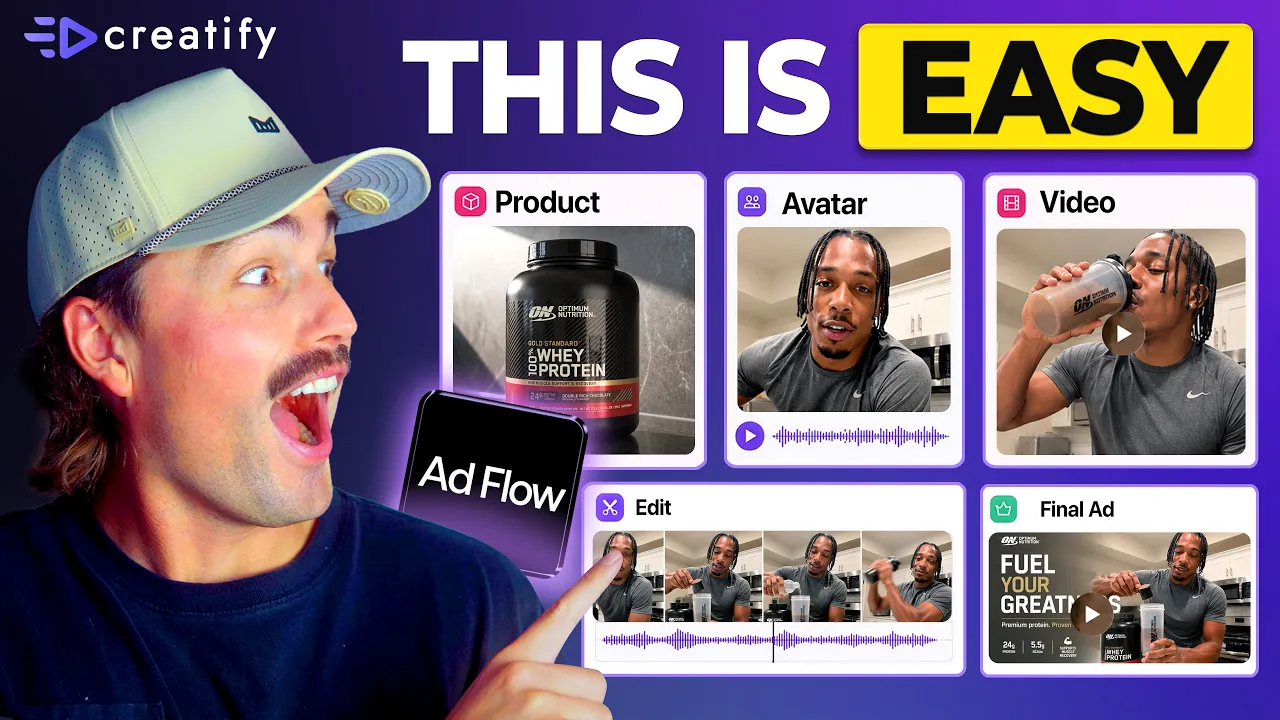
Semua Brand Beralih ke Node-Based AI Tool. Ini Alasannya (Alur Kerja Lengkap untuk Pemula)
Semua Brand Beralih ke Node-Based AI Tool. Ini Alasannya (Alur Kerja Lengkap untuk Pemula)


Tim Creatify
BAGIKAN


DALAM ARTIKEL INI
👉🏻 Coba Creatify secara gratis: https://creatify.ai/?utm_source=yt&utm_medium=sm_organic&utm_campaign=vs&utm_content=41
Cara membuat dan menguji ad creative menggunakan alur kerja AI berbasis node — tanpa coding dan tanpa membuat ulang dari awal setiap saat.
Jika Anda menjalankan iklan dan membuang waktu berjam-jam untuk membangun kembali creative Anda setiap kali ingin menguji hook atau angle baru, alur kerja ini menghilangkan bottleneck tersebut sepenuhnya. Saya akan menjelaskan apa itu node dalam istilah sederhana, bagaimana setiap bagian dari iklan Anda — script, avatar, produk, CTA — menjadi blok Lego yang dapat ditukar pasang sendiri, dan bagaimana sebuah tool memungkinkan Anda mendeskripsikan iklan yang Anda inginkan lalu merakit seluruh pipeline secara otomatis untuk Anda. Anda meninjau dan menyetujui seluruh creative plan sebelum semuanya dibuat.
Tool yang saya gunakan adalah Creatify — khususnya AdFlow Copilot, yang menerima deskripsi satu baris, menghasilkan creative direction lengkap dengan proposal hook, struktur scene, dan copy, lalu membangun seluruh canvas node saat Anda memberikan konfirmasi. Tanpa penyambungan manual, tanpa penempatan node, tanpa pengaturan teknis yang rumit.
Saya beralih dari menghabiskan waktu 2-3 jam untuk membangun kembali sebuah iklan setiap kali ingin menguji angle baru, menjadi hanya menukar satu node dan menjalankan versi baru dalam waktu kurang dari 10 menit — tanpa menyentuh bagian struktur lainnya. Itu hanyalah sebagian kecil dari waktu produksi biasa, dan ini berarti saya bisa menguji 10 hingga 15 variasi dalam seminggu, bukan hanya dua atau tiga. Jika Anda menghadapi ad fatigue dan membutuhkan alur kerja otomatisasi kreatif yang dapat diskalakan seiring volume pengujian Anda, ini adalah jalur tercepat yang saya temukan.
Pendekatannya:
1. Gunakan Copilot untuk menghasilkan pipeline pertama Anda: deskripsikan iklan, setujui rencananya, biarkan sistem membangunnya
2. Identifikasi satu node yang ingin Anda uji: hook, avatar, atau CTA — dan ubah bagian itu saja
3. Jalankan iterasi pada satu canvas untuk menemukan apa yang menghasilkan konversi tanpa harus mulai dari awal
Alur kerja ini sangat cocok untuk brand e-commerce, pemasar DTC, toko dropshipping, media buyer — pengiklan mana pun yang menjalankan paid traffic yang membutuhkan lebih banyak creative output tanpa memakan lebih banyak waktu produksi.
Terima kasih telah menonton!
-- Eric
Time-stamps:
0:00 – Intro
0:42 – Apa Itu Node dalam Pembuatan Iklan AI?
1:30 – Mengapa Tool Iklan AI Berbasis Node Mulai Mendominasi
1:45 – Cara Kerja Pembuatan Iklan Berbasis Node
2:57 – Membuat Iklan dengan Creatify AdFlow Copilot
4:06 – Membuat Iklan AI Langkah demi Langkah
6:30 – Memilih Model Video AI yang Tepat
8:06 – Cara Melakukan Scale Up Pengujian Ad Creative
9:24 – Outro
#CreatifyAdFlow #NodeBasedAI #AIWorkflow
👉🏻 Coba Creatify secara gratis: https://creatify.ai/?utm_source=yt&utm_medium=sm_organic&utm_campaign=vs&utm_content=41
Cara membuat dan menguji ad creative menggunakan alur kerja AI berbasis node — tanpa coding dan tanpa membuat ulang dari awal setiap saat.
Jika Anda menjalankan iklan dan membuang waktu berjam-jam untuk membangun kembali creative Anda setiap kali ingin menguji hook atau angle baru, alur kerja ini menghilangkan bottleneck tersebut sepenuhnya. Saya akan menjelaskan apa itu node dalam istilah sederhana, bagaimana setiap bagian dari iklan Anda — script, avatar, produk, CTA — menjadi blok Lego yang dapat ditukar pasang sendiri, dan bagaimana sebuah tool memungkinkan Anda mendeskripsikan iklan yang Anda inginkan lalu merakit seluruh pipeline secara otomatis untuk Anda. Anda meninjau dan menyetujui seluruh creative plan sebelum semuanya dibuat.
Tool yang saya gunakan adalah Creatify — khususnya AdFlow Copilot, yang menerima deskripsi satu baris, menghasilkan creative direction lengkap dengan proposal hook, struktur scene, dan copy, lalu membangun seluruh canvas node saat Anda memberikan konfirmasi. Tanpa penyambungan manual, tanpa penempatan node, tanpa pengaturan teknis yang rumit.
Saya beralih dari menghabiskan waktu 2-3 jam untuk membangun kembali sebuah iklan setiap kali ingin menguji angle baru, menjadi hanya menukar satu node dan menjalankan versi baru dalam waktu kurang dari 10 menit — tanpa menyentuh bagian struktur lainnya. Itu hanyalah sebagian kecil dari waktu produksi biasa, dan ini berarti saya bisa menguji 10 hingga 15 variasi dalam seminggu, bukan hanya dua atau tiga. Jika Anda menghadapi ad fatigue dan membutuhkan alur kerja otomatisasi kreatif yang dapat diskalakan seiring volume pengujian Anda, ini adalah jalur tercepat yang saya temukan.
Pendekatannya:
1. Gunakan Copilot untuk menghasilkan pipeline pertama Anda: deskripsikan iklan, setujui rencananya, biarkan sistem membangunnya
2. Identifikasi satu node yang ingin Anda uji: hook, avatar, atau CTA — dan ubah bagian itu saja
3. Jalankan iterasi pada satu canvas untuk menemukan apa yang menghasilkan konversi tanpa harus mulai dari awal
Alur kerja ini sangat cocok untuk brand e-commerce, pemasar DTC, toko dropshipping, media buyer — pengiklan mana pun yang menjalankan paid traffic yang membutuhkan lebih banyak creative output tanpa memakan lebih banyak waktu produksi.
Terima kasih telah menonton!
-- Eric
Time-stamps:
0:00 – Intro
0:42 – Apa Itu Node dalam Pembuatan Iklan AI?
1:30 – Mengapa Tool Iklan AI Berbasis Node Mulai Mendominasi
1:45 – Cara Kerja Pembuatan Iklan Berbasis Node
2:57 – Membuat Iklan dengan Creatify AdFlow Copilot
4:06 – Membuat Iklan AI Langkah demi Langkah
6:30 – Memilih Model Video AI yang Tepat
8:06 – Cara Melakukan Scale Up Pengujian Ad Creative
9:24 – Outro
#CreatifyAdFlow #NodeBasedAI #AIWorkflow

Anda mungkin juga menyukai




Siap mempercepat pemasaran Anda?
Uji ide produk baru Anda dalam hitungan menit dengan iklan video yang dihasilkan oleh AI

Siap mempercepat pemasaran Anda?
Uji ide produk baru Anda dalam hitungan menit dengan iklan video yang dihasilkan oleh AI
Siap mempercepat pemasaran Anda?
Uji ide produk baru Anda dalam hitungan menit dengan iklan video yang dihasilkan oleh AI
Siap mempercepat pemasaran Anda?
Uji ide produk baru Anda dalam hitungan menit dengan iklan video yang dihasilkan oleh AI

Buat iklan video yang menarik untuk produk Anda
dari URL apa pun



Creatify Lab • Hak Cipta © 2026
Bahasa
Indonesian (Indonesia)
Fitur
Alat
Kasus Penggunaan
Buat iklan video yang menarik untuk produk Anda
dari URL apa pun
Creatify Lab • Hak Cipta © 2026
Bahasa
Indonesian (Indonesia)
Fitur
Alat
Kasus Penggunaan
Buat iklan video yang menarik untuk produk Anda
dari URL apa pun
Creatify Lab • Hak Cipta © 2026
Bahasa
Indonesian (Indonesia)
Fitur
Alat
Kasus Penggunaan
YouTube
Snapchat
Shopify
Buat Avatar AI
OTT & CTV
Generasi Lead
Buat iklan video yang menarik untuk produk Anda
dari URL apa pun
Creatify Lab • Hak Cipta © 2026
Bahasa
Indonesian (Indonesia)
Fitur
Alat
Kasus Penggunaan

