

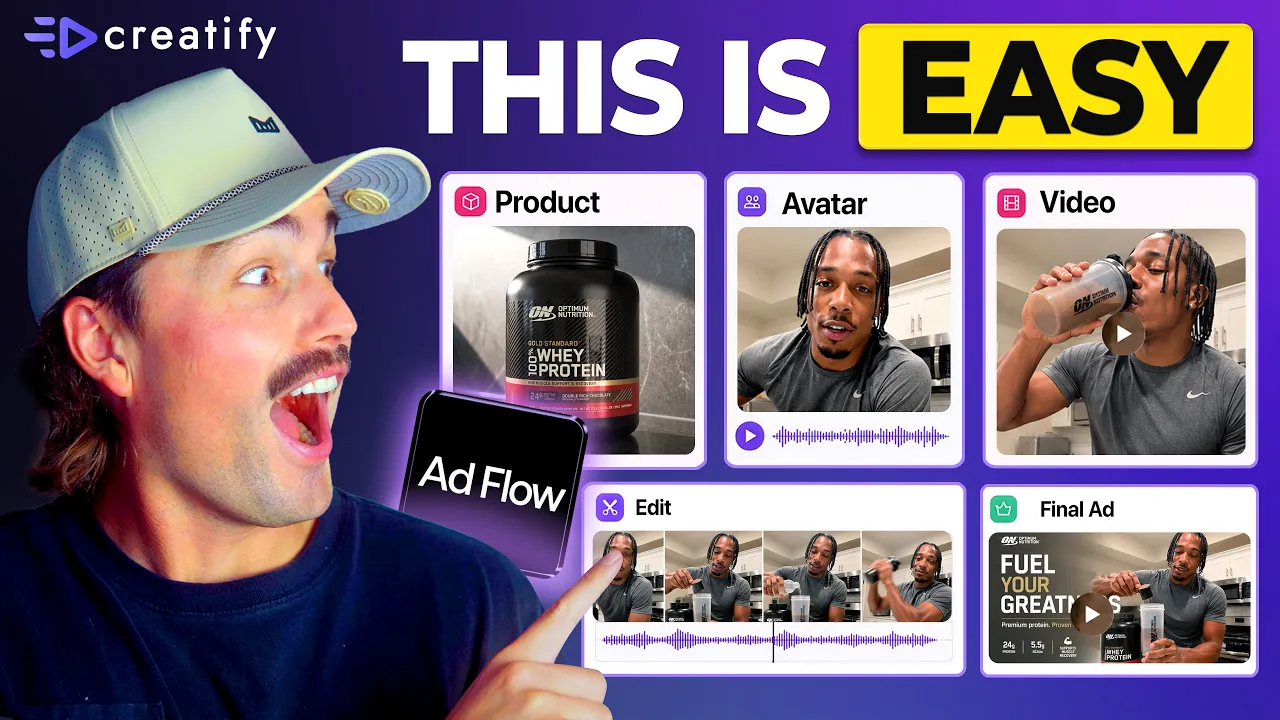
Por qué todas las marcas se están pasando a las herramientas de IA basadas en nodos (flujo de trabajo completo para principiantes)
Por qué todas las marcas se están pasando a las herramientas de IA basadas en nodos (flujo de trabajo completo para principiantes)


Equipo Creatify
COMPARTIR


EN ESTE ARTÍCULO
👉🏻 Prueba Creatify gratis: https://creatify.ai/?utm_source=yt&utm_medium=sm_organic&utm_campaign=vs&utm_content=41
Cómo crear y probar creativos publicitarios utilizando un flujo de trabajo de IA basado en nodos — sin codificación y sin tener que reconstruir desde cero cada vez.
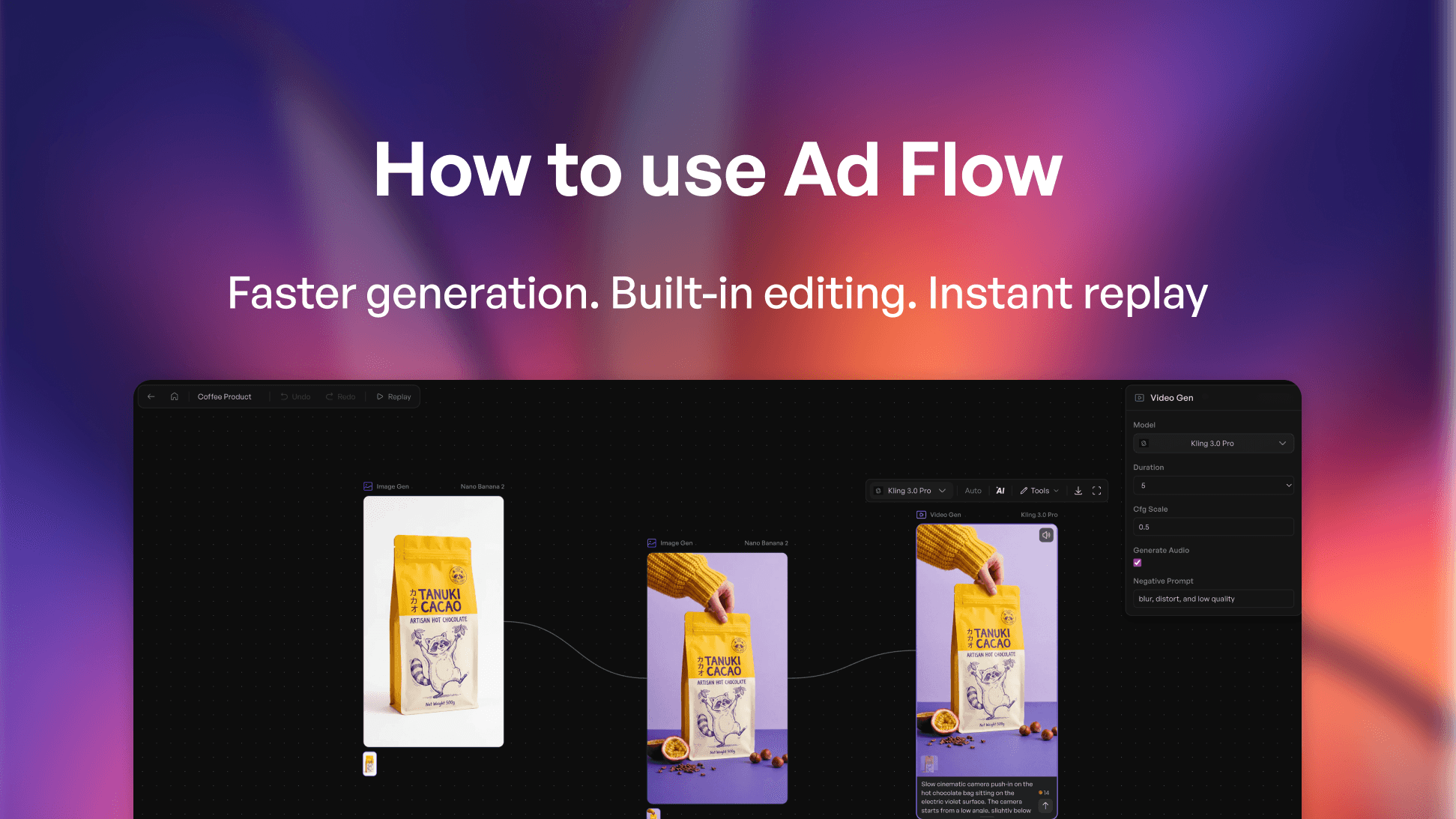
Si estás publicando anuncios y perdiendo horas reconstruyendo tu creativo cada vez que quieres probar un nuevo gancho o ángulo, este flujo de trabajo elimina ese cuello de botella por completo. Explico qué es realmente un nodo en términos sencillos, cómo cada parte de tu anuncio — guion, avatar, producto, CTA — se convierte en su propio bloque de Lego intercambiable, y cómo una herramienta te permite describir el anuncio que deseas y ensambla automáticamente todo el pipeline por ti. Revisas y apruebas el plan creativo completo antes de que se construya nada.
La herramienta que utilizo es Creatify — específicamente AdFlow Copilot, que toma una descripción de una sola línea, genera una dirección creativa completa con una propuesta de gancho, estructura de escena y copy, y luego construye todo el lienzo de nodos en el momento en que confirmas. Sin cableado manual, sin colocación de nodos, sin necesidad de configuración técnica.
Pasé de dedicar de 2 a 3 horas a reconstruir un anuncio cada vez que quería probar un nuevo ángulo, a intercambiar un solo nodo y lanzar una nueva versión en menos de 10 minutos — sin tocar el resto de la estructura. Eso es una fracción del tiempo de producción, y significa que puedo probar de 10 a 15 variaciones en una semana en lugar de dos o tres. Si estás lidiando con la fatiga publicitaria y necesitas un flujo de trabajo de automatización creativa que escale con tu volumen de pruebas, este es el camino más rápido que he encontrado.
El enfoque:
1. Usa Copilot para generar tu primer pipeline: describe el anuncio, aprueba el plan, deja que se construya
2. Identifica el nodo único que quieres probar: gancho, avatar o CTA — y cambia solo eso
3. Ejecuta iteraciones en un solo lienzo para encontrar lo que convierte sin tener que empezar de nuevo
Este flujo de trabajo funciona para marcas de comercio electrónico, marketers de DTC, tiendas de dropshipping, media buyers — cualquier anunciante que dirija tráfico pagado y necesite más rendimiento creativo sin más tiempo de producción.
¡Gracias por ver!
-- Eric
Marcas de tiempo:
0:00 – Intro
0:42 – ¿Qué es un nodo en la creación de anuncios con IA?
1:30 – Por qué las herramientas de anuncios de IA basadas en nodos están dominando
1:45 – Cómo funciona la creación de anuncios basada en nodos
2:57 – Creando un anuncio con Creatify AdFlow Copilot
4:06 – Creando un anuncio de IA paso a paso
6:30 – Eligiendo el modelo de video de IA adecuado
8:06 – Cómo escalar las pruebas de creativos publicitarios
9:24 – Outro
#CreatifyAdFlow #NodeBasedAI #AIWorkflow
👉🏻 Prueba Creatify gratis: https://creatify.ai/?utm_source=yt&utm_medium=sm_organic&utm_campaign=vs&utm_content=41
Cómo crear y probar creativos publicitarios utilizando un flujo de trabajo de IA basado en nodos — sin codificación y sin tener que reconstruir desde cero cada vez.
Si estás publicando anuncios y perdiendo horas reconstruyendo tu creativo cada vez que quieres probar un nuevo gancho o ángulo, este flujo de trabajo elimina ese cuello de botella por completo. Explico qué es realmente un nodo en términos sencillos, cómo cada parte de tu anuncio — guion, avatar, producto, CTA — se convierte en su propio bloque de Lego intercambiable, y cómo una herramienta te permite describir el anuncio que deseas y ensambla automáticamente todo el pipeline por ti. Revisas y apruebas el plan creativo completo antes de que se construya nada.
La herramienta que utilizo es Creatify — específicamente AdFlow Copilot, que toma una descripción de una sola línea, genera una dirección creativa completa con una propuesta de gancho, estructura de escena y copy, y luego construye todo el lienzo de nodos en el momento en que confirmas. Sin cableado manual, sin colocación de nodos, sin necesidad de configuración técnica.
Pasé de dedicar de 2 a 3 horas a reconstruir un anuncio cada vez que quería probar un nuevo ángulo, a intercambiar un solo nodo y lanzar una nueva versión en menos de 10 minutos — sin tocar el resto de la estructura. Eso es una fracción del tiempo de producción, y significa que puedo probar de 10 a 15 variaciones en una semana en lugar de dos o tres. Si estás lidiando con la fatiga publicitaria y necesitas un flujo de trabajo de automatización creativa que escale con tu volumen de pruebas, este es el camino más rápido que he encontrado.
El enfoque:
1. Usa Copilot para generar tu primer pipeline: describe el anuncio, aprueba el plan, deja que se construya
2. Identifica el nodo único que quieres probar: gancho, avatar o CTA — y cambia solo eso
3. Ejecuta iteraciones en un solo lienzo para encontrar lo que convierte sin tener que empezar de nuevo
Este flujo de trabajo funciona para marcas de comercio electrónico, marketers de DTC, tiendas de dropshipping, media buyers — cualquier anunciante que dirija tráfico pagado y necesite más rendimiento creativo sin más tiempo de producción.
¡Gracias por ver!
-- Eric
Marcas de tiempo:
0:00 – Intro
0:42 – ¿Qué es un nodo en la creación de anuncios con IA?
1:30 – Por qué las herramientas de anuncios de IA basadas en nodos están dominando
1:45 – Cómo funciona la creación de anuncios basada en nodos
2:57 – Creando un anuncio con Creatify AdFlow Copilot
4:06 – Creando un anuncio de IA paso a paso
6:30 – Eligiendo el modelo de video de IA adecuado
8:06 – Cómo escalar las pruebas de creativos publicitarios
9:24 – Outro
#CreatifyAdFlow #NodeBasedAI #AIWorkflow

¿Listo para convertir tu producto en un video atractivo?
También te puede interesar




¿Listo para acelerar tu marketing?
Prueba tus nuevas ideas de producto en minutos con anuncios de video generados por IA

¿Listo para acelerar tu marketing?
Prueba tus nuevas ideas de producto en minutos con anuncios de video generados por IA
¿Listo para acelerar tu marketing?
Prueba tus nuevas ideas de producto en minutos con anuncios de video generados por IA
¿Listo para acelerar tu marketing?
Prueba tus nuevas ideas de producto en minutos con anuncios de video generados por IA

Genera anuncios de video atractivos para tus productos
desde cualquier URL



Creatify Lab • Copyright © 2026
Idioma
Spanish
Características
Herramientas
Casos de Uso
Genera anuncios de video atractivos para tus productos
desde cualquier URL
Creatify Lab • Copyright © 2026
Idioma
Spanish
Características
Herramientas
Casos de Uso
Genera anuncios de video atractivos para tus productos
desde cualquier URL
Creatify Lab • Copyright © 2026
Idioma
Spanish
Características
Herramientas
Casos de Uso
YouTube
Snapchat
Shopify
Crear Avatar de IA
OTT y CTV
Generación de Leads
Genera anuncios de video atractivos para tus productos
desde cualquier URL
Creatify Lab • Copyright © 2026
Idioma
Spanish
Características
Herramientas
Casos de Uso

