

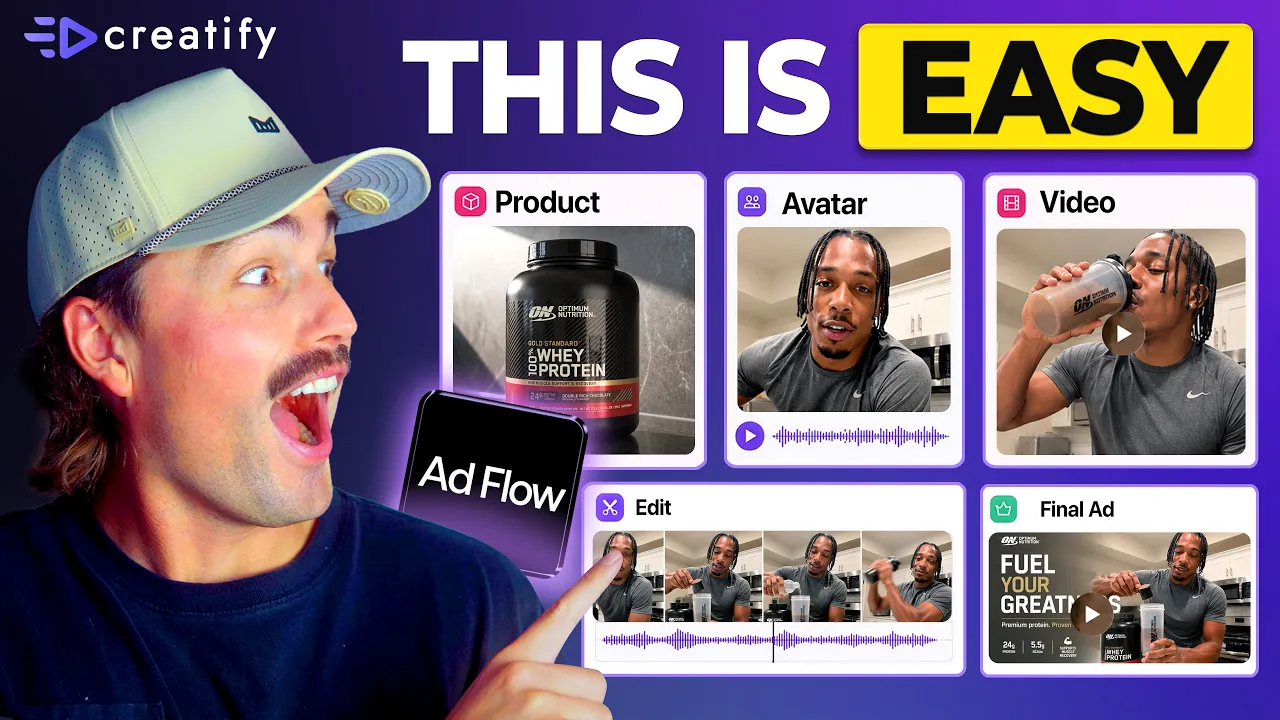
Jede Brand wechselt zu Node-basierten KI-Tools. Hier ist der Grund (Kompletter Beginner-Workflow)
Jede Brand wechselt zu Node-basierten KI-Tools. Hier ist der Grund (Kompletter Beginner-Workflow)


Creatify-Team
TEILEN


IN DIESEM ARTIKEL
👉🏻 Testen Sie Creatify kostenlos: https://creatify.ai/?utm_source=yt&utm_medium=sm_organic&utm_campaign=vs&utm_content=41
Wie Sie Ad Creatives mithilfe eines Node-basierten KI-Workflows erstellen und testen – ohne Codierung und ohne jedes Mal wieder bei Null anfangen zu müssen.
Wenn Sie Anzeigen schalten und Stunden damit verschwenden, Ihr Creative jedes Mal neu aufzubauen, wenn Sie einen neuen Hook oder Winkel testen möchten, beseitigt dieser Workflow diesen Engpass vollständig. Ich erkläre Ihnen in einfachen Worten, was ein Node (Knotenpunkt) eigentlich ist, wie jeder Teil Ihrer Anzeige – Skript, Avatar, Produkt, CTA – zu einem eigenen, austauschbaren Lego-Baustein wird und wie ein Tool es Ihnen ermöglicht, die gewünschte Anzeige zu beschreiben und automatisch die gesamte Pipeline für Sie zusammenstellt. Sie überprüfen und genehmigen den gesamten Creative-Plan, bevor irgendetwas erstellt wird.
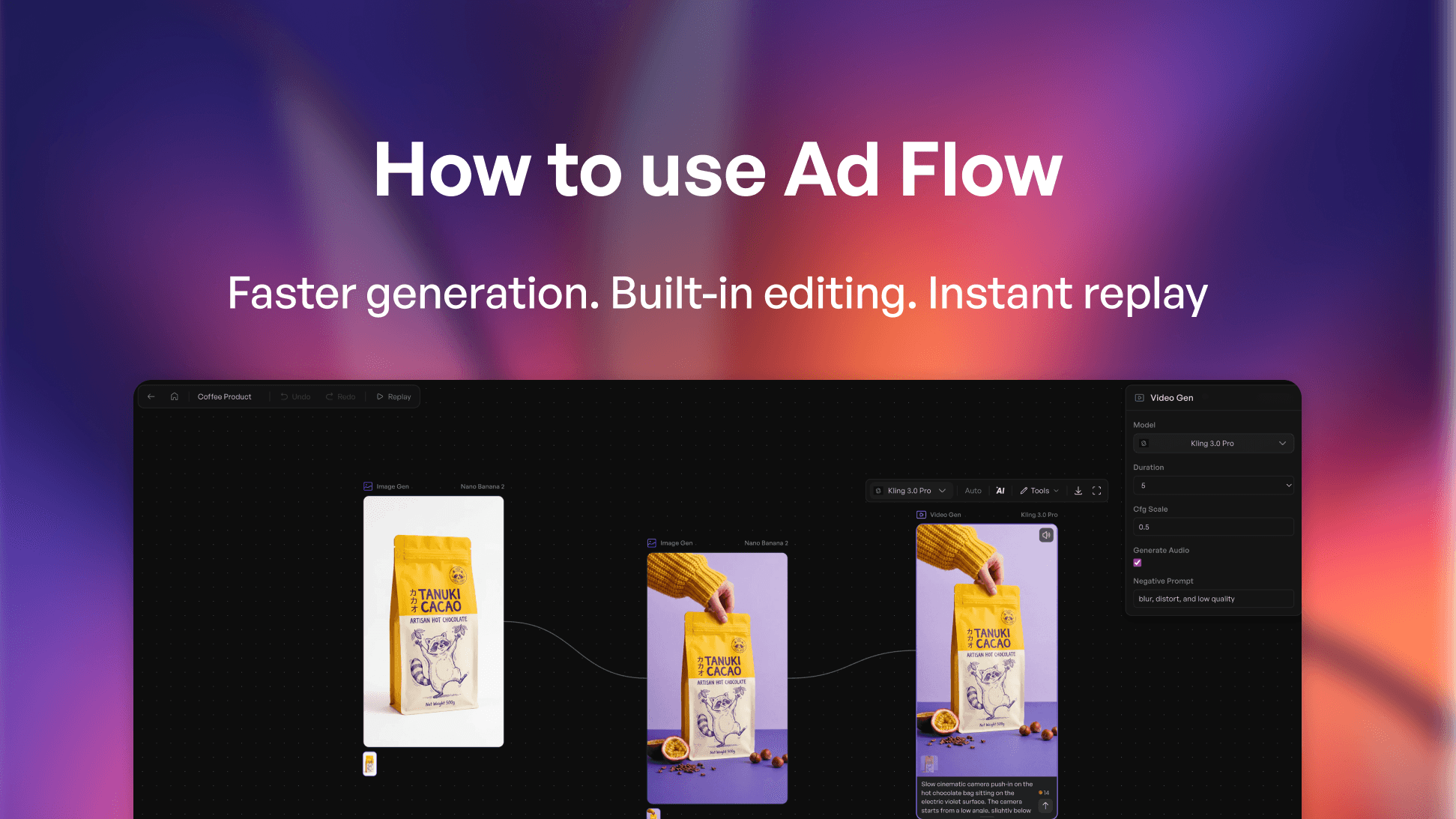
Das Tool, das ich verwende, ist Creatify – genauer gesagt AdFlow Copilot. Es nimmt eine einzeilige Beschreibung, generiert eine vollständige kreative Ausrichtung mit einem vorgeschlagenen Hook, einer Szenenstruktur sowie Copywriting und baut dann im Moment Ihrer Bestätigung die gesamte Node-Canvas auf. Keine manuelle Verkabelung, keine Node-Platzierung, keine technische Einrichtung erforderlich.
Früher habe ich 2–3 Stunden damit verbracht, eine Anzeige jedes Mal neu aufzubauen, wenn ich einen neuen Winkel testen wollte. Jetzt tausche ich einfach einen Node aus und lasse in weniger als 10 Minuten eine neue Version laufen – ohne den Rest der Struktur anzufassen. Das ist ein Bruchteil der Produktionszeit und bedeutet, dass ich 10 bis 15 Variationen in einer Woche testen kann, anstatt nur zwei oder drei. Wenn Sie mit Anzeigenmüdigkeit (Ad Fatigue) zu kämpfen haben und einen Workflow zur kreativen Automatisierung benötigen, der mit Ihrem Testvolumen skaliert, ist dies der schnellste Weg, den ich gefunden habe.
Der Ansatz:
1. Nutzen Sie Copilot, um Ihre erste Pipeline zu generieren: Beschreiben Sie die Anzeige, genehmigen Sie den Plan, lassen Sie ihn erstellen
2. Identifizieren Sie den einzelnen Node, den Sie testen möchten: Hook, Avatar oder CTA – und ändern Sie nur diesen
3. Führen Sie Iterationen auf einer einzigen Canvas durch, um herauszufinden, was konvertiert, ohne von vorne zu beginnen
Dieser Workflow funktioniert für E-Commerce-Marken, DTC-Marketer, Dropshipping-Stores, Media Buyer – kurz für jeden Advertiser, der Paid Traffic schaltet und mehr Creative-Output ohne zusätzlichen Produktionsaufwand benötigt.
Vielen Dank fürs Zuschauen!
-- Eric
Time-stamps:
0:00 – Intro
0:42 – Was ist ein Node bei der KI-Anzeigenerstellung?
1:30 – Warum Node-basierte KI-Ad-Tools den Markt erobern
1:45 – Wie Node-basierte Anzeigenerstellung funktioniert
2:57 – Eine Anzeige erstellen mit Creatify AdFlow Copilot
4:06 – Schritt-für-Schritt-Erstellung einer KI-Anzeige
6:30 – Die Wahl des richtigen KI-Videomodells
8:06 – Wie Sie das Testen von Ad Creatives skalieren
9:24 – Outro
#CreatifyAdFlow #NodeBasedAI #AIWorkflow
👉🏻 Testen Sie Creatify kostenlos: https://creatify.ai/?utm_source=yt&utm_medium=sm_organic&utm_campaign=vs&utm_content=41
Wie Sie Ad Creatives mithilfe eines Node-basierten KI-Workflows erstellen und testen – ohne Codierung und ohne jedes Mal wieder bei Null anfangen zu müssen.
Wenn Sie Anzeigen schalten und Stunden damit verschwenden, Ihr Creative jedes Mal neu aufzubauen, wenn Sie einen neuen Hook oder Winkel testen möchten, beseitigt dieser Workflow diesen Engpass vollständig. Ich erkläre Ihnen in einfachen Worten, was ein Node (Knotenpunkt) eigentlich ist, wie jeder Teil Ihrer Anzeige – Skript, Avatar, Produkt, CTA – zu einem eigenen, austauschbaren Lego-Baustein wird und wie ein Tool es Ihnen ermöglicht, die gewünschte Anzeige zu beschreiben und automatisch die gesamte Pipeline für Sie zusammenstellt. Sie überprüfen und genehmigen den gesamten Creative-Plan, bevor irgendetwas erstellt wird.
Das Tool, das ich verwende, ist Creatify – genauer gesagt AdFlow Copilot. Es nimmt eine einzeilige Beschreibung, generiert eine vollständige kreative Ausrichtung mit einem vorgeschlagenen Hook, einer Szenenstruktur sowie Copywriting und baut dann im Moment Ihrer Bestätigung die gesamte Node-Canvas auf. Keine manuelle Verkabelung, keine Node-Platzierung, keine technische Einrichtung erforderlich.
Früher habe ich 2–3 Stunden damit verbracht, eine Anzeige jedes Mal neu aufzubauen, wenn ich einen neuen Winkel testen wollte. Jetzt tausche ich einfach einen Node aus und lasse in weniger als 10 Minuten eine neue Version laufen – ohne den Rest der Struktur anzufassen. Das ist ein Bruchteil der Produktionszeit und bedeutet, dass ich 10 bis 15 Variationen in einer Woche testen kann, anstatt nur zwei oder drei. Wenn Sie mit Anzeigenmüdigkeit (Ad Fatigue) zu kämpfen haben und einen Workflow zur kreativen Automatisierung benötigen, der mit Ihrem Testvolumen skaliert, ist dies der schnellste Weg, den ich gefunden habe.
Der Ansatz:
1. Nutzen Sie Copilot, um Ihre erste Pipeline zu generieren: Beschreiben Sie die Anzeige, genehmigen Sie den Plan, lassen Sie ihn erstellen
2. Identifizieren Sie den einzelnen Node, den Sie testen möchten: Hook, Avatar oder CTA – und ändern Sie nur diesen
3. Führen Sie Iterationen auf einer einzigen Canvas durch, um herauszufinden, was konvertiert, ohne von vorne zu beginnen
Dieser Workflow funktioniert für E-Commerce-Marken, DTC-Marketer, Dropshipping-Stores, Media Buyer – kurz für jeden Advertiser, der Paid Traffic schaltet und mehr Creative-Output ohne zusätzlichen Produktionsaufwand benötigt.
Vielen Dank fürs Zuschauen!
-- Eric
Time-stamps:
0:00 – Intro
0:42 – Was ist ein Node bei der KI-Anzeigenerstellung?
1:30 – Warum Node-basierte KI-Ad-Tools den Markt erobern
1:45 – Wie Node-basierte Anzeigenerstellung funktioniert
2:57 – Eine Anzeige erstellen mit Creatify AdFlow Copilot
4:06 – Schritt-für-Schritt-Erstellung einer KI-Anzeige
6:30 – Die Wahl des richtigen KI-Videomodells
8:06 – Wie Sie das Testen von Ad Creatives skalieren
9:24 – Outro
#CreatifyAdFlow #NodeBasedAI #AIWorkflow

Bereit, Ihr Produkt in ein fesselndes Video zu verwandeln?
Das könnte Ihnen auch gefallen




Bereit, Ihr Marketing zu beschleunigen?
Testen Sie Ihre neuen Produktideen innerhalb von Minuten mit KI-generierten Videoanzeigen

Bereit, Ihr Marketing zu beschleunigen?
Testen Sie Ihre neuen Produktideen innerhalb von Minuten mit KI-generierten Videoanzeigen
Bereit, Ihr Marketing zu beschleunigen?
Testen Sie Ihre neuen Produktideen innerhalb von Minuten mit KI-generierten Videoanzeigen
Bereit, Ihr Marketing zu beschleunigen?
Testen Sie Ihre neuen Produktideen innerhalb von Minuten mit KI-generierten Videoanzeigen

Erstellen Sie ansprechende Videoanzeigen für Ihre Produkte
von jeder URL



Creatify Lab • Urheberrecht © 2026
Sprache
German (Germany)
Features
Tools
Anwendungsfälle
Erstellen Sie ansprechende Videoanzeigen für Ihre Produkte
von jeder URL
Creatify Lab • Urheberrecht © 2026
Sprache
German (Germany)
Features
Tools
Anwendungsfälle
Erstellen Sie ansprechende Videoanzeigen für Ihre Produkte
von jeder URL
Creatify Lab • Urheberrecht © 2026
Sprache
German (Germany)
Features
Tools
Anwendungsfälle
YouTube
Snapchat
Shopify
Erstelle KI-Avatar
OTT & CTV
Lead-Generierung
Erstellen Sie ansprechende Videoanzeigen für Ihre Produkte
von jeder URL
Creatify Lab • Urheberrecht © 2026
Sprache
German (Germany)
Features
Tools
Anwendungsfälle

