
Os compradores consideram as fotos do anúncio do imóvel muito úteis em 81% das vezes. Os tours virtuais chegam a 38%. Os dois números vêm do 2025 NAR Profile of Home Buyers and Sellers e, juntos, dizem algo que a maioria das listas de ferramentas ignora.
E há o outro número do mesmo relatório: 52% dos compradores usaram um site de vídeos online durante a busca, e 52% encontraram online a casa que compraram.
Junte esses dados e a função do vídeo fica clara. Ninguém compra uma casa por causa de um reel de 45 segundos. O reel é como alguém encontra o anúncio, e depois a pessoa estuda as fotos e a planta para decidir. Vídeo é distribuição.
Isso muda o que você deveria procurar. Se você escolhe um criador de vídeos imobiliários pelo quão cinematográfico o resultado parece, está otimizando o eixo errado. Veja como as categorias de produto diferem, o que as separa no trabalho com imóveis, depois as ferramentas que valem uma olhada e, por fim, as regras de divulgação que passaram a valer de verdade em janeiro.
O que um vídeo de anúncio de imóvel faz por você
Alcance, principalmente. O 2025 REALTOR® Technology Survey da NAR descobriu que as mídias sociais são a tecnologia que mais gera leads, com 39%, à frente do CRM, com 23%, e do MLS local, com 17%. O vídeo é o que você coloca nesse canal.
Ele também é uma ferramenta para captar imóveis, algo que os corretores subestimam. O 2024 Consumer Housing Trends Report do Zillow, citado no próprio comunicado da empresa, descobriu que 71% dos vendedores têm mais probabilidade de contratar um corretor que usa mídia interativa. O vídeo que você faz para um imóvel é, em parte, uma apresentação para captar o próximo.
Do lado dos portais, a página de dados do Showcase do Zillow, atualizada pela última vez em maio de 2025, diz que os anúncios Showcase têm 79% mais visualizações de página, 76% mais salvamentos e 91% mais compartilhamentos, têm 10% mais chance de entrar em negociação nos primeiros 14 dias e são vendidos por cerca de 2% a mais.
Leia esse dado com atenção. São dados do Zillow sobre um produto pago do Zillow que também compra "exposição especializada no Zillow", e o Showcase representa menos de 1% dos anúncios. Mídia melhor e posicionamento pago estão misturados nesse número, então trate-o como indicativo. Vale saber também que o comunicado de imprensa do Zillow de abril de 2024 colocava a mesma métrica de 14 dias em 20%, e não 10%, e que a página atual cita o aumento de 2% no preço como 9.000 e 7.000 dólares em lugares diferentes. Os números de desempenho dos fornecedores variam. Confira a data de qualquer um que citarem para você.
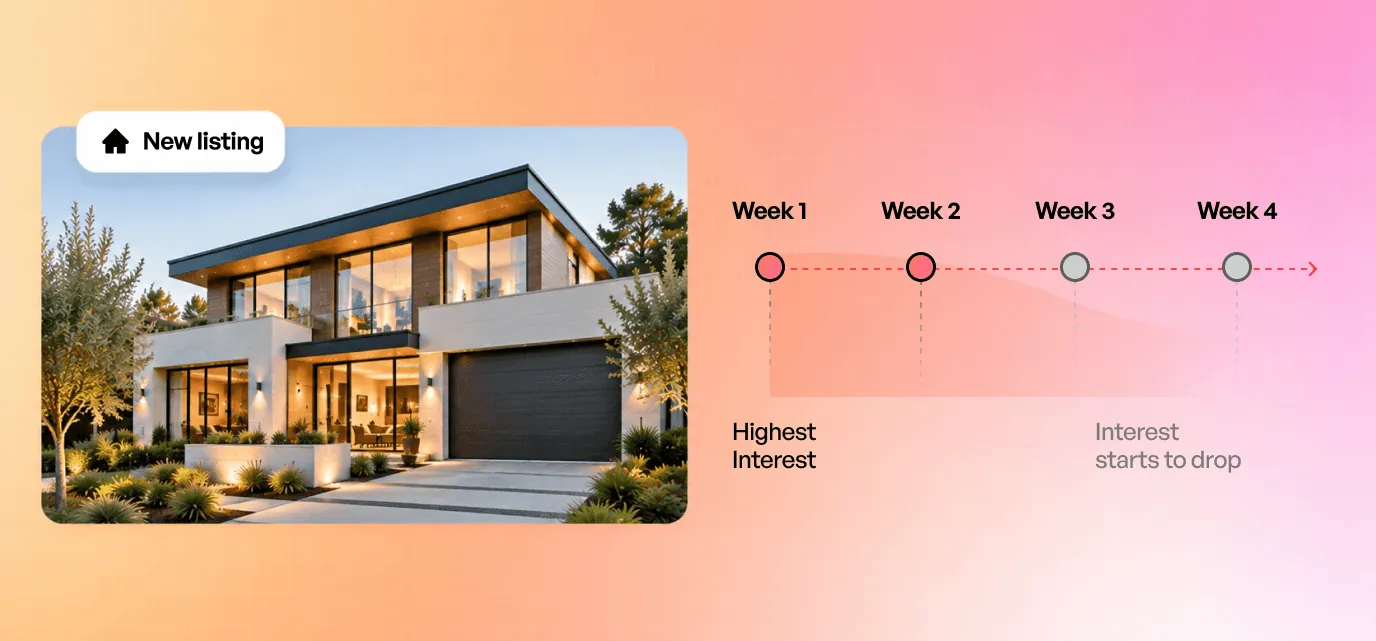
A pressão do tempo é o que deveria orientar sua escolha. No mesmo relatório da NAR, os vendedores relataram uma mediana de quatro semanas no mercado, e os compradores procuraram por uma mediana de 10 semanas. A janela em que um anúncio é novo e interessante é curta, e ela se abre no dia em que as fotos chegam.
Criador, app ou editor de vídeos imobiliários: três produtos diferentes
Os termos são usados como sinônimos nos resultados de busca, mas entregam coisas diferentes.
Um criador de vídeos imobiliários pega materiais que você já tem e monta um vídeo finalizado. Você fornece as fotos ou o link do anúncio, e ele faz o resto. O caminho mais rápido, com o menor controle sobre o resultado.
Um app de vídeos imobiliários geralmente faz esse mesmo trabalho no celular, às vezes com captura integrada, para que você filme e finalize num só lugar sem tocar num computador.
Um editor de vídeos imobiliários, que é o que a maioria das pessoas quer dizer com software de edição de vídeos imobiliários, coloca você numa linha do tempo com suas próprias imagens. Controle total, e uma ordem de grandeza mais lento do que os outros dois.
Muitos corretores procuram um e precisam de outro. Se você anuncia vinte imóveis por ano e não tem o hábito de editar, o software de vídeo imobiliário vai ficar esquecido no seu computador, e um criador era o que você queria. Se você é fotógrafo imobiliário e entrega para corretores clientes, os criadores e os apps de vídeo imobiliário de um toque vão te frustrar em menos de uma semana, e um software de edição é a única coisa que resolve.
Os cinco critérios abaixo valem qualquer que seja a categoria escolhida.
As cinco coisas que importam na hora de escolher um software de vídeo imobiliário
Tempo entre as fotos e a primeira publicação. Todos os outros setores conseguem produzir conteúdo em lote. Você não. Cada imóvel é único, o material perde todo o valor no dia em que o imóvel entra em contrato, e a janela útil se abre no momento em que o fotógrafo entrega. A pergunta certa é se você consegue publicar algo na mesma tarde, e não quantos templates há na biblioteca.
Custo por imóvel, não custo por licença. A Real Estate Bees fez a pergunta a mais de 2.000 fotógrafos imobiliários em 2024, e os valores informados se concentram entre 200 e 300 dólares para um imóvel padrão com menos de 5.000 pés quadrados, com cerca de 350 dólares cobrados por fotos mais vídeo. São faixas informadas pelos próprios profissionais, e não uma média nacional, e variam com a metragem e a concorrência local. Isso funciona para um imóvel de destaque. Multiplique por 20 imóveis por ano e vira uma despesa de cinco dígitos. Compare as ferramentas pelo que um imóvel custa para você e conte os extras que não aparecem na página de preços: licenciamento de músicas, licenças adicionais, limites de renderização, créditos de IA.
Versões com e sem marca a partir de um único projeto. Este critério é específico do seu setor e é o que a maioria das listas ignora completamente. Seu MLS quase certamente quer uma versão sem marca. O realMLS explica a diferença: tours com marca "contêm suas informações de contato ou sua imagem", os sem marca "contêm apenas imagens do imóvel. Nenhuma informação de contato", e errar na divulgação da marca é uma violação das regras. Uma ferramenta que não consegue produzir as duas versões a partir de um projeto obriga você a fazer o trabalho duas vezes em cada imóvel.
Todas as proporções sem reeditar. Vertical para Reels e TikTok, horizontal para o YouTube e o portal, quadrado para o feed. Se você tiver que refazer a edição para cada uma, seu tempo real de produção é o triplo do que a demonstração sugeria.
Se o resultado pode ser publicado legalmente. O que merece uma seção própria.
As regras de divulgação mudaram em janeiro
Se você vende na Califórnia, isso agora é lei, e não apenas uma boa prática.
A AB 723 foi sancionada em 10 de outubro de 2025 como Chapter 497, adicionando a Section 10140.8 ao Business and Professions Code, e entrou em vigor em 1º de janeiro de 2026. Quando uma imagem estática usada para divulgar um imóvel foi alterada digitalmente, o anúncio precisa trazer uma declaração de divulgação "razoavelmente visível e localizada na imagem ou ao lado dela", além de um link, URL ou QR code para uma cópia publicamente acessível da imagem original sem alterações.
Observe que a lei foi escrita em torno de fotografias, e não de vídeo. Mesmo assim, ela alcança a maioria dessas ferramentas, porque os produtos de foto para vídeo são construídos sobre as mesmas fotos.
Retoques comuns estão liberados. A lei isenta "iluminação, nitidez, balanço de branco, correção de cor, ângulo, alinhamento, corte, exposição ou outros ajustes comuns de edição de fotos", desde que "não alterem a representação do imóvel". Adicionar, remover ou mudar o que há no cômodo é outra história.
A regra da NAR vale onde quer que você trabalhe, mas só se você for membro: o Código vincula os REALTORS®, não todo corretor licenciado. Artigo 12: "Os REALTORS® devem ser honestos e verdadeiros em suas comunicações imobiliárias e apresentar um retrato fiel em sua publicidade, marketing e outras representações." A Standard of Practice 12-10 proíbe manipular o conteúdo de anúncios "de qualquer forma que produza um resultado enganoso", incluindo imagens enganosas.
Outros estados estão seguindo o mesmo caminho. Escrevendo para a HousingWire em junho de 2026, Paul Parker aponta o Wisconsin Act 69, que entra em vigor em 2027, e o New York S9584, ainda pendente, este último abrangendo vídeo e mídia imersiva além das fotos.
O teste de Parker inclui a pergunta que pega especificamente o vídeo: o clipe mostra movimento aéreo ou um tour gerado a partir de fotos que nunca foram feitas daquele jeito? A redação que ele sugere vale a pena copiar. "O movimento estilo drone é simulado. Nenhuma imagem de drone foi capturada." E também "Decorado virtualmente. Os móveis mostrados não estão incluídos."
Então a pergunta de compra passa a ser: o que esta ferramenta gera e o que ela apenas organiza? Um produto que faz pan e zoom nas suas fotos reais está numa posição diferente de um que inventa um cômodo. Pergunte antes de assinar, porque a obrigação de divulgação recai sobre você, não sobre o fornecedor.
Vale notar a velocidade com que o terreno está mudando. O Zillow colocou o Virtual Staging com IA no Showcase em 10 de setembro de 2025, permitindo que os compradores redecorem um cômodo em sete estilos de design ou retirem os móveis. O anúncio não diz como essas imagens redecoradas são rotuladas. Os portais estão lançando ferramentas generativas no mesmo mercado em que a lei de divulgação acabou de apertar, e quem tem a licença em jogo é o corretor.
Os melhores apps e ferramentas de vídeo imobiliário, pela função que cumprem
Eles não substituem uns aos outros, então ranqueá-los de um a dez seria inútil. Escolha pelo material que você tem.
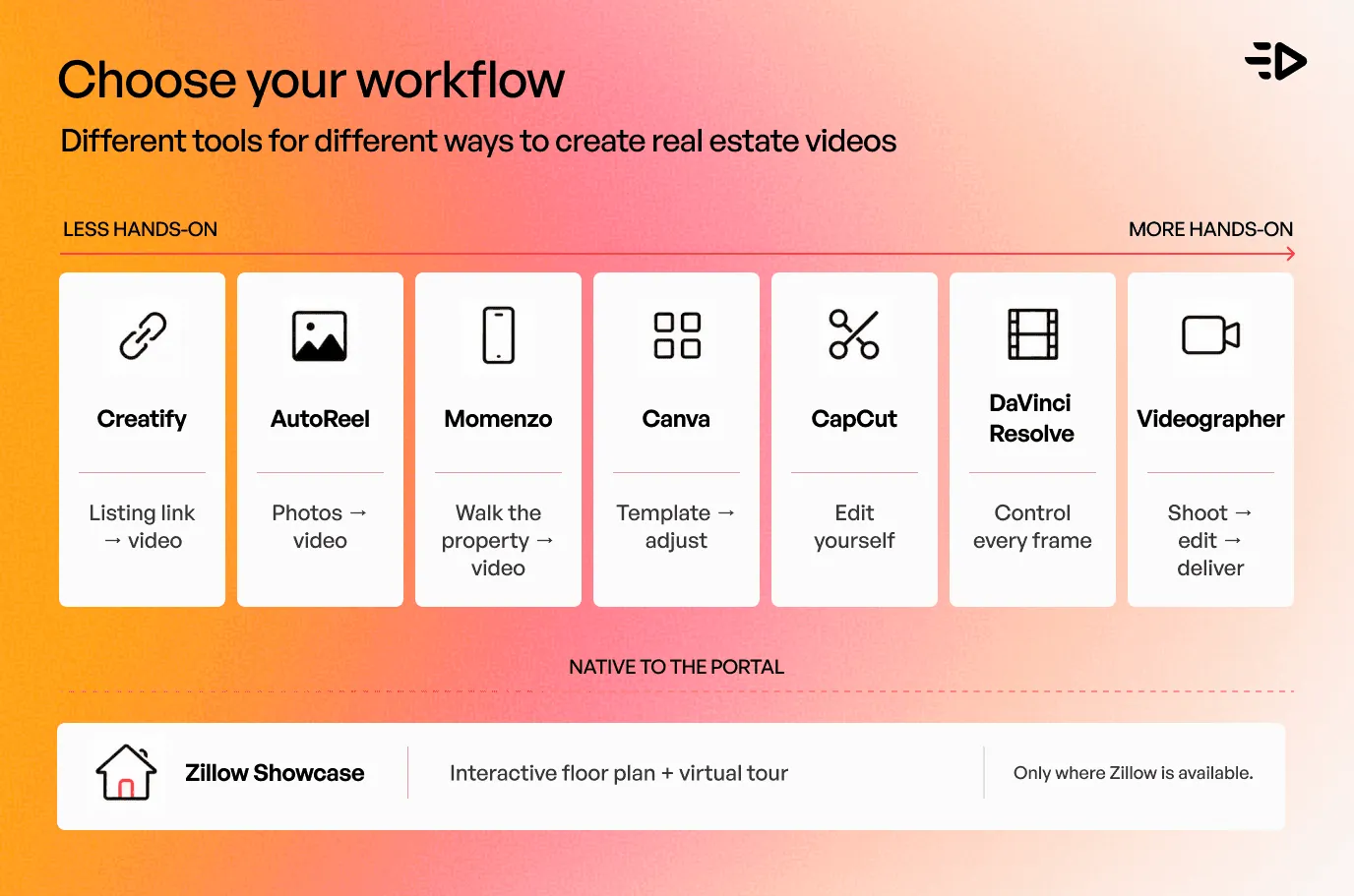
Você tem o link do anúncio: Creatify
Cole a URL do anúncio no agente e deixe-o trabalhar. O Creatify Agent recebe um link, pesquisa, escreve o roteiro, escolhe o elenco, gera as tomadas, cria a trilha de áudio, monta a edição e faz o controle de qualidade com base no briefing antes de qualquer entrega. Para anúncios em vídeo de imóveis, o Creatify fala em menos de 4 dólares por vídeo único e menos de 2 dólares por variação, produzidos quando o imóvel chega ao mercado, e não semanas depois.
O que importa, considerando a seção acima, é a camada de proteção. Um revisor com visão computacional confere cada cena com o briefing, características e afirmações verificadas ficam travadas como restrições, e o texto na tela é validado com dados confirmados antes de entrar na edição. A saída vem em 9:16, 16:9 e 1:1, então o problema de formato é resolvido de uma vez.
A Zumper, plataforma de anúncios de aluguel, passou de zero para mais de 300 vídeos em um único trimestre desse jeito e economizou cerca de 20.000 dólares por mês.
Um aviso sobre adequação: a ferramenta foi feita para criativos de anúncios, então é a escolha certa quando a função do vídeo é distribuição e promoção paga. Se o que você quer é um tour cinematográfico e lento de um imóvel de 4 milhões de dólares, contrate alguém.
Você tem o conjunto de fotos: AutoReel
O AutoReel transforma as fotos do anúncio num vídeo e importa diretamente do Realtor.com. Cada foto vira um clipe de 3 segundos e, dependendo do plano, você tem de cinco a 20 fotos por vídeo, gerando clipes de 15 a 60 segundos, prontos em 10 a 15 minutos. Há um plano gratuito com dois vídeos por mês e marca d'água.
É uma apresentação de slides com movimento, então herda a qualidade das suas fotos, seja ela qual for. E é também o caso em que a pergunta de Parker sobre movimento simulado se aplica mais diretamente.
Você prefere filmar: Momenzo
O Momenzo é um app de vídeo imobiliário feito para o celular que roda em iPhone e Android. Você percorre o imóvel seguindo as instruções do app, e ele cuida das legendas, da correção de iluminação e das sobreposições com a marca. 59 dólares por três meses ou 169 dólares por ano, com vídeos de imóveis ilimitados.
Você ainda precisa percorrer o imóvel, o que é a vantagem ou o problema, dependendo da sua semana.
Você quer templates ajustáveis: Canva
O Canva tem uma biblioteca de templates de vídeo imobiliário, e a maioria das equipes já o conhece. Gratuito para começar, com controle da edição por arrastar e soltar e nenhuma automação por imóvel. Funciona bem com pouco volume, é sofrido com vinte imóveis.
Você quer editar por conta própria: CapCut ou DaVinci Resolve
Esta é a questão do software de edição de vídeo imobiliário, e ela merece uma resposta direta, e não um descaso. A edição de vídeo para corretores se divide mais por dispositivo do que por produto: o celular entre uma visita e outra, ou o computador depois do expediente.
O CapCut é onde a maioria dos corretores que editam no celular acaba parando, e é o mais perto que a categoria tem de um app padrão de edição de vídeo imobiliário, apesar de nada nele ter sido feito para imóveis. É gratuito e roda em celular, tablet, computador e web, então uma edição que você começa entre visitas termina no notebook. Ser de uso geral tem dois lados: nenhum template ali sabe o que é um anúncio de imóvel, e você monta cada vídeo do zero.
No computador, o DaVinci Resolve tem uma versão gratuita que lida com a maioria dos formatos de 8 bits até 60 fps em Ultra HD, e o Resolve Studio custa 295 dólares em pagamento único, e não por assinatura, no Mac, Windows e Linux. É uma suíte profissional de cor e finalização, o que é exatamente o que você quer ou um mês da sua vida que você não vai recuperar. O Premiere Pro custa 22,99 dólares por mês no plano anual, se a sua imobiliária já vive no ecossistema da Adobe.
A leitura honesta desta categoria: software de edição é a resposta certa para fotógrafos e videomakers imobiliários que entregam para clientes, e para corretores que realmente gostam do ofício. Para um corretor com um imóvel para publicar hoje à tarde, uma linha do tempo é o jeito mais caro do mundo de produzir um vídeo vertical de 30 segundos.
Você quer algo nativo do portal: Zillow Showcase
Planta interativa, tour virtual e posicionamento promovido no Zillow. Só funciona onde o Zillow está, representa menos de 1% dos anúncios, então a disponibilidade é limitada, e toda afirmação de desempenho sobre ele vem do próprio Zillow.
Você ainda deveria contratar um videomaker
Fonte: Kyle Loftus
Imóveis de luxo, imóveis com arquitetura marcante, qualquer caso em que o próprio imóvel é a história, e qualquer gravação que precise de imagens reais de drone em vez de um movimento simulado. A 200 a 350 dólares por imóvel, essa é a escolha certa para alguns imóveis por ano e a errada para todos eles.
Um fluxo de trabalho de 48 horas para um novo imóvel
As fotos chegaram. Escolha as 15 a 20 que contam o percurso em ordem: fachada, entrada, sala principal, cozinha, suíte principal, o grande diferencial, área externa dos fundos.
Faça a versão vertical primeiro. É ali que a descoberta acontece. A versão horizontal para o portal e o YouTube sai depois, dos mesmos materiais.
Escreva a linha de divulgação antes da legenda. Se algo foi decorado, adicionado, removido ou gerado, a divulgação acompanha a mídia, e não fica num documento separado, e os anúncios na Califórnia precisam que a original seja acessível por link ou QR code.
Exporte a versão sem marca ao mesmo tempo. Não na semana que vem, quando você já esqueceu qual era o arquivo do projeto.
Publique enquanto o anúncio é novo. Diante de uma mediana de 4 semanas no mercado, o primeiro e o segundo dia pesam mais do que todo o resto do período somado.
Faça uma segunda versão com uma frase de abertura diferente. Mesmas imagens, novo gancho. É a alavanca de desempenho mais barata que você tem e a que todo mundo pula.
Guarde os originais. Fotos originais, versões editadas e o texto de divulgação que você usou, arquivados juntos. É o quinto ponto do teste de Parker e também, simplesmente, como você sobrevive a uma reclamação.
Antes de se comprometer com qualquer ferramenta, passe um imóvel por ela de ponta a ponta e produza uma versão em 16:9 e outra em 9:16. Uma hora com um imóvel real diz mais do que um mês de demonstrações.
Escolhendo uma
Fotos em mãos e dez minutos livres: AutoReel ou Creatify
Quer que o link do anúncio produza tudo: Creatify
Não se importa de percorrer o imóvel com o celular: Momenzo
Quer ajustar um template você mesmo: Canva
Quer controlar cada frame numa linha do tempo: CapCut no celular, DaVinci Resolve no computador
O imóvel é o produto e existe orçamento: um videomaker
Qualquer ferramenta: pergunte o que ela gera e o que ela apenas organiza
Leia também: Anúncios automatizados explicados: o que é automatizado e o que não é
Perguntas Frequentes
Qual é o melhor criador de vídeos imobiliários?
Não existe um único, e qualquer lista que coroa um vencedor está chutando sobre o seu fluxo de trabalho. Escolha pelo material: Creatify se você quer colar o link de um anúncio e receber criativos de anúncio prontos, AutoReel se você tem um conjunto de fotos, Momenzo se prefere filmar com o celular, Canva se quer controle manual, e um videomaker para imóveis de destaque.
Qual é o melhor app para criar vídeos imobiliários?
Para um fluxo de trabalho centrado no celular, o Momenzo foi feito para isso: você filma seguindo as instruções do app e ele adiciona legendas, correção de iluminação e marca, por 59 dólares por três meses. A maioria dos rankings dos melhores apps de vídeo imobiliário coloca Momenzo, AutoReel e Canva uns contra os outros, o que só ajuda quando você sabe se vai filmar, fornecer um conjunto de fotos ou montar tudo você mesmo. Se "app" significa qualquer coisa no navegador, a pergunta é qual material você tem, e a resposta acima se aplica.
Quanto custa um videomaker imobiliário?
Numa pesquisa de 2024 da Real Estate Bees com mais de 2.000 fotógrafos imobiliários, os valores informados se concentram entre 200 e 300 dólares para um imóvel padrão com menos de 5.000 pés quadrados, com cerca de 350 dólares cobrados por fotos mais vídeo e iniciantes mais perto de 100 a 200. São faixas informadas pelos próprios profissionais, e não uma média nacional, e variam com a metragem, a duração do vídeo e a concorrência local. Peça um orçamento para o imóvel específico.
Posso usar IA para fazer vídeos imobiliários, e qual ferramenta de IA é a melhor?
Sim, e muitos corretores fazem isso. A melhor depende, de novo, do seu material: Creatify se você quer transformar o link de um anúncio em criativos de anúncio prontos, AutoReel se você vai fornecer um conjunto de fotos. A limitação não é a tecnologia, é a divulgação: se a ferramenta altera a aparência do imóvel, você tem obrigações pela Standard of Practice 12-10 da NAR em qualquer lugar e pela AB 723 da Califórnia, se vender lá.
Qual é o melhor software de edição de vídeo imobiliário?
O melhor software de edição de vídeo para imóveis depende de quem está com o mouse na mão. Para corretores, o CapCut cobre quase tudo: é gratuito e roda no celular, no computador e na web, então um projeto passa de um para outro. Para finalização no computador, o DaVinci Resolve tem uma versão gratuita que vai até Ultra HD a 60 fps, com o Studio custando 295 dólares em compra única, e o Premiere Pro custa 22,99 dólares por mês no plano anual. Fotógrafos imobiliários que entregam para clientes costumam escolher o Resolve ou o Premiere. Corretores que só precisam publicar um imóvel geralmente descobrem que um software de edição é mais ferramenta do que o trabalho exige.
Que app posso usar para transformar fotos de imóveis em vídeos?
O AutoReel foi feito para isso e importa do Realtor.com, transformando cada foto num clipe de 3 segundos. O Creatify faz isso a partir do link do anúncio, em vez do conjunto de fotos. O Canva funciona se você prefere posicionar as fotos por conta própria. Seja qual for a ferramenta, se ela adiciona um movimento que a câmera nunca fez, vale a linha de divulgação sugerida por Paul Parker: "O movimento estilo drone é simulado. Nenhuma imagem de drone foi capturada."
Existe um criador de vídeos imobiliários gratuito?
Vários, com limites. O AutoReel tem um plano gratuito com dois vídeos por mês e marca d'água. O Canva é gratuito para começar. O CapCut e o DaVinci Resolve são gratuitos, mas são editores, e não criadores, então a montagem fica por sua conta. Planos gratuitos geralmente custam uma marca d'água, um limite de renderização ou o seu tempo, e num imóvel prestes a ir ao ar, a marca d'água é o que pesa.
Quanto custa editar um vídeo imobiliário?
São duas respostas diferentes. Terceirizando, você fica na faixa que os fotógrafos imobiliários informaram à Real Estate Bees, cerca de 200 a 300 dólares por um imóvel padrão e cerca de 350 por fotos mais vídeo. Internamente, o software sai quase de graça e o custo é o seu tempo: reserve uma ou duas horas por imóvel numa linha do tempo depois que você dominar a ferramenta, que é o número que a maioria dos corretores deixa de fora da comparação.
Preciso divulgar imagens de imóveis decoradas virtualmente ou alteradas por IA?
Na Califórnia, desde 1º de janeiro de 2026, sim: uma declaração de divulgação mais um link, URL ou QR code para a imagem original sem alterações. Em outros lugares, o Artigo 12 e a Standard of Practice 12-10 da NAR já proíbem imagens enganosas, e Wisconsin e Nova York têm medidas em andamento. Correções rotineiras de iluminação e cor estão isentas pela AB 723. Confira sua situação com seu corretor responsável ou assessor jurídico, em vez de confiar num resumo.
Qual deve ser a duração de um vídeo de anúncio de imóvel?
Curto para o feed, mais longo para o portal. Uma versão vertical de 20 a 45 segundos faz o trabalho de descoberta, e ferramentas como o AutoReel têm limite de 60 segundos por design. Mantenha o tour completo separado e mais longo para quem já decidiu que tem interesse.
O vídeo do anúncio ajuda um imóvel a vender mais rápido?
A resposta honesta é que ele ajuda o anúncio a ser encontrado, e ser encontrado mais cedo é o que acelera o prazo. Os próprios números do Showcase do Zillow apontam nessa direção, embora misturem qualidade de mídia com posicionamento pago. Vídeo nenhum salva uma casa com preço errado.
Resumo
Escolha pelos critérios sem glamour. Com que rapidez você consegue publicar depois que as fotos chegam, quanto um imóvel custa para você ao longo de um ano inteiro de anúncios, se a ferramenta entrega versões com e sem marca juntas, se exporta todas as proporções de uma vez e se você pode publicar o resultado sem problema de divulgação.
Uma coisa vale a reflexão. Os corretores que tiram mais proveito dessas ferramentas tratam o vídeo do anúncio como a propaganda e o conjunto de fotos como a página do produto: volume e velocidade na propaganda, precisão e detalhe na página. A maioria das pessoas gasta dinheiro e atenção ao contrário e depois se pergunta por que o tour polido não mexeu em nada.