

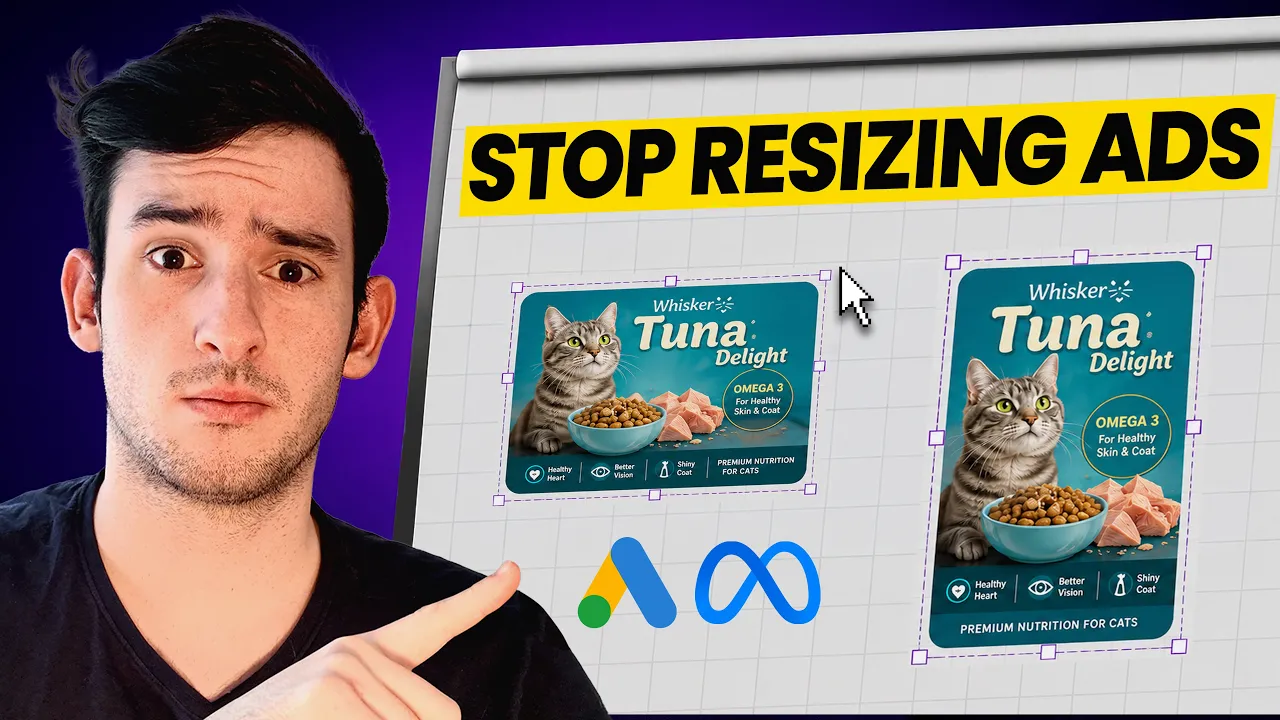
Cara Membuat Meta Ad Creatives & Google PMax Assets dengan AI
Cara Membuat Meta Ad Creatives & Google PMax Assets dengan AI


Tim Creatify
BAGIKAN


DALAM ARTIKEL INI
👉🏻 Coba Creatify secara gratis: https://creatify.ai/?utm_source=yt&utm_medium=sm_organic&utm_campaign=vs&utm_content=50
Cara membuat materi iklan Meta ad dan aset Google PMax dengan AI — dalam hitungan menit, tanpa desainer, tanpa Canva, dan tanpa perlu mengubah ukuran secara manual.
Jika Anda menjalankan iklan Meta dan Google PMax dan Anda terjebak dalam pembuatan satu ukuran materi iklan atau membayar seseorang untuk mengubah ukuran setiap aset secara manual, alur kerja AI ini mengatasinya. Di dalam video, saya memulai dengan satu tautan produk dan satu prompt sederhana untuk menghasilkan materi iklan statis 1:1 (1080x1080) dan video 1080x1920. Dari sana, AI mengadaptasinya ke setiap ukuran yang dibutuhkan Meta dan Google PMax — mengubah satu brief tunggal menjadi paket materi iklan lengkap yang siap diunggah ke platform iklan.
Alat yang saya gunakan adalah Creatify — agen ini mengadaptasi materi iklan yang sama ke ukuran lain, seperti 1200x628 dan 1080x1920, yang dioptimalkan untuk penempatan Google PMax. Alat ini mempertahankan arah kreatif dan hanya menyesuaikan tata letak agar sesuai dengan masing-masing ukuran.
Saya beralih dari membuat satu ukuran materi iklan menjadi satu paket lengkap berisi lima aset lebih dari satu brief awal saja, memangkas proses ubah ukuran yang biasanya memakan waktu berjam-jam menjadi hanya beberapa menit. Jika Anda ingin menghindari membayar desainer atau menyusun ulang iklan dari awal, ini adalah jalur tercepat yang saya temukan.
Pendekatannya:
1. Mulai dengan membuat satu materi iklan statis persegi 1:1 yang berfungsi di Meta dan Google PMax
2. Adaptasikan statis tersebut ke ukuran horizontal dan vertikal dengan prompt sederhana
3. Uji dan skalakan materi iklan yang menang
Berfungsi untuk brand e-commerce, pemasar, dan agensi yang melakukan pengujian iklan di berbagai platform — bisnis DTC apa pun yang menjalankan iklan Meta dan Google PMax.
Terima kasih telah menonton!
-- Joel
Stempel waktu:
0:00 - Intro
0:54 - Mengapa ukuran materi iklan itu penting
1:18 - Mulai di sini: persegi 1:1
4:01 - Dua materi iklan pertama Anda
4:17 - Mengadaptasi ke setiap ukuran Meta & PMax
6:22 - Mengapa Anda memulai dengan 1:1
6:51 - Apa yang harus diunggah terlebih dahulu
7:27 - Rekap alur kerja lengkap
7:50 - Outro
#MetaAds #GooglePMax #AIAdCreatives
👉🏻 Coba Creatify secara gratis: https://creatify.ai/?utm_source=yt&utm_medium=sm_organic&utm_campaign=vs&utm_content=50
Cara membuat materi iklan Meta ad dan aset Google PMax dengan AI — dalam hitungan menit, tanpa desainer, tanpa Canva, dan tanpa perlu mengubah ukuran secara manual.
Jika Anda menjalankan iklan Meta dan Google PMax dan Anda terjebak dalam pembuatan satu ukuran materi iklan atau membayar seseorang untuk mengubah ukuran setiap aset secara manual, alur kerja AI ini mengatasinya. Di dalam video, saya memulai dengan satu tautan produk dan satu prompt sederhana untuk menghasilkan materi iklan statis 1:1 (1080x1080) dan video 1080x1920. Dari sana, AI mengadaptasinya ke setiap ukuran yang dibutuhkan Meta dan Google PMax — mengubah satu brief tunggal menjadi paket materi iklan lengkap yang siap diunggah ke platform iklan.
Alat yang saya gunakan adalah Creatify — agen ini mengadaptasi materi iklan yang sama ke ukuran lain, seperti 1200x628 dan 1080x1920, yang dioptimalkan untuk penempatan Google PMax. Alat ini mempertahankan arah kreatif dan hanya menyesuaikan tata letak agar sesuai dengan masing-masing ukuran.
Saya beralih dari membuat satu ukuran materi iklan menjadi satu paket lengkap berisi lima aset lebih dari satu brief awal saja, memangkas proses ubah ukuran yang biasanya memakan waktu berjam-jam menjadi hanya beberapa menit. Jika Anda ingin menghindari membayar desainer atau menyusun ulang iklan dari awal, ini adalah jalur tercepat yang saya temukan.
Pendekatannya:
1. Mulai dengan membuat satu materi iklan statis persegi 1:1 yang berfungsi di Meta dan Google PMax
2. Adaptasikan statis tersebut ke ukuran horizontal dan vertikal dengan prompt sederhana
3. Uji dan skalakan materi iklan yang menang
Berfungsi untuk brand e-commerce, pemasar, dan agensi yang melakukan pengujian iklan di berbagai platform — bisnis DTC apa pun yang menjalankan iklan Meta dan Google PMax.
Terima kasih telah menonton!
-- Joel
Stempel waktu:
0:00 - Intro
0:54 - Mengapa ukuran materi iklan itu penting
1:18 - Mulai di sini: persegi 1:1
4:01 - Dua materi iklan pertama Anda
4:17 - Mengadaptasi ke setiap ukuran Meta & PMax
6:22 - Mengapa Anda memulai dengan 1:1
6:51 - Apa yang harus diunggah terlebih dahulu
7:27 - Rekap alur kerja lengkap
7:50 - Outro
#MetaAds #GooglePMax #AIAdCreatives

Anda mungkin juga menyukai


Siap mempercepat pemasaran Anda?
Uji ide produk baru Anda dalam hitungan menit dengan iklan video yang dihasilkan oleh AI

Siap mempercepat pemasaran Anda?
Uji ide produk baru Anda dalam hitungan menit dengan iklan video yang dihasilkan oleh AI
Siap mempercepat pemasaran Anda?
Uji ide produk baru Anda dalam hitungan menit dengan iklan video yang dihasilkan oleh AI
Siap mempercepat pemasaran Anda?
Uji ide produk baru Anda dalam hitungan menit dengan iklan video yang dihasilkan oleh AI

Buat iklan video yang menarik untuk produk Anda
dari URL apa pun



Creatify Lab • Hak Cipta © 2026
Bahasa
Indonesian (Indonesia)
Fitur
Alat
Kasus Penggunaan
Buat iklan video yang menarik untuk produk Anda
dari URL apa pun
Creatify Lab • Hak Cipta © 2026
Bahasa
Indonesian (Indonesia)
Fitur
Alat
Kasus Penggunaan
Buat iklan video yang menarik untuk produk Anda
dari URL apa pun
Creatify Lab • Hak Cipta © 2026
Bahasa
Indonesian (Indonesia)
Fitur
Alat
Kasus Penggunaan
YouTube
Snapchat
Shopify
Buat Avatar AI
OTT & CTV
Generasi Lead
Buat iklan video yang menarik untuk produk Anda
dari URL apa pun
Creatify Lab • Hak Cipta © 2026
Bahasa
Indonesian (Indonesia)
Fitur
Alat
Kasus Penggunaan
