Dalam sebuah studi tahun 2025 dari Queen Mary University of London, yang diterbitkan dalam PLOS One, pendengar salah mengira suara klon AI sebagai orang sungguhan sebanyak 58% dari keseluruhan waktu uji coba, sementara mereka hanya mengidentifikasi suara manusia asli dengan benar sebanyak 62% dari keseluruhan waktu uji coba. Kesenjangannya kini menyusut hingga hampir tidak ada. Suara AI terbaik kini dapat lolos sebagai suara manusia asli.
Jadi, ketika voiceover yang baru saja Anda buat masih terdengar seperti robot, model suaranya jarang menjadi penyebab utamanya. Masalahnya biasanya terletak pada bagaimana suara tersebut digunakan. Penyampaian yang kaku seperti robot disebabkan oleh satu hal, dan itu adalah sesuatu yang dapat Anda kendalikan. Panduan ini mengulas cara menambahkan suara AI ke video Anda agar terdengar seperti orang asli yang sedang berbicara, dan di akhir panduan Anda akan tahu cara menggunakan AI untuk kebutuhan voice over yang benar-benar terdengar manusiawi.
Mengapa suara AI terdengar kaku seperti robot
Bahan yang hilang tersebut memiliki sebuah nama: prosodi. Prosodi adalah ritme, intonasi, penekanan, dan tempo bicara—musik di balik kata-kata yang menyampaikan makna dan emosi. Seperti yang dijelaskan oleh Communications of the ACM, ucapan bisa sangat mudah dipahami tetapi masih terasa mekanis ketika petunjuk-petunjuk tersebut terdengar datar, karena mesin yang membacakan kata-kata tidak memahami apa yang dikatakannya seperti halnya manusia memahami ucapannya sendiri.
Kedataran tersebut muncul dalam empat tanda yang mudah dikenali. Nada suaranya tetap monoton, sehingga setiap kalimat terdengar sama saja. Temponya seragam, dengan pengaturan waktu dan durasi jeda yang identik di sepanjang ucapan. Penekanannya lemah, sehingga kata-kata penting tidak menonjol. Dan emosinya tidak cocok dengan naskah, sehingga baris kalimat yang seharusnya terdengar hangat malah terdengar netral. Model AI dapat mengucapkan setiap kata dengan benar, namun tetap melewatkan keempat aspek tersebut. Memperbaiki suara robotik berarti mengembalikan prosodinya, dan sisa panduan ini akan membahas bagaimana Anda melakukannya, baik untuk kebutuhan suara AI pada video, klip media sosial, maupun narasi berdurasi panjang.
Menulislah untuk kenyamanan telinga
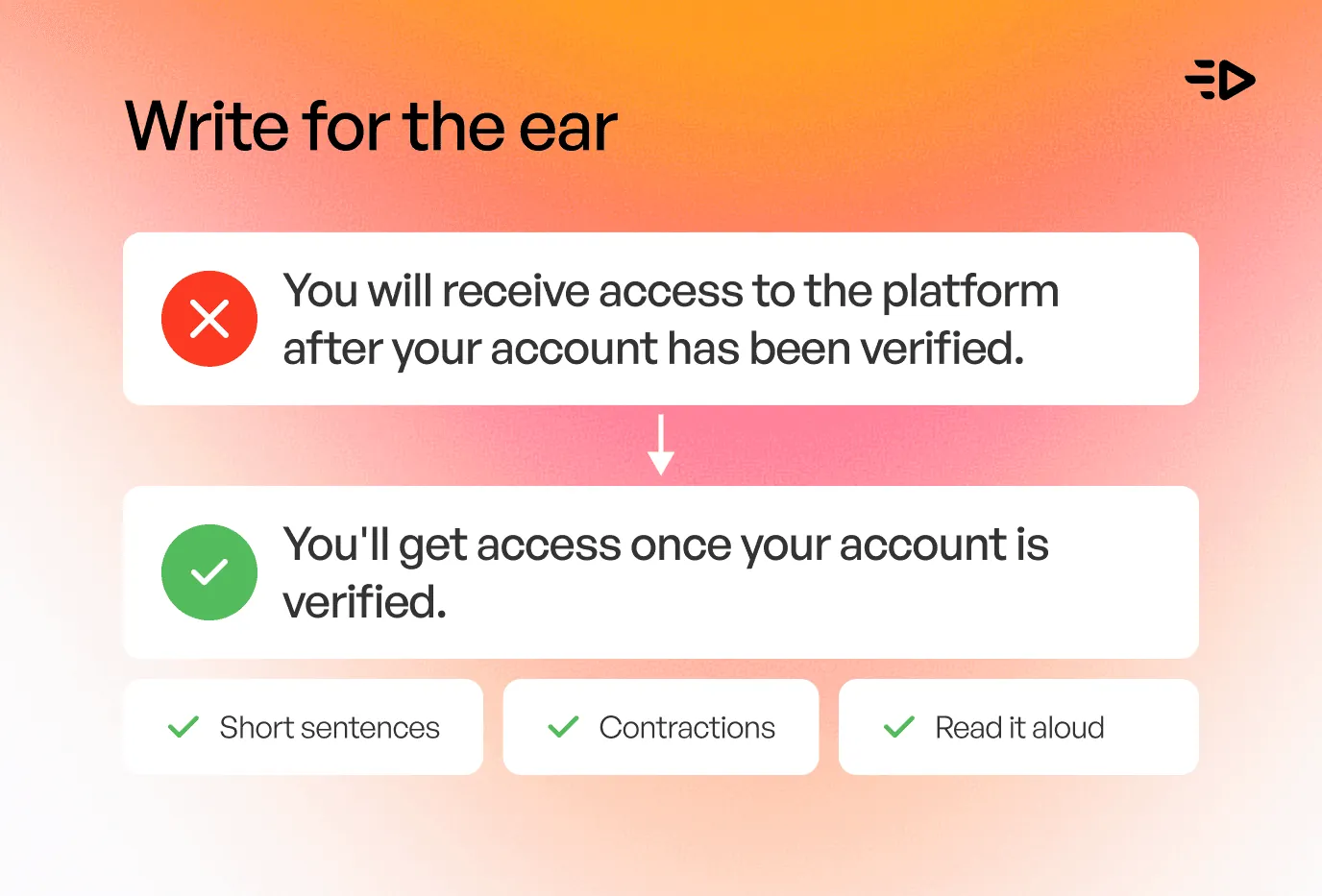
Langkah perbaikan pertama dilakukan sebelum Anda menyentuh alat pembuat suara. Sebagian besar penyampaian yang kaku seperti robot berawal dari naskah yang ditulis untuk dibaca dalam hati, penuh dengan kalimat panjang dan pilihan kata formal yang tidak pernah diucapkan orang secara langsung dalam percakapan sehari-hari.
Tulis ulang naskah tersebut seperti cara Anda berbicara. Gunakan kalimat-kalimat pendek dan singkatan yang kasual. Berikan tanda baca untuk jeda napas, dengan koma dan titik di tempat pembicara biasanya akan berhenti sejenak secara alami. Kemudian baca sendiri naskah tersebut dengan lantang, dan di bagian mana pun Anda tersandung atau kehabisan napas, pangkas kalimatnya. Jika terasa janggal di mulut Anda, suaranya akan terdengar lebih buruk lagi dalam bentuk suara sintetis. Naskah yang dirancang untuk kenyamanan telinga memberikan ritme alami yang dibutuhkan oleh mesin suara untuk bekerja, dan ini adalah langkah awal yang sama, apa pun alat pengolah voiceover AI untuk video yang Anda pilih.
Kendalikan tempo dan jeda
Tempo yang datar adalah salah satu ciri suara robot yang paling kentara, karena manusia asli pasti mempercepat tempo, memperlambat, dan berhenti sejenak untuk memberikan penekanan. Alat pembuat suara AI yang bagus memungkinkan Anda mengontrol hal itu, dan mekanismenya patut untuk Anda ketahui.
Sebagian besar alat tersebut dibangun di atas standar yang disebut SSML, atau Speech Synthesis Markup Language, yang dikelola oleh W3C, badan yang sama di balik HTML. Bahasa ini memberi Anda tag untuk jeda, penekanan, nada, kecepatan, dan pengucapan, dan banyak alat yang menyediakannya sebagai kontrol sederhana tanpa memerlukan keahlian coding. Gunakan fitur ini untuk menambahkan jeda sebelum poin penting, memperlambat penyampaian kalimat yang krusial, dan memecah paragraf yang padat menjadi bagian-bagian bicara yang lebih pendek. Tanda baca melakukan banyak peran ini secara otomatis, sehingga koma, titik, dan jeda paragraf dalam naskah Anda sudah ikut membentuk tempo sebelum Anda menambahkan pengaturan manual apa pun.
Tambahkan penekanan dan emosi
Suara manusia akan menekankan kata-kata yang penting dan membiarkan kata-kata lainnya mengalir biasa. Pembacaan AI yang datar memberikan bobot yang sama pada setiap kata, itulah mengapa suaranya terasa hambar tanpa nyawa. Tandai kata-kata yang ingin Anda tekankan, lalu biarkan alat tersebut menaikkan nada dan volumenya seperti yang diizinkan oleh kontrol penekanan dan prosodi SSML.
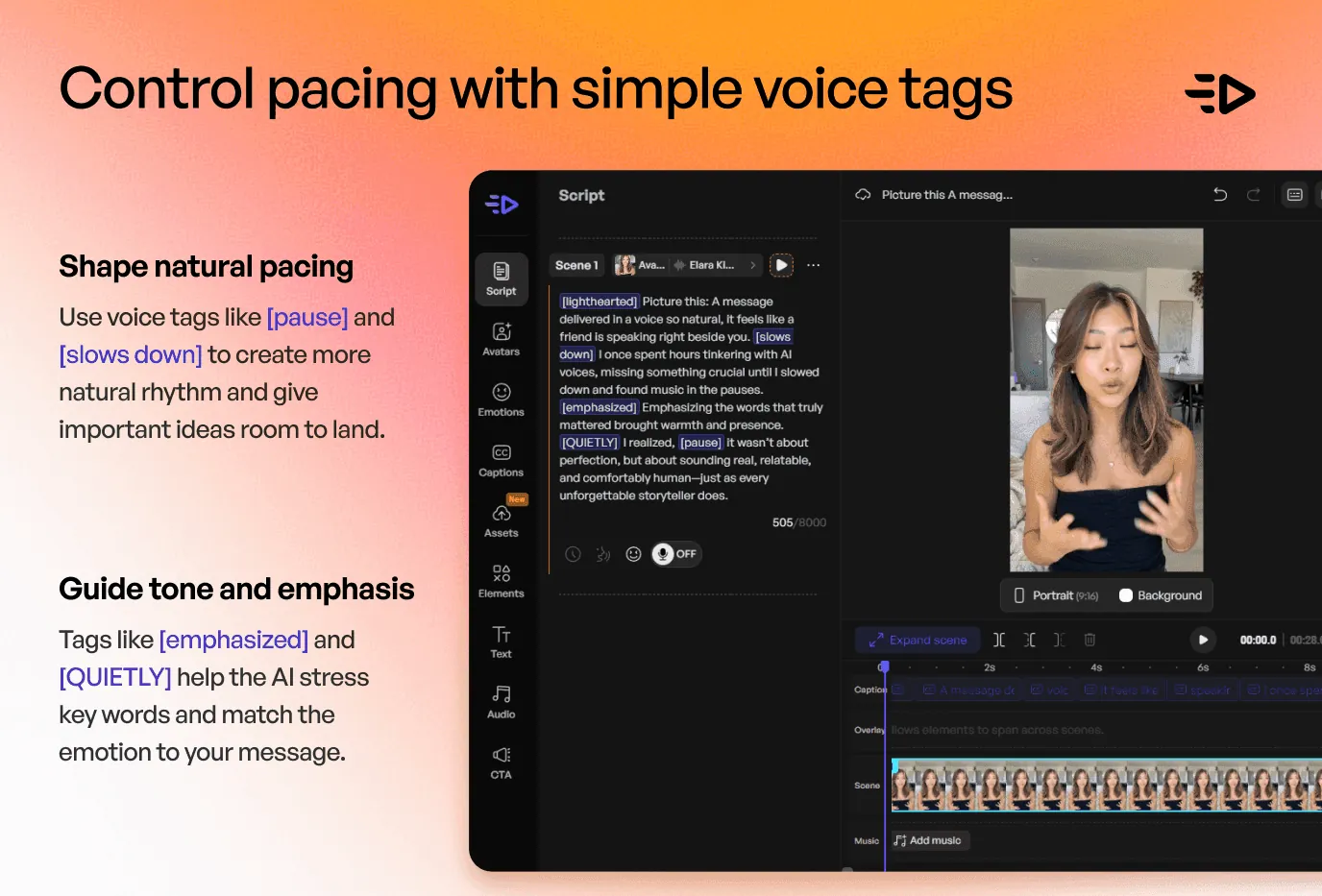
Emosi adalah setengah bagian lainnya. Pilih suara yang memiliki rentang vokal asli, lalu sesuaikan nadanya dengan pesan yang ingin disampaikan: hangat untuk sambutan, penuh energi untuk promo, atau tenang untuk tutorial. Beberapa alat memungkinkan Anda mengarahkan gaya penyampaian secara langsung. Platform seperti Creatify menawarkan lebih dari 140 pilihan suara di lebih dari 75 bahasa dengan nada dan kecepatan yang dapat disesuaikan, ditambah tag emosi seperti [laugh] dan [excited] yang dapat Anda masukkan ke dalam naskah untuk memvariasikan penyampaian. Di sinilah voice over AI yang bagus untuk video tidak lagi terdengar seperti buatan mesin: emosi dari suara tersebut selaras dengan apa yang disampaikan oleh kata-kata, sehingga keduanya tidak lagi saling bertolak belakang.
Baca juga: 7 alat optimasi iklan saat iklan pemenang Anda mulai kehilangan performa
Perbaiki pengucapan
Satu kata yang diucapkan secara salah dapat merusak seluruh ilusi suara alami yang telah dibangun. Nama, istilah merek, akronim, dan angka adalah pelanggar yang paling sering ditemui, karena model AI hanya menebak kata-kata yang asing baginya dan sering kali tebakannya salah.
Dengarkan kembali secara khusus bagian-bagian ini, lalu koreksi. Kontrol fonem dan instruksi pengucapan (say-as) pada SSML memungkinkan Anda mengeja kata secara fonetis atau memberi tahu mesin untuk membaca "2026" sebagai tahun dan "CEO" sebagai huruf demi huruf. Jika alat yang digunakan tidak menyediakan fitur tersebut, tulis ulang kata tersebut sesuai dengan bunyi pengucapannya, misalnya "Nginx" ditulis sebagai "engine-x," dan suara AI akan mengikutinya. Ini adalah langkah kecil namun krusial yang melindungi kualitas dari semua hal lain yang telah Anda optimalkan.
Cara memasukkan suara AI ke dalam video dan menyesuaikannya dengan footage
Suara yang bagus dalam konteks yang salah akan tetap terasa janggal. Pilih suara yang tepat untuk video Anda: usia, aksen, dan energi yang sesuai dengan rekaman video serta audiens yang Anda tuju. Pembacaan berenergi tinggi yang diletakkan di atas video produk yang lambat dan dramatis akan terasa tidak sinkron, dan penonton dapat merasakan ketidakcocokan tersebut meskipun mereka tidak dapat menjelaskannya secara spesifik.
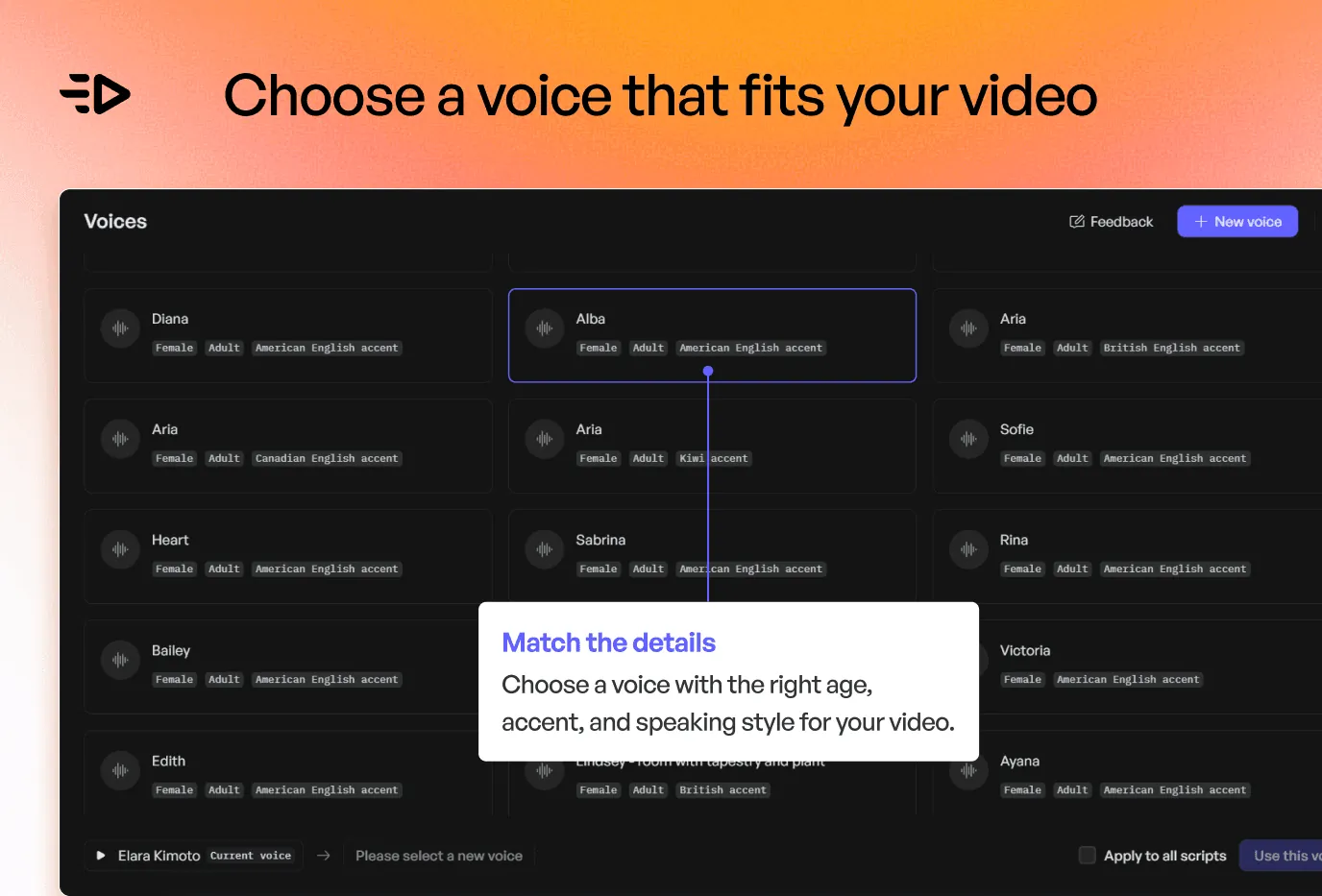
Selanjutnya, cocokkan audio dengan visual video Anda. Atur tempo agar narasi terdengar pas dengan apa yang tampil di layar, berikan ruang kosong di mana visual harus mendominasi momen, dan seimbangkan tingkat volume agar suara narasi terdengar jernih di atas musik latar belakang apa pun. Jika video Anda menampilkan presenter di depan kamera, menjaga gerakan bibir tetap sinkron dengan audio sama pentingnya dengan suara itu sendiri, di sinilah alat avatar yang menyelaraskan gerakan bibir (lip-sync) dengan ucapan yang dihasilkan AI membuktikan nilainya. Pustaka suara Creatify juga mencakup kloning suara, sehingga sebuah brand dapat menarasikan segalanya dalam satu suara yang konsisten di berbagai bahasa.
Baca juga: Cara membuat video AI: 7 alur kerja untuk setiap use case
Pertanyaan yang Sering Diajukan
Bagaimana cara menambahkan suara AI ke video?
Tulis naskah Anda, tempelkan ke dalam alat suara AI atau alat text-to-speech, pilih suara, lalu buat narasinya. Setelah itu, impor audio tersebut ke dalam editor video Anda dan selaraskan dengan rekaman video. Untuk hasil terbaik, sesuaikan naskah dengan ritme lisan terlebih dahulu dan gunakan kontrol tempo, penekanan, serta pengucapan yang tersedia pada alat tersebut sebelum Anda mengekspornya.
Mengapa suara AI saya terdengar seperti robot?
Hampir selalu karena masalah prosodi, yaitu ritme, intonasi, dan penekanan yang membuat ucapan terdengar hidup. Pembacaan robotik terasa datar: nada monoton, tempo seragam, penekanan lemah, dan emosi yang tidak cocok dengan kata-kata. Model suara AI biasanya sangat mumpuni; cara penyampaiannya saja yang perlu dibentuk melalui naskah dan kontrol yang tersedia pada alat tersebut.
Bagaimana cara membuat suara AI terdengar lebih alami dan manusiawi?
Menulislah seperti cara orang berbicara, gunakan kalimat-kalimat pendek dan singkatan, lalu baca dengan lantang untuk mendeteksi kalimat yang terasa janggal. Tambahkan jeda dan variasikan tempo, tekankan kata-kata yang penting, perbaiki pengucapan nama atau angka yang salah, dan pilih suara yang nadanya sesuai dengan pesan Anda. Penyesuaian-penyesuaian kecil pada semua aspek ini akan menghasilkan pembacaan yang terdengar sangat manusiawi.
Bagaimana cara menggunakan suara AI di TikTok?
TikTok memiliki fitur text-to-speech bawaan: tambahkan teks pada klip Anda, ketuk teks tersebut, lalu pilih "Text to speech" dengan suara pilihan Anda. Untuk kontrol yang lebih besar dan hasil penyampaian yang lebih alami, buat voiceover menggunakan alat suara AI khusus, atur tempo dan penekanannya, lalu unggah audio tersebut sebagai trek suara untuk video TikTok Anda.
Bisakah voiceover AI terdengar seperti orang sungguhan?
Ya. Penelitian dari Queen Mary University of London menemukan bahwa pendengar kesulitan untuk membedakan antara klon suara AI berkualitas tinggi dengan suara manusia asli. Kualitas teknologinya sudah sangat mumpuni; untuk mendapatkan hasil yang alami, hal ini sebagian besar bergantung pada keahlian dalam mengolah naskah, tempo, penekanan, serta pemilihan suara agar penyampaiannya cocok dengan cara orang sungguhan berbicara.